
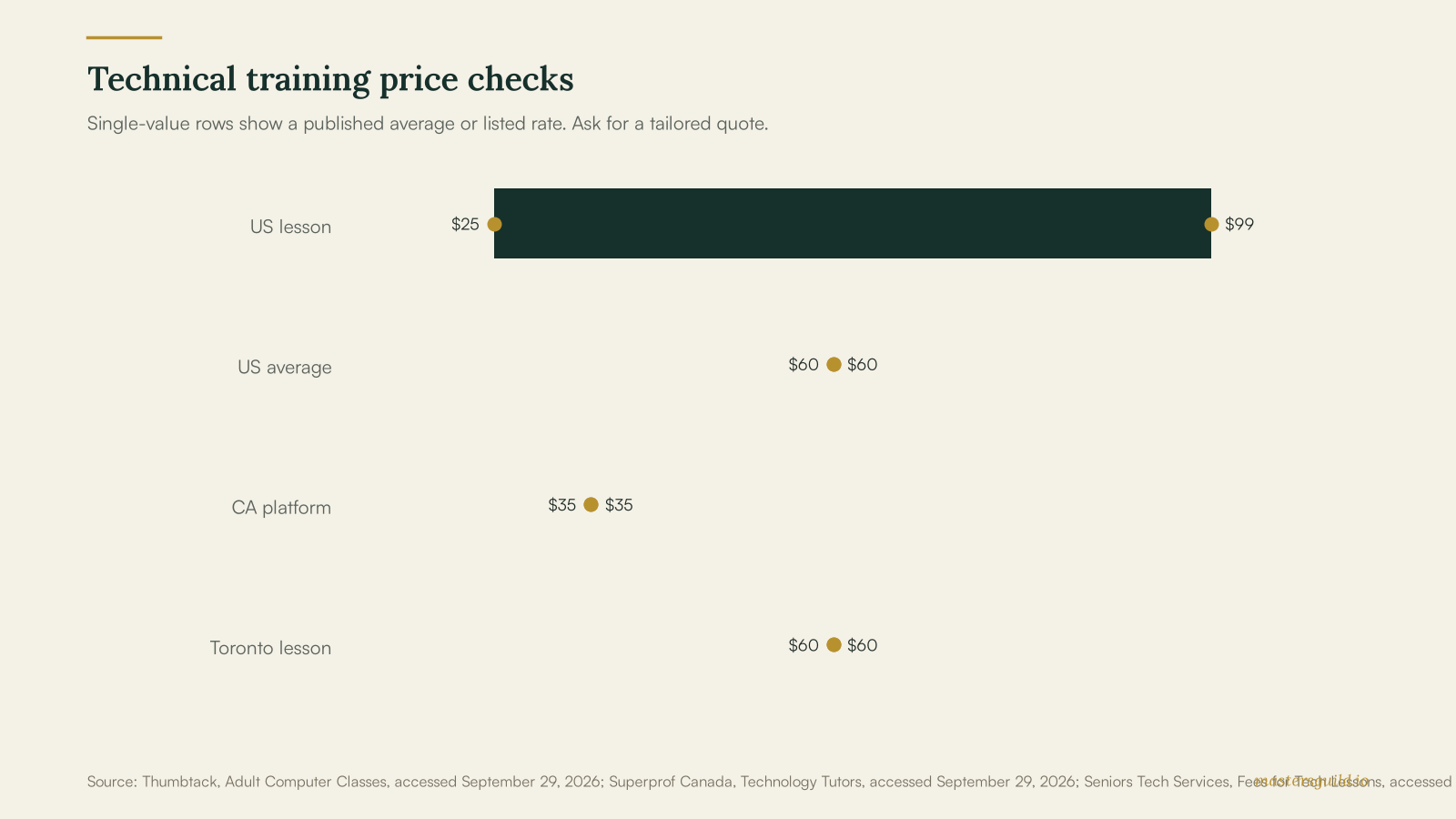
Technical skills training costs $25–$99 per hour for published US computer-lesson listings and about C$35–C$60 per hour for Canadian technology tutoring examples. The low end suits basic online help. A session on spreadsheets, cloud files, security settings, or software for work can require a specialist and a higher rate. Book around one clear result, then compare written scopes.
Key takeaways
- $25–$99 USD is Thumbtack’s published US range for computer lessons.
- $60 USD is Thumbtack’s published US average for a computer lesson.
- C$35 per hour is Superprof Canada’s displayed average for technology lessons.
- C$60 per hour plus tax is one Toronto provider’s published rate for private technology lessons.
Computer-Lesson Prices Depend on the Goal
Thumbtack’s computer-class guidance places US computer lessons at $25–$99 USD per hour, with a published average of $60 USD. Treat that range as a starting point. The site advises clients to compare instructors’ credentials, lesson format, and price quotes.
For Canada, Superprof Canada’s technology-tutor listings show a displayed average of C$35 per hour. A Toronto provider, Seniors Tech Services, publishes C$60 per hour plus tax for one-to-one online or at-home technology lessons, with a travel charge for some at-home appointments. These sources show different marketplaces and service models, so ask local tutors for a job-specific rate.
| Training format | US planning price | Canadian planning price | Best fit |
|---|---|---|---|
| One-to-one computer lesson | $25–$99 per hour | Request a local quote | A specific device or task |
| Published marketplace average | $60 per hour | C$35 per hour | A first budget check |
| Toronto private technology lesson | Request a local quote | C$60 per hour plus tax | Home or online support |
| Advanced technical work | Request a specialist quote | Request a specialist quote | Software, security, or work systems |
A Defined Outcome Makes One-to-One Training More Useful
Pick one task before you contact a tutor. A useful request might cover setting up a new laptop, organizing family photos, learning spreadsheet basics, managing passwords, backing up files, or using video calls. Add the device model, operating system, apps involved, and your present comfort level.
Ask the tutor to describe what happens during the session and what you will be able to do afterward. A tutor who teaches a repeatable routine gives you more value than a person who completes the task without explaining it. If you need help with a home network rather than a lesson, use network setup and support near you to find a provider for the installation scope.
Tutor Experience and Format Change the Rate
Basic computer coaching can focus on a single app or device. More technical work can include file recovery, security settings, cloud storage, software workflows, or a professional certification path. Share the exact goal before a tutor quotes the job, because each topic calls for different experience.
Online sessions can work when you can share your screen and describe the issue. At-home sessions fit tasks that depend on a home device, router, printer, or workspace. Confirm the session length, travel costs, cancellation policy, and whether the tutor will leave written notes. For a broken computer or lost files, compare a repair scope with our data recovery and backup guide.
A Small Trial Session Helps You Vet a Tutor
Start with one focused session. Before the lesson, write down the result you want and collect any login-free examples, error messages, or files the tutor needs to see. Keep passwords, bank information, and identity documents private during a lesson. You can sign in yourself when a task requires an account.
After the session, test the steps on your own. Ask the tutor to send a short checklist that names the next practice step and any follow-up work. This approach helps you decide whether to book another session without committing to a large package.
Frequently Asked Questions
How much does technical skills training cost in 2026?
Thumbtack publishes a US computer-lesson range of $25–$99 per hour and a $60 average. Superprof Canada displays C$35 per hour for technology lessons, while Seniors Tech Services lists C$60 per hour plus tax for private Toronto technology lessons. Local quotes vary with topic, format, and tutor experience.
What should I ask a technology tutor to teach me?
Choose one practical result, such as organizing files, learning spreadsheet basics, setting up a video call, using cloud storage, or managing passwords. Share your device and apps before the tutor prices the session.
Is online technical training a good fit?
Online training suits screen-based tasks when you can share your screen and follow steps on your own device. An at-home session may fit a router, printer, or workspace problem that requires physical setup.
How do I choose a technical skills trainer?
Compare the tutor’s experience with your goal, lesson format, hourly rate, travel costs, and written follow-up. Book one defined session first, then test whether you can repeat the task alone.
Post your technical-training goal, device details, timing, and budget on Masters’ Guild to receive offers from identity-verified local pros. Payment is held until the work is complete, so you can compare the scope before choosing a provider. Find a technical skills trainer on Masters’ Guild.