
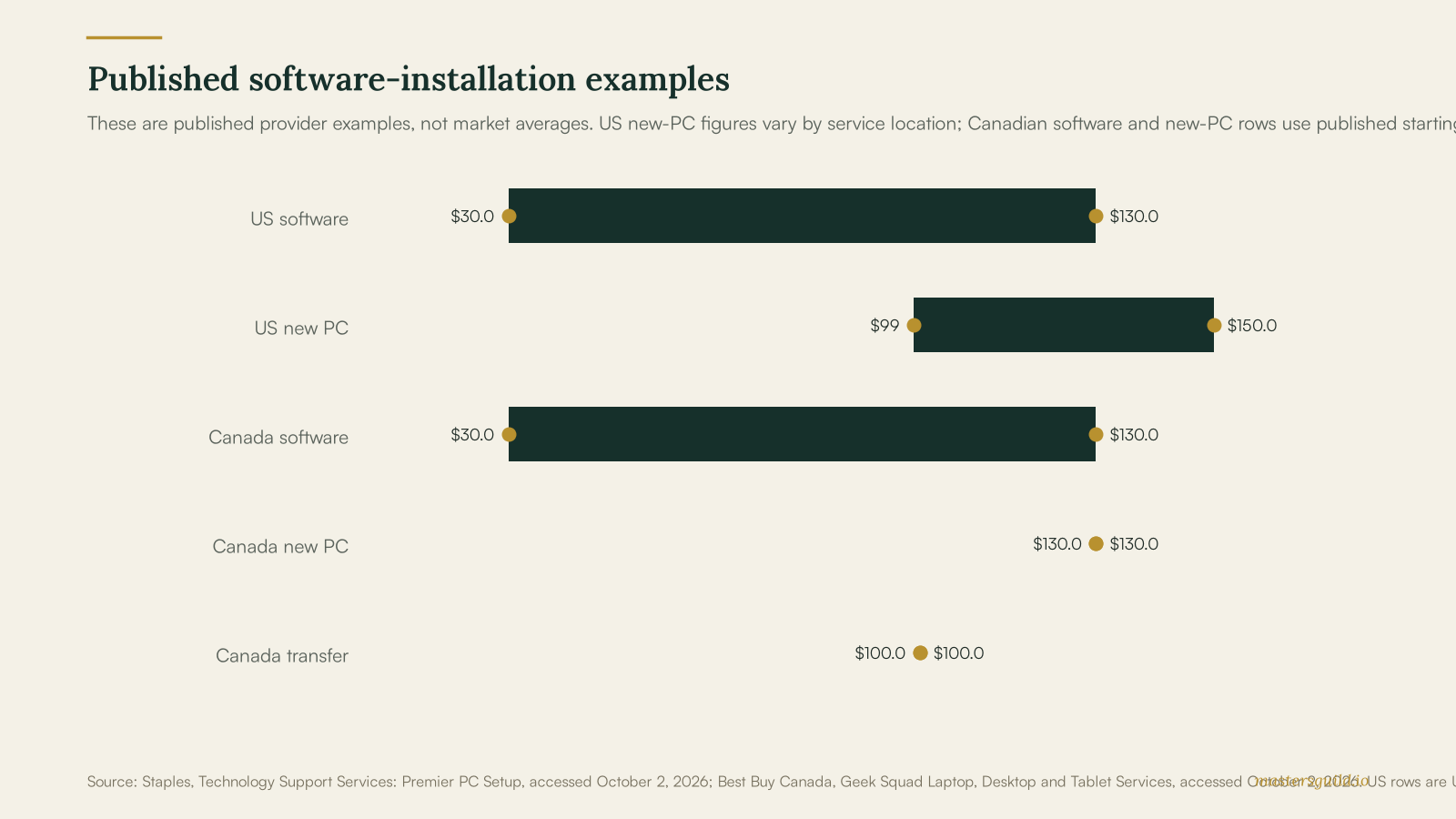
Software installation cost runs from $29.99 to $129.99 in current US provider examples and from C$29.99 to C$129.99 in Canada. The lower end covers a basic remote or in-store install. The higher end covers an in-home visit or a wider new-computer setup. Published provider prices set useful planning bounds; ask each provider to price the same scope.
Key takeaways
- $29.99–$129.99 USD is Staples’ published range for a software install, from in-store or online help to an at-home visit.
- C$29.99–C$129.99 is Best Buy Canada’s published range from software installation to new-computer setup.
- C$99.99 is Best Buy Canada’s published starting price for data transfer when a new computer needs files moved.
- Back up important files before a reset, reinstall, or service appointment.
Software Installation Prices Follow the Work Scope
Staples lists software installation at $29.99 in store or online and $129.99 at home. Its service description says the technician installs specified software on one PC, reboots it, and tests that it works. Staples’ software-installation service provides those US price examples.
Best Buy Canada lists software installation starting at C$29.99 and new-computer setup starting at C$129.99. The new-computer service includes user and email accounts, data transfer, critical software, updates, and a printer. Its data-transfer service starts at C$99.99. Best Buy Canada’s computer-services page provides those Canadian examples.
| Service scope | US published example | Canadian published example | Ask the provider to confirm |
|---|---|---|---|
| Basic software install | $29.99 in store or online | C$29.99 starting price | Named applications and updates |
| In-home software install | $129.99 | Request a local quote | Travel, setup, and testing |
| New-computer setup | $99.00 in store | C$129.99 starting price | Accounts, printer, and transfer |
| Data transfer | $69.99 in store | C$99.99 starting price | Files, folders, and destination |
A Written Scope Keeps Setup Quotes Comparable
Give each provider the device model, operating system, software names, license status, and whether you need a printer, email, files, or accounts moved. Ask the provider to state whether the price covers remote help, a store appointment, or a visit to your home.
For a new laptop, confirm who will install updates, connect peripherals, test the apps, and show you the sign-in process. For a larger home setup, pair this work with a home network setup service when the pro also needs to connect Wi-Fi equipment, printers, or shared devices. A separate software installation service listing can help you describe the job before you request offers.
Data Protection Changes the Right Hiring Choice
Back up files before a reset, reinstall, or repair appointment. Microsoft tells Windows users to back up important files before resetting a PC because some reset choices can remove apps, settings, and personal files. Microsoft’s recovery guidance explains the options.
Keep passwords, recovery codes, and payment details under your control. A legitimate provider can tell you when they need you to sign in. The Federal Trade Commission warns that scammers use unexpected calls, pop-ups, and messages to get remote access or payment. Contact a provider through a number or site you found yourself, and ignore an unsolicited warning. The FTC’s tech-support scam guidance explains the warning signs.
If the problem involves a slow or infected machine rather than an app install, use our computer virus removal cost guide to compare that separate service. Describe the symptoms without sending passwords or financial records in the job post.
DIY Fits a Simple, Licensed App Install
Install the app yourself when you have the official installer, the license or subscription details, a current backup, and time to test the result. Use the publisher’s official download page. Stop if the installer asks for system-level changes you do not understand, if the computer contains irreplaceable files, or if the job includes a system reset or data transfer.
Hire a pro when you need several apps installed, a new computer prepared, data transferred, a printer connected, or a household member shown how the setup works. Ask for a fixed scope before the appointment and stay available to approve account sign-ins.
Frequently Asked Questions
How much does software installation cost in 2026?
Staples lists $29.99 for in-store or online software installation and $129.99 for an at-home visit in the United States. Best Buy Canada lists software installation from C$29.99 and new-computer setup from C$129.99. These are provider examples, so a local quote can differ.
Does a software-installation price include data transfer?
Do not assume that it does. Best Buy Canada lists data transfer from C$99.99, while its new-computer setup starts at C$129.99 and includes data transfer. Ask the provider to list the source device, destination, folders, and verification step in the scope.
Should I give a technician my password?
Enter passwords yourself when possible. A provider may need you to sign in during the appointment, but you can keep the password private. The FTC advises people to avoid unexpected tech-support contacts that request remote access or payment.
Can I install software myself?
You can install a simple licensed app when you use the official publisher download, have a backup, and can test the result. Hire a pro for account migration, operating-system work, several devices, or any job where a failed setup could affect important files.
Post your software-installation job with the device, apps, timing, and support needs on Masters’ Guild to receive offers from identity-verified local pros. Payment is held until the work is complete, so you can compare the scope before choosing a provider. Get quotes on Masters’ Guild.