
Local service guide
Cloud Service Setup in Winston-Salem: Hiring Guide
For Cloud Service Setup in Winston-Salem, hire a technician with a written scope covering your devices, files, account access and recovery checks. Request a demonstrated upload and restore, plus instructions for maintaining the setup. For computer lessons, consider Central Library's one-on-one assistance; the program excludes assistance with personal devices, so arrange separate help for configuring your laptop or phone. [1]
Define the work before choosing a technician
Write down your intended outcome, such as opening family photos on another device or copying documents from an old computer. List the devices, accounts and folders involved. Ask each candidate to describe what they will configure and how you will retrieve a file afterward. Include a demonstration in the scope so you can check the result before approving completion.
For shared household devices, decide who should see each folder. Identify private documents and shared photos before granting access. Keep the account ownership and billing contact under your control, and enter your own password during setup. Agree on the technician's access method and removal of temporary access at handover.
Request an itemized written quote
Request a written quote for your named devices, files and follow-up needs. Ask for separate amounts for labor, storage subscriptions and equipment. Confirm whether the technician will work remotely or visit your home, and whether the price includes troubleshooting and another session if work remains unfinished.
Ask how the technician would handle existing accounts, duplicate files and an interrupted transfer. Request a completion note identifying configured folders, remaining work and your next steps. For a migration, require your approval before anyone removes original files. Keep that approval separate from permission to start copying.
Protect files before making changes
CISA recommends frequent backups to a secure external drive or a vetted cloud service. Before starting encryption, it advises backing up your data, choosing an encryption solution and securing recovery keys and passwords. Ask the technician to follow that sequence and explain how you will retrieve your recovery information. [4]
Ask the technician to explain deletion and overwrite behavior in the service you choose. Use a disposable test file to demonstrate recovery, then restore a copy to a folder you can find. Request instructions for a device failure or loss of account access. Preserve your family documents throughout the test.
For external-drive backups, CISA advises disconnecting the drive outside active backups because ransomware could use the connection to delete or corrupt backup files. Agree on a routine for connecting the drive, checking completion and storing it in a safe place. [4]
Plan around your home connection
Tell the technician about connection interruptions you have noticed. Ask them to check connectivity before beginning the transfer and agree on who will monitor progress after the appointment. Put unfinished uploads and any follow-up visit in the written scope.
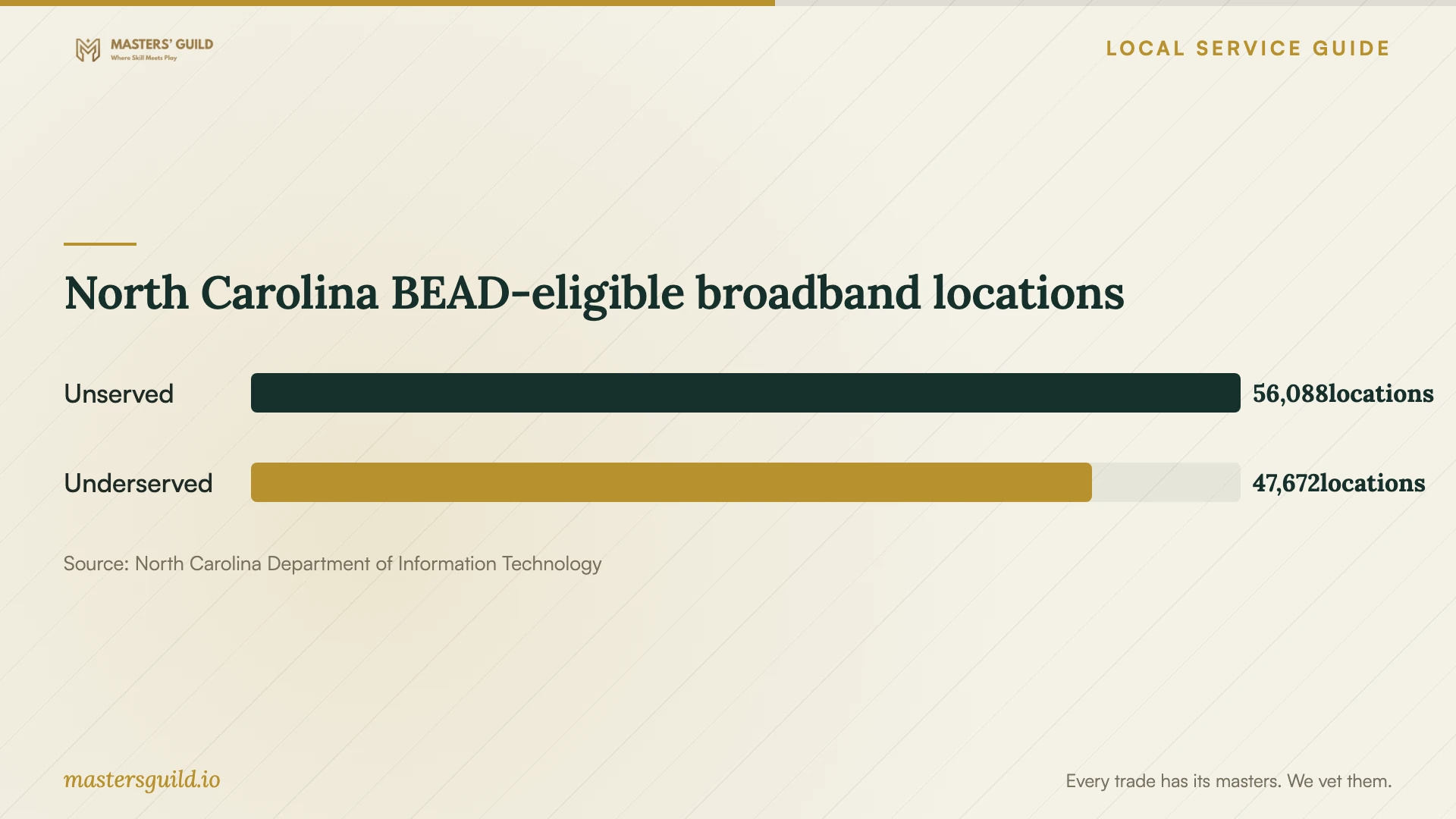
North Carolina's Department of Information Technology provides a location-based BEAD planning map derived from Version 4 of the FCC broadband location fabric. The department describes funding eligibility and continuing eligibility modifications. Consult the map when investigating an access problem, then ask your internet provider about service at your address before committing to a migration date. [3]
Check the handover
Open a sample document and photo from the intended destination. Repeat the check on each listed device using the account that should have access. Ask the technician to demonstrate recovery and identify remaining work. Keep original files until you have checked the destination and accepted the migration against your written scope.
Keep instructions for checking backup status, restoring files and changing sharing permissions. Review subscription billing and cancellation terms before approving a purchase. Record how to obtain follow-up help, and confirm that you can sign in without relying on the technician.
North Carolina BEAD-eligible broadband locations
Local details that affect your job
Central Library lessons exclude personal-device work
The Computer Training Bridge lists 45-minute one-on-one assistance at Central Library's Computer Learning Center, 660 W 5th St, and excludes assistance with personal devices. Its page lists October 20 and October 27, 2026 among several dates alongside a page-level availability statement of zero out of two seats. It does not assign that availability to either date. Call 336-703-3079 about your preferred date and the wait list before visiting. Choose this program for instruction; arrange separate technician help for your own laptop or phone. [1]
WinstonNet locations offer internet access for learning
The Computer Training Bridge's WinstonNet directory describes free high-speed internet access and Wi-Fi hotspots at its labs. It lists Reynolda Manor Branch Library at 2839 Fairlawn Drive and Carver School Road Branch Library at 4915 Lansing Drive. Contact a listed location if you need access to research cloud services or use learning resources. Ask staff about access arrangements and permission before planning a private transfer. These directory entries concern internet access; use the separate one-on-one program's rules when arranging instruction. [1] [2]
Use the state map to investigate connectivity
NCDIT's BEAD planning map covers North Carolina, including location-level funding eligibility. The department describes changes that can remove locations from eligibility. For a household here, use the map as a starting point for an access inquiry and confirm current ordering availability with an internet provider. Avoid scheduling a large transfer around an assumed future connection. [3]
Choose help that matches your task
| Your need | Next step | Scope to confirm |
|---|---|---|
| Learn a computer subject | Call about Central Library one-on-one registration | 45-minute sessions; personal-device assistance excluded |
| Find internet access for learning | Contact a listed WinstonNet location | Directory describes free internet and Wi-Fi; confirm access arrangements |
| Configure household devices | Request an itemized technician quote | Name devices, accounts, folders and handover checks |
| Move important files | Agree on a migration and recovery plan | Preserve a backup and demonstrate retrieval before approving removal of originals |
| Investigate connectivity | Consult the state map and contact an internet provider | Map concerns funding eligibility; confirm present service at your address |
Your hiring checklist
- List devices, operating systems, accounts and folders to include.
- Identify private files and decide who should access shared folders.
- Request an itemized written quote for labor, subscriptions, equipment and follow-up.
- Agree on account ownership, technician access and removal of temporary access.
- Arrange a backup and safe storage of recovery information before changes.
- Confirm connectivity and assign responsibility for unfinished uploads.
- Check sample files on each device and watch a restore demonstration.
- Keep handover instructions and approve removal of originals after checking the migration.
Frequently Asked Questions
Can the library set up cloud storage on my laptop?
The listed Central Library one-on-one program excludes personal-device assistance. Consider it for instruction on a computer subject and arrange separate technician help for laptop configuration. Call to check availability for your preferred date. [1]
How should I budget for setup?
Request an itemized written quote for your devices, files and follow-up needs. Ask for separate labor, subscription and equipment amounts, and agree on charges for unfinished uploads or another visit.
Should I delete old files after uploading?
Keep originals until you have checked the destination and accepted the migration. Ask for a backup and a restore demonstration. CISA recommends frequent backups to a secure external drive or a vetted cloud service. [4]
Does BEAD eligibility establish that I can order service?
NCDIT describes funding-eligible locations and eligibility changes. Use its planning map for an access inquiry, then confirm ordering availability and installation timing with an internet provider before scheduling your transfer. [3]
Sources and scope
This guide combines the sources below with practical planning guidance. Figures apply to the stated geography and period; request a written quote for your property.