
Local service guide
Winnipeg network setup: plan and hire
For network setup in Winnipeg, ask the provider to separate router configuration from new data cabling in the quote. Describe the rooms and devices you need connected, then request testing and a written handover. Before approving cabling, confirm your building type: the City exempts low-voltage VDV installations in single detached houses from permits, but identifies data systems among installations that can require permits and inspections elsewhere. Check installer credentials separately from the permit exemption. [1]
Describe the problem before choosing equipment
Write down where connections fail and what you were doing at the time. Include the room, device, application and whether other devices lost their connection. Ask the provider to investigate the existing setup before recommending replacement equipment. Request a separate explanation of any issue they believe your internet provider must resolve.
Send photographs of the modem, router and existing data outlets, along with model numbers. Mark the rooms where you need video calls, streaming or printer access. Ask each bidder to explain the proposed equipment locations and cable routes. For a home office, specify which work devices you want included in the final test.
Confirm the building type and cabling requirements
The City lists telephone, data and other voice, data and video systems among low-voltage installations that need permits and inspections, subject to its stated exemptions. It exempts installations in a single detached house. If you live in a condo, apartment or another building type, ask the City how the rules apply to your proposed cabling before approving the work. [1]
The City says contractors obtaining VDV or security-system electrical permits need a City electrical A, C-alarm or C-VDV licence. It also tells people hiring installers to confirm a Manitoba journeyperson electrician licence or an applicable limited specialized trade licence, including M-V for voice, data and video. Ask which credential covers your installation and who will perform the work. [1]
For rental or shared premises, request the owner's approval for drilling and cable routes. Include responsibility for wall repairs, access to shared spaces and removal of abandoned equipment in the written scope. Ask the installer to identify any work that needs another trade before you accept the quote.
Request a quote you can compare
Ask bidders to separate diagnosis, equipment, configuration, cable installation, testing and wall repairs. Request the number and destination of new outlets, the proposed route and the equipment models. Identify who buys the hardware and who handles a defective unit. Ask for taxes, permit charges where applicable, and follow-up support as separate entries.
Request written quotes for your rooms, equipment and cabling scope. Before approving additional work, ask the provider to explain the finding, the proposed fix and its price. Agree on how you will authorize changes while the installer is on site.
Specify secure settings and a usable handover
The Canadian Centre for Cyber Security recommends changing default Wi-Fi and router passwords, using WPA2 or WPA3 encryption, disabling WPS and keeping firmware current. It also recommends a guest network for visitors and IoT devices, and disabling remote management where possible. Ask the provider to document the settings they apply and explain any exceptions needed for your equipment. [3]
Before moving devices to a guest network, ask the installer to confirm their device-discovery and local-access requirements. Explain which devices need to find a printer, share files or communicate with another device. Include those tasks in the final test, and ask the installer to explain the chosen network arrangement.
Keep control of the administrator account. Ask the provider to show you how to change credentials, check updates and contact support. The Cyber Centre advises checking with your provider whether the router has reached end of life, has stopped receiving firmware updates or has known vulnerabilities. Include that check before deciding to retain existing hardware. [3]
Before signing off, use your own devices in the agreed rooms and try the tasks you listed in the job description. Request outlet labels and test results for new cabling. Record any unresolved issue and the next action. Agree on the follow-up period, any return-visit charge and how the provider will handle access after the job.
Plan an underground connection before booking excavation
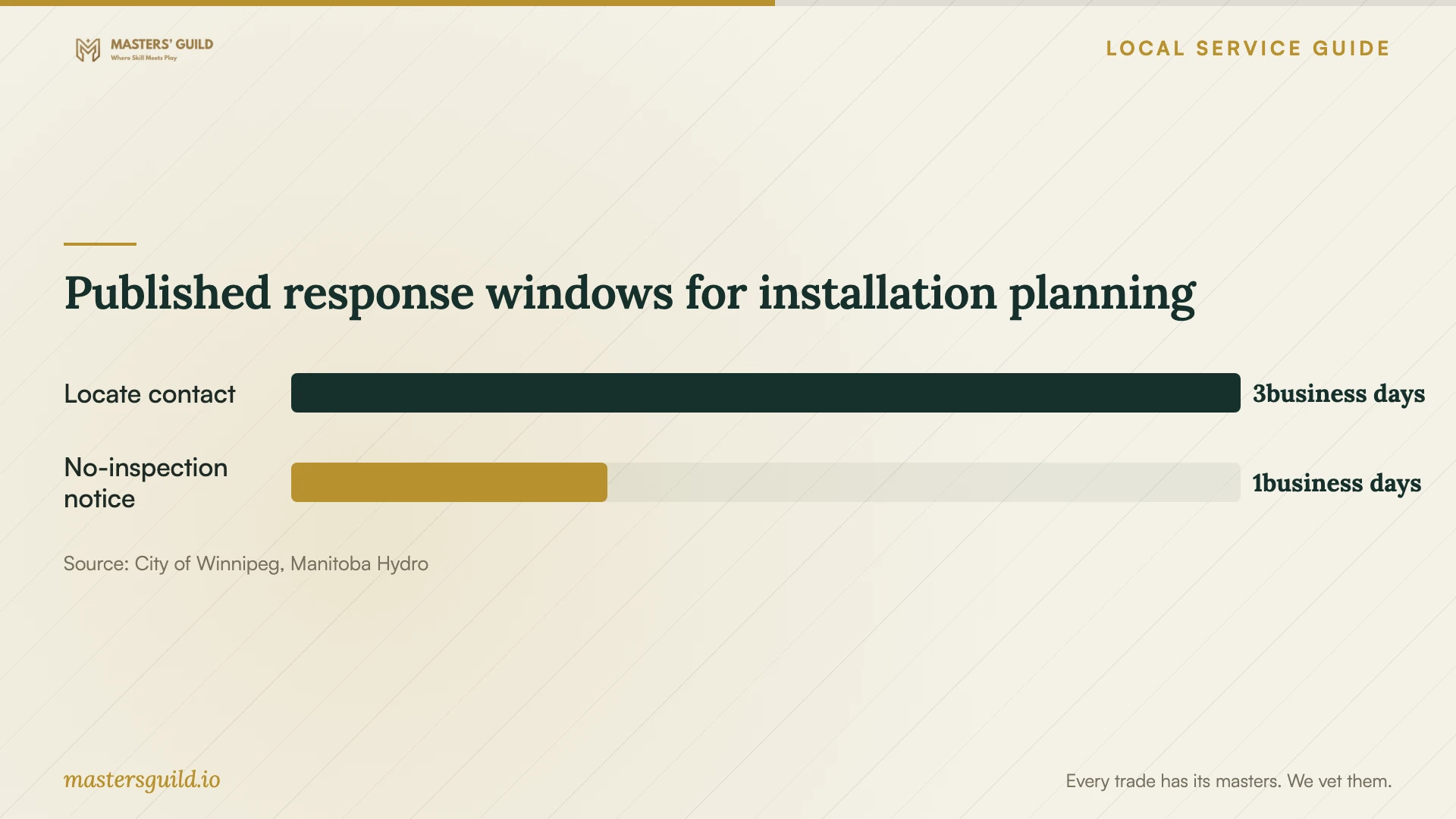
For a cable route to a detached garage or other outbuilding, Manitoba Hydro requires a locate request before digging deeper than 15 cm. Hydro says it will contact you within three business days with a locate date. That contact window does not promise that crews will complete the locate within three business days. [2]
Hydro requires you to request re-marking and an updated facilities locate form if work has not started within 14 days after line location. Keep the form on site through excavation and backfill, and have the contractor preserve the markings. Ask the installer to coordinate the locate and excavation dates before committing to a start date. [2]
Published response windows for installation planning
Local details that affect your job
Resolve permit questions with Winnipeg before cabling
For uncertain building types or installation scopes, contact the City's Permits Direct Line at 204-986-5140. Contractors can submit electrical permit applications through Permits Online. The City also accepts application forms at the Zoning and Permits office, Unit 31-30 Fort Street. Ask your installer to record the permit decision and, when required, provide the permit reference. [1]
Automatic permit issuance has specific limits
Winnipeg offers automatic issuance through Permits Online for qualifying low-risk VDV and security installations. The installation must avoid the listed exclusions, including buildings over six storeys, patient-care areas, electrically hazardous areas and new construction associated with a building permit. The combined total of the listed devices, outlets and racks cannot exceed 20. Contractors must still request inspection; under selective inspection, the City may decide an inspection is unnecessary. [1]
Allow Manitoba utility-locate lead time
For excavation deeper than 15 cm, request a locate before work begins. Manitoba Hydro marks its underground electrical and natural-gas lines and supplies instructions on a facilities locate form. Ask your contractor to confirm how they will address other buried services along the proposed route rather than treating Hydro's markings as a complete map of the property. [2]
Choose the scope to request
| Your situation | Request from the provider | Approval checkpoint |
|---|---|---|
| You want help with existing equipment | Diagnosis, configuration and testing on your devices | Approve replacement hardware after receiving an explanation |
| You need new cabling in a single detached house | Cable routes, outlet testing and applicable installer credentials | Confirm that the City's low-voltage VDV permit exemption covers the scope |
| You need new cabling in another building type | A permit determination and contractor credential details | Resolve City requirements and owner approval before installation |
| You want a buried connection to an outbuilding | A route plan and utility-locate coordination | Request locates before excavation deeper than 15 cm |
Your hiring checklist
- List the rooms, devices and tasks the provider must test.
- Photograph existing equipment and outlets without sharing passwords.
- Ask who will confirm permit requirements and installer credentials.
- Approve equipment locations, cable routes and wall-repair responsibilities.
- Request an itemized quote and a process for authorizing extra work.
- Arrange utility locates before approving an underground route.
- Request administrator access, documented settings and checks of device discovery and local access.
- Test your agreed tasks and record unresolved issues before sign-off.
Frequently Asked Questions
Does home data cabling need a Winnipeg permit?
The City exempts low-voltage VDV installations in single detached houses. Do not apply that exemption to another building type without checking. The City identifies provincial installer licensing requirements, so ask about credentials even when the permit exemption applies. [1]
Does a low-risk permit mean no inspection?
Contractors must request inspection for low-risk VDV and security permits. The City uses selective inspection and may decide that an inspection is unnecessary. It says it will notify the contractor within one business day of the inspection request when no inspection is required. [1]
Should I replace my router before hiring support?
Ask the provider to assess it first. Request a check for firmware support and known vulnerabilities, as recommended by the Canadian Centre for Cyber Security. Ask the provider to explain how any proposed replacement addresses your connection problem. [3]
How should I compare installation prices?
Give bidders the same room list, equipment requirements and cabling scope. Compare hardware, testing, wall repairs and follow-up support alongside the total. Ask each bidder to identify exclusions and explain how they charge for work you approve during the visit.
Sources and scope
This guide combines the sources below with practical planning guidance. Figures apply to the stated geography and period; request a written quote for your property.