
Local service guide
Home Office Setup in Winnipeg: Plan and Hire
For Home Office Setup in Winnipeg, hire for a written list of tasks: desk assembly, monitor placement, cable organization and equipment testing. Request a separate electrical scope if you need new outlets or circuit changes, because the City requires permits for electrical system construction, alteration, repair or extension. Before buying mounts or booking installation, test the desk position with your chair, screens and usual work materials. [1]
Define the work before requesting quotes
Write down what you want the installer to finish. Name each desk, chair, monitor arm and storage unit, and say whether you want assembly, placement, wall mounting or equipment connection. Include model numbers in your request to the provider, plus photos of the room and the proposed mounting surface.
Separate furniture work from computer support. Ask whether the provider will connect your dock, test both screens, check your webcam and microphone, and confirm your printer works. If you need network troubleshooting or employer-managed device changes, describe those tasks before booking and ask your employer which settings you may change.
Ask for a written quote that identifies labour, supplied hardware, travel or parking charges, taxes, packaging removal and exclusions. Give each provider the same scope and compare the itemized quotes. For hourly work, request an estimate and a spending limit that requires your approval before the provider continues.
Test monitor placement before fixing mounts
CCOHS treats monitor positioning recommendations as starting points for individual adjustment. It suggests about an arm’s length of viewing distance and recommends increasing text size if you cannot read comfortably at the suggested distance. For a tall or portrait monitor, keep the top of the screen at or below eye level; people using progressive or other close-work lenses may prefer a lower position. [3]
For two equally used monitors, CCOHS recommends placing them in front of you with their edges touching and angling them into a semicircle. If you use one more often, put that screen in front of you and angle the secondary screen to one side. [3]
Try the proposed layout before the installer drills holes. Sit in your usual chair, open a document and test a video call. For a standing desk, repeat the test at your standing height. Ask the provider to check the arm’s compatibility with your monitor and desk, follow the mounting instructions, and leave enough cable movement for the desk’s travel.
Choose lighting for screens and paper
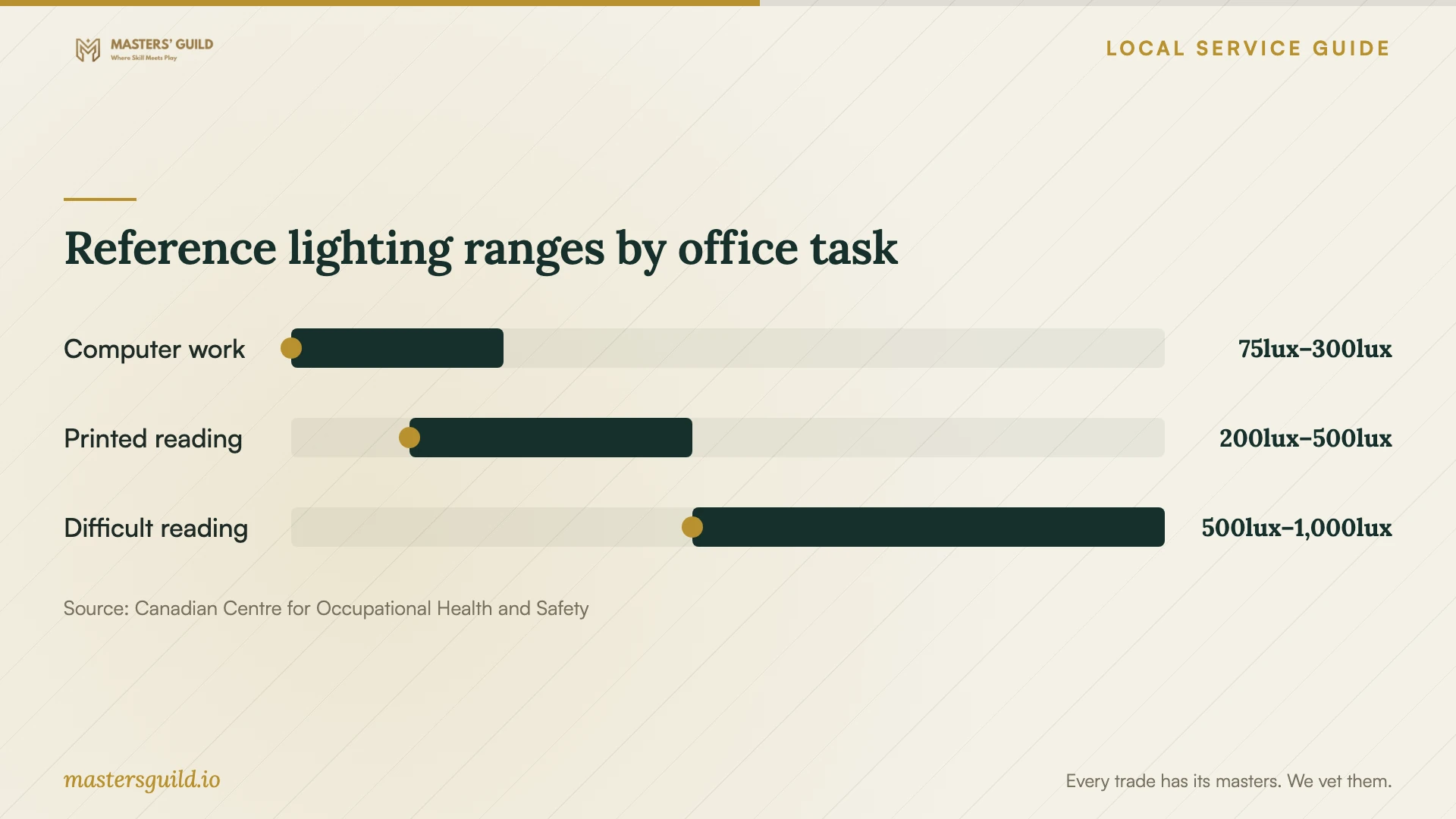
CCOHS lists 75–300 lux for computer tasks and 200–500 lux for high-contrast or large-scale visual tasks, including reading good-quality printed materials. The computer range varies by screen type and polarity. Use these task reference ranges to discuss lighting needs rather than treating one value as a brightness target for the whole room. [4]
Before choosing the desk location, check reflections from your normal working position. CCOHS recommends orienting the workstation so windows run parallel to your line of sight, using matte surfaces where possible, and using adjustable local lighting with brightness controls to address glare. [4]
Ask the installer to help you test lamp and screen positions with the blinds in the positions you expect to use. Check both screen reading and paper work. If you want to compare the room with the chart, use a light meter at the task surface while sitting in your working position; CCOHS recommends measuring with workers in their normal positions. [4]
Agree on completion checks
Before the provider leaves, inspect the assembled furniture together. Ask them to demonstrate desk movement, monitor-arm adjustment and the connections included in your quote. Check that cables allow adjustment without pulling on plugs, and agree where to keep spare parts and assembly instructions.
Test the setup with your own work: read a spreadsheet, join a call and use the printer if it formed part of the job. Record any unfinished items and agree who will resolve them. Keep electrical permit documentation with the invoice when electrical work forms part of the project.
Reference lighting ranges by office task
Local details that affect your job
New outlets need an electrical permit check
Winnipeg requires an electrical permit for construction, alteration, repair or extension of electrical systems. Ask a licensed electrical contractor to quote new outlets or circuit changes and identify who will obtain the permit. The City accepts applications through Permits Online and lists 204-986-5140 as its Permits Direct Line for questions. [1]
The homeowner route has dwelling restrictions
The City lets homeowners apply for electrical permits when they live in a single detached dwelling that is their primary residence and do the work themselves. Its stated exemptions for voice/data installation and certain same-location fixture, switch or receptacle replacements apply to an owner-occupied, single detached dwelling. For replacement equipment, the exemption also requires no modifications to an existing bonded branch circuit with copper wiring. If you live in a condo or rental, ask the City about your scope before relying on these exemptions. [1]
Running a business adds a zoning decision
The City says a home-based business development permit is required if business mail comes to your home or you conduct business administrative duties there. It also requires administrative conditional use approval for a home-based business providing personal services to customers on the premises or including up to two non-resident employees. If you work remotely as an employee, describe your arrangement to the City and ask how its home-based business rules apply before planning business-related changes. [2]
Choose help by the work you need
| Your project | Help to request | Before booking |
|---|---|---|
| Desk and chair assembly | Furniture assembly provider | Supply model numbers and agree on placement and packaging removal. |
| Monitor arm or wall mount | Provider experienced with the proposed mounting method | Test viewing position and ask them to check product and surface compatibility. |
| Dock, printer or connection problems | Computer or network support provider | List devices and agree on the tests included. |
| New outlet or circuit alteration | Licensed electrical contractor | Confirm the electrical permit scope and who will apply. |
| Office for your own home-based business | City zoning guidance before installation | Check development permit requirements for business mail or administrative duties at home. |
Your hiring checklist
- Measure the room, desk space and delivery route before ordering furniture.
- Send providers furniture model numbers, monitor details and room photos.
- List assembly, mounting, cable organization and computer-support tasks separately.
- Test your seated and standing screen positions before approving mount locations.
- Ask who supplies mounting hardware and checks compatibility.
- Get an itemized quote, exclusions and an approval limit for additional work.
- Ask the City about your electrical scope and proposed business use before authorizing changes.
- Agree on equipment tests, cleanup and unfinished-item handling before the visit.
Frequently Asked Questions
Can one provider assemble the desk and add an outlet?
Ask the provider to identify who will perform each task. For the outlet work, request a licensed electrical contractor and confirm the permit arrangements. Winnipeg requires a permit for electrical system construction, alteration, repair or extension. [1]
Does working from home require a business permit?
The City requires a home-based business development permit when business mail comes to the home or business administrative duties take place there. If you work remotely as an employee, describe your arrangement to the City and ask how that rule applies to you before deciding whether to apply. [2]
Where should I put two monitors?
CCOHS recommends placing equally used monitors in front of you with touching edges and an inward angle. If you use one more, put it in front of you and angle the other to the side. Use about an arm’s length as a starting distance and adjust for comfortable reading. [3]
How should I compare setup quotes?
Give each provider the same item list, photos and completion checks. Compare labour, hardware, equipment testing, cleanup and exclusions. Ask for a separate electrical scope and an approval limit for additional work.
Sources and scope
This guide combines the sources below with practical planning guidance. Figures apply to the stated geography and period; request a written quote for your property.