
Local service guide
Data recovery and backup in Winnipeg, MB
Data recovery and backup in Winnipeg starts with choosing the right scope: restoring an existing backup, assessing inaccessible files, or responding to a suspected cyber incident. Ask the provider for a written diagnosis, an approval limit and a plan to verify the returned files. For ongoing backup work, require a demonstrated restore and clear responsibility for failed-backup alerts. If you suspect ransomware, disconnect affected devices from the internet and internal network and contact incident-response help before arranging routine restoration. [3]
Choose the recovery job before requesting a quote
Tell the provider what you need back: an accounting database, shared project folders, customer records or files from one computer. List the applications you need to use those files and identify the last date when you know they worked. Describe the symptoms and any steps you or another technician have taken. Ask the provider to explain the proposed assessment before authorizing changes to the original device.
Separate the initial assessment from the recovery authorization. Request a written description of the work, the files the provider will prioritize and the point at which they will seek further approval. Ask whether the person receiving your device performs recovery work or coordinates with another specialist. Agree on how you will receive updates and how the provider will document each transfer of the device.
Treat suspected ransomware as an incident-response job. The Cyber Centre advises isolating infected systems, using an alternative communication method that the attacker cannot access, and reporting the incident to local police, the Canadian Anti-Fraud Centre and the Cyber Centre. Ask your responder to coordinate evidence preservation, investigation and restoration before you authorize wiping or rebuilding. [3]
Compare the full quote and the acceptance terms
Request separate amounts for assessment, authorized recovery work, return storage, shipping and any urgent-service option. Ask the provider to state applicable taxes and the total approval limit. For ongoing backup proposals, separate setup charges from storage, monitoring, support and restore assistance. Compare proposals against the same devices, applications and data volume.
Define success before accepting a recovery offer. Give the provider a short list of priority files and ask how you can check that they open and contain the records you need. Clarify what you would owe if the provider returns only some files, if your priority files remain unusable, or if you decline the quote after assessment. Request the return of your original device and written terms for deleting temporary copies.
For deadlines, ask for separate commitments for assessment, a recovery estimate and delivery. State your business deadline and request a fallback plan for essential work during the interruption. Avoid signing an open-ended authorization because you need the files urgently.
Specify a backup service you can restore from
Ask the installer to document which computers, shared storage, applications and cloud accounts the proposal covers. Set your own requirements for how much recent work you could afford to lose and how long you could operate without each system. Have the provider demonstrate a restore against those requirements before accepting the setup.
The Cyber Centre recommends two or more backups stored offline and inaccessible through your networks and internet connection, with a secondary cloud backup as an additional option. It recommends a regular testing schedule, such as monthly. Ask the provider who will rotate offline copies, where they will keep them and who will perform and record the tests. [3]
For cloud storage, ask where the provider will store the data, who can access it and how you can retrieve it when the contract ends. The Cyber Centre advises considering data residency and checking a storage vendor's security measures, incident-management processes and disaster-recovery plan. Canadian storage requirements depend on your applicable regulatory and policy obligations; do not assume that every business has the same requirement. [3]
Assign a named person to receive failed-backup alerts and agree on the response expected from the contractor. Keep an accessible record of account ownership, recovery contacts and the agreed restore procedure. During handover, ask someone from your business to perform a sample restore with the provider watching.
Use national incident data to frame the planning discussion
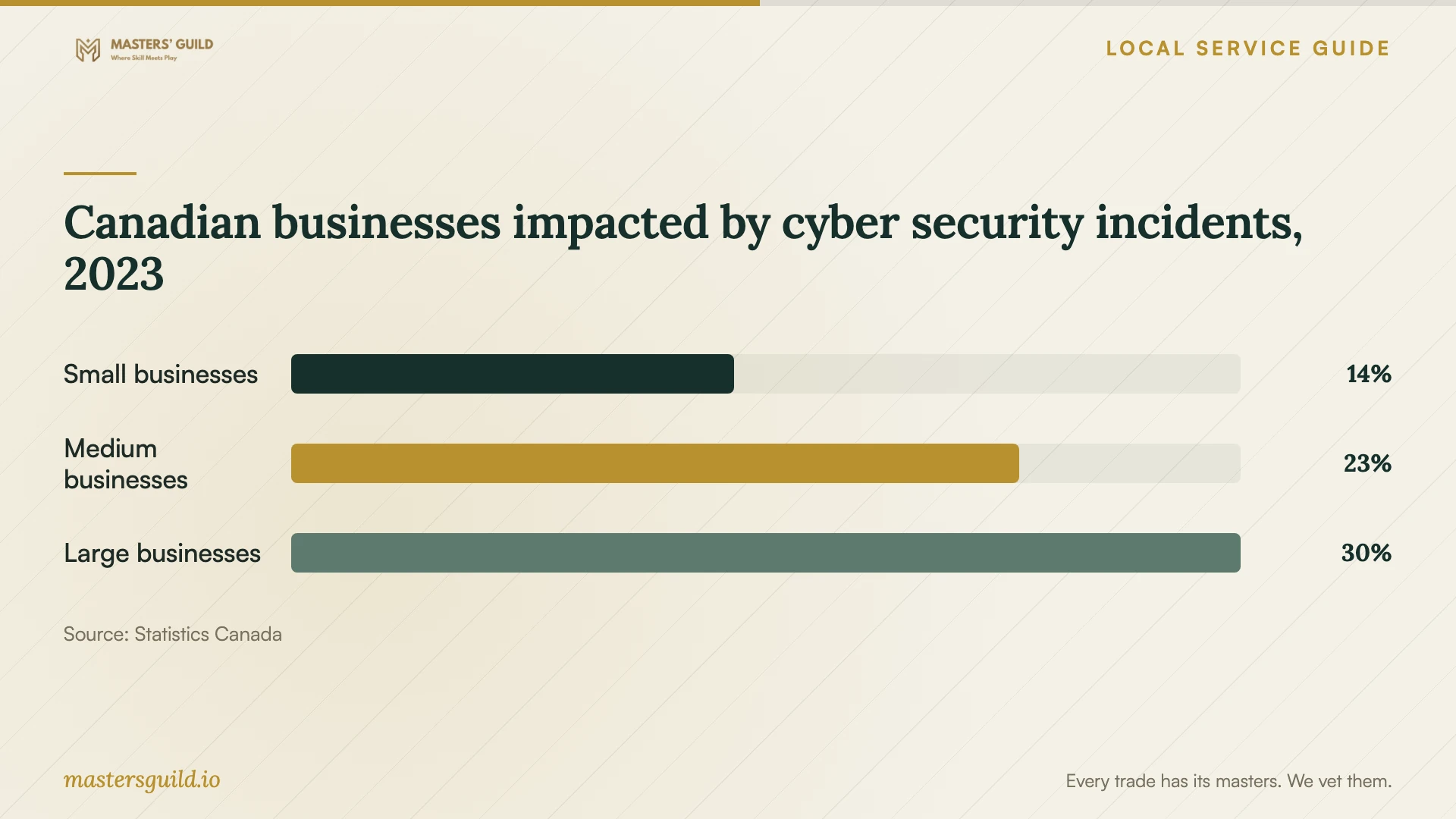
Statistics Canada reported that 14% of small businesses, 23% of medium-sized businesses and 30% of large businesses experienced impactful cyber security incidents in 2023. In this survey, small businesses had 10 to 49 employees. These national figures provide context for discussing backup and recovery requirements; they do not measure Winnipeg drive failures or recovery-service prices. [4] [5]
For a business with fewer than 10 employees, use your own files and operations to set priorities rather than treating the chart as your likelihood of an incident. Ask the provider to walk through losing access to your most important application, then demonstrate how you would retrieve the needed data and resume work. [5]
Canadian businesses impacted by cyber security incidents, 2023
Local details that affect your job
Plan around Manitoba Hydro outage notices
Manitoba Hydro advises customers preparing for a planned outage to unplug computers and Wi-Fi routers to protect them from possible power surges when electricity returns. Before a notified outage at your Winnipeg premises, ask your backup provider to specify when you should finish backups, shut down equipment and disconnect it. Agree on who will check backup status after you reconnect. Include network equipment in that discussion so you know how to handle a scheduled cloud backup during the interruption. [1]
Arrange PHIA terms before handing over clinic data
Manitoba's Personal Health Information Act defines an information manager to include a person or body providing information technology services to a trustee. Section 25 requires a trustee providing personal health information under that arrangement to enter a written agreement protecting it against unauthorized access, use, disclosure, destruction or alteration. A Winnipeg clinic that is a PHIA trustee should arrange this agreement before the handoff and confirm the contractor's protection, retention and destruction obligations. This requirement concerns PHIA trustees and their information managers, rather than every ordinary business recovery job. [2]
Choose the scope to request
| Your situation | Service to request | Confirm before approval |
|---|---|---|
| You have a backup you want to restore | Backup restoration and application checks | Which backup date to use and how you will verify the restored records |
| Files are inaccessible and you have no verified backup | Recovery assessment | Proposed method, approval limit, priority files and payment terms |
| You suspect ransomware | Cyber incident response and recovery | Isolation, evidence preservation and checks before restoring or reconnecting |
| You want ongoing backup protection | Backup setup, monitoring and restore testing | Offline copies, test schedule, alert ownership and exit arrangements |
| A PHIA trustee will provide patient information | Recovery or backup with an information-manager agreement | Required written safeguards and protection, retention and destruction obligations |
Your hiring checklist
- List priority files, required applications and your business deadline.
- Record device details, symptoms and previous recovery attempts.
- Identify available backups and the date of the last successful restore test.
- Confirm who will perform the work and document device transfers.
- Get assessment charges, recovery terms and an approval limit in writing.
- Agree on how you will verify priority files before accepting delivery.
- Specify account ownership, temporary-copy deletion and contract-exit arrangements.
- For backup installation, name the alert recipient and arrange a witnessed restore.
Frequently Asked Questions
How much should I budget for recovery?
Obtain a diagnosis-based written quote. The evidence used here does not establish Winnipeg recovery prices. Ask for assessment charges, authorized recovery work, return storage, shipping, taxes and any urgency charge as separate items. Clarify what you owe for partial recovery or an unsuccessful attempt.
Can I rely on a cloud backup alone?
The Cyber Centre recommends multiple backups in multiple locations, including two or more offline copies. It notes that cloud providers can also experience ransomware incidents. Ask your installer to explain how you would restore essential files if you could not access the cloud service. [3]
How do I know the backup setup works?
Require a demonstration in which you restore selected files and check their contents. For application data, ask to verify that you can use the restored records in the required application. The Cyber Centre recommends testing backups on a regular schedule, with monthly testing as an example. [3]
What should I do first if I suspect ransomware?
Disconnect affected devices from the internet and internal network. Contact your incident-response provider through a separate communication method. The Cyber Centre advises reporting ransomware to local police, the Canadian Anti-Fraud Centre and the Cyber Centre, and checking backups for compromise before restoration. [3]
Sources and scope
This guide combines the sources below with practical planning guidance. Figures apply to the stated geography and period; request a written quote for your property.