
Local service guide
Winnipeg computer virus removal: hiring help
For computer virus removal in Winnipeg, hire a technician who will agree in writing on device isolation, file preservation, recovery work and account protection. Describe whether the problem affects one computer, shared files or business accounts. Ask for incident-response support if you suspect a wider compromise, and approve any erasure or reinstall only after discussing backups and evidence.
Contain the problem before arranging service
The Canadian Centre for Cyber Security advises contacting your IT provider and disconnecting an infected device from Wi-Fi, Ethernet and other networks. If malware appears active or spreading, it advises powering off the device. Use a separate, trusted device to arrange help and avoid sensitive account access on the affected computer. [2]
Tell the technician what you observed: unexpected browser changes, disabled security software, inaccessible files or unusual account activity. The Cyber Centre lists these among possible infection indicators. Describe the observations without deciding in advance that a virus caused them. [2]
Give the provider a short timeline: the last normal use, the suspicious message or download, any remote access you allowed and the first warning you noticed. Mention connected drives and shared business folders. Ask how to preserve relevant messages and transaction records before anyone changes the computer.
Choose a provider with the right recovery scope
Ask whether the provider handles individual computers, business accounts and network incidents. For a shop or office, explain which work depends on the device, such as invoicing, bookings or payroll. Request a plan for keeping essential work available while the technician investigates.
The Cyber Centre describes malware that can collect login details, browser session tokens and documents. Its recovery guidance includes resetting passwords, revoking active sessions and access tokens, and re-enrolling multi-factor authentication. Ask who will perform those account tasks and how you will confirm completion. [2]
Agree on the files the technician may access, where any copies will go and when the provider will delete them. Ask how the technician will obtain access without receiving passwords for unrelated accounts. Name the person in your business who can authorize a reinstall or data deletion.
Compare written quotes and approval points
Request an itemized quote for your device and recovery needs. Ask for separate prices for diagnosis, malware recovery, operating-system reinstallation, backup handling and application setup. Confirm whether the provider charges a fixed amount or hourly labour, and request a total that identifies taxes, travel and any diagnostic charge payable if you decline the repair.
Ask for a diagnosis milestone and a return-to-work plan rather than assuming a completion time. Specify which applications and files you need restored. Require the provider to contact you before exceeding the agreed budget or changing the recovery approach.
The Cyber Centre recommends restoring data from known, clean backups created before infection and scanning backup files before restoration. Its guidance calls for reconnecting after operating-system reinstallation and clean malware scans. Ask the technician to explain how the proposed work addresses these recovery steps. [2]
Separate computer recovery from fraud reporting
Winnipeg Police provides reporting categories for scam fraud, identity theft and unauthorized use or possession of a payment device. It accepts known and unknown suspects in those categories. Tell the technician if you also need to preserve information for a report, and agree on that work before approving a wipe. [1]
Record the payment method, transaction references, contact details used by the caller and any remote-access software you installed. Keep copies of relevant messages on a trusted device. Assign someone to handle reporting while the technician works on recovery.
Use national incident data to plan the job
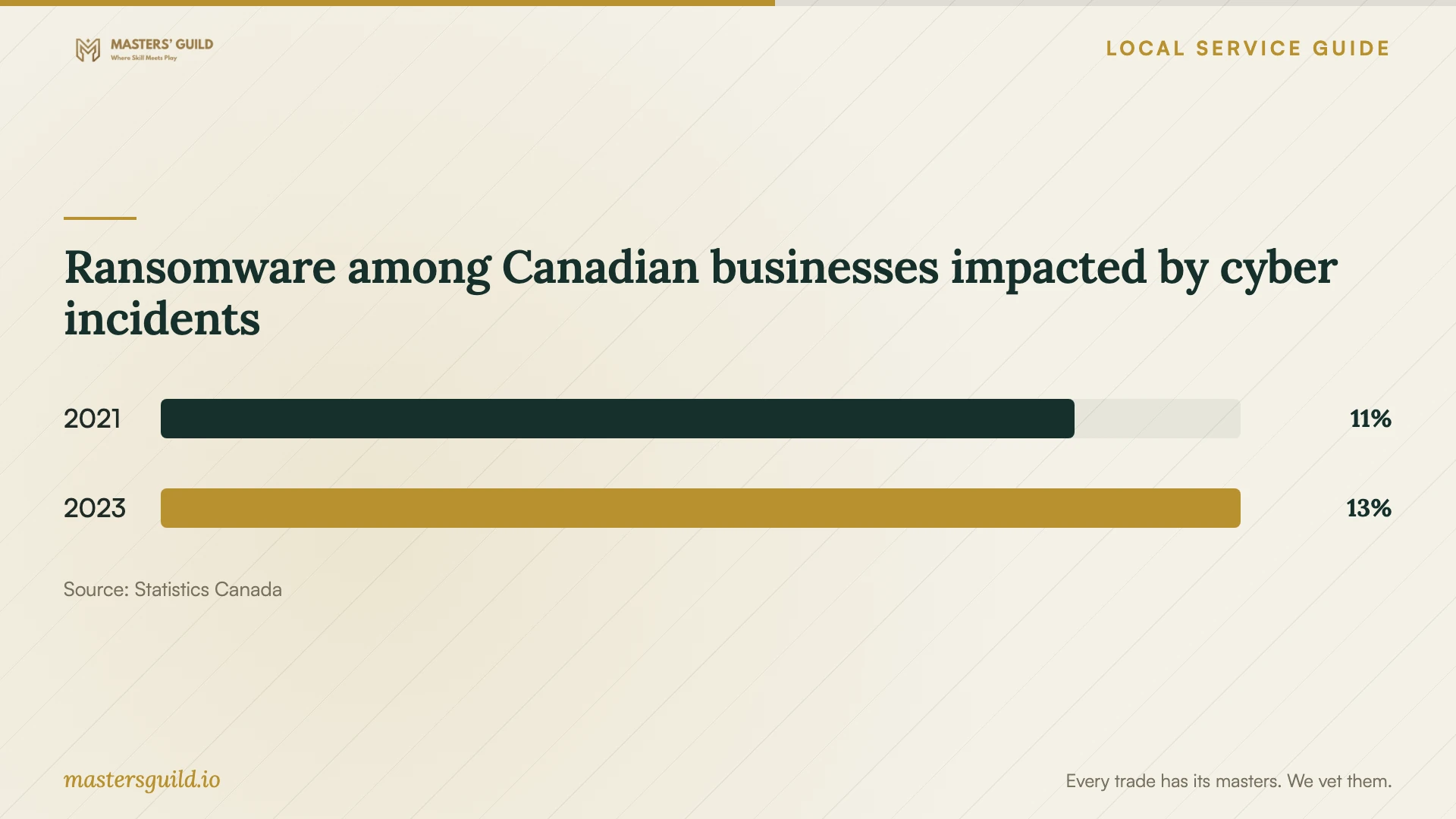
Statistics Canada reported that 11% of businesses impacted by cyber security incidents experienced ransomware in 2021, compared with 13% in 2023. These are national figures among impacted businesses, not the proportion of all businesses infected or a Winnipeg risk estimate. [3]
Use that context to ask about inaccessible files and backup restoration when booking help. Agree on a handover that covers restored applications, account protection and what to do if symptoms return. Ask the technician to explain what they checked before you resume business use.
Ransomware among Canadian businesses impacted by cyber incidents
Local details that affect your job
Scam reporting depends on financial loss
For a telephone, letter or internet scam without financial loss, Winnipeg Police directs you to the Canadian Anti-Fraud Centre at 1-888-495-8501 and says a police report is unnecessary. If you gave money to someone you believe deceived you, its online scam-fraud category accepts reports with known or unknown suspects. Choose the reporting route before asking a technician to erase potentially relevant records. [1]
Identity theft and payment misuse have separate report options
Winnipeg Police accepts online reports for fraudulent use of another person's identity and unauthorized use or possession of a payment device, with known or unknown suspects. Use the category that matches the harm when arranging computer recovery. For reporting questions, call the non-emergency number, 204-986-6222. Online reporting is not monitored 24/7; call 9-1-1 for an emergency or crime in progress. [1]
Match the booking to the problem
| Situation | Service to request | Approval point |
|---|---|---|
| Unexpected pop-ups or browser changes | Diagnosis and a proposed recovery scope | Approve further work after the technician explains the findings. |
| Encrypted files or a ransom demand | Incident-response assessment and backup review | Discuss preservation and recovery options before authorizing erasure. |
| Unusual account activity | Device recovery plus account protection | Assign password resets, session revocation and multi-factor authentication work. |
| Scam payment or identity misuse | Recovery with agreed evidence preservation | Select the relevant Winnipeg Police reporting category. |
| Several devices or shared business systems affected | Assessment of the wider business environment | Agree on isolation, essential operations and staged return to use. |
Your hiring checklist
- Prepare a timeline of symptoms, suspicious contacts and any remote access you allowed.
- List affected devices, shared folders and business accounts for the technician.
- Identify essential files and tell the provider when you last made a backup.
- Agree on evidence preservation before authorizing erasure or reinstallation.
- Get an itemized quote, an approval limit and a contact point for scope changes.
- Specify who may access files and who can approve data deletion.
- Request a written handover covering recovery work, account tasks and follow-up.
Frequently Asked Questions
Can I arrange remote virus removal?
Ask the provider to assess whether remote work fits the incident before granting access. The Cyber Centre advises disconnecting infected devices from networks, so agree on containment first. Request the access method, work scope and process for removing technician access afterward. [2]
Should I approve a wipe before the technician starts?
Approve a wipe only after discussing essential files, backups, applications and evidence. Ask the technician to identify what the work will erase and how restoration will proceed. The Cyber Centre recommends using clean backups created before infection and scanning backup files before restoring them. [2]
Does removing malware also secure my accounts?
Include account recovery in the written scope. The Cyber Centre recommends resetting associated passwords, revoking active sign-in sessions and access tokens, and re-enrolling multi-factor authentication. Ask who will complete each task using a trusted device. [2]
Do I report a scam if I lost no money?
Winnipeg Police says telephone, letter or internet scams without financial loss should go to the Canadian Anti-Fraud Centre at 1-888-495-8501. Its online reporting page also provides separate options for identity theft and unauthorized payment-device use. [1]
Sources and scope
This guide combines the sources below with practical planning guidance. Figures apply to the stated geography and period; request a written quote for your property.