
Local service guide
Data recovery and backup in Windsor, ON
Data recovery and backup in Windsor starts with choosing the right scope: restoring an existing backup, assessing a device with missing files, or setting up protection for future losses. Ask the provider to identify which job you need and give you written diagnostic fees, approval limits, data-handling terms and a handover plan. For a shop or office, specify the files you need first and require a demonstrated restore before accepting a new backup setup.
Choose the job before requesting a quote
Describe the incident without diagnosing it: the device stopped appearing, someone deleted a folder, the computer lost power, or you cannot open the accounting files. Record the device model, the last successful access and any steps you have taken. Ask the provider whether it proposes a backup restore or an assessment of the original device.
For an inaccessible device, pause further attempts while you arrange an assessment. Ask for instructions before running repair software, opening the enclosure or shipping the equipment. Tell the provider if you need particular folders rather than everything on the drive. Request a separate destination for recovered files and retain the original device until you have checked the handover.
For a backup installation, list the computers, shared storage and business applications you want covered. Name the person who will receive failure alerts and arrange restores. The Cyber Centre recommends identifying business-critical data, setting backup procedures and testing recovery. Make those tasks part of the agreed work. [3]
Compare quotes by deliverables
Request separate amounts for assessment, recovery work, replacement storage, transport and backup setup. For an ongoing service, ask for the recurring charge, storage allowance, cancellation terms and any restore charges. These sources do not establish a Windsor recovery price range, so compare written quotes for the same device and scope.
Ask the provider to define success before you approve recovery. Specify the records and file formats you need, how you will inspect the results, and what you owe if it recovers only part of the requested material. Get any no-recovery fee promise in writing, including its exclusions. Agree who can authorize additional work and whether the provider will return the original equipment.
For timing, request milestones for intake, assessment, your approval and handover. Give the provider your operating deadline and ask whether it can offer a staged return of priority files. Avoid committing to a reopening date until you have inspected the recovered records and checked that your applications can use them.
Arrange offsite and offline protection
The Cyber Centre recommends the 3-2-1 approach: three copies of your information, including the original and two backups, on two different media types, with one copy offsite. It also recommends an offline backup. Ask the installer to show where each copy lives and how you will access it if your premises or usual computer are unavailable. [3]
An offsite copy and an offline copy address different situations. The Cyber Centre warns that a fire or flood can affect onsite backups and that attackers or ransomware can compromise network-attached storage. It advises disconnecting removable media after backup. Ask the provider to explain which copy stays disconnected and who manages the rotation. [3]
Agree how much recent work you can afford to lose and how long you can operate without your records. Use those limits to request a backup schedule and a restore demonstration. Have the provider restore a representative folder to another destination, then open the files yourself. Include application data in the demonstration if that is part of the scope.
Set privacy terms before handing over equipment
The Office of the Privacy Commissioner of Canada says organizations subject to PIPEDA must take reasonable steps to protect personal information when a third party processes it, whether in Canada or abroad. Outsourcing does not remove that responsibility. Ask who will access customer or employee records, what safeguards they use and whether they send devices or copies to another company. [4]
Ask where the provider processes recovered files and stores backups. The Cyber Centre advises considering data residency because an organization may have requirements for Canadian storage. The Privacy Commissioner explains that foreign processing brings the information under that country's laws and requires clear disclosure to individuals. Check the requirements that apply to your records before approving a destination. [3] [4]
Put access permissions, secure delivery, retention and deletion in the agreement. Ask how the provider reports a security incident and when it deletes working copies after your acceptance. Arrange a secure method for sharing any required credentials; keep passwords out of an initial quote request.
Use national incident data as planning context
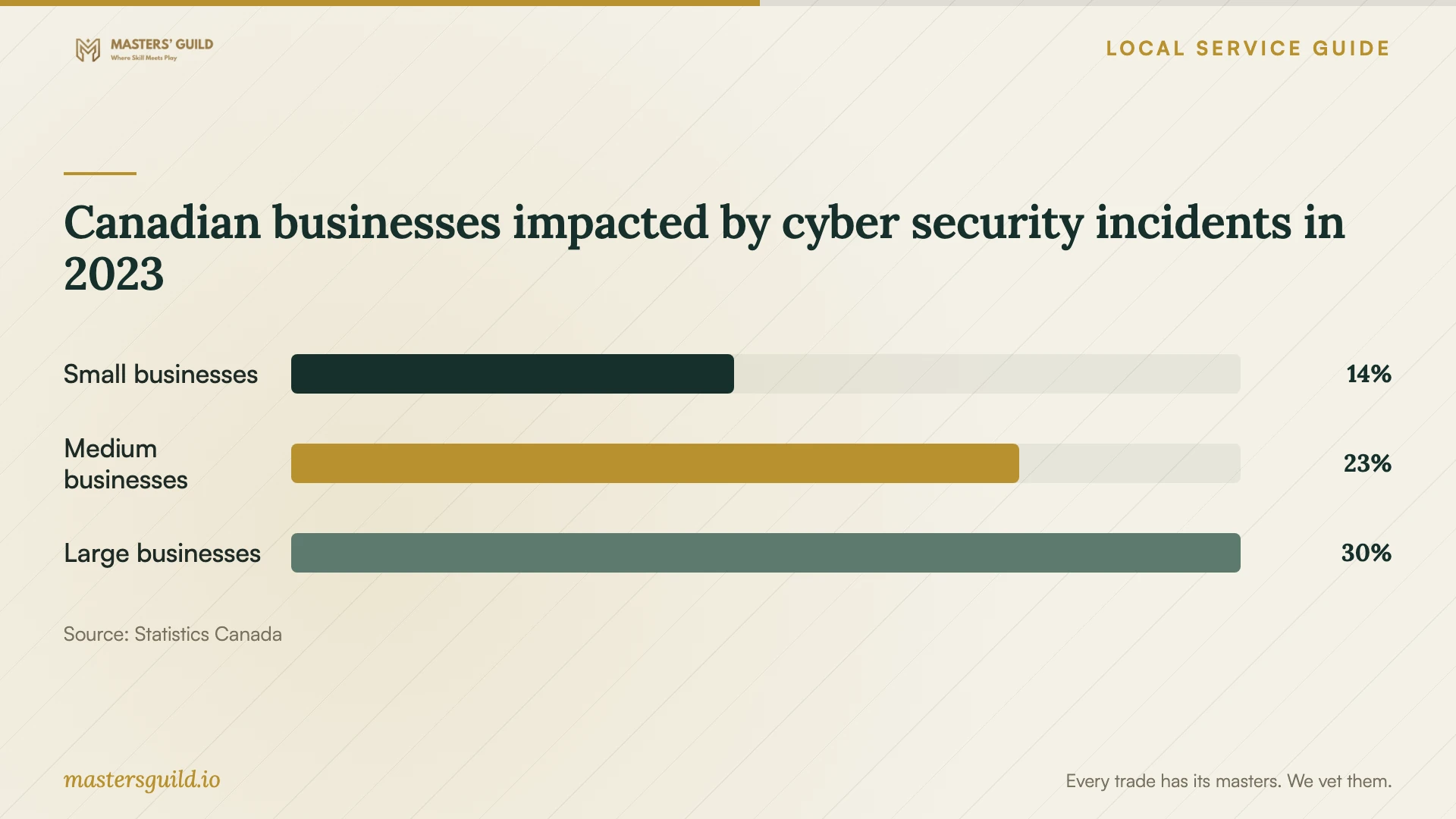
Statistics Canada's chart reports that 14% of small businesses, 23% of medium-sized businesses and 30% of large businesses in Canada were impacted by cyber security incidents in 2023. These figures describe national business groups. They do not establish a Windsor incident rate, the chance of losing a particular drive or a recovery success rate. [5]
Use that context to include cyber incidents in your restore plan alongside equipment loss and damage to your premises. The Cyber Centre notes that backups can assist recovery from ransomware but cannot prevent attackers from selling or leaking stolen information. Ask for access controls and incident procedures as well as copies of your files. [3]
Canadian businesses impacted by cyber security incidents in 2023
Local details that affect your job
Plan backup placement around basement flooding
The City of Windsor maintains basement-flooding guidance and recommends downspout disconnection to reduce risk. Qualifying city homeowners can call 311 to arrange an inspection for its no-charge disconnection service. If you operate from a home basement, ask the backup installer to assess equipment placement and arrange a copy outside the property. Check homeowner eligibility with the City rather than assuming a commercial premises qualifies. [1] [3]
Include ENWIN's computer power advice in the scope
ENWIN advises keeping files and operating systems backed up, using a high-quality surge protector for computer equipment and considering a UPS for frequent computer use, including a home business. Ask your installer to assess which computer or shared-storage device needs power protection and to demonstrate its shutdown arrangements. Keep the backup and power-protection tasks explicit in the quote. [2]
Match the service to your immediate need
| Situation | Request | Acceptance check |
|---|---|---|
| You have a backup and need records restored | A restore to a separate destination | Open priority files and check application access |
| Your device is inaccessible and no usable backup is known | An assessment with a written approval limit | Agree priority files and partial-recovery charges |
| Your only backup stays at the premises | An offsite copy to address loss of access after fire or flood | Demonstrate access without the onsite computer |
| Your backup stays connected to the network | An offline copy as recommended by the Cyber Centre | Identify who disconnects or rotates the copy |
| You will hand over personal information | Written third-party safeguards and processing locations | Review privacy terms before releasing equipment |
Your hiring checklist
- Record the symptoms, device model, last successful access and attempted fixes.
- List priority folders, business applications and the deadline for usable records.
- Ask for intake instructions before further recovery attempts or transport.
- Obtain separate assessment, recovery, storage and recurring-service charges.
- Confirm the lab, subcontractors, processing countries and deletion terms.
- Specify an offsite copy, an offline copy and the person responsible for alerts.
- Inspect recovered files and witness a backup restore before accepting the work.
Frequently Asked Questions
Can I restore the backup myself?
Consider it if you understand the restore procedure and have another destination for the files. Keep the original backup while you inspect the restored material. If you need help, request a restore-only scope and specify which files or applications the provider must check.
Does a NAS count as sufficient backup protection?
Assess the other copies and their locations. The Cyber Centre warns that attackers or ransomware can compromise a NAS. It recommends an offsite copy and an offline backup. Ask the installer to show how the proposed setup meets those needs. [3]
Must a business store its backups in Canada?
Check the requirements that apply to your organization. The Cyber Centre says regulatory or policy requirements may require Canadian storage. The Privacy Commissioner explains that PIPEDA permits outsourcing but requires safeguards, with additional considerations for foreign processing. Ask for the actual storage and processing countries. [3] [4]
What should I receive at handover?
Request the recovered files, original equipment, an agreed list of missing material and written backup instructions. For a new setup, include account ownership, alert recipients, restore steps and a demonstration using your priority files. Confirm when the provider will delete its working copies.
Sources and scope
This guide combines the sources below with practical planning guidance. Figures apply to the stated geography and period; request a written quote for your property.