
Local service guide
Home office setup in Vancouver: plan and hire
For home office setup in Vancouver, choose your desk position and mounting method before requesting an itemized quote for assembly, equipment connections and cable management. Ask the provider to separate furniture work from proposed electrical alterations. If you live in a strata, check your building's current bylaws before approving wall attachments or concealed cable routes. Have the installer adjust the workstation with you seated at it before accepting the work.
Define the work before asking for quotes
Write a task list that names each item: assemble the desk, fit a monitor arm, connect the dock, position the printer and secure cables. Include product model numbers and photographs of the room. Tell the provider which items you already own and which parts you expect them to supply. Ask them to identify any missing brackets, adapters or cables before the appointment.
Separate assembly from computer support in the quote. Ask whether the provider will test the monitors, camera, microphone and internet connection, or only assemble and place equipment. Request separate prices for optional work, materials, travel or parking, packaging removal and return visits. Agree on how the provider will obtain your approval if they discover extra work.
Fit the workstation to you before fixing it in place
WorkSafeBC suggests starting with the monitor about an arm's length away and adjusting for the individual. Its typical viewing range is 400–740 mm. It recommends placing the top of the screen at seated eye level, while noting that people who use bifocals may need a lower screen. Use those recommendations to test your desk and monitor position before the installer commits to a mount. [2]
For two screens that you use equally, WorkSafeBC recommends placing their meeting point in front of you and setting both at the appropriate viewing height. If you use one screen more often, centre that screen. Its guidance asks users to check whether they can see the distant edges of displayed information by moving their eyes rather than their head. [2]
Sit in your intended chair and open the applications you use for work. Ask the installer to let you test keyboard position, screen text size and reach before securing the equipment. For a standing desk, check the complete movement from seated to standing height and leave enough cable slack for that movement. Confirm the arm's compatibility with your monitor and desk against the manufacturers' instructions.
Agree on attachments and building access
Choose a proposed mounting method before booking: a desktop stand, a desk clamp or a wall attachment. Ask the provider to explain the intended fixings and cable route. For drilling or concealed routing, send that description to your landlord or strata manager and ask what permissions apply. Consider a freestanding arrangement while you resolve questions about attachments.
The archived British Columbia standard bylaws require written strata approval for specified alterations to a strata lot and for alterations to common property, including limited common property. The document is current to March 11, 2024. Treat it as a reason to check your building's current documents, rather than assuming that every wall mount requires approval or that this archived text establishes the present rule. [1]
Ask building management about contractor access, delivery arrangements, permitted work hours and any elevator booking before you confirm the appointment. Give the installer the agreed access instructions and tell them where they can unload. If your plan includes moving or adding outlets, obtain a separate electrical scope and confirm the applicable qualifications, approvals and permits before authorizing that work.
Budget for installation and electricity separately
Use written quotes to budget for this installation. The cited sources do not establish a Vancouver labour price or a typical total setup cost. Compare providers on the same task list and ask whether each quote includes materials and taxes. Keep purchases such as a desk, monitor arm, dock and cables separate so you can see what you are paying for labour.
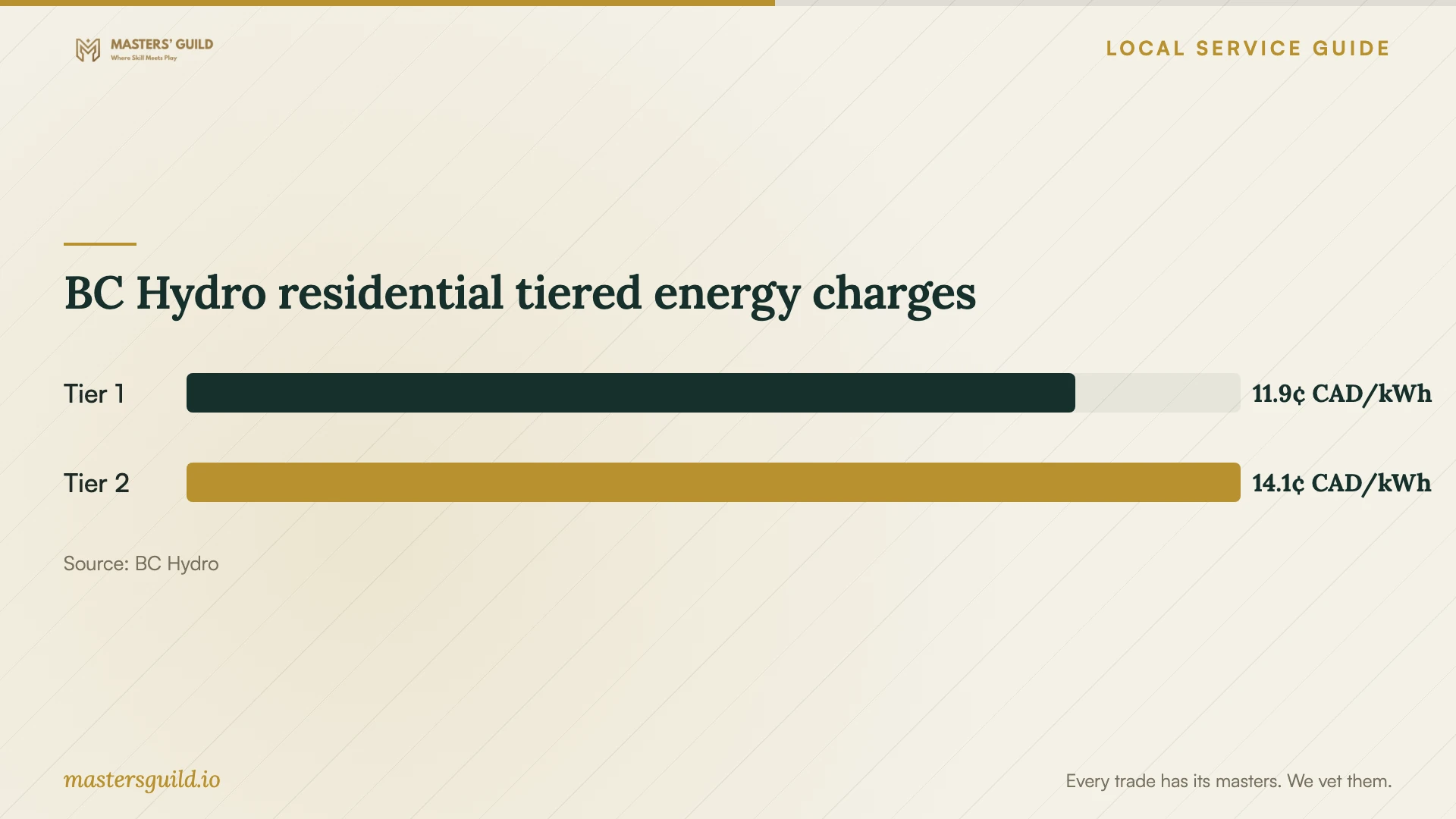
BC Hydro's residential tiered page lists energy charges of 11.87 Canadian cents per kWh below the billing threshold and 14.08 cents per kWh above it. BC Hydro calculates that threshold using 22.1918 kWh for each day in the billing period. Check your account's rate plan before using these figures to consider equipment running costs. [3]
Ask for equipment power specifications if electricity use matters to your purchase decision. A rate per kWh alone cannot tell you what your workstation will cost to run. You also need its consumption and operating hours. BC Hydro's page lists a separate basic charge and states that its official tariff prevails if the webpage and tariff differ. [3]
Test the finished setup before the provider leaves
Agree on a handover test when you book. Ask the installer to demonstrate desk movement, monitor adjustment and cable clearance. Open a video call to check your camera and microphone, connect each display and test the internet from the desk. Keep passwords under your control by entering them yourself when the provider needs access.
Review the completed task list together. Ask the provider to identify any unfinished work, explain how to adjust the equipment and give you the remaining hardware and instructions. Photograph the cable route and attachments for your records. Confirm whom to contact if a fitting loosens or a connection stops working, and request the agreed service terms in writing.
BC Hydro residential tiered energy charges
Local details that affect your job
Strata attachments need a building-specific check
For a Vancouver strata home, ask the manager to review the proposed mounting and cable-routing method against the building's current bylaws. The cited provincial standard bylaws, archived to March 11, 2024, address written approval for specified building components and common-property alterations. Ask which parts of your proposed work require approval before arranging drilling; do not infer the answer from the archived document alone. [1]
A home workspace does not automatically mean business electricity service
BC Hydro's residential eligibility description includes a dwelling where a portion supports a business if one meter supplies the whole dwelling. If you use part of your Vancouver home for work, check that description and your account before assuming you need business service. BC Hydro notes that it may request a declaration in select circumstances. This regional utility guidance does not establish eligibility for a separately metered office. [3]
Choose the scope to request
| Your plan | Scope to request | Before booking |
|---|---|---|
| Desk and desktop monitors | Furniture assembly and equipment placement | Send models and dimensions; test the seated layout |
| Desk-mounted monitor arm | Arm fitting and cable management | Confirm desk and monitor compatibility using manufacturer instructions |
| Wall attachment or concealed cables | Written mounting and routing proposal | Ask your landlord or strata manager to review applicable permissions |
| Video calls and connected equipment | Computer setup with a handover test | Specify displays, dock, camera, microphone and internet testing |
| New or relocated outlets | Separate electrical assessment and quote | Confirm qualifications, approvals and permits for the proposed work |
Your hiring checklist
- Measure the desk area, doorways and intended delivery route.
- Send furniture models, monitor specifications and room photographs with your task list.
- Test your seated screen position before choosing a fixed mounting point.
- Ask building management to review attachments and confirm contractor access arrangements.
- Request separate scopes for assembly, computer support and proposed electrical alterations.
- Confirm included materials, taxes, access costs and the process for approving extra work.
- Agree on equipment tests and written service terms before booking.
Frequently Asked Questions
How much should I budget for the installation?
Request itemized quotes for your exact equipment and task list. The cited sources do not establish local installation prices. Compare labour, supplied parts, access charges and taxes, and ask each provider to price optional work separately.
Do I need strata approval for a monitor wall mount?
Ask your strata manager to review the proposed attachment against current building bylaws. The archived provincial standard bylaws address approval for specified alterations and common property, but they do not establish that every monitor mount needs approval under today's rules. [1]
Where should the installer position my monitor?
WorkSafeBC gives a typical viewing distance of 400–740 mm and recommends the screen top at seated eye level, with individual adjustments. Test the position while using your normal applications. Tell the installer if corrective lenses affect your viewing position. [2]
Can residential electricity service cover a home workspace?
BC Hydro describes residential eligibility for a dwelling partly used for business when one meter supplies the whole dwelling. Check your account and eligibility with the utility; this description does not cover every office arrangement. [3]
Sources and scope
This guide combines the sources below with practical planning guidance. Figures apply to the stated geography and period; request a written quote for your property.