
Local service guide
Computer Virus Removal in Vancouver, BC
Arrange Computer Virus Removal in Vancouver by asking a technician for a written plan covering isolation, file preservation, recovery and account security before approving cleanup. For a business computer, involve your existing IT provider first. The Canadian Centre for Cyber Security advises disconnecting an infected device from networks and avoiding sensitive account logins on that device. Tell the technician whether it holds payroll, customer records or shared-drive access, and require approval before they erase files or reinstall the operating system. [3]
Choose help that matches the incident
Describe what you observed: browser redirects, unknown programs, disabled protection, inaccessible files or unauthorized account activity. The Cyber Centre lists these among possible infection indicators. Give the technician the sequence of events, including any attachment opened, software installed or remote access granted. Ask them to explain what they will investigate before they propose a repair. [3]
Choose a provider who can work with your operating system and business applications. Ask whether they will investigate affected accounts and other connected computers, or refer that work to a security specialist. For encrypted files, suspected information theft or several affected devices, request an incident-response scope and a separate recovery proposal. Identify who will authorize changes and who needs progress updates.
Contain the problem before handing over the computer
Contact your IT provider and disconnect a suspected infected device from Wi-Fi, Ethernet and other networks. The Cyber Centre advises powering it off if malware appears active or spreading. Avoid signing into email, banking or administrative accounts from it. Use a separate trusted device to coordinate help, and tell the technician what you disconnected or powered off. [3]
Record warning text, suspicious sender details and approximate times without reopening suspicious links or attachments. Preserve messages and payment records if fraud may have occurred. In its money-mule fraud guidance, VPD advises keeping suspect communications and contacting the bank or card company. Ask your responder which records to retain for your incident before approving a wipe. [2]
Tell the technician where your backups live and when you last checked them. The Cyber Centre recommends restoring from known clean backups created before infection and scanning backup files before restoration. Have the technician assess the backup before using it, and agree on a file-preservation plan if you lack a suitable copy. [3]
Compare written scopes and total charges
Have each provider separate diagnosis, cleanup, operating-system reinstallation, backup assessment, file restoration and account recovery. Set an approval limit for additional work. Clarify whether they charge for an unsuccessful diagnosis or recovery attempt, and whether replacement parts, software subscriptions and follow-up support cost extra. Request the total including applicable taxes.
For a visit to your shop or office, confirm the appointment window, access arrangements and any travel charge. For drop-off service, request a receipt identifying the device and accessories. For remote work, verify the provider through contact details you obtained independently and agree on the session's purpose and end point. VPD warns against granting computer access to callers in its bank-impersonation fraud guidance. [2]
Request a device-specific quote and a target date for the initial assessment. Describe the symptoms, essential files and recovery needs when requesting that quote. If you need the computer for payroll or appointments, discuss a temporary replacement and identify which tasks you can resume while recovery continues.
Define access to employee and customer information
Agree on what the technician may view, copy or retain, where they will store diagnostic files, and when they will delete working copies. Identify folders containing employee or customer information. Require approval before they upload files to an external analysis service or install ongoing monitoring. Give them a named business contact for access decisions.
In guidance published on December 9, 2015, B.C.'s privacy commissioner explained that workplace security tools may collect employee personal information. The office recommended consulting a privacy officer or legal counsel when considering security tools and providing employees with notice about collection. Treat those recommendations as historical guidance, rather than confirmation of current legal requirements. Ask your privacy contact to review proposed monitoring against current requirements before you authorize it. [4]
Agree on return-to-service checks
Request a written recovery summary covering findings, changes, restored files and unresolved concerns. The Cyber Centre's organizational guidance recommends reconnecting only after operating-system reinstallation and clean malware scans. Ask the responder how they will apply that guidance to your incident and demonstrate readiness before returning the computer to your business network. [3]
Include account recovery in the handover. The Cyber Centre recommends resetting passwords associated with the device, revoking active sign-in sessions and access tokens, and re-enrolling multi-factor authentication. Assign each task to a named person. Obtain a follow-up contact if alerts return, and schedule updates, backup checks and regular scans. [3]
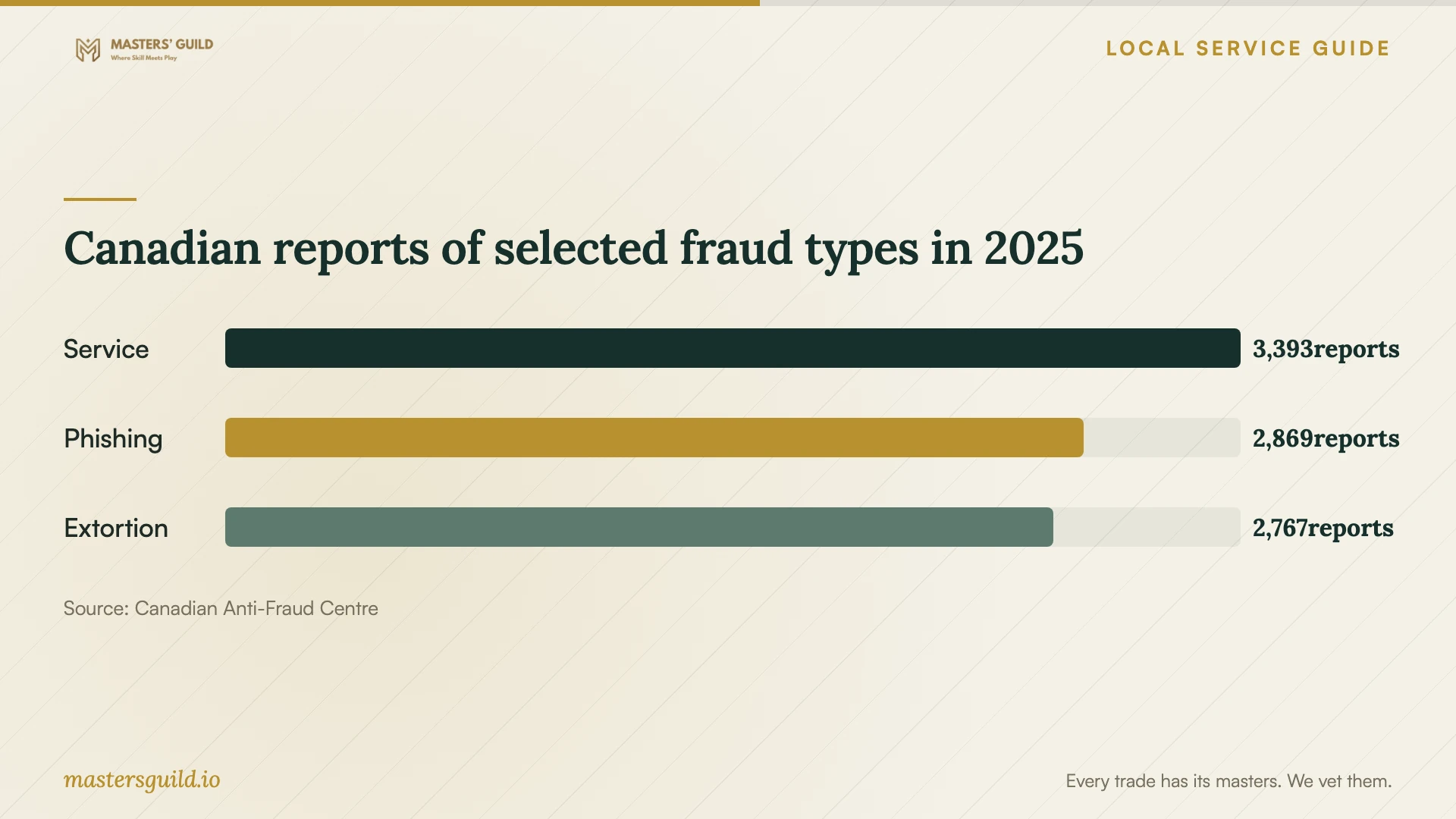
Canadian reports of selected fraud types in 2025
Local details that affect your job
B.C. PST affects how you compare invoices
The Province says PST does not apply to services that test, configure, repair or restore software. Hardware repair services are taxable, and purchased software generally attracts 7% PST unless an exemption applies. Mixed packages have bundled-purchase rules. For your Vancouver device, request itemized cleanup, hardware and software charges and ask the provider to explain the PST treatment before you approve the total. [1]
Use Vancouver's fraud reporting route
VPD directs fraud victims in Vancouver to call 604-717-3321 and directs attempted-fraud reports to the Canadian Anti-Fraud Centre. If you paid a caller or sent funds after a computer warning, preserve the communications and contact your bank or card company as appropriate. Arrange technical recovery alongside reporting; ask the technician to consult you before deleting records you may need. [2]
Match the next step to what you observed
| Situation | Immediate step | Scope to request |
|---|---|---|
| Threatening email includes an old password | Preserve the message and avoid replying or paying; VPD describes this phishing tactic | Assess whether separate device or account evidence warrants investigation |
| Redirects, unknown programs or disabled protection | Contact IT and isolate the suspected infected device | Diagnosis, recovery plan and account-security review |
| Encrypted files or a ransom demand | Disconnect networks; power off if malware appears active or spreading | Incident response, backup assessment and preservation approval before erasure |
| Unauthorized account logins | Avoid sensitive logins on the affected device | Password resets, session and token revocation, and multi-factor authentication recovery |
Your hiring checklist
- Write down symptoms, their start time and any recent downloads or remote sessions.
- Tell your existing IT provider which device and business accounts are involved.
- List essential files and available backups without attaching unverified drives to the affected computer.
- Request a written scope, initial assessment date and approval limit for extra work.
- Separate software services, hardware work and software purchases in the quote.
- Agree on file access, external uploads, retention and permission before erasure.
- Assign responsibility for account recovery and return-to-network approval.
- Obtain a recovery summary and follow-up contact before closing the job.
Frequently Asked Questions
Can a technician handle the job remotely?
Ask whether remote service fits the symptoms and your containment plan. The Cyber Centre recommends disconnecting infected devices from networks, so agree with your IT responder before reconnecting for remote access. Verify the provider independently and approve a defined session. Reject computer-access requests from callers claiming to represent your bank. [2] [3]
Will virus removal recover encrypted files?
Request separate answers about removing malware and recovering files. The Cyber Centre describes ransomware as denying access, typically through encryption, and recommends restoration from known clean backups. Ask the responder to assess recoverability before you approve charges; require permission before they erase the device. [3]
Should every cleanup charge include B.C. PST?
The Province exempts software repair and restoration services from PST, while hardware services and software purchases have different treatment. Bundled charges can require allocation under provincial rules. Ask for an itemized invoice and an explanation of tax on each component. [1]
What should I ask before accepting the repaired computer?
Request the findings, recovery steps, scan results and remaining concerns in writing. Confirm who will complete password resets, session revocation and multi-factor authentication recovery. Ask who approves network reconnection and whom to contact if symptoms return. [3]
Sources and scope
This guide combines the sources below with practical planning guidance. Figures apply to the stated geography and period; request a written quote for your property.