
Local service guide
Tulsa software installation: plan the right help
For software installation in Tulsa, hire a technician with a written scope that names your device, applications, account setup and completion tests. Before buying software, check your eligibility: Tulsa Community College offers Microsoft Office free to current students, and Tulsa City-County Library offers specialty software in its Digital Literacy Lab after orientation. Decide whether you need an application installed on your own computer, a place to try it, or instruction on using it. [1] [2]
Define the result you want before requesting quotes
Describe the job through the task you want to complete. For example, ask the technician to install your chosen application, sign in with your account, open an existing document and save a new one. Specify whether you also want help connecting a printer, moving files or learning the main controls. Ask the provider to identify which tasks the quote includes.
Send the computer model, operating system version, application name and any error message when requesting help. Describe an unsuccessful installation separately from a new setup. Ask the technician to check compatibility before you authorize a software purchase, and agree on what happens if they cannot complete the installation.
Discuss the appointment format with the provider. Ask whether they can complete your requested work remotely, whether you must remain at the computer and whether they need physical access to another device. For an in-home appointment, confirm the visit charge and include time to test the application together before the technician leaves.
Check local access before paying for software
Tulsa Community College states that Microsoft Office is free for current TCC students. Its instructions direct students to sign in to MyTCC, select the Student tab, open Software Downloads under Quick Links and follow the online store instructions. If you qualify, check that route before asking a technician to purchase a separate copy. [2]
Tulsa City-County Library lists Adobe Creative Cloud applications, Apple creative applications, programming tools and digital art software in its Digital Literacy Lab. Cardholders must attend a lab orientation before using the specialty software. Consider a lab visit if you want to explore a listed application before deciding to install it at home. [1]
The library describes the lab as a self-directed working space and places responsibility for learning the resources on customers. Plan your visit around a project you want to try. If you also want help installing that application on your own computer, confirm whether someone offers that service and agree on a separate scope. [1]
Compare the full scope of each quote
Request an itemized quote with labor, software purchases, travel, file transfer and instruction shown separately. Ask whether the provider charges a fixed amount or bills for time, and whether they require your approval before adding work. Specify whether you want operating system replacement, account recovery or troubleshooting included.
Request written quotes for your device and tasks to set your budget. Give each provider the same device details and requested outcome, then compare their exclusions, completion tests and follow-up terms alongside the total. Keep a copy of the agreed scope so you can refer to it during the appointment.
Discuss how the technician will handle a failed download, an account you cannot access or a compatibility problem. Agree on a stop point for additional charges. Before approving a new subscription, establish who will own the account and who will manage renewals.
Prepare your computer and control account access
Back up files you want to keep before the appointment and check that you can open the backup. Gather purchase receipts, license information and access to the email address associated with the software. Ask the technician which permissions they need. Enter passwords and verification codes yourself during the session.
For remote work, have the technician explain the connection process before you approve access. Close unrelated documents and stay present during the appointment. At the end, ask them to show you how to disconnect and review any access settings they changed.
Complete the handover by doing your intended task while the technician watches. Open the application, check the account, work with a sample file and save the result. Request a short record of installed applications, purchases, settings changed and unresolved issues. Keep that record with your receipt.
Separate installation help from learning help
Tulsa City-County Library offers LinkedIn Learning for business, software, technology and creative skills through its online learning resources. Its mobile instructions tell users to enter TCCL as the library ID, then sign in with a library card number and PIN. Consider this resource if your application opens and your next goal is learning how to use it. [3]
If you want personal instruction during the appointment, name the task and ask the provider to quote for it. Request a demonstration, then repeat the task yourself. Keep a list of questions for a later lesson so you can finish the installation checks before moving into training.
Digital Literacy Lab published daily opening hours
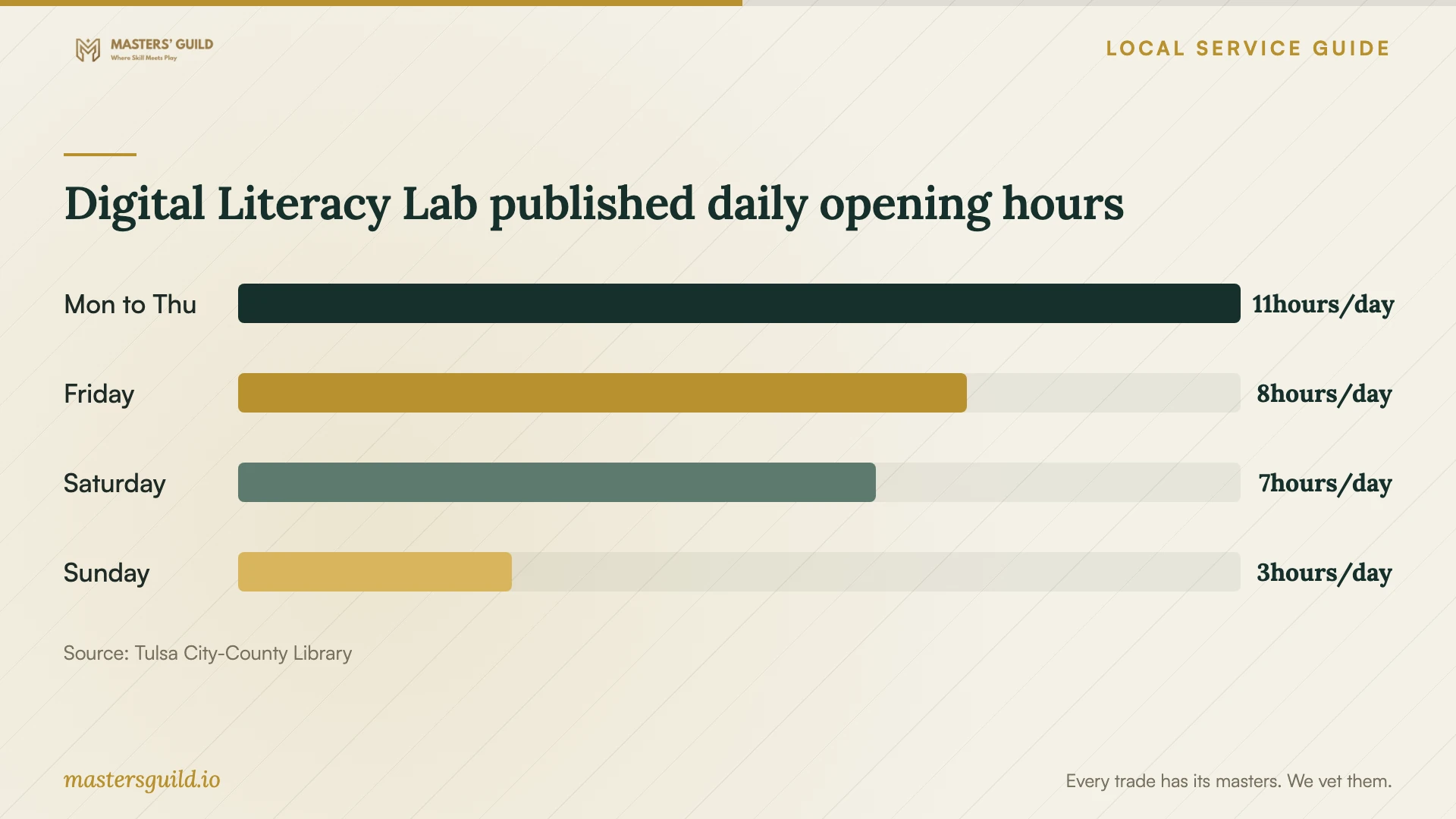
Local details that affect your job
TCC students have a specific Office download route
Current TCC students can obtain Microsoft Office free through MyTCC. Select the Student tab and Software Downloads in Quick Links, then follow the online store instructions. Check your student access before purchasing Office or booking help that includes a software purchase. [2]
Lab orientation comes before specialty software access
Tulsa City-County Library requires cardholders to attend a Digital Literacy Lab orientation before using its specialty software. The lab lists Photoshop, Illustrator, Final Cut Pro, Blender and Visual Studio Code among its applications. Ask about orientation and your chosen application before planning a visit; the lab is self-directed. [1]
Use the library login route for software training
The library offers LinkedIn Learning through its online learning resources. On mobile, its instructions specify TCCL as the library ID followed by your library card number and PIN. Use this route when planning instruction after installation. [3]
Choose the next step for your software task
| Your situation | Next step | Confirm before proceeding |
|---|---|---|
| Current TCC student seeking Microsoft Office | Check MyTCC Student tab and Software Downloads | Your current student access and the download instructions |
| Library cardholder exploring creative or coding software | Check the Digital Literacy Lab software list and arrange orientation | Your chosen application and readiness for self-directed work |
| Application opens, but you need instruction | Explore library LinkedIn Learning or request a lesson | The exact task you want to learn |
| You want software installed on your own computer | Request a scoped technician quote | Compatibility, purchases, account access and completion tests |
| Installation has failed | Describe the error and request troubleshooting in the quote | The charge limit and what happens if the provider cannot finish |
Your hiring checklist
- Write down the device model, operating system, application and any error message.
- Check student software access or library resources before authorizing a purchase.
- Request separate prices for labor, licenses, travel, file transfer and instruction.
- Agree on the appointment format, extra-charge approval and completion tests.
- Back up important files and gather receipts and account access.
- Enter your own passwords and verification codes during the appointment.
- Perform your intended task before accepting the completed work.
- Keep the receipt and a record of purchases, settings and unresolved issues.
Frequently Asked Questions
Can I get Microsoft Office through TCC?
TCC states that Microsoft Office is free for current students. Sign in to MyTCC, select the Student tab and open Software Downloads under Quick Links. Follow the online store instructions before purchasing another copy. [2]
Does the library install software on my home computer?
The library offers cardholders access to specialty software in its self-directed Digital Literacy Lab after orientation. Confirm separately whether anyone offers installation on your own device before arranging help for your home computer. [1]
Should I give the technician my password?
Ask which access they need and enter passwords and verification codes yourself. Stay present during the appointment. At handover, review remote access settings and ask the technician to explain anything they changed.
How do I know the installation is complete?
Agree on a test before work starts. Open the application with your account, perform the task you hired for and save the result. Ask the technician to record any remaining errors and explain the terms for follow-up help.
Sources and scope
This guide combines the sources below with practical planning guidance. Figures apply to the stated geography and period; request a written quote for your property.