
Local service guide
Cloud Service Setup in Toledo, OH
For Cloud Service Setup in Toledo, hire a technician against a written list of accounts, devices and folders, and require a file recovery demonstration before signing off. Check your connection before scheduling the initial upload: Buckeye says fiber is available in some Toledo areas, so confirm service at your address rather than assuming citywide coverage. Ask for separate prices for setup labor, cloud subscriptions and any follow-up visit. [2]
Define the work before requesting quotes
Give each technician the same inventory: device models, operating systems, current cloud accounts, folders to include and the amount of data you intend to move. State whether you want help with photos, documents or both. Name the person who will own the account and pay the subscription.
Ask the technician to explain the proposed service's sync, deletion and recovery behavior before changing settings. Request a plan for keeping your original files during migration. If you want backup protection, ask the technician to demonstrate how you would recover a file after an accidental change or deletion.
Set boundaries for cleanup. Decide whether the quote includes duplicate removal, folder renaming or old-account closure. Require your approval before the technician deletes originals or changes shared access. Keep cleanup separate from the initial transfer if you have not decided what to retain.
Check the Toledo connection before booking
Buckeye's Toledo page directs customers to check availability and states that fiber reaches some areas of the city. Confirm your exact address, connection type and current plan before asking a technician to schedule a large transfer. Ask the internet provider to confirm which offer you can order. [2]
Use the FCC's National Broadband Map as another address-level check. The FCC explains that you can inspect provider-reported technologies and maximum advertised download and upload speeds, and filter residential locations. Treat those entries as reported availability, then confirm installation and service terms with the provider. [3]
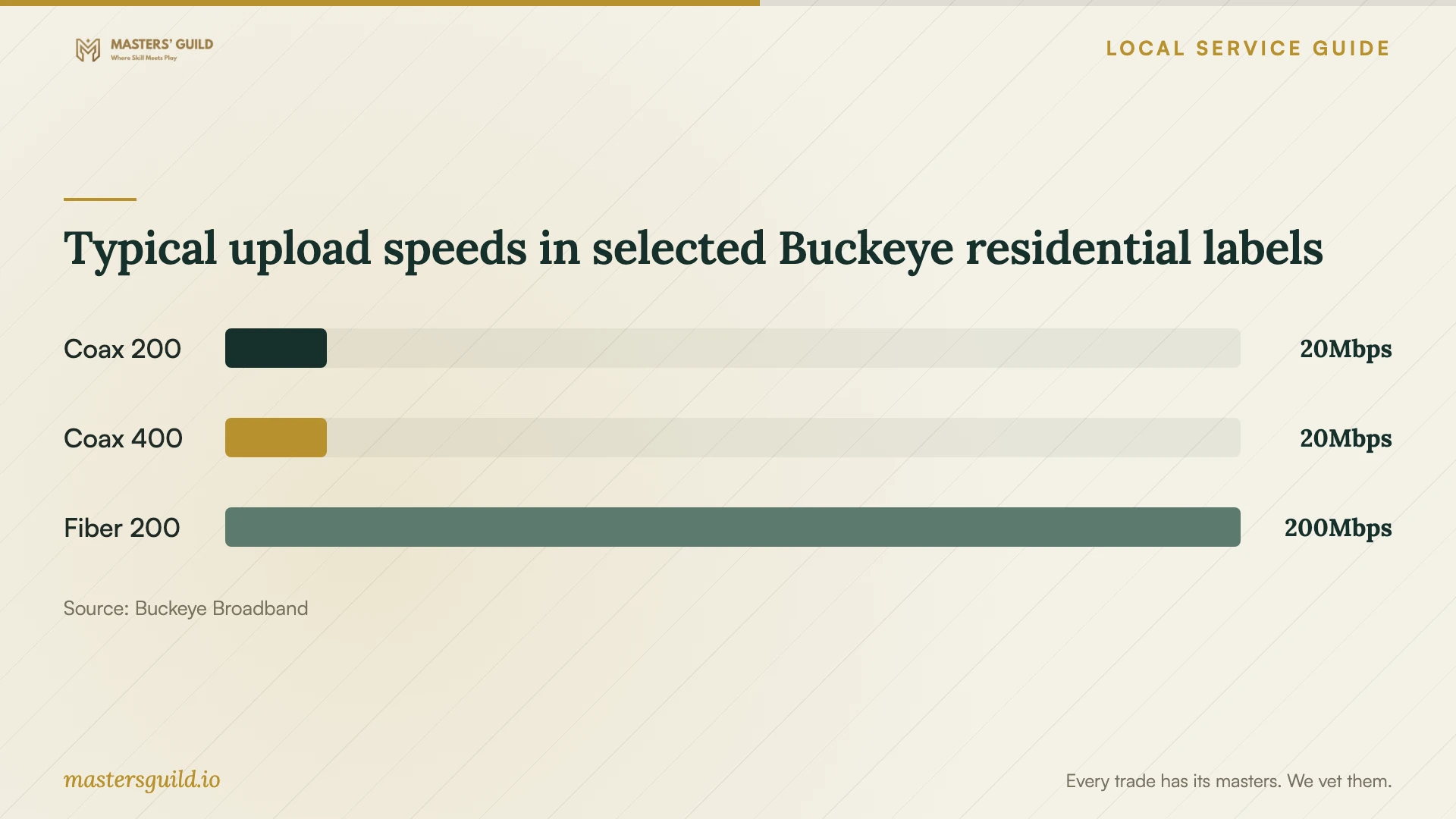
Buckeye's residential Flat Rate Pak 3.0 disclosures illustrate why download speed alone is an incomplete shopping criterion. The provider lists 20 Mbps typical upload for both Coax 200 and Coax 400, while Fiber 200 lists 200 Mbps. Ask your technician to measure your current upload performance and explain whether an internet change would help your proposed transfer. [1]
Separate setup costs from ongoing bills
Request a written labor quote with a clear stopping point. Ask whether the technician charges by the visit, by the hour or for a defined result. Include travel, remote follow-up, extra devices and troubleshooting in the discussion. The supplied evidence does not establish a Toledo market rate for cloud setup labor.
Ask for a separate subscription estimate based on the storage you intend to use. Have the technician identify the account holder, billing frequency and renewal terms before you approve a purchase. Avoid agreeing to an internet upgrade until you have compared its upload speed and full recurring cost with your current service.
Read the label for the exact internet offer rather than borrowing terms from a similarly named plan. Buckeye publishes residential and business disclosures with different offers, fees and data allowances. Ask the provider to identify the label that applies to your address and order, including any introductory period and additional charges. [1]
Choose remote help or an in-home appointment
Consider remote help if you can sign in, find the folders and supervise the session. Request an in-home quote if you want the technician to work across several devices or inspect your home connection. Tell the technician about inaccessible accounts or devices before booking so the quote addresses those obstacles.
Ask for experience with your chosen platform and a description of the handover. Enter your own passwords where possible, approve purchases yourself and ask the technician to explain any access they request. Agree on whether they may view personal files and how they will handle any temporary copies.
Test the result before closing the job
Ask the technician to open selected transferred files from the destination account and from each intended device. Include examples from important folders. Check shared access with the intended recipient and ask the technician to walk you through restoring a test file without overwriting your working copy.
If uploads remain unfinished, record what remains and who will check completion. Request plain-language instructions for checking progress, responding to errors and contacting support. Keep your original copies until you have reviewed the transfer and recovery test, then remove temporary technician access.
Typical upload speeds in selected Buckeye residential labels
Local details that affect your job
Fiber availability requires an address check
Buckeye states that fiber is available in some Toledo areas. Before booking a migration around a fiber connection, confirm availability at your home and arrange any installation first. Give the cloud technician the confirmed connection details so they can plan the upload and follow-up. [2]
A higher coax download tier may keep the same upload speed
Buckeye's residential Flat Rate Pak 3.0 Coax 200 and Coax 400 labels both list 20 Mbps typical upload. For a cloud-upload project, ask about upload capability before paying for a higher download tier. The corresponding Fiber 200 label lists 200 Mbps upload, subject to address availability. [1] [2]
Ask local staff before committing to paid setup
Buckeye lists its Brainiacs Tech Hub at 4111 Talmadge Road, across from Franklin Park Mall, and advertises on-site advice and free internet classes. Ask staff whether they can help explain your internet plan or offer a relevant class before booking paid cloud work. The page does not establish a cloud-migration package or its price. [2]
Choose the scope of help
| Your situation | What to request | Before accepting the quote |
|---|---|---|
| You want files on several devices | Account setup, selected-folder configuration and device checks | Name the folders and ask the technician to explain deletion behavior. |
| You want recoverable copies | A backup plan and a demonstrated file recovery | Agree on what the recovery test must show. |
| You are moving from an old account | A migration plan with original-file retention | Specify what must transfer and who approves old-account closure. |
| You are considering an internet upgrade | An upload assessment and exact-address availability check | Compare upload terms; Buckeye's Flat Rate Pak 3.0 Coax 200 and Coax 400 both list 20 Mbps upload. |
| The initial upload remains unfinished | A follow-up completion check | Record remaining work, responsibility and any extra charge. |
Your hiring checklist
- List devices, cloud accounts, folders and approximate data volume for the quote.
- Confirm your address-level internet availability and current plan's upload terms.
- Name the account owner and keep billing and recovery contacts under your control.
- Request separate labor, subscription and follow-up charges in writing.
- Agree on access permissions and require approval before deleting original files.
- Choose sample files for destination checks and a recovery demonstration.
- Record unfinished uploads and assign a completion check.
- Collect instructions and remove temporary technician access after handover.
Frequently Asked Questions
How much should I budget for cloud setup?
Request a quote based on your devices, accounts and transfer scope. These sources do not establish local setup labor prices. Ask the technician to separate labor, recurring subscriptions and follow-up charges so you can compare offers on the same basis.
Should I upgrade my internet before the appointment?
Check your current upload capability and ask the technician to assess the planned transfer first. Buckeye lists the same 20 Mbps typical upload for residential Flat Rate Pak 3.0 Coax 200 and Coax 400. Confirm the exact offer and address availability before ordering. [1] [2]
Can I check other connection options at my address?
Use the FCC's National Broadband Map to inspect provider-reported availability, technologies and maximum advertised speeds at your address. Select residential filters, then confirm service and installation terms with the provider you are considering. [3]
What should the technician demonstrate before I pay?
Ask them to open sample files at the destination, check access on your intended devices and demonstrate the agreed recovery process. If uploads remain unfinished, agree on a completion check and collect instructions before closing the job.
Sources and scope
This guide combines the sources below with practical planning guidance. Figures apply to the stated geography and period; request a written quote for your property.