
Local service guide
Computer virus removal in Tacoma, WA
For computer virus removal in Tacoma, choose a technician you contact yourself and request a written scope covering diagnosis, cleanup, file preservation and permission before any reset. Ask for the total including sales tax and agree on how the technician will demonstrate the repair. Washington’s Attorney General warns against giving computer access to unsolicited callers claiming an infection. [5]
Describe the problem before authorizing cleanup
Tell the technician what you saw and what you did next: an unfamiliar warning, changed browser settings, a failed startup, or a request to install remote-access software. Include the device model, operating system and whether you can reach your files. Ask for diagnosis before accepting a virus-removal package; do not treat an alarming message as a confirmed diagnosis.
Mention any access you gave an unsolicited caller. The Washington Attorney General explains that a remote-access scammer can open files, move the mouse and type on the screen. Its guidance tells consumers to hang up on unsolicited support offers and withhold personal information, financial information and computer access. [5]
For that situation, ask the technician to include a review of installed remote-access tools and discuss account-security follow-up. Use a separate trusted device for sensitive account changes while you arrange help. Tell the technician whether anyone requested payment or saw private documents.
Choose the service arrangement and protect your files
Ask whether the provider offers remote support, drop-off service or a home visit, then choose around your ability to use the device and your comfort with access. For remote work, agree on the session time, confirm who will connect and ask how access will end. For drop-off work, request an intake receipt that identifies the device and accessories.
Write down which photos, documents and other files matter most. Tell the technician where you keep existing backups and ask them to assess those backups before restoring anything. Require separate approval for a reset, operating-system reinstall or drive replacement. Ask who can view your files, where any temporary copies will go and when the provider will delete those copies.
Agree on a contact method for discoveries during diagnosis. Set a spending limit and ask the technician to stop for approval if the work exceeds it. Request separate options for preserving files and returning the device to use, especially if you would consider replacement.
Compare written quotes including Washington tax
Washington’s Department of Revenue states that IT services became subject to retail sales tax on October 1, 2025. Its covered activities include troubleshooting hardware and software issues. Ask the technician to show the service charge, any software or storage purchases, travel charges and applicable tax as separate lines. [1]
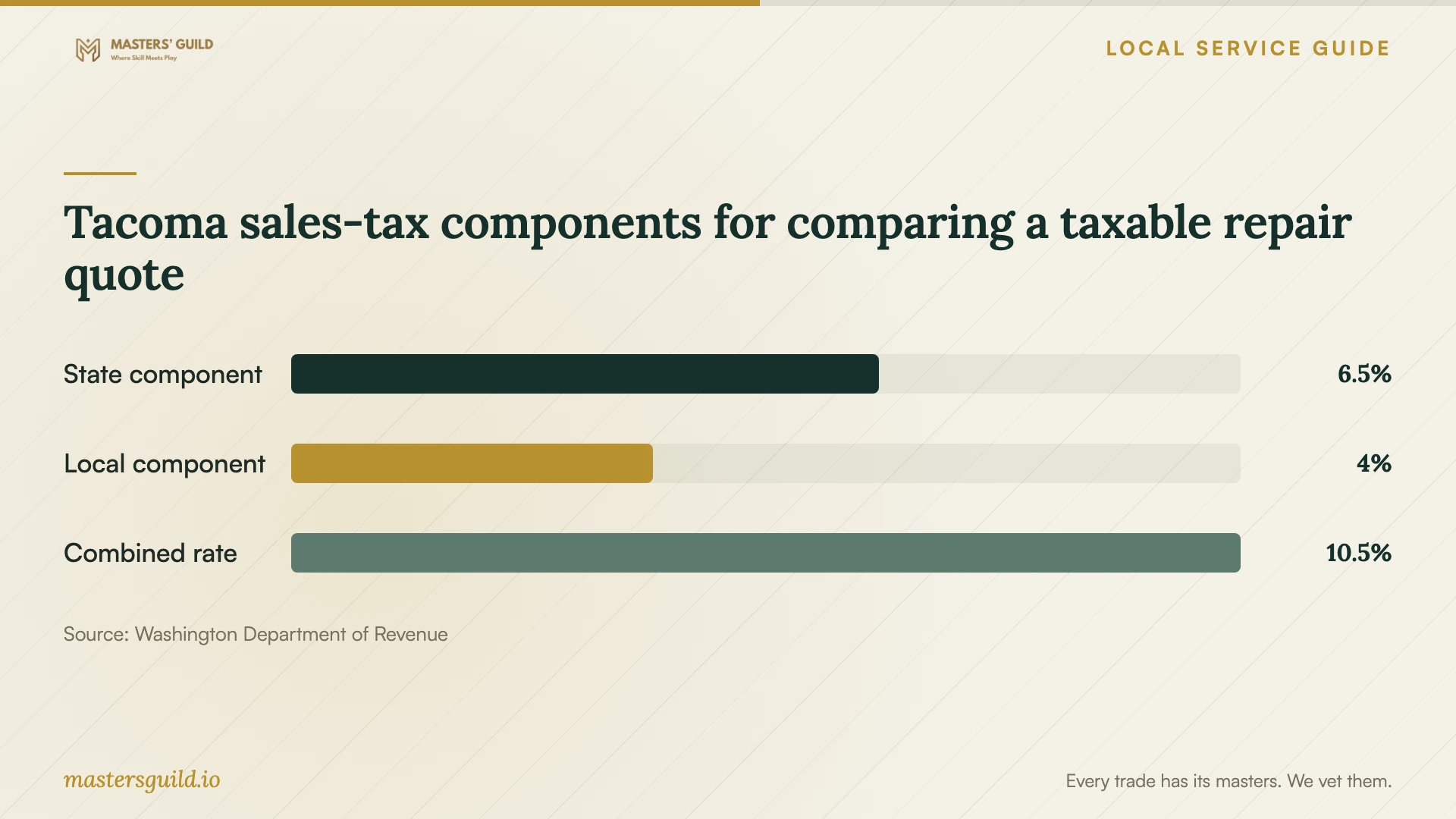
For October through December 2026, the Department of Revenue lists Tacoma’s state component at 6.5%, local component at 4.0% and combined rate at 10.5%. The department directs readers to its address lookup to confirm the correct rate for a specific address. Have the provider confirm the applicable address and tax treatment before you compare totals. [2]
Compare the same scope across quotes. Ask whether the provider includes diagnosis, cleanup, operating-system repair, file preservation and follow-up, or charges for each separately. Request the diagnostic charge you would owe if you decline the repair. Set a completion target with the provider rather than assuming a standard turnaround.
Define completion before you hand over the device
Ask for a written summary of what the technician found, removed, repaired or reinstalled. Agree on checks you can observe at handover: startup, access to the files you named, browser behavior and the status of the security software. Ask the technician to explain any remaining issue and list actions you must take yourself.
Request the follow-up terms before booking. Ask what happens if the original symptom returns, which work the provider would charge for again and whether they will remove temporary support access. Keep the intake receipt, approved scope and final report together so you can explain the history if you need further help.
Plan replacement and recycling without losing your data
If you prefer replacement, ask for a separate file-preservation and data-erasure proposal before handing the old device to a recycler. Confirm which files you can open on the replacement and request a record of the agreed erasure work. Treat recycling eligibility and data handling as separate arrangements.
The City of Tacoma directs residents to E-Cycle Washington for electronics. Its household hazardous-waste guide lists electronics among items the hazardous-waste facility does not accept. Use an electronics collection option rather than taking a computer to that facility’s hazardous-waste intake. [3]
Washington’s Department of Ecology lists computers, laptops, monitors and tablets among devices covered by free E-Cycle recycling. It excludes keyboards, mice and printers from that program and provides a collection-location search by address, city or ZIP code. Check the destination and acceptance requirements before transporting your equipment. [4]
Tacoma sales-tax components for comparing a taxable repair quote
Local details that affect your job
Include Tacoma’s current tax in your comparison
The state’s fourth-quarter 2026 table lists Tacoma, location code 2717, at a combined sales-tax rate of 10.5%. Washington includes hardware and software troubleshooting among taxable IT services. Request a tax-inclusive total and ask the provider to confirm the applicable address through the state’s rate lookup before approving work. [1] [2]
Use electronics collection instead of hazardous-waste intake
Tacoma’s hazardous-waste guide excludes electronics from its household hazardous-waste acceptance list and directs residents to E-Cycle Washington. If you replace an infected computer, select an electronics collection destination after arranging file preservation and data erasure. [3]
Separate the computer from excluded accessories
The statewide E-Cycle program offers free recycling for computers and laptops, but does not include keyboards, mice or printers. Tacoma residents can search collection locations by address or ZIP code. Ask about accessories before packing the full desktop setup for one trip. [4]
Choose the next step for your situation
| Situation | Next step | Ask before approving |
|---|---|---|
| An unsolicited caller claims your computer has a virus | End the call and select your own support provider | Explain whether you gave the caller access or payment information |
| You can use the device and prefer help at home | Ask about a scheduled remote session or home visit | Confirm the access procedure, included work and total charge |
| The device will not start or you need files preserved | Request diagnosis and a file-preservation proposal | Require approval before a reset, reinstall or drive replacement |
| You want to replace the computer | Arrange file transfer and data handling, then find E-Cycle collection | Confirm device acceptance and separate arrangements for excluded peripherals |
Your hiring checklist
- Record the symptoms and any access you gave a caller.
- List the device, operating system, essential files and existing backups.
- Choose a technician you contact yourself and confirm the service arrangement.
- Request an itemized scope and total including applicable tax.
- Require approval before erasure, reinstall, added purchases or extra charges.
- Agree on completion checks, the repair report and follow-up terms.
- If replacing the device, arrange data handling before choosing a recycling destination.
Frequently Asked Questions
How much should I budget for removal?
Request a written quote for your device and symptoms. Compare diagnosis, cleanup, file preservation and operating-system repair as separate items, and ask what you owe if you decline repair. Washington taxes IT troubleshooting; Tacoma’s listed combined rate for October through December 2026 is 10.5%, subject to confirming the applicable address. [1] [2]
Should I let someone who called me connect to my computer?
Decline unsolicited access and contact a provider you choose. Washington’s Attorney General warns that scammers pose as technology-company support staff and seek remote access. If you granted access, tell your chosen technician what happened and request an access review. [5]
Can I require the technician to preserve my photos?
Put that requirement in the scope before work starts. Identify the folders and existing backups, ask how the technician will assess preservation options, and require approval before erasing or reinstalling. Ask them to explain any uncertainty before you authorize the repair.
Where can I recycle a computer I decide to replace?
Tacoma directs residents to E-Cycle Washington. The statewide program covers computers and laptops for free and offers a location search. Keyboards, mice and printers fall outside E-Cycle coverage. Arrange file preservation and data erasure before handing over the device. [3] [4]
Sources and scope
This guide combines the sources below with practical planning guidance. Figures apply to the stated geography and period; request a written quote for your property.