
Local service guide
Computer virus removal in Surrey, BC
Computer virus removal in Surrey should start with a written estimate covering diagnosis, cleanup, file preservation and any reinstall. Choose a technician who explains the proposed work and asks your permission before deleting files or adding charges. Describe your symptoms and backup situation before booking. For a ransom demand or encrypted files, take the device offline and arrange recovery advice before authorizing a wipe. The Canadian Centre for Cyber Security recommends keeping an isolated ransomware-affected device powered on to preserve evidence. [3]
Describe the problem before booking
Tell the technician what you saw and what happened before it: a warning message, download, attachment or remote-access session. Photograph messages with another device. Include your operating system and device model, whether the computer starts, and whether you can open your documents. Ask the provider to diagnose the problem before you approve a removal package.
List the files you need to preserve and the date of your last backup. Explain whether you entered passwords or payment details during the incident. Ask the technician to separate computer repair from account-recovery tasks and identify which tasks you must handle yourself. If the device belongs to your employer, consult its IT contact before arranging outside repairs.
Choose the service arrangement and verify the business
Ask whether the provider proposes remote support, drop-off service or a home visit, and why that arrangement suits your situation. For remote support, agree on how you will identify the technician, approve access and end the session. For drop-off, confirm who will receive the device and who can approve extra work.
The City of Surrey's business directory includes business names, categories, licence types, addresses, phone numbers and town centres. Cross-check the name on your estimate and confirm the current receiving address with the provider. The City warns that directory information may be inaccurate and some businesses opt out, so an absent entry does not settle the business's status. [1]
Ask separate questions about the technician's malware diagnosis and file-handling procedures. Before travelling, confirm appointment requirements, collection arrangements and whether to bring a charger or recovery information. Request a receipt identifying the device and accessories you leave.
Compare written estimates and tax lines
Get written estimates for the same cleanup, backup and reinstall scope. Ask providers to state the diagnostic fee, included work and spending limit. Clarify charges for application setup and follow-up support, and what you owe if the technician finds no malware or cannot complete the repair. Request approval before the provider changes the scope.
B.C. exempts services to software, including testing, configuration, repair and restoration, from PST. Hardware repair services attract PST. Purchased software generally attracts 7% PST unless an exemption applies. Ask the technician to separate these components rather than treating the entire appointment as one tax category. [2]
For separately priced software and hardware services, provincial guidance says customers pay PST on the hardware-service charge. Single-price bundles have additional rules. Request an itemized estimate and final payable total, including applicable taxes, before comparing offers. [2]
Preserve files and handle ransomware
Agree on file preservation before approving deletion or an operating-system reinstall. Identify the folders that matter, ask where the technician will store repair copies, and set a deletion date for those copies. Discuss who may access confidential documents. Keep the agreed instructions with your estimate.
For ransomware, the Cyber Centre advises taking affected devices offline and keeping them powered on after isolation to preserve forensic evidence. It also recommends professional cyber security assistance. This guidance addresses organizations; homeowners can use its containment advice while arranging help and discussing whether anyone needs to preserve evidence before remediation. [3]
The Cyber Centre warns that attackers can infect network-connected backups. It recommends scanning backup files before restoration, resetting credentials and addressing the attack's entry point before reconnecting systems. Ask your technician to include these steps in the recovery discussion. Paying a ransom does not guarantee access to encrypted files or systems. [3]
Check the work and distinguish incident types
Before accepting the repair, ask what the technician found, what they changed and what remains unresolved. Test essential documents and applications with them. Review purchased software, subscription renewals and account-recovery tasks. Agree on how to contact the provider if the original symptoms return.
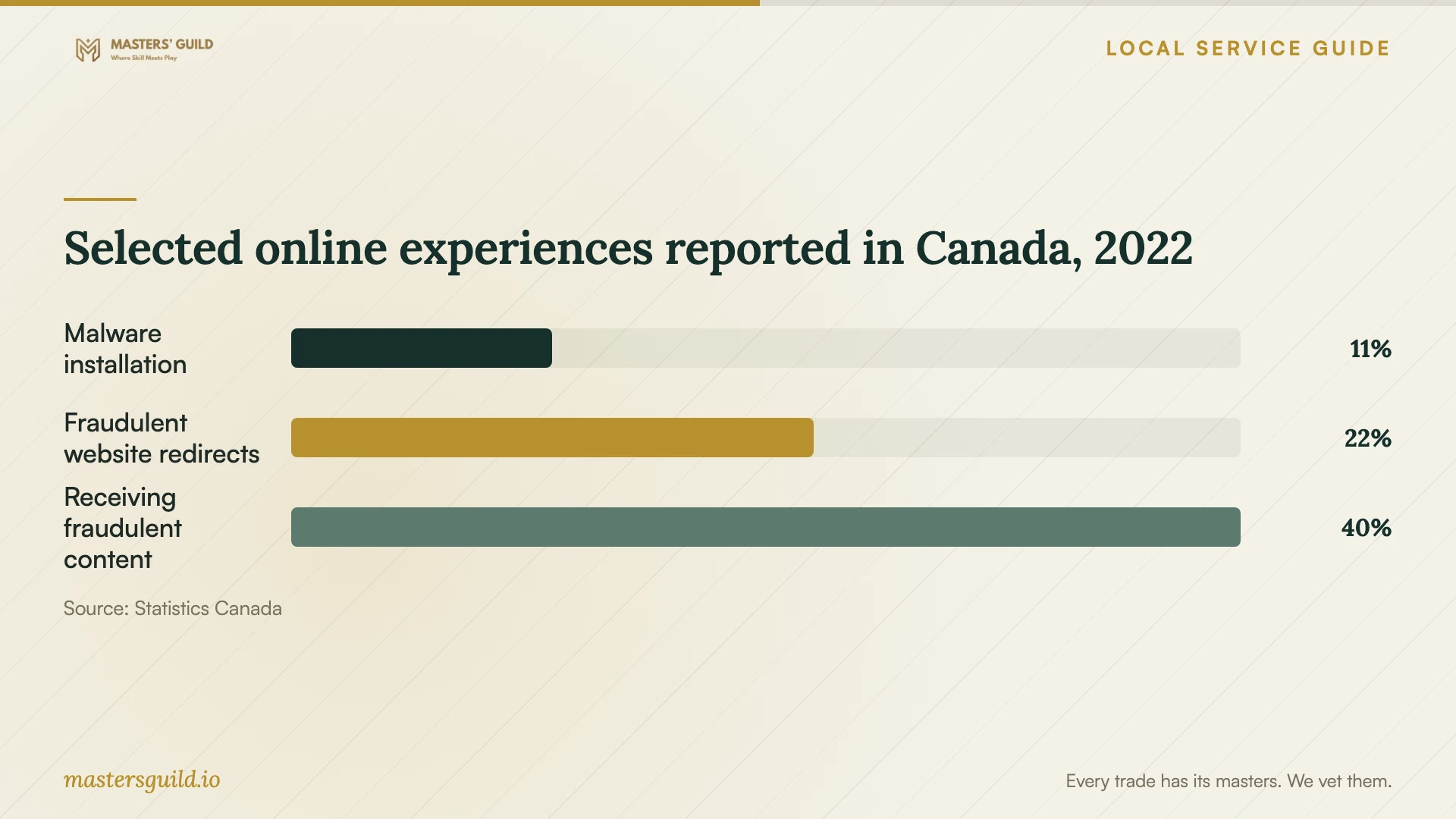
The historical national chart measures three experiences from Statistics Canada's 2022 survey: unauthorized virus or malware installation, redirection to fraudulent websites asking for personal information, and receiving fraudulent content. The reported percentages were 11%, 22% and 40%, respectively. Describe the experience you had when booking, rather than treating each suspicious message as confirmation of an infected computer. These figures do not measure present-day Surrey conditions. [4]
Selected online experiences reported in Canada, 2022
Local details that affect your job
Use Surrey's municipal directory before a drop-off
The City's directory includes addresses, phone numbers, licence types and town centres. Compare the business identity on your estimate with the directory, then confirm the receiving address before taking your computer there. Some businesses opt out, and the City cautions that records may be inaccurate. Use the directory alongside direct confirmation rather than rejecting a provider solely because you cannot find an entry. [1]
Separate B.C. taxable components in the estimate
For work in Surrey, ask the provider to distinguish software restoration services from hardware repairs and purchased software. B.C. exempts software services from PST, taxes hardware services and generally applies 7% PST to software purchases unless an exemption applies. An itemized estimate helps you compare a cleanup-only offer with one that includes a replacement part or software licence. [2]
Choose the scope to discuss with the technician
| Your situation | Request | Before approving work |
|---|---|---|
| Suspicious messages while files remain accessible | Diagnosis and a proposed cleanup scope | Describe the messages and ask the technician to explain the diagnosis. |
| You disclosed credentials or allowed remote access | Device assessment and an account-recovery plan | Agree who will review account access and reset credentials. |
| Ransom demand or encrypted files | Recovery advice and evidence preservation | Take the device offline. The Cyber Centre recommends keeping it powered on after isolation. |
| The estimate includes hardware or purchased software | Separate service and purchase charges | Ask how B.C. PST applies to each component and confirm the payable total. |
Your hiring checklist
- Record symptoms and photograph warning messages with another device.
- List essential files and identify your most recent backup.
- Confirm the provider's business name and receiving address.
- Compare estimates with matching cleanup, backup and reinstall scope.
- Set a spending limit and require approval before deletion or added work.
- Agree on access to files, storage of repair copies and their deletion.
- Test essential files and applications and collect a written repair summary.
Frequently Asked Questions
How should I budget for removal?
Get written estimates for the same cleanup, backup and reinstall scope. Ask about the diagnostic fee, approval limit and charges if the provider cannot complete the job. Confirm the final payable total before booking.
Does B.C. charge PST on malware cleanup?
B.C. exempts services to software, including repair and restoration, from PST. Hardware services and purchased software have different treatment. Ask for separate charges and an explanation of taxes, especially for a bundled package. [2]
Should I shut down a computer showing a ransom notice?
The Cyber Centre recommends taking ransomware-affected devices offline and keeping them powered on after isolation to preserve evidence. Its guidance addresses organizations. Arrange recovery advice before approving a wipe, and tell the technician about connected backup devices. [3]
Does a Surrey directory listing establish repair expertise?
Use the directory to check business identity and contact information, then ask the technician about diagnosis, file handling and recovery procedures. The City cautions that directory data may be inaccurate and some businesses opt out. [1]
Sources and scope
This guide combines the sources below with practical planning guidance. Figures apply to the stated geography and period; request a written quote for your property.