
Local service guide
Smart Appliance Setup in Stockton, CA
For Smart Appliance Setup in Stockton, hire someone who will confirm your appliance models, connect them to your own accounts, test the requested features, and demonstrate the controls before leaving. Separate app pairing from physical installation in the quote. If the job includes changes to regulated equipment or systems, check Stockton’s permit requirements before work begins. Bring your electricity rate plan so you can agree on suitable dishwasher or laundry schedules. [2] [3]
Define the setup you want to buy
Send the provider model numbers and a short description of the result you want. For a dishwasher, that might mean app access, a completion notification, and a demonstrated delayed start. For a washer, you might want another household member to receive notifications. Ask the provider to confirm those features for your exact model before you book.
Describe the appliance’s current state: installed and working, awaiting installation, or displaying an error. Request separate line items for app setup, network troubleshooting, physical installation, and additional equipment. Ask who will handle unresolved manufacturer-account problems and whether the quoted price includes a return visit.
The supplied official sources do not establish a Stockton setup price. Compare written quotes for the same scope rather than budgeting from an unsupported local average. Ask whether the provider charges a fixed amount or by time, what triggers an extra charge, and how they will seek approval before adding work.
Prepare your accounts and test the handover
Use an account you control and enter your own password during the appointment. Have your phone, account-recovery access, appliance instructions, and Wi-Fi credentials ready. Tell the provider which household members should have access and ask them to explain any permissions they request.
Request a demonstration from your phone. Check the agreed notification, schedule, and household access settings. Ask the provider to show you how to cancel a delayed start and operate the appliance from its physical controls. Follow the manufacturer’s instructions for remote operation and leave any unsupported feature out of the acceptance test.
Before paying for completion, ask for a short handover note listing the configured features, unresolved issues, and steps for reconnecting after a network change. Review account access with the provider and remove temporary access you no longer need. Agree on whom to contact if the demonstrated feature stops working.
Set schedules around your own electricity plan
PG&E lists E-TOU-C peak hours as 4–9 p.m. every day and E-TOU-D peak hours as 5–8 p.m. on weekdays. It recommends shifting laundry and dishwasher use to lower-priced periods. Ask the provider to read your plan with you and demonstrate a schedule that avoids its applicable peak window while following your appliance’s operating instructions. [2]
For example, an E-TOU-C customer can ask for a supported dishwasher delay that starts after 9 p.m. Confirm the appliance’s clock and the displayed start time during handover. If you have solar, ask your electricity provider to help interpret your account before choosing a schedule; Ava explains that enrolled solar customers buy electricity from Ava when their panels do not supply all their consumption. [1] [2]
Treat utility-program enrollment as a separate decision. PG&E’s Automated Response Technology program lets an authorized provider manage enrolled smart technology around rates and high-demand events. Customers can enroll with one program provider at a time, and incentives depend on that provider. Ask about support for your exact device and enrollment terms before authorizing participation. [4]
Use efficiency data to guide setup questions
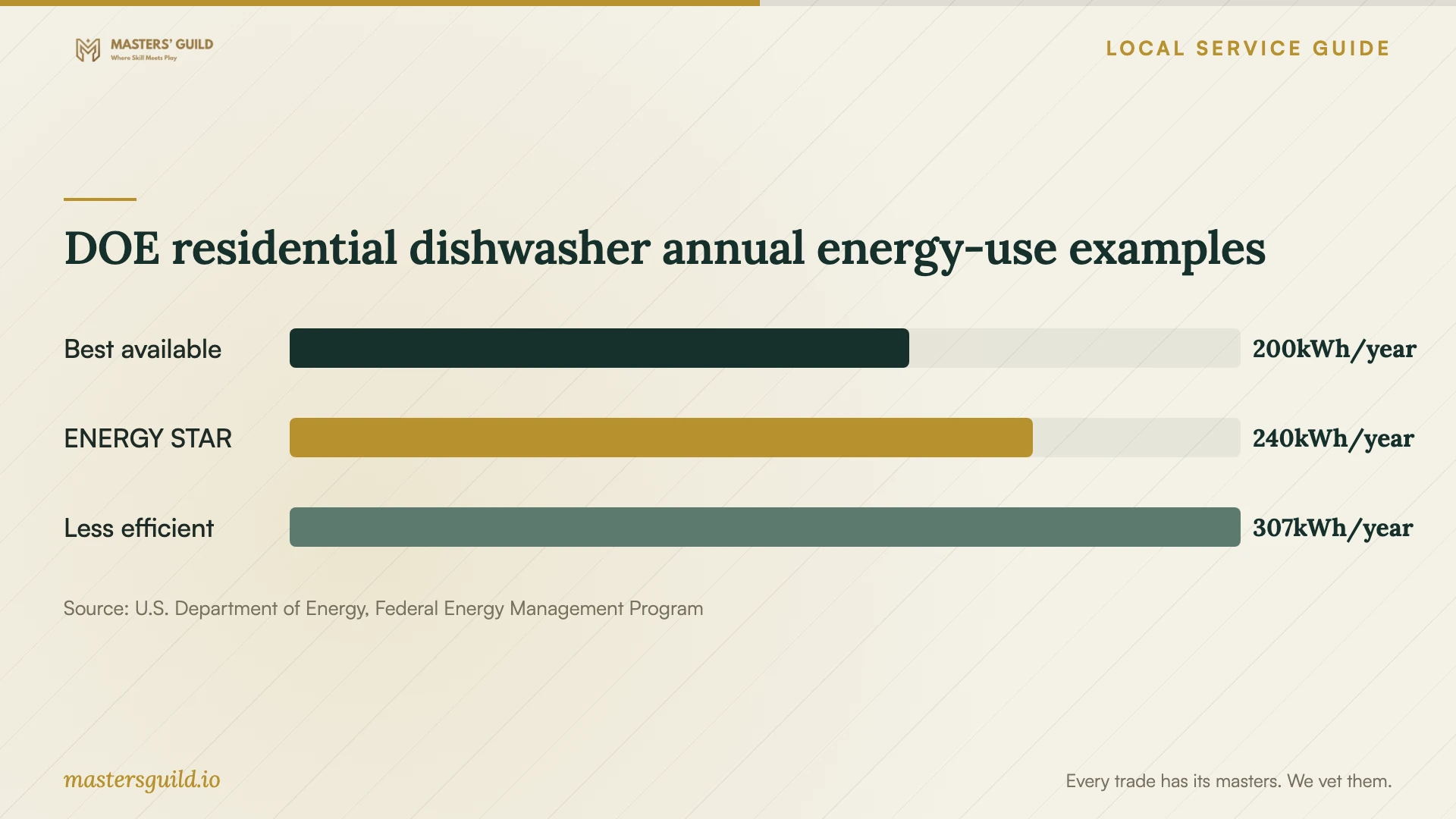
The Department of Energy’s October 2023 residential dishwasher comparison lists annual energy use of 200 kWh for its best-available example, 240 kWh for its ENERGY STAR example, and 307 kWh for its less-efficient example. These are national reference comparisons. They do not measure the benefit of connecting an appliance to Wi-Fi or predict your bill. [5]
Use the chart to keep appliance efficiency and scheduling separate when discussing the job. Ask the provider to show you the model’s energy-related settings and any supported delayed-start control. DOE recommends air drying to reduce drying-cycle energy use; ask how to select that option if your appliance offers it. [5]
DOE residential dishwasher annual energy-use examples
Local details that affect your job
Check both parts of your Stockton electricity bill
Stockton began receiving Ava electricity service in April 2025. Ava handles generation for enrolled customers, while PG&E handles delivery and sends the bill. Before the appointment, locate your generation service and rate-plan information on that bill. Do not ask the setup provider to assume your plan from your address. For an Ava-enrolled solar account, Ava also handles purchases of surplus generation, so include that account information when seeking scheduling advice. [1]
Resolve permit responsibility before installation
Stockton’s municipal code requires permits for installation, alteration, repair, or replacement of equipment and systems regulated by its adopted codes. It also requires inspection of work needing a permit and combination permits for construction projects involving more than one trade. If your quote includes electrical, plumbing, or other physical installation work, ask the Building Official to determine the requirements for that scope. Name the person responsible for permits and inspections in the quote. The cited code does not establish a blanket exemption for app pairing. [3]
Choose the right scope for the appointment
| Your situation | Arrange | Confirm before booking |
|---|---|---|
| Installed appliance; you want app access | A setup appointment with a model-specific demonstration | Supported features, account ownership, and completion tests |
| You want delayed laundry or dishwasher starts | Setup with rate-plan review | Your actual plan; E-TOU-C peaks 4–9 p.m. daily, E-TOU-D peaks 5–8 p.m. weekdays |
| The job includes changes to regulated equipment or systems | Installation planning and a permit determination | Building Official requirements and responsibility for inspections |
| You want utility-controlled automation | A separate eligibility and enrollment discussion | Exact device support, provider terms, and the one-provider enrollment limit |
Your hiring checklist
- Send model numbers, installation status, and the features you want demonstrated.
- Ask the provider to confirm support for each requested feature before booking.
- Compare quotes with separate setup, network, installation, equipment, and follow-up items.
- Prepare your phone, account-recovery access, instructions, and Wi-Fi credentials.
- Bring your electricity bill and confirm the applicable rate plan before choosing schedules.
- Confirm permit and inspection responsibility for any physical installation work.
- Test the agreed controls and notifications from your own phone.
- Keep the handover notes and review temporary account access before the provider leaves.
Frequently Asked Questions
Can I handle app pairing myself?
Try the manufacturer’s setup instructions if you feel comfortable managing the account and requested settings. Hire help if you want someone to check the model’s supported features, investigate connection problems, or demonstrate household access. Keep physical installation outside your DIY app-setup plan until you have confirmed its requirements.
Does app setup require a Stockton permit?
The cited municipal code addresses regulated equipment and systems; it does not provide a specific ruling on app pairing. Ask the Building Official about your scope if the appointment includes physical installation or changes to electrical or plumbing systems. [3]
Should I schedule the dishwasher after 9 p.m.?
On PG&E’s E-TOU-C plan, the daily peak period ends at 9 p.m. E-TOU-D uses a different weekday peak window. Confirm your own plan and follow the appliance’s operating instructions before choosing a delayed start. [2]
Will connecting my appliance qualify me for utility rewards?
Do not assume eligibility from connectivity alone. PG&E directs customers to participating Automated Response Technology providers for enrollment. Confirm your device’s support and the provider’s terms; providers determine participation incentives at their discretion. [4]
Sources and scope
This guide combines the sources below with practical planning guidance. Figures apply to the stated geography and period; request a written quote for your property.