
Local service guide
Home Office Setup in St. Petersburg, FL
Arrange Home Office Setup in St. Petersburg by separating furniture assembly, monitor positioning and device connections from changes to your home's electrical system. Give prospective providers the furniture models, room measurements and a list of equipment to connect. For new outlets or room alterations, confirm permit requirements with the city before work starts and check the contractor's credentials. Ask for a written scope that includes adjustment, testing and cleanup. [1] [3]
Define the job before requesting offers
Write down the result you want: an assembled desk, an adjusted chair, mounted monitors, connected peripherals and cables secured along an agreed route. List each item by manufacturer and model. Tell the provider whether you already own the mounting hardware, adapters and cables, and ask them to identify missing parts before the visit.
Separate furniture installation from computer support in the quote. Ask whether the provider will connect your dock, test displays, configure your printer or troubleshoot your network. For a wall-mounted monitor, request a plan for the wall attachment and cable route before approving drilling. Keep new outlets and other electrical alterations as a separate scope for a contractor whose credentials you can verify. [1] [3]
Compare itemized written offers for the same scope. Ask providers to separate labor, supplied parts, removal charges and any follow-up visit. Agree how they will handle missing hardware or a mount that does not fit, including whether you must approve an extra charge before they continue.
Check furniture fit before assembly
Measure the available floor space and mark your proposed desk position. Check door movement, chair movement, storage access and the route to the desk. CCOHS recommends considering room dimensions, lighting, outlet locations and computer equipment when selecting furniture. Choose the layout with those needs in mind before someone assembles a heavy desk. [4] [6]
Test the furniture's adjustment range against your own needs. CCOHS recommends adjustable furniture and a chair with height-adjustable armrests; it also recommends a footrest when using a non-adjustable desk. Ask the installer to show you how to adjust the equipment, then sit at the desk and perform your usual typing, mouse and paper tasks before accepting the setup. [4]
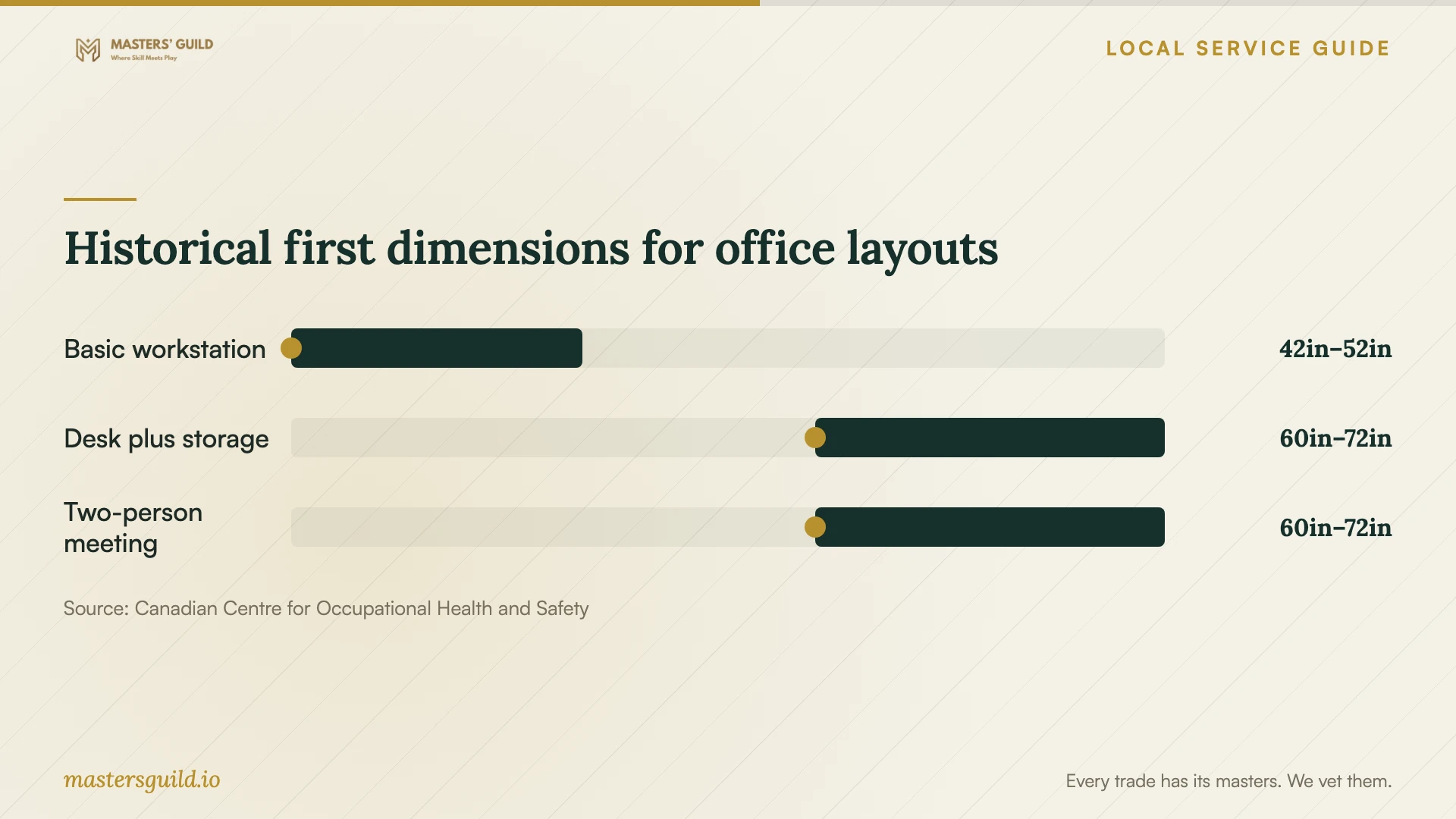
Use the workspace chart as an early layout check. CCOHS reproduces historical dimensions for several office arrangements, but says space needs depend on the person, equipment and work. Measure both dimensions of your proposed layout. A comparison of one dimension alone cannot establish whether your desk, chair and storage will fit. [6]
Position monitors before securing cables
Start with the monitor about an arm's length from you and adjust it until you can read without leaning toward the screen. CCOHS recommends increasing text or image size when a longer viewing distance makes details hard to read. For a tall or portrait monitor, keep the top of the screen at or below eye level. People using bifocals or progressive lenses may prefer a lower position. [5]
Tell the installer how you use multiple screens. CCOHS recommends placing your main screen in front of you and a less-used screen to one side at an angle. For equal use, it recommends placing the screens in front with their edges touching and angling them into a semicircle. Test that arrangement with your usual applications before the provider fixes the cable routing. [5]
At handover, test the connections you agreed to include: displays, keyboard, mouse, webcam, audio and printer. Move the monitor arms and run an adjustable desk through its travel while checking that cables have room to move. Ask the provider to leave power connections accessible and show you where each cable goes.
Plan electrical work and removal separately
If your preferred layout needs an additional outlet, send the city and electrical contractor a description of that work before scheduling installation. St. Petersburg tells homeowners to obtain required permits before improvements start. Pinellas County distinguishes business tax receipts from contractor competency licenses and says construction-trade contractors must register to work in the county. [1] [3]
List unwanted equipment before agreeing to haul-away. Pinellas County asks residents to check that a recycler accepts their specific items. It directs residents to a battery drop-off center for rechargeable batteries, or for the whole device when the battery cannot be removed. Tell the provider which items contain batteries and agree on their destination. [2]
Before releasing an old computer, back up the files you need and arrange data removal. Keep that task explicit in the scope rather than assuming the person taking away the equipment will handle it. Ask for packaging removal separately from electronics disposal so you can confirm both at the end of the visit.
Historical first dimensions for office layouts
Local details that affect your job
Confirm the city's narrow permit exemption
Effective July 1, 2026, St. Petersburg offers a Permit Exemption form for qualifying work on a single-family dwelling totaling less than $7,500. The city excludes properties in flood hazard areas and work involving structural components, mechanical, electrical, plumbing or gas systems. A furniture-and-outlet package should therefore not rely on its total price as proof of exemption. Describe each task to the Building Department and confirm the permit path before work starts. [1]
Check trade credentials beyond a business receipt
Pinellas County says a business tax receipt differs from a contractor competency license and that construction-trade contractors must register to work in the county. If your office project includes electrical alterations, ask for the electrical contractor's license and county registration details. Use the contractor-verification resources identified by the city before approving that part of the job. [1] [3]
Choose the removal route by battery type
Pinellas County's household hazardous waste programs do not accept electronics without rechargeable batteries. The county directs residents to its Where Does It Go? search tool for electronics recyclers and battery drop-off centers. For a laptop with a battery you cannot remove, take the whole device to a battery drop-off center. Ask the receiving facility to confirm acceptance before the provider collects your equipment. [2]
Choose help for the tasks you need
| Your scope | Help to request | Before approving |
|---|---|---|
| Desk and chair assembly | Furniture assembly provider | Confirm models, included hardware, adjustment and cleanup. |
| Monitors and peripherals | Provider offering mounting and computer setup | Confirm mount compatibility and which connections they will test. |
| New outlet or electrical alteration | Electrical contractor with verified credentials | Confirm city permit requirements and county registration. |
| Old equipment removal | Provider offering documented disposal | Separate rechargeable-battery devices and confirm facility acceptance. |
Your hiring checklist
- Send furniture, monitor and dock model numbers with photos of the room.
- Measure the desk position, access route, chair space and storage clearance.
- List assembly, mounting, device connections and testing as separate tasks.
- Identify supplied parts and ask who will purchase anything missing.
- Confirm electrical scope, contractor credentials and permit responsibilities before work starts.
- Agree on packaging removal, electronics destinations and data removal.
- Test furniture adjustments and equipment connections before accepting the job.
Frequently Asked Questions
Do I need a permit for the whole office setup?
Ask the city about the actual work. Its under-$7,500 exemption has restrictions, including exclusions for electrical work and flood hazard areas. Confirm furniture installation and any building alterations as separate tasks rather than assuming one answer covers the package. [1]
How much should I budget?
Compare itemized written offers for the same furniture, equipment and tasks. Ask providers to separate assembly, mounting, computer support, parts and removal. Confirm any minimum visit charge and how they will price extra work before choosing an offer.
Where should my second monitor go?
CCOHS recommends putting the screen you use most in front of you and the secondary screen beside it at an angle. For equal use, position both in front with touching edges and angle them into a semicircle. Adjust the arrangement for readable text and comfortable viewing. [5]
Can the installer put my old laptop in the garbage?
Pinellas County says residents must keep devices with rechargeable batteries out of garbage and recycling bins. Remove the battery for battery drop-off, or take the whole laptop to a battery drop-off center if you cannot remove it. [2]
Sources and scope
This guide combines the sources below with practical planning guidance. Figures apply to the stated geography and period; request a written quote for your property.