
Local service guide
Data Recovery and Backup in St. Louis, MO
For Data Recovery and Backup in St. Louis, hire a provider who separates immediate recovery work from ongoing backup installation. Agree on assessment charges, spending limits, confidential handling and a demonstration of restored files before accepting delivery. If you suspect ransomware, disconnect affected devices from the network and involve an incident-response specialist. CISA recommends isolating affected systems and prioritizing restoration on a clean network. [3]
Choose the service that fits the incident
Tell the provider whether you need missing files recovered, a backup restored or a backup system installed. Include the device model, storage type, symptoms, last successful backup and attempted fixes. Request an explanation of assessment steps before authorizing changes to the device.
For unusual drive noises or water exposure, ask whether the provider accepts that failure type and where assessment will happen. Request transport and storage instructions before moving equipment. Avoid repeated trial repairs while arranging assessment, and disclose any recovery software you have tried.
Treat a ransom message or suspicious file encryption as a reason to involve incident response. CISA advises disconnecting affected systems from the network. Its checklist recommends powering down only when network disconnection is impossible, because shutdown loses potential evidence in memory. Have the responder coordinate containment, evidence preservation and restoration. [3]
Approve the quote in stages
Compare written quotes for the same device and failure description. Request separate charges for assessment, recovery, return storage, shipping and backup installation. For ongoing service, request the storage allowance, subscription charge, monitoring scope and cost of a future restore. Ask which charges require approval before work begins.
Agree on what you owe if the provider recovers nothing or only some files. Define acceptance with examples: a bookkeeping file that opens in its application, readable customer documents or a complete project folder. Require approval before the provider exceeds the agreed scope or transfers equipment elsewhere.
Request separate timing estimates for assessment and file delivery. Identify the records you need first and explain how long you can operate without them. CISA recommends prioritizing systems that support health and safety, revenue or other critical services, including systems they depend on. [3]
Specify backup coverage and demonstrate a restore
List the folders, applications and accounts the installer must cover. State how much recent work you could afford to lose and how soon you need access after an interruption. Have the installer explain how the backup schedule and restoration process meet those needs. Include any business software you need to open recovered records.
CISA recommends offline, encrypted backups of critical data and regular tests of availability and integrity. Have the installer identify the copy that remains inaccessible to a compromised workstation. Establish who controls encryption keys and how you regain access if the provider is unavailable. [3]
Before accepting installation, choose sample files and watch the installer restore them to a separate location. Open the files in your applications. Record restore steps, account ownership and support contacts. Assign someone to check failed-backup alerts and arrange future tests. Keep instructions accessible without the affected computer.
Set confidential handling terms before handover
Identify who may view recovered files, where the provider keeps working copies and whether subcontractors receive equipment or data. Put transfer, access, retention and deletion terms in writing. Request a handover receipt identifying the equipment, receiving person and agreed work. Name the person at your business who can authorize additional access.
CISA recommends contract language that formalizes security requirements for backup providers and limits third-party access to their responsibilities. Name an escalation contact for suspected unauthorized access. Give the technician only the access needed for the agreed work. [3]
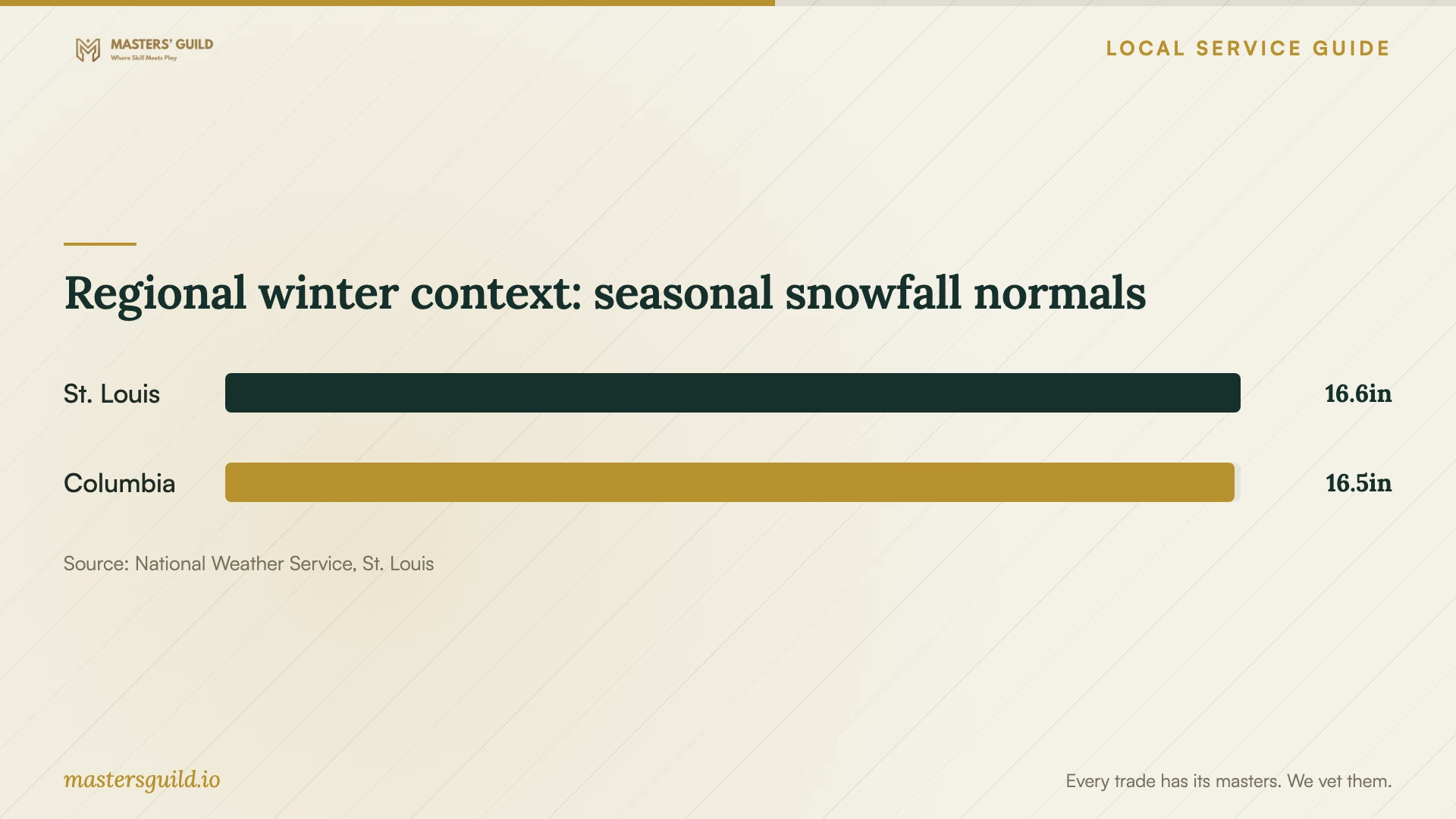
Regional winter context: seasonal snowfall normals
Local details that affect your job
Scope power protection and safe access using Ameren guidance
Ameren advises surge protection and suggests considering a UPS for a computer, router or modem. Have your installer identify the equipment to protect and demonstrate the planned shutdown procedure. During an outage, Ameren advises unplugging computers and other vulnerable equipment because restoration may involve a surge. Its guidance calls for an electrician if standing water is near wiring or appliances. Arrange electrical safety before the recovery technician handles affected equipment. [1] [5]
Include Missouri breach escalation in the handover agreement
Missouri Section 407.1500 defines a security breach through unauthorized access and acquisition of covered personal information that compromises its security, confidentiality or integrity. Drive failure alone does not establish that definition. For qualifying records involving Missouri residents, the statute directs custodians to notify the owner or licensee immediately after discovering a breach, subject to its provisions. The statute includes investigation exceptions and law-enforcement delay provisions. Identify your business contact in the agreement and request a written escalation process. Consult legal counsel about an incident and any notification duties. [2]
Discuss backup placement beyond the affected premises
The National Weather Service describes heavy thunderstorm rainfall and possible flash flooding in the Missouri and western Illinois region. It also reports snow, sleet and freezing rain in most winters. Discuss potential water entry at your premises with the installer, place local backup equipment away from those areas and request a copy away from the premises. The regional snowfall comparison supplies historical context for winter planning; it does not assess flood risk at your address or predict equipment failure. [4]
Choose the next step before authorizing work
| Situation | Next step | Question before approval |
|---|---|---|
| Missing files with a usable backup | Request a restore assessment | Can you restore sample files to a separate location and verify they open? |
| Unusual drive noises or water exposure | Request specialist assessment and handling instructions | Do you accept this failure type, and will another facility handle the device? |
| Ransom message or suspicious encryption | Disconnect affected devices from the network and involve incident response | Who will preserve evidence and confirm a clean recovery environment? |
| New backup installation | Specify offline encrypted copies and restore testing | Who checks alerts, controls keys and performs future tests? |
| Standing water near wiring or appliances | Arrange an electrician before equipment handling | When can the recovery technician access the equipment safely? |
Your hiring checklist
- List essential files, applications and accounts in recovery priority order.
- Record symptoms, device details, the last usable backup and attempted fixes.
- Confirm the assessment location, subcontractors and device-handling instructions.
- Approve assessment charges, recovery limits and partial-recovery payment terms.
- Agree on confidentiality, access, retention, deletion and incident escalation.
- Specify backup coverage, account ownership, encryption-key access and power protection.
- Witness a sample restore and assign responsibility for alerts and future tests.
Frequently Asked Questions
Should I restore a backup after ransomware?
Have the incident responder confirm a clean recovery environment first. CISA advises restoring from offline, encrypted backups while avoiding reinfection of clean systems. Agree on who investigates the compromise and authorizes reconnection before resuming business. [3]
What should a recovery quote include?
Request assessment charges, recovery approval limits, return storage, shipping and payment terms if essential files cannot be recovered. Name the files that matter and agree on how you will check them before accepting delivery.
How should I evaluate a cloud backup proposal?
Request a restore demonstration and an explanation of protection against deletion or compromise. CISA recommends regular backup tests and offline encrypted copies. It also discusses cloud delete protection and version control. Have the installer explain how the proposed arrangement meets your recovery needs. [3]
Does drive failure require a Missouri breach notice?
Drive failure alone does not establish unauthorized access and acquisition under Section 407.1500. For suspected access to covered information, consult legal counsel about notification duties and exceptions. The statute requires five-year retention of a documented determination under its fraud-risk exception. [2]
Sources and scope
This guide combines the sources below with practical planning guidance. Figures apply to the stated geography and period; request a written quote for your property.