
Local service guide
Computer Virus Removal in Seattle: Hiring and Costs
Arrange Computer Virus Removal in Seattle by requesting a device-specific cleanup price and completion estimate, a written scope, and a file-preservation plan before granting access. Describe the symptoms and any recent remote-support session. Require your approval before the technician reinstalls the operating system, replaces a drive, or adds charges.
Define the cleanup and protect your files
Give the technician a short account of what happened: the warning you saw, software you installed, unexpected browser behavior, and whether someone connected to the computer. Include the device model and operating system if you know them. Ask the technician to explain the proposed diagnosis before you authorize cleanup.
List the documents, photos, and other files you want preserved. Tell the technician about your existing backups and ask how they will check the files you need before making changes. Require approval before a reset, reinstall, or drive replacement.
Include data handling in the written scope. Ask who may access your files, where the technician will store any copied data, and when they will delete their copy. Discuss how you will enter credentials if the work requires a sign-in; avoid sending passwords with your initial inquiry.
Choose access arrangements and compare quotes
Discuss remote, drop-off, and home service with the provider before booking. For remote work, agree on how you will confirm the technician’s identity and end the session. For drop-off, get a receipt identifying the device and accessories. For a home visit, confirm the arrival window and travel charge.
Request a device-specific cleanup price and completion estimate. Ask whether the diagnosis fee counts toward cleanup, whether backup costs extra, and what a proposed reinstall would cost. Set a spending limit and require a call before additional work. Ask what follow-up the provider offers if the original symptom returns.
Washington’s Department of Revenue says IT services became subject to retail sales tax on October 1, 2025. It includes hardware and software troubleshooting among taxable IT services. Ask the provider to identify taxable charges and sales tax on the quote. [1]
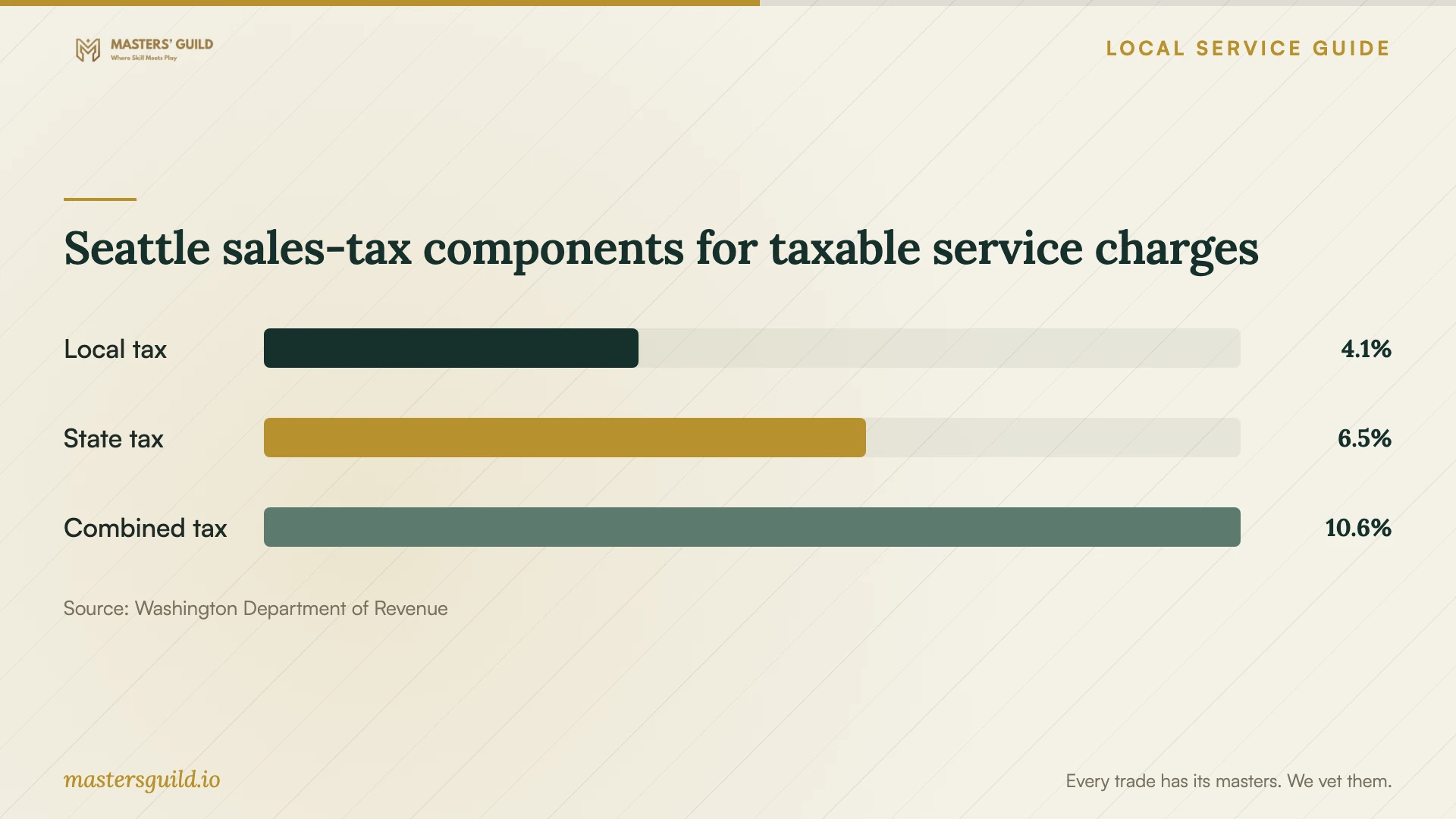
For October through December 2026, the department lists Seattle’s local rate as 4.05%, the state rate as 6.50%, and the combined rate as 10.55%. It directs readers to its Tax Rate Lookup tool for a specific address. Ask the provider which address applies to the work, especially when comparing remote support with a shop outside Seattle. [2]
Handle unsolicited support and suspected scams
Washington’s Attorney General describes callers who claim to represent a technology company, announce a computer problem, and ask for remote access. The office advises hanging up on unsolicited tech-support offers and withholding computer access, personal information, and financial information. [3]
Choose the provider through contact details you selected. Request the business name, the name of the person handling your computer, a written scope, and payment terms. Ask the technician to explain what access they need before you start a support session.
If you granted a suspected scammer access, describe what you installed and what the caller did. In its June 12, 2015 consumer alert, the Attorney General recommends technician removal of added software, password changes, contact with your financial institution, account monitoring, and a consumer complaint. These are longstanding recovery recommendations, not evidence of a new Seattle incident. [4]
Keep receipts and notes about the call. Ask the technician to document the software they removed and any account-related actions you need to take. If you disclosed financial information, contact your financial institution without waiting for the repair appointment. [4]
Check the handover and plan replacement
At handover, ask the technician to demonstrate the functions you need: signing in, opening preserved files, and using your usual applications. Get a work summary covering unresolved problems, added software, subscriptions, and follow-up terms. Ask the technician to remove temporary support access.
If you choose replacement, request separate prices for recovering wanted files and removing sensitive data from the old device. Washington’s Department of Ecology says deleting files or formatting a drive does not destroy data. It places responsibility for sensitive-data removal on the owner and says collectors do not guarantee confidentiality. [5]
Washington households qualify for free E-Cycle recycling of covered computers and laptops. Home pickup and premium services may cost extra; keyboards, mice, and printers fall outside the program. Call 1-800-RECYCLE to find a collection location, then call that location to confirm accepted items before taking equipment there. [5]
Seattle sales-tax components for taxable service charges
Local details that affect your job
Confirm the address rate before comparing offers
Washington’s taxable IT-service rules include hardware and software troubleshooting. Seattle’s published combined sales-tax rate for October through December 2026 is 10.55%. Use the Department of Revenue’s Tax Rate Lookup tool, identified on its local rate-table page, to check a specific address. Ask the provider to confirm the applicable address and give you a total including tax. [1] [2]
Find recycling and arrange data removal separately
Seattle households can use Washington’s E-Cycle program for covered computers and laptops. Call 1-800-RECYCLE to find a collection location and confirm its arrangements before visiting. Ask about pickup charges and accessories. Arrange sensitive-data removal before collection because Ecology says collectors do not guarantee confidential-data security. [5]
Choose the next step for your situation
| Situation | Next step | Before authorizing work |
|---|---|---|
| You need diagnosis and cleanup | Request a device-specific scope and quote | Identify files to preserve and set a spending limit |
| An unexpected caller announces a virus | Hang up on the unsolicited support offer | Withhold computer access and financial information |
| You granted a suspected scammer access | Arrange removal of added software and follow account-recovery guidance | Describe what you installed; contact your financial institution if relevant |
| The technician proposes a reinstall | Request a separate price and file-preservation plan | Approve the proposed changes before work starts |
| You choose replacement | Arrange sensitive-data removal and find an E-Cycle collection location | Confirm accepted items and any pickup charge |
Your hiring checklist
- Record symptoms, recent downloads, and any remote-support session.
- List files to preserve and describe your existing backups.
- Request a written diagnosis and cleanup scope.
- Get a device-specific price, completion estimate, and approval limit.
- Ask the provider to identify tax, travel, and backup charges.
- Require approval before a reset, reinstall, or drive replacement.
- Check preserved files and needed applications at handover.
- For replacement, arrange data removal and confirm collection arrangements.
Frequently Asked Questions
What should a virus-removal quote include?
Request diagnosis and cleanup charges, file-preservation arrangements, tax, and travel or backup fees. Agree on a completion estimate and spending limit. Require separate approval for reinstalling the operating system or replacing hardware, and ask for written follow-up terms.
Does Washington tax computer troubleshooting?
The Department of Revenue includes hardware and software troubleshooting in taxable IT services under rules effective October 1, 2025. Seattle’s published combined rate for October through December 2026 is 10.55%. Use the department’s Tax Rate Lookup tool and ask the provider to confirm the applicable address. [1] [2]
Should I let an unexpected support caller connect?
Washington’s Attorney General advises hanging up on unsolicited tech-support offers and withholding access, personal information, and financial information. Contact a provider you selected and agree on access arrangements before starting support. [3]
How do I arrange recycling after replacing the computer?
Arrange sensitive-data removal from the old device first, then call 1-800-RECYCLE to find a collection location. Washington households qualify for free covered computer and laptop recycling, but pickup may cost extra. Ecology says collectors do not guarantee confidential-data security and deleting files or formatting a drive does not destroy data. [5]
Sources and scope
This guide combines the sources below with practical planning guidance. Figures apply to the stated geography and period; request a written quote for your property.