
Local service guide
Software Installation in Scottsdale, AZ
Arrange Software Installation in Scottsdale by asking a technician to quote the exact application, device and tasks you need, including setup and a test using your own files. Separate installation labor from software purchases, account recovery and data transfer. If you only need temporary access to Word, Excel or PowerPoint, consider the public library's computers before paying for work on your device. [1]
Define the work before requesting a quote
Tell the technician the application name and version, your computer model, operating system and the task you want to complete. Describe the problem in ordinary terms: you need to open a spreadsheet, connect an email account or use a program on a replacement computer. Include the exact error message if an attempted installation failed.
Ask the technician to separate downloading and installing the application from signing in, configuring settings, moving files and teaching you how to use it. Request a quote that identifies software charges, labor, travel and follow-up support. Agree on the amount you will authorize before the technician starts extra work.
Choose remote help or a visit
Ask whether the technician can complete your particular job remotely and what access they need. Describe whether the computer starts, whether you can sign in and whether it connects to the internet. For a visit, confirm whether you should bring the computer to the provider or prepare a workspace at home.
Before a remote appointment, ask the provider to explain how you will approve access and end the session. Stay present for account sign-ins. Enter your own passwords and verification codes, and ask the technician to explain any request for administrator access before you approve it.
Prepare accounts, files and an acceptance test
Check that you can sign in to the account associated with your software purchase. Keep purchase confirmations available, but leave passwords out of the job description. Ask the technician to confirm the intended version and purchase option before you buy anything. Put the account and subscription in your own name.
Back up files you want to keep and check that you can open a copy before authorizing work that changes the operating system or moves data. Tell the technician which folders matter. Ask them to seek permission before deleting files, removing applications or resetting the computer.
Agree on a practical completion test: launch the application, open a sample document, save a change and try any printer or email connection included in the scope. Request a short handover covering the installed version, account ownership, recurring charges and how to obtain follow-up help.
Use local computer access during downtime
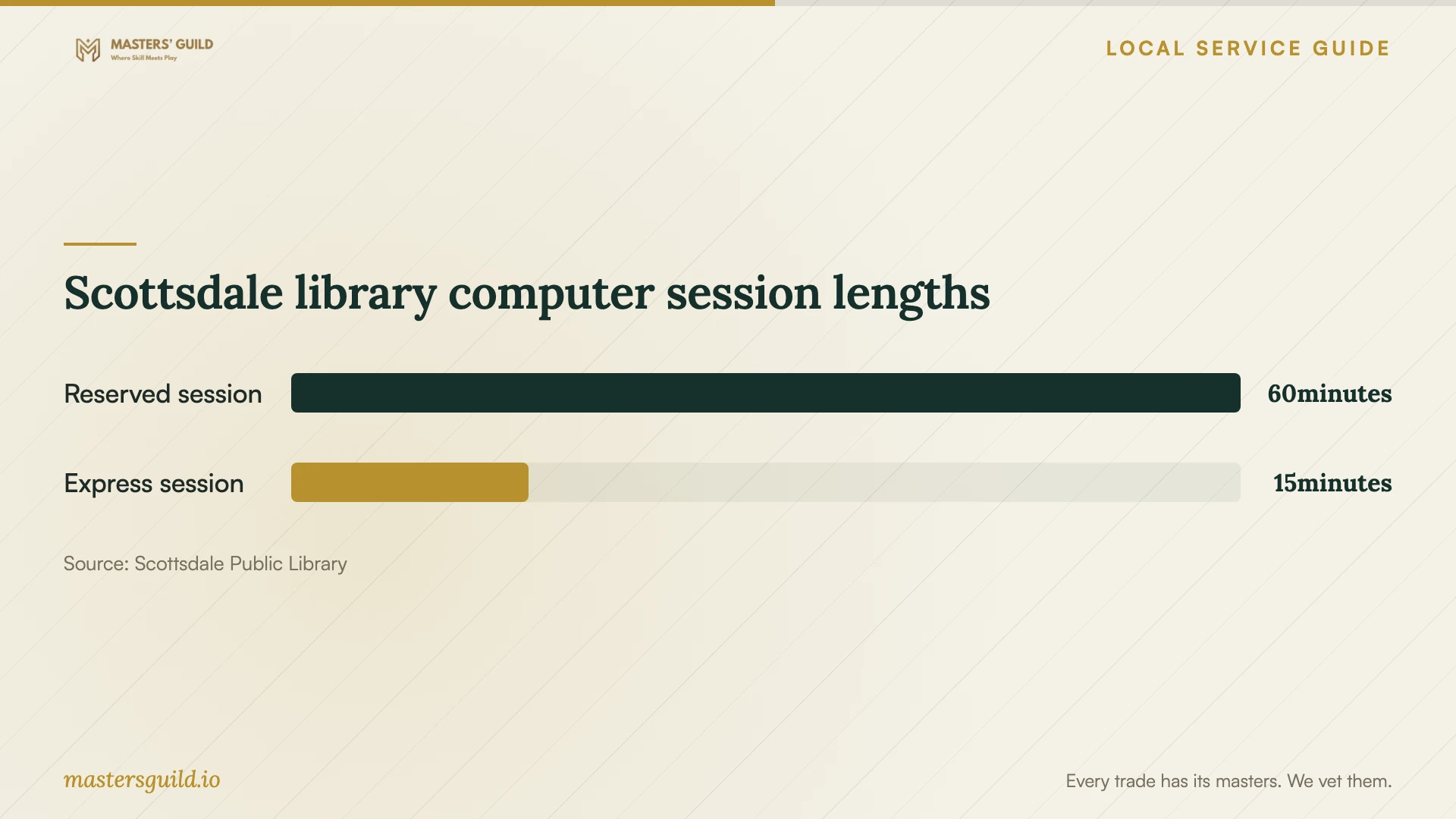
Scottsdale Public Library provides free computers with Windows, internet access, Word, Excel and PowerPoint. With a library card, you can reserve a one-hour session through the reservation system in each library. The library also describes a Computer Use Only card for people without a library card. [1]
For a short task, the library provides express computers without a card or reservation. Its acceptable-use policy limits express access to one 15-minute use per patron per day. Choose a reserved session for a longer document task, and check branch hours before traveling. [1] [2]
Treat public computers as shared workspaces. The library warns that it does not guarantee privacy for personal information or email and that other patrons may see information on your screen. Avoid using a public session for sensitive account recovery; sign out of accounts when you finish. [2]
Scottsdale library computer session lengths
Local details that affect your job
Public computer access has installation limits
The library's acceptable-use policy prohibits unauthorized modification of library equipment, software or data, and violations of software license agreements. If you need a specialist application, ask staff about permitted use before making plans around a library computer. Arrange installation on your own device when the job requires changes the library has not authorized. [2]
Ask about instruction before buying installation help
The city's April 2026 Human Services newsletter listed password-manager, email, Wi-Fi and Ask the Experts sessions at Via Linda Senior Center. Those sessions are historical. If your application already opens and you need help using it, contact the center to confirm current classes, eligibility, fees and whether instructors can address your question. [3]
Choose the next step for your software task
| Your situation | Next step | Confirm before proceeding |
|---|---|---|
| An application needs installation on your computer | Request a scoped technician quote | Version, account ownership, configuration and completion test |
| You need temporary Word, Excel or PowerPoint access | Consider a library computer | Branch hours and a one-hour reservation |
| You need a brief document or email task | Consider a library express computer | One 15-minute use per patron per day |
| You want to install specialist software on a library computer | Ask staff about authorized use | The policy prohibits unauthorized software modifications |
| The application works, but you need instruction | Ask Via Linda Senior Center about current technology classes | The supplied city newsletter describes past April 2026 sessions |
Your hiring checklist
- Write down the application, version, device model and exact error message.
- Choose a sample task the technician must demonstrate before completion.
- Ask for separate labor, software, travel and follow-up charges.
- Confirm account ownership and sign in yourself during the appointment.
- Back up important files and verify that you can open the copies.
- Agree on permission for deletions, resets and additional work.
- Request a handover note and end any remote session after the work.
Frequently Asked Questions
How should I compare installation quotes?
Give each provider the same device information and task list. Ask them to identify software charges, setup, file transfer and follow-up support. Compare the total for that scope and agree on how they will request approval for additional work.
Can I use library computers instead of installing office software?
Scottsdale Public Library provides Word, Excel and PowerPoint on its public computers. Consider that option for temporary document work. Ask staff about your intended use and remember that the library does not guarantee privacy for personal information or email. [1] [2]
Should I send the technician my password?
Arrange to enter your password yourself during the appointment. Ask the technician to explain which account they need and why. Keep verification codes and recovery information out of messages and job descriptions.
Does Via Linda Senior Center offer the listed classes now?
The supplied city newsletter lists April 2026 sessions, so it does not establish current availability. Contact the center before planning a visit or delaying a paid appointment. [3]
Sources and scope
This guide combines the sources below with practical planning guidance. Figures apply to the stated geography and period; request a written quote for your property.