
Local service guide
Computer Virus Removal in San Jose, CA
For Computer Virus Removal in San Jose, choose a technician who will explain the diagnosis, agree on how to protect your files, and give you a written estimate before repairs. California's Bureau of Household Goods and Services includes personal computers in its consumer repair guidance and requires service dealers to provide that estimate. Before booking, ask whether the proposed work falls under the dealer's BHGS registration and whether the quote includes cleanup, operating-system repair, or a reinstall. [1]
Define the problem before requesting a quote
Describe what you saw without deciding that the computer has a virus. Write down the warning text, the application you were using, and whether you clicked a link, downloaded software, or allowed someone to control the computer. Tell the technician whether you can reach the desktop and which files you need to preserve. Ask them to explain what they will check before recommending removal or a reinstall.
If you suspect someone has unauthorized access, stop using that computer for banking or entering passwords while you arrange help. Use a separate trusted device to contact your bank or account provider if you disclosed credentials or sent money. Tell the technician about any remote-access software you allowed someone to install. Keep warning screenshots and payment records for your own records.
Compare the full repair scope
Ask each technician to quote the same task: diagnosis, proposed cleanup, file preservation, and a check of the problems you reported. Request separate amounts for optional backup, operating-system reinstallation, software setup, and a home visit. The supplied sources do not establish a San Jose removal price range, so compare written quotes rather than using a guessed local average.
BHGS says service dealers must provide a written estimate with the total price before repairs. Dealers must quote any trip charge before the service call and may charge a reasonable diagnostic fee. Ask whether the diagnostic charge applies if you decline repairs and whether the dealer credits it toward approved work. [1]
Set a spending limit and require the technician to contact you before changing the scope. BHGS explains that additional parts or labor require disclosure of the total repair charge and your approval, subject to the conditions in its consumer guidance. Keep the estimate and any later approvals together so you can compare them with the invoice. [1]
Choose remote help, drop-off, or a home visit
Ask a remote technician what access they need, how you will authorize it, and how they will end that access. Choose the provider through contact details you found yourself. Do not book through a phone number in an unexpected warning. Request an explanation of each proposed action before you approve access or payment.
For drop-off service, ask for an intake receipt listing the device, charger, visible condition, and agreed work. For a home visit, confirm the arrival window and trip charge before booking. Whichever format you choose, request an expected completion date and ask how the technician will contact you if diagnosis changes that plan. [1]
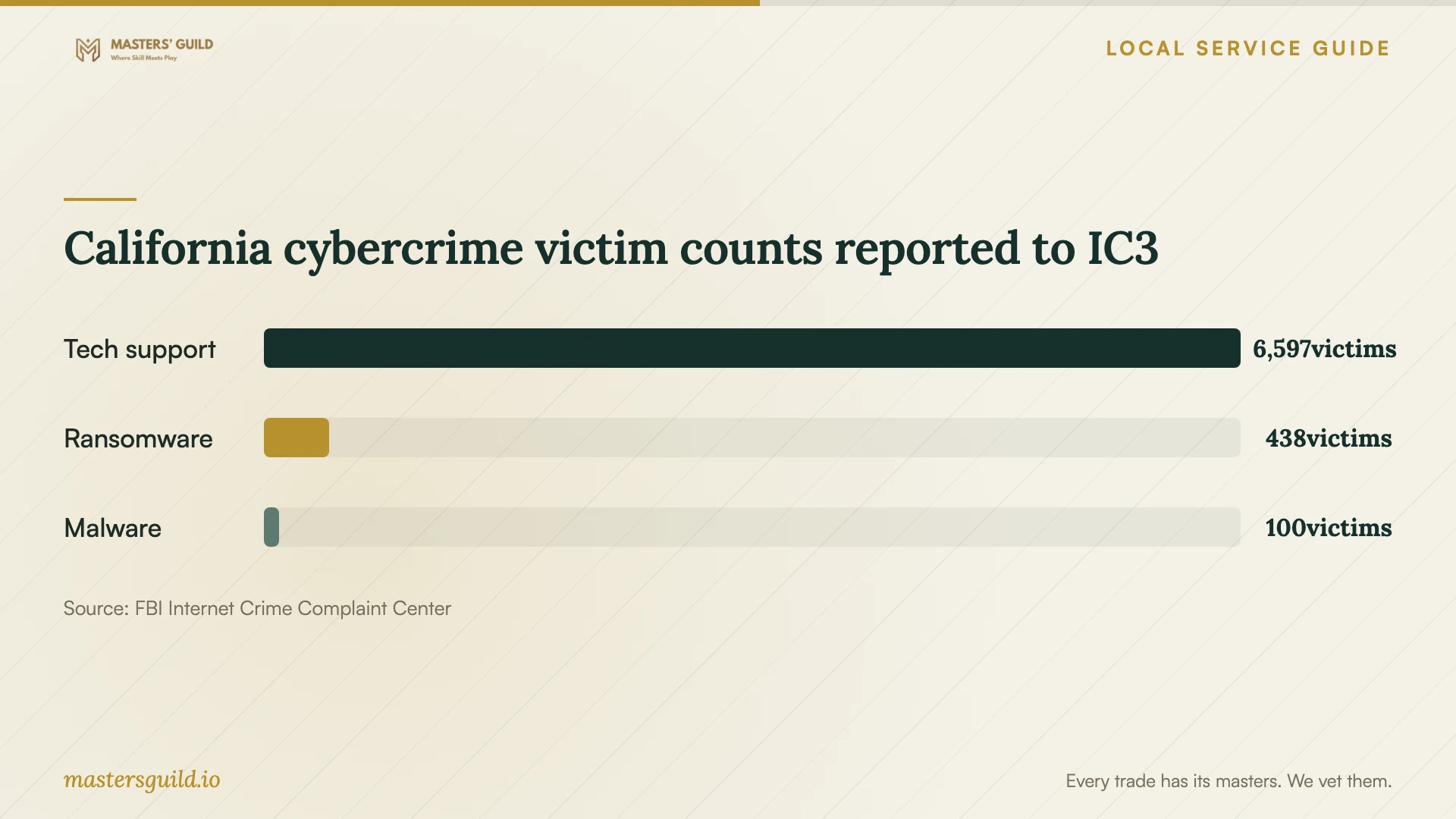
The FBI's California report lists 6,597 tech-support crime victims for 2025, alongside 438 ransomware victims and 100 malware victims. Those statewide reported counts support taking care when arranging help. They do not establish your computer's diagnosis, the number of infections in San Jose, or the trustworthiness of a particular repair business. [2]
Agree on access and file handling
Tell the technician which folders matter and whether you have a backup you can use. Ask who will access your files, where they will store any copies, and when they will delete those copies. Require approval before the technician erases storage or reinstalls the operating system. Ask them to explain which files and applications you would need to restore afterward.
Ask whether you can enter the device login yourself or use a temporary repair account. Avoid handing over email, banking, or password-manager credentials as part of a general repair request. If the technician says an account login is necessary, ask for the specific task and arrange to enter it yourself.
Check the result before closing the job
Request an invoice describing what the technician found and changed. Ask them to show you the checks they performed, then test the files and applications you identified at intake. Confirm how to contact them if the same symptoms return and ask for any follow-up terms in writing.
If you are unhappy with the initial repair, BHGS says you may file a complaint. If you take the computer to another service dealer, ask that dealer to put their findings about the first repair on the invoice. Preserve the original estimate, approval messages, invoice, and device identification. [1]
California cybercrime victim counts reported to IC3
Local details that affect your job
California repair oversight applies to personal computers
BHGS regulates service dealers repairing electronic equipment for personal or home-office use and names personal computers among its examples. Before hiring, ask for the business's BHGS registration information and clarify whether it covers your proposed service. Use the consumer guide's License Search option to check the business; contact BHGS if the scope is unclear. This is a reason to check repair-dealer registration rather than assume the work has no regulatory requirements. [1]
Arrange Spanish-language support and computer access
SJPL lists a free Tech Hub operated by Catholic Charities at the Luther Burbank Family Resource Center, 4 Wabash Avenue, Room 11. It offers an open computer lab, digital-skills classes, and one-on-one support for English and Spanish speakers. Call 669-677-0326 to ask about an appointment and current hours before your repair drop-off. The listing does not promise virus removal; use it to arrange computer access or basic technology help. [3]
A Vietnamese-language option on Senter Road
SJPL lists ICAN's Tech Hub on the third floor of the Vietnamese American Service Center, 2410 Senter Road. Its services include a computer lab, digital-skills classes, and one-on-one support for all ages in English and Vietnamese. Call 408-831-8061 to arrange support and confirm hours. Ask about the help you need before visiting, and arrange malware remediation with a repair provider rather than assume the hub offers it. [3]
Choose the next step for your situation
| Situation | Next step | Ask before approving |
|---|---|---|
| Unexpected support warning | Choose a technician through contact details you find yourself | What access do you need, and what will you charge? |
| Computer starts and files matter | Request diagnosis with a file-preservation agreement | Will you seek approval before copying or erasing files? |
| Technician proposes a reinstall | Request a separate written scope | Which files and applications will I need to restore? |
| Considering a home visit | Confirm the trip charge before the service call | Is diagnosis separate from the repair total? |
| Need computer access during repair | Ask an SJ Access Tech Hub about its computer lab | What hours, language support, and appointment options apply? |
Your hiring checklist
- Record the warning text and describe what happened before it appeared.
- List the files and applications you want to preserve.
- Ask for repair-dealer registration information and a written scope.
- Confirm diagnostic, trip, and repair charges before authorizing work.
- Require separate approval for file copying, erasure, or reinstallation.
- Agree on access permissions, completion timing, and update calls.
- Arrange another computer if you need access during the repair.
- Test your priority files and applications and retain the final invoice.
Frequently Asked Questions
How much should I budget for removal?
Request a written quote for your device and symptoms. These sources do not establish local service prices. Ask the provider to separate diagnosis, cleanup, backup, reinstallation, and travel so you can compare the same scope across quotes.
Does a computer repair provider need registration?
BHGS regulates service dealers repairing personal and home-office electronics, including personal computers. Ask for registration information and confirm whether your proposed malware-removal work falls within that scope. Contact BHGS if the provider's explanation leaves the applicability unclear. [1]
Can I get free virus removal at a Tech Hub?
SJPL describes free computer access, digital-skills training, and personalized support at its Tech Hubs. Its listing does not promise virus removal. Ask staff what assistance they provide, and use a repair provider for a separately agreed remediation job. [3]
What should I do if the repair does not resolve the problem?
Contact the provider with the symptoms and your invoice, and refer to the agreed follow-up terms. BHGS allows complaints about an unsatisfactory initial repair. If another dealer examines the computer, ask them to document their findings about the first dealer's work on the invoice. [1]
Sources and scope
This guide combines the sources below with practical planning guidance. Figures apply to the stated geography and period; request a written quote for your property.