
Local service guide
Computer virus removal in San Diego: hiring help
For computer virus removal in San Diego, choose a repair business you can verify, get a written estimate, and agree on file preservation before authorizing cleanup or a system reinstall. California’s Bureau of Household Goods and Services covers personal and home-office computer repairs and requires service dealers to provide a written total-price estimate before repairs. Ask the technician to separate diagnosis, cleanup, file backup, and any reinstall in the proposed scope. [1]
Define the problem before requesting a quote
Describe what you see rather than asking for a generic tune-up. Write down the warning text, browser behavior, whether the computer starts, and the last action you remember before the problem appeared. Tell the technician whether you clicked a link, installed software, or gave someone remote access. Request a diagnosis before agreeing to a particular repair.
Identify the files you need to preserve: family photos, tax records, schoolwork, or documents stored outside your usual folders. Explain whether you have a separate backup and when you last checked its contents. Ask the technician to contact you before deleting files, replacing a drive, or reinstalling the operating system.
Compare the scope and total charge
California BHGS says service dealers must give consumers a written estimate that includes the total price before repairs. Dealers must quote any trip charge before a service call; they may charge a reasonable diagnostic fee and charge for repair work you approve. For a home appointment, request these amounts before reserving the visit. [1]
Ask each business to quote the same work. Include diagnosis, malware cleanup, file preservation, and a check of the problem you reported. Request separate prices for backup, operating-system repair, and reinstall work if the technician proposes them. Ask whether the diagnostic charge counts toward the repair bill and what you owe if you decline repairs.
Set an approval limit in writing. BHGS says a dealer can charge for additional parts or labor when it states the total repair charge and obtains your approval under the conditions described in its consumer guide. Ask the business to send the revised total before proceeding with extra work. [1]
Choose how to hand over access
Ask about remote help, drop-off service, and a home visit, then choose the arrangement you can supervise and accommodate. For remote work, agree on the access tool, who will initiate the session, and how you will end access afterward. For drop-off, request a receipt listing the computer, charger, and other items you leave.
Discuss account access before the appointment. Ask which credentials the technician needs and whether you can enter them yourself. Keep banking and email passwords out of the general job description. Agree on who can view personal files, where the technician will store any backup, and when the business will delete its copies.
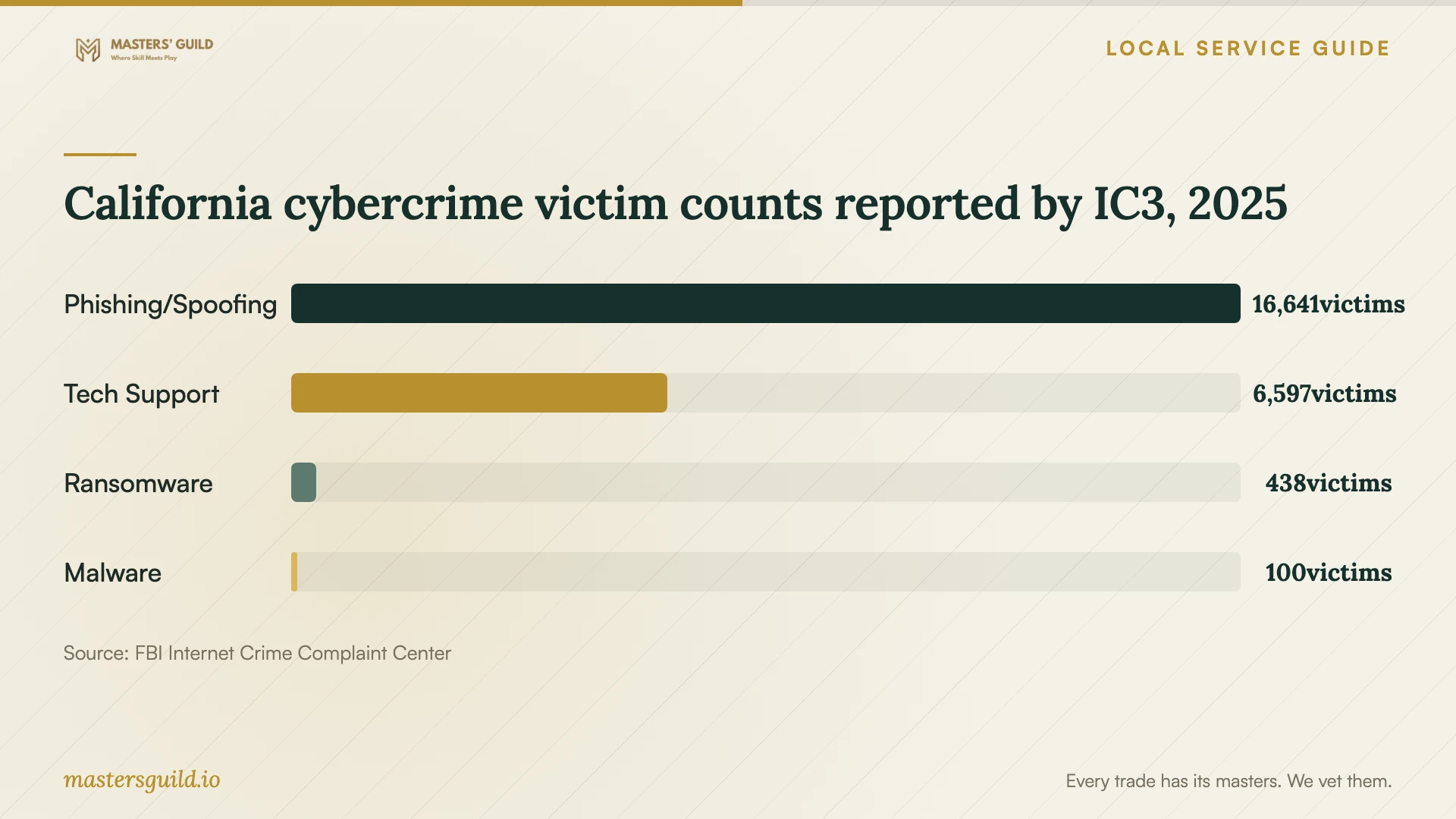
Choose the repair business through a contact route you select. California’s 2025 IC3 report lists 6,597 tech-support victims statewide. That figure supports taking care when arranging help, but it does not identify any repair business or measure infections in San Diego. Avoid treating a warning screen or an unsolicited caller as your hiring recommendation. [4]
Agree on completion and follow-up
Before approving work, ask how the technician will demonstrate completion. Request a written account of what they found, what they removed or changed, and any remaining concerns. At collection, check the files you identified and try the tasks that prompted the service request. Ask about follow-up terms and any charge for reviewing a recurring symptom.
Keep the estimate, approval messages, receipt, and final invoice together. BHGS accepts complaints about covered repair work. If another dealer examines an unsatisfactory repair, the bureau advises asking that dealer to describe problems with the first dealer’s work on the invoice. [1]
Compare repair with replacement before erasing anything
Ask for the proposed repair total and a separate file-preservation plan before choosing replacement. Consider the computer’s usefulness to you, the software you need, and the effort of setting up another device. Give explicit approval for erasure only after agreeing on which files you will keep and checking the copy you plan to retain.
The City of San Diego identifies Miramar Recycling Center, operated by Allan Company at the entrance to Miramar Landfill, as a free drop-off option for computer electronics. Call the operator at 858-268-8971 to confirm current hours and acceptance arrangements before traveling. The city’s acceptance notice does not describe a secure data-destruction service; ask a technician how to handle the storage device before recycling. [3]
California cybercrime victim counts reported by IC3, 2025
Local details that affect your job
Use California’s repair-dealer checks
For a personal or home-office computer, start with BHGS rather than relying on an advertised certification. Its consumer guide includes personal computers among covered electronics. Use the license-search page’s All Other Industries route and review citations and disciplinary records. BHGS warns that its databases can differ, so check the available records and match the business name before booking. [1] [2]
Plan a Miramar recycling trip after data handling
If you decline further repairs, the city lists free acceptance of computer electronics at Miramar Recycling Center, at the landfill entrance. Contact Allan Company at 858-268-8971 before loading the device. Agree on file preservation and storage-device handling first; the city notice establishes recycling acceptance without promising data destruction. [3]
Choose the next step for your computer
| Your situation | Suggested next step | Confirm before approval |
|---|---|---|
| You can show the problem on screen | Request diagnosis and ask whether supervised remote help fits | Access method, session end, and written scope |
| You want a home appointment | Ask for the visit and diagnostic charges before booking | BHGS requires advance quotation of any trip charge |
| You need files preserved | Request a file-preservation plan before cleanup or reinstall | Folders to keep, backup destination, and permission before erasure |
| The technician proposes extra work | Request the revised total before giving approval | Additional parts or labor and the complete repair charge |
| You decide to replace the device | Arrange data handling, then confirm Miramar drop-off arrangements | The city lists free computer-electronics acceptance |
Your hiring checklist
- Record the symptoms and exact warning text before requesting help.
- List the files you need to keep and check any existing backup.
- Match the repair business’s name to its BHGS records.
- Request a written scope and total, including diagnostic and visit charges.
- Require separate approval for erasure, reinstall work, and additional charges.
- Agree on account access, backup storage, and deletion of the technician’s copies.
- Check your important files and reported symptoms before accepting completion.
- Keep the estimate, approvals, handover receipt, and invoice.
Frequently Asked Questions
How much should I budget for removal?
Request a written quote for your device and symptoms. The evidence here does not establish a San Diego price range. California BHGS requires a total-price estimate before repairs, so ask the business to identify diagnosis, cleanup, backup, and proposed reinstall charges before you approve work. [1]
Does the technician need permission to reinstall the system?
Put your authorization terms in writing before work starts. Require the technician to contact you before erasing files or reinstalling, and agree on the files to preserve. Ask to inspect the retained copy before approving erasure.
How can I check a repair business?
Use California BHGS’s license-search route and review its enforcement databases. Match the business name and check its status and any restrictions. BHGS explains that a Current license is valid but may carry probationary terms. [2]
Where can I recycle a computer I choose to replace?
The city lists free computer-electronics acceptance at Miramar Recycling Center, operated by Allan Company at the entrance to Miramar Landfill. Call 858-268-8971 to confirm arrangements. Ask about storage-device handling separately because the city notice does not promise secure data destruction. [3]
Sources and scope
This guide combines the sources below with practical planning guidance. Figures apply to the stated geography and period; request a written quote for your property.