
Local service guide
Computer Virus Removal in San Antonio, TX
Arrange Computer Virus Removal in San Antonio with a technician you choose, a written spending limit, and a plan for preserving your files before work starts. Describe the symptoms and any access you already allowed. If an unexpected caller or pop-up supplied the repair number, stop contact first. The Texas Attorney General identifies these approaches as tech support scam patterns. [1]
Describe the problem before choosing the service
Give the technician a short account of what you saw and what you did next. Include the warning text, recent downloads, unwanted software, and any remote connection you allowed. Describe the symptoms without adopting a pop-up’s diagnosis. Keep a photo of the message if you can do so without following its links.
The Texas Attorney General describes scammers who claim a computer has a virus, then demand payment or access. The agency warns that access can let them inspect personal or financial information, install malware, or add spyware. Tell your chosen technician about previous access before agreeing to routine cleanup. [1]
Match the appointment to your circumstances. For remote help, explain whether the computer starts and whether you can operate it. Have the provider explain how you will start, observe, and end the session. For drop-off service, obtain a receipt identifying the device and accessories. For a home visit, settle address coverage and travel charges before booking.
Give the technician clear limits on file handling
Name the files you need to keep, such as family photos, tax documents, and schoolwork. Identify essential applications too. Put these priorities in the repair scope, with a requirement for your approval before destructive changes. Have the technician explain what you would need to reinstall if they propose resetting the device.
Agree on backup handling in the same conversation. Specify where the technician may store a copy, who may access it, and when they should delete any retained copy. If you already have a backup, provide its date and discuss checks before restoration. Keep account passwords out of the job description.
If you suspect theft and want evidence preserved, state that purpose before authorizing cleanup. Discuss whether the provider can handle that work and what information they would preserve. The Texas Comptroller treats certain computer forensic services and computer support involving investigation of potential criminal or civil matters as taxable security services. [2]
Compare the full quote and the return plan
Use one description of the job when comparing offers. Each quote should distinguish diagnosis, cleanup, operating system work, backup or recovery, software, travel, and tax. Set a spending limit and decide how the technician will obtain approval for additions. Include the amount you would owe if you decline further work after diagnosis.
Discuss scheduling in terms of intake, a diagnostic update, and expected return. Give the provider your deadline if you need the computer for household finances or school. Agree on how they will contact you about delays and whether you can collect the device if you decide to stop the job.
Keep software purchases separate from the repair decision. Before accepting an antivirus subscription, review its initial charge, renewal terms, and compatibility with your device. AV-Comparatives recommends weighing price, ease of use, compatibility, and support alongside multiple recent test reports. [3]
Review the work before accepting completion
At handover, review a written account of the findings, changes, and checks. Try the tasks that prompted the repair and open the files you wanted preserved. Have the technician explain unresolved concerns and any next steps. Record the follow-up period, what it covers, and which problems would require another paid diagnosis.
Treat an antivirus test score as information about the tested product. AV-Comparatives distinguishes file detection from protection against changes during malware execution. Its laboratory test does not assess your repaired computer or the technician’s work. Use device-specific findings when deciding whether to accept completion. [3]
AV-Comparatives also explains that cloud connectivity can affect detection and that false alarms matter when interpreting results. Discuss the scan conditions and any disputed files with the technician. Before approving removal of a file you recognize, resolve how they will preserve the information you need. [3]
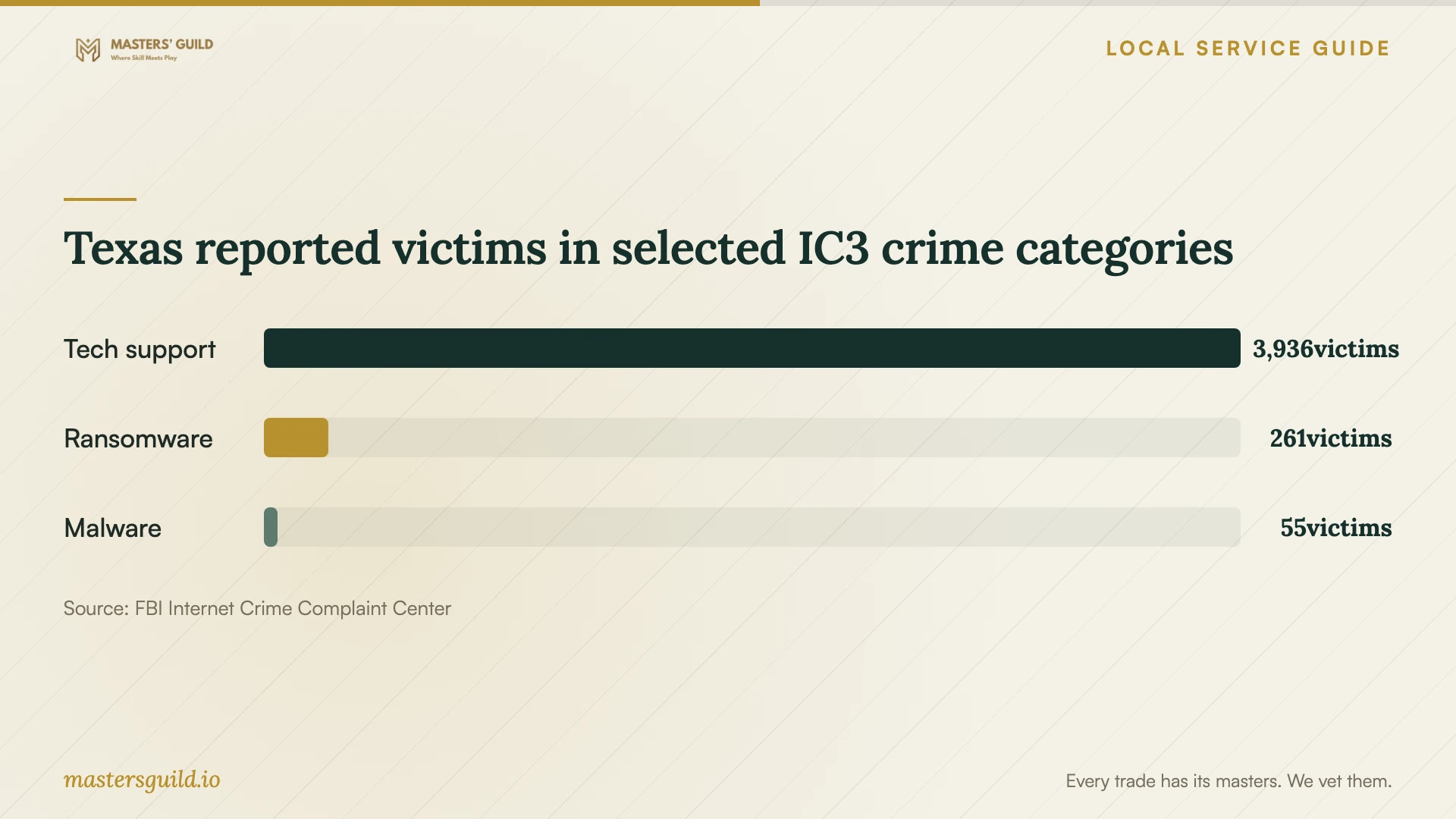
Texas reported victims in selected IC3 crime categories
Local details that affect your job
Use Texas scam guidance to screen a repair offer
The Texas Attorney General’s statewide guidance applies to households here: avoid the phone number supplied by an unsolicited virus warning and choose your own contact route. A paid search advertisement alone does not establish credibility; the agency warns that illegitimate services can buy ads. If you believe someone scammed you, the agency advises ending communication and filing a consumer complaint. Keep the provider’s name, messages, and payment records for your complaint. [1]
Have the provider explain Texas tax treatment
For a provider serving your San Antonio address, obtain an itemized tax explanation when cleanup includes backup or investigation work. The Texas Comptroller lists offsite electronic backup as data processing and exempts twenty percent of data processing charges from tax. It also lists personal property repair and certain investigative computer services among taxable categories. These statewide classifications do not establish one tax treatment for every virus removal job. Have the provider identify the services they are charging for and explain the taxable portion. [2]
Choose the next step for your situation
| Situation | Next step | Resolve before work |
|---|---|---|
| An unexpected caller offers virus removal | End the contact and choose your own provider | Use contact information you have checked |
| You need personal files preserved | Define file handling before cleanup | Approval before deletion, reset, or reinstall |
| Cleanup includes offsite backup | Obtain separate service and tax descriptions | Backup destination and Texas data processing treatment |
| You want suspected theft investigated | Discuss evidence preservation before routine cleanup | Provider capability and investigative scope |
| The provider recommends antivirus software | Compare practical needs and multiple tests | Compatibility, support, purchase price, and renewal terms |
Your hiring checklist
- Prepare a symptom summary, including downloads and remote access you allowed.
- List essential files, applications, and the date of your existing backup.
- Check the business contact details and identify who will handle the device.
- Agree on the written scope, spending limit, and approval boundaries.
- Record backup storage, access, and deletion terms.
- Keep the quote, intake receipt, update date, and expected return date.
- Review files, original symptoms, completion notes, and follow-up coverage at handover.
Frequently Asked Questions
How much should I budget for removal?
Obtain written quotes using the same symptom summary and file preservation requirements. Compare the total after diagnosis, including backup, operating system work, software, travel, and tax. Set a maximum authorized amount and settle the diagnostic fee before leaving the device or starting a remote session.
Should I call the number in a virus warning?
Choose a provider through contact information you check. The Texas Attorney General describes unsolicited calls and pop-ups that request payment or computer access as a tech support scam pattern. The agency suggests closing the internet session, restarting the computer, or contacting a reputable source for help. [1]
Can a technician promise to preserve all my files?
Have the technician assess your preservation needs before you approve work. Identify what matters most and discuss any limits, recovery charges, and backup options. Record the agreed handling plan instead of relying on a general reassurance.
Does a high antivirus score prove my computer is clean?
AV-Comparatives evaluates product protection against malicious files before, during, or after execution under laboratory conditions. That test does not verify your device after repair. Review the technician’s findings, the original symptoms, and any remaining concerns. [3]
Sources and scope
This guide combines the sources below with practical planning guidance. Figures apply to the stated geography and period; request a written quote for your property.