
Local service guide
Cloud Service Setup in Salem, OR: Hiring Guide
For Cloud Service Setup in Salem, OR, hire a technician against a written scope that names the files to move, staff permissions, backup arrangements, and completion tests. Request separate setup and subscription charges, keep control of the business account, and require a demonstrated file restore before accepting backup work. Include Oregon personal-information safeguards when planning a customer-record migration. [2] [3]
Define the work before comparing quotes
Write an inventory of the computers, existing accounts, shared folders, and business applications involved. Identify who owns each account and which files staff need during the move. Tell bidders whether you want file sharing, email migration, device backup, or cloud infrastructure. Ask them to identify tasks that require a separate specialist.
Choose acceptance tests before booking. For shared storage, ask a staff member to open and edit an approved file while another account attempts to access a restricted folder. For migration, agree on how the technician will compare original files with the destination and record exceptions. For backup, require a restore into a separate folder so you can inspect the result.
Request itemized quotes showing labor, subscriptions, storage, travel, and follow-up support. Ask whether the technician charges for unattended uploads and how you will approve extra work. Compare bids against the same inventory and acceptance tests. Use the written quotes to establish your budget; the sources cited here do not establish local setup prices.
Check connectivity at the business address
Use the FCC National Broadband Map to investigate your exact premises before arranging a large upload. The map shows providers that report offering service at that location, technologies, and maximum advertised upload and download speeds. You can filter for business locations. Treat those listings as reported availability rather than a measurement of your connection. [1]
Ask the technician to measure your current upload connection and propose a first-transfer schedule around business use. Give them the amount of data you intend to move and your preferred completion window. Request a plan for interrupted uploads and name the person who will check completion after the appointment.
Confirm availability with the internet provider before ordering a connection change. If the FCC listing conflicts with what a provider offers at your address, you can submit an availability challenge. The FCC mobile map describes outdoor or in-vehicle coverage, so arrange an indoor test before choosing cellular service as an office backup connection. [1]
Keep account control and limit technician access
Create the business account under contact details you control. Ask the technician to document administrator access, billing ownership, recovery contacts, and the steps for removing their access. Enter your own credentials during a supervised session. Agree on remote-support access and its end date before work begins.
CISA recommends phishing-resistant multifactor authentication, separate administrator and everyday user accounts, and permissions limited to each person's duties. It also recommends restricting third-party access to the devices and servers within that provider's responsibilities. Ask the bidder to explain how they will apply those controls to your chosen service. [3]
Have the technician walk through staff departures, lost devices, and account recovery with you. Request instructions for disabling a staff account and reviewing shared-folder access. Include a handover session for the person who will manage these tasks after installation.
Specify backup protection and a restore test
CISA recommends offline, encrypted backups of critical data and regular tests of their availability and integrity. Its cloud guidance also includes version control and deletion protection where supported. Ask the technician to identify the protections they will configure, the data they cover, and how you will verify them. [3]
Write down the folders and applications included in backup, the retention settings, and who receives failure alerts. Ask the technician to explain how you would recover after a mistaken deletion or loss of account access. Require a demonstration using a selected business file and keep the recovery instructions.
Keep original files until you complete the agreed migration checks and recovery test. Record missing files, permission problems, and unresolved errors before accepting the work. Agree on a follow-up date to inspect upload completion and address exceptions.
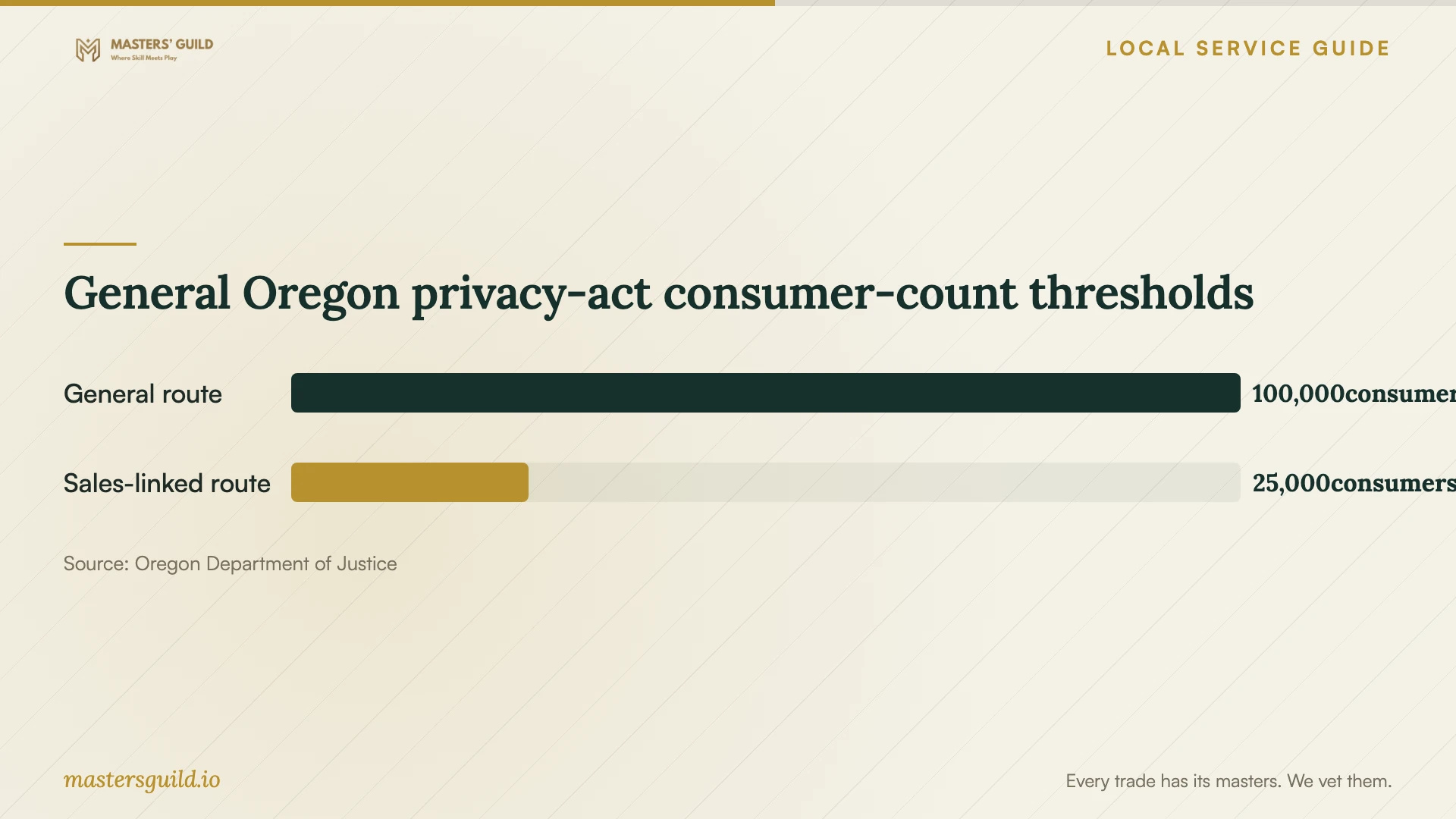
General Oregon privacy-act consumer-count thresholds
Local details that affect your job
Oregon privacy-act scope affects the migration brief
For a Salem business handling customer records, review Oregon Consumer Privacy Act applicability before granting technician access. Oregon DOJ describes general thresholds of at least 100,000 consumers, or at least 25,000 consumers plus over 25% of annual gross revenue from personal-data sales. The law also applies to vendors processing personal data on behalf of a covered controller. Motor vehicle manufacturers and specified affiliates have a separate exception to the general thresholds. Ask a qualified adviser to assess applicability, including exemptions, and determine processor contract requirements before migration. [2]
Below-threshold businesses still need personal-information safeguards
Oregon DOJ states that the separate Oregon Data Breach Law places security obligations on all entities holding personal information of Oregon residents. Its guidance identifies access controls, multifactor authentication, encryption, training, and data minimization as common safeguards. Even if your business falls below OCPA thresholds, ask the technician to document access to customer information, protection of temporary migration copies, and removal of those copies after your approval. Review these arrangements before sharing customer folders. [2]
Match the appointment to the work
| Your need | Scope to request | Acceptance check |
|---|---|---|
| Shared business files | Folder organization, staff accounts, and access permissions | Test approved and restricted access with staff accounts |
| Move existing records | Source inventory, destination mapping, exception report, and retained originals | Compare agreed files and resolve recorded exceptions |
| Recover critical data | Backup coverage, offline encrypted copies, and restore instructions | Restore a selected file and inspect its contents |
| Oregon customer information | Privacy applicability review and documented migration safeguards | Confirm access limits and handling of temporary copies |
Your hiring checklist
- List devices, accounts, folders, applications, and the data to move.
- Identify the business owner of billing, administration, and recovery contacts.
- Check address-level broadband listings and request an upload measurement.
- Request separate labor, subscription, storage, and follow-up charges.
- Agree on staff permissions and the technician's access end date.
- Review Oregon privacy applicability and personal-information safeguards.
- Require a migration exception list and a demonstrated file restore.
- Retain originals until you approve the checks and receive handover instructions.
Frequently Asked Questions
Should I book remote help or an on-site appointment?
Ask each bidder how they will inspect devices and complete your acceptance tests. Choose an on-site appointment if you want hands-on device setup or staff training at the premises. For remote work, agree on session access, supervision, and removal of the support connection.
Can I accept a successful upload as proof of backup?
Require a recovery test before accepting backup work. CISA recommends regular backup testing and offline, encrypted copies of critical data. Ask the technician to demonstrate restoration and document the protections and retention settings. [3]
Does Oregon privacy law apply to every small business?
OCPA applicability depends on thresholds, exemptions, and special provisions. Oregon DOJ also states that the separate Data Breach Law places security obligations on all entities holding Oregon residents' personal information. Review both questions before moving customer records. [2]
Does the FCC map prove how fast my upload will run?
The FCC map lists provider-reported availability and maximum advertised speeds at a location. Ask the technician to measure your connection and propose a transfer schedule based on your data and working hours. [1]
Sources and scope
This guide combines the sources below with practical planning guidance. Figures apply to the stated geography and period; request a written quote for your property.