
Local service guide
Data Recovery and Backup in Sacramento
Arrange Data Recovery in Sacramento by asking the provider to assess your affected device, identify the files you need, and quote the work before you authorize recovery. For backup installation, require a demonstrated restore and written responsibilities for monitoring failures. If you suspect ransomware, isolate affected devices from the network and involve an incident responder before restoring business systems. CISA recommends isolation, evidence preservation, and recovery on clean systems. [2]
Choose the scope before handing over a device
Describe what happened, which device holds the missing files, and what you have tried. Give the provider a priority list: current customer records, accounting files, active projects, or another specific set. Ask whether the provider will assess the device at its own premises or transfer it to another facility. Confirm who will contact you and who can approve additional work.
Ask the provider to separate file recovery, computer repair, application setup, and backup installation in the proposal. Define completion in terms you can check: named folders returned, sample files opened, and the required business application working. Check your important records before accepting a computer that starts up as proof of successful recovery.
For suspected ransomware, CISA recommends disconnecting affected devices from the network. It advises powering them down only if network isolation is not possible, because shutdown loses evidence held in volatile memory. Ask an incident responder to direct the next steps and coordinate evidence collection before anyone rebuilds the system. [2]
Compare written quotes and data-handling terms
Get a device-specific assessment and compare written quotes for the same recovery scope. Request a diagnostic charge, recovery authorization limit, and explanation of charges if the provider cannot return the files you need. Ask the provider to itemize transport, return storage, priority service, and proposed follow-up work. Set a point at which the provider must stop and seek your approval.
Before handoff, ask who can access your data, whether the provider uses subcontractors, and how it protects recovered copies during transfer and storage. Require a receipt identifying the device and its serial number. Agree on how the provider will deliver encryption credentials, return the original device, and delete working copies after you accept the result.
For ongoing backup management, write security requirements into the agreement. CISA recommends formalizing third-party security requirements through contract language and limiting a provider's access to the systems within its responsibilities. Ask who owns the backup account and how you will regain control if you change providers. [2]
Specify a backup you can restore
Tell the installer how much recent work you can afford to lose and how long you can operate without each application. Use those answers to agree on backup frequency, retention, and restoration priorities. Include business records you hold outside the main computer, such as shared storage and hosted applications, in the discussion.
CISA recommends keeping critical backups offline and encrypted, then testing their availability and integrity in a disaster-recovery scenario. Its guidance also covers cloud deletion protection and version control. Ask the installer to explain how the proposed setup protects copies from deletion or encryption through a compromised account. [2]
At handover, have the installer restore a representative folder to a separate destination and open the files with you. For an application-dependent business, request a test that includes the application and its data. Record the time taken, missing items, and the steps another technician would need to repeat. Name the person responsible for reviewing failed-job alerts and arranging the next test.
Plan the return to business
Agree on an assessment deadline and the provider's next update before handing over the device. Ask for a recovery estimate after assessment, with separate dates for priority files and remaining material if the provider offers staged delivery. Arrange access to another computer and identify the minimum records you need while work continues.
For ransomware recovery, CISA recommends prioritizing critical services and restoring offline, encrypted backups to clean systems. It warns against reinfecting systems during recovery. Ask your responder who will confirm that the environment is ready and who will authorize reconnection. [2]
Before closing the job, check your priority files, document unresolved gaps, and retain the service receipt. Keep the original device until you have accepted the returned data and agreed on its disposition. Schedule backup handover as a separate acceptance step so you can review account access, restore instructions, and monitoring responsibilities.
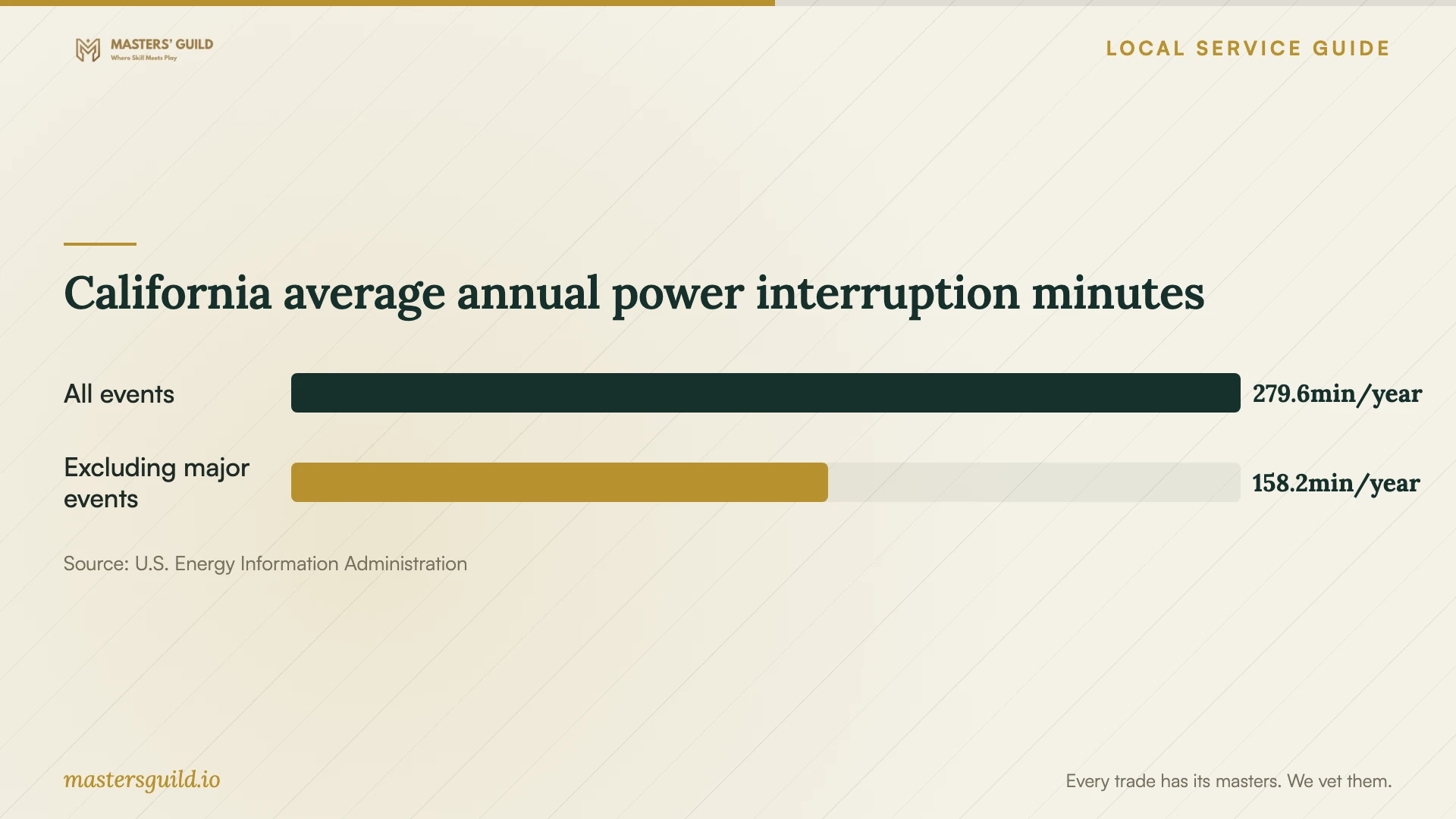
California average annual power interruption minutes
Local details that affect your job
SMUD storm experience changes the installation brief
SMUD's 2024 annual report describes February wind gusts exceeding 60 miles per hour for 12 straight hours and power interruptions affecting hundreds of thousands of its customers. For premises served by SMUD, ask your installer to assess an uninterruptible power supply, configure safe shutdown where supported, and demonstrate how staff should check backup jobs after power returns. Use this historical event to plan for interruption. It does not establish the outage risk at your address or the cause of a particular drive failure. [1]
California breach reporting changes whom you involve
The California Attorney General states that businesses must notify California residents when an unauthorized person acquired, or is reasonably believed to have acquired, their unencrypted personal information as defined by law. A business required to notify more than 500 California residents from one breach must submit a sample notice to the Attorney General, excluding personally identifiable information. If your missing records involve suspected unauthorized access, involve an incident responder and legal adviser alongside the recovery provider. Ask them to preserve evidence and assess notification duties; a failed drive alone does not establish unauthorized acquisition. [3]
Match the work to your situation
| Situation | Service to request | Acceptance question |
|---|---|---|
| Missing files with an existing backup | Backup assessment and restore assistance | Can you restore the required files to a separate destination and open them with me? |
| Unreadable device with no checked backup | Recovery assessment with an authorization limit | Which files will you attempt to recover, and when must you seek further approval? |
| Ransomware or suspected compromise | Incident response coordinated with recovery | Who will preserve evidence and confirm clean systems before restoration? |
| New or replacement backup setup | Installation, restore testing, and monitoring handover | Who checks failures, controls the account, and repeats restore tests? |
Your hiring checklist
- Record the device model, serial number, symptoms, and actions you have taken.
- List the files and applications you need first, with a business deadline.
- Identify existing backup locations and the last restore you checked.
- Get written diagnostic charges, authorization limits, and unsuccessful-recovery terms.
- Confirm the handling facility, subcontractors, access controls, and device receipt.
- Agree on encrypted delivery, original-device return, and deletion of working copies.
- Require a restore demonstration and assign responsibility for backup alerts.
- Ask the installer to document safe shutdown and post-outage backup checks.
Frequently Asked Questions
How much should I budget for recovery?
Get a device-specific assessment and written quote. Compare diagnostic charges, approved recovery work, return storage, transport, and unsuccessful-recovery terms for the same scope. Request backup installation and ongoing management as separate line items.
How should I check that my new backup works?
Require a demonstrated restore and agree on repeat testing. CISA recommends testing backup availability and integrity in a disaster-recovery scenario. Ask the provider to document which files and applications it tested, the result, and any gaps. [2]
Should I turn off a computer showing a ransom message?
CISA recommends network isolation first. It advises shutdown only when you cannot disconnect the device from the network, because shutdown loses volatile-memory evidence. Contact an incident responder to direct containment and recovery. [2]
Do the outage figures determine which battery backup I need?
No. EIA reports statewide average annual interruption minutes, including or excluding major events. Those figures do not describe a single outage at your premises. Ask the installer to assess your equipment and the runtime needed to complete a safe shutdown. [4]
Sources and scope
This guide combines the sources below with practical planning guidance. Figures apply to the stated geography and period; request a written quote for your property.