
Local service guide
Computer Virus Removal in Sacramento: Hiring Guide
Arrange Computer Virus Removal in Sacramento by asking a technician for a written diagnosis and repair scope, a total estimate, and your approval before any file deletion or operating-system reinstall. California's Bureau of Household Goods and Services regulates personal and home-office computer repair and requires written estimates before repairs. Describe the symptoms, identify the files you need to preserve, and agree on how the technician will return and test your computer. [1] [2]
Define the repair before approving it
Tell the technician what you observed: unwanted browser changes, unfamiliar messages, failed startup, or a warning you cannot dismiss. Record the wording or take a photograph. Ask for diagnosis before authorizing malware cleanup, and avoid treating your description of a suspected virus as a confirmed finding.
Ask the technician to write down the proposed work and any exclusions. Specify whether you want file preservation, a backup, browser cleanup, operating-system repair, or help reinstalling your applications. Ask what findings would trigger a separate estimate and who will contact you for approval.
BHGS requires dealers to disclose diagnosis fees in writing before accepting the product at a repair facility, removing it from your property, or performing repairs. Its documentation guidance also requires written repair estimates that include parts, labor, and applicable service-call or transportation charges. Request these documents before committing to the appointment. [2]
Choose an appointment and control access
Ask each provider which appointment formats they offer and what they need from you. For a home visit, confirm the arrival window and access to your workspace. For drop-off service, confirm collection arrangements. If you consider remote help, ask how you will authorize access, observe the work, and end the session.
Give the technician a list of folders and applications you want preserved. Identify any existing backup and ask how they will assess it before restoring files. Keep account recovery information under your control, and agree on a method for entering passwords without placing them in the job description or leaving a written password list.
For a service call, the dealer must quote any trip charge before the visit. When you leave a computer at a repair location or the dealer removes it from your home, BHGS requires a claim check or receipt. Check the model and serial number against your device and keep a copy. [1] [2]
Compare estimates without assuming a local price
Request estimates for the same scope so you can compare what each technician proposes. Ask whether the diagnosis fee counts toward the repair, how they charge for backup work, and whether they need approval for additional work. Set a spending limit and name the person who can authorize changes.
The California consumer guide allows a reasonable diagnostic fee and charges for approved repair work. BHGS documentation guidance says dealers must obtain your consent before charging beyond the estimate. Ask for an updated total before approving extra labor or parts, rather than approving an open-ended repair. [1] [2]
The cited official guidance does not publish a Sacramento malware-removal price or completion-time range. Ask the provider for both after they review your symptoms. If you need the computer for a particular date, discuss that deadline before drop-off and ask when they will contact you if their plan changes. [1] [2]
Check the result and written coverage
Agree on a collection check before work begins. Ask the technician to explain what they found, what they changed, and whether they deleted or restored files. Test startup, the browser, and the applications you identified in your scope. Ask for instructions if the original symptoms return.
BHGS requires a legible invoice after repair, including when the dealer charges no fee. Its guidance calls for the reported problem, itemized work and charges, dealer registration information, and warranty status. Keep the invoice with your receipt and approved estimate. [2]
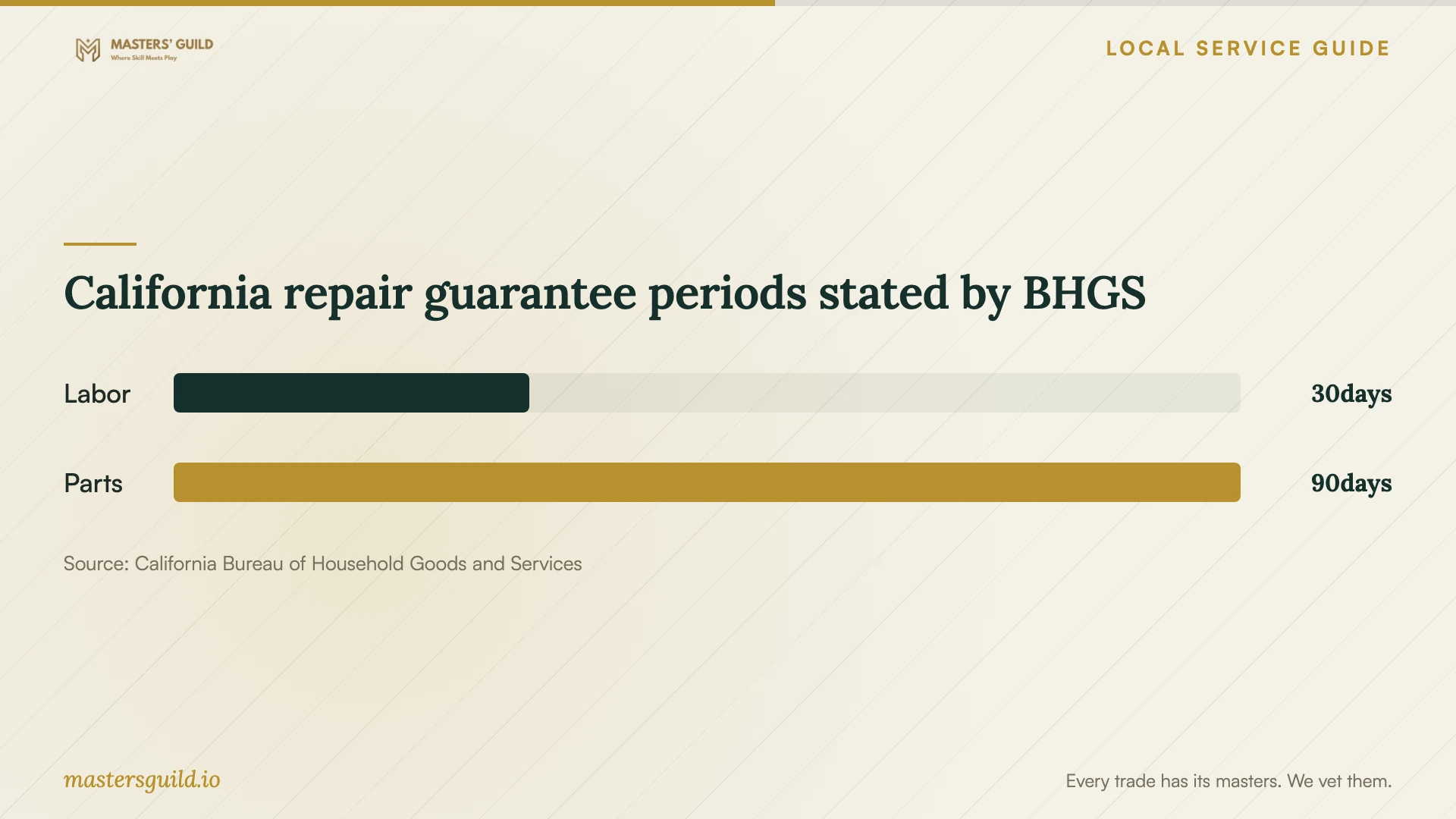
The chart summarizes BHGS's stated labor and parts guarantee periods unless otherwise noted. If the dealer offers a guarantee, BHGS says the written terms must identify the covered work, duration, and responsible party. Ask how those terms apply to your cleanup; do not assume a labor guarantee promises protection against future infections. [2]
Plan replacement and data removal together
If you choose replacement, ask for a separate plan to recover the files you want and erase the retired device. Specify which storage devices you will keep and which you will recycle. Ask the technician to explain how they will handle a drive they cannot access before you authorize disposal.
Sacramento County lists laptops, computers, all-in-one desktops, and hard drives among electronics residents can recycle for free at Kiefer Landfill and North Area Recovery Station. The county requires the load to contain only free items and tells residents to erase personal data before dropping off e-waste. Confirm your load qualifies before arranging transport. [3]
California repair guarantee periods stated by BHGS
Local details that affect your job
California documentation protections apply to home computer repairs
For a Sacramento personal or home-office computer repair, use California's BHGS consumer guidance to check the dealer's paperwork. Request the written total before repairs and check the registration number on the drop-off receipt and final invoice. If you dispute the initial repair, the consumer guide says you may file a BHGS complaint; if another dealer repairs it, ask that dealer to document what they found wrong with the first work. [1] [2]
County recycling changes the replacement plan
Residents considering replacement can use the county's listed free e-waste drop-off at Kiefer Landfill or North Area Recovery Station. Arrange personal-data erasure before the trip and separate items that do not qualify for free disposal. The cited program describes resident eligibility; do not assume it covers a business computer load. [3]
Choose the next step for your computer
| Your situation | Next step | Before approving |
|---|---|---|
| You suspect malware but have no diagnosis | Request an assessment and proposed repair scope | Obtain the diagnosis fee disclosure in writing |
| You need irreplaceable files | Discuss file preservation before cleanup | Require approval before deletion or reinstall |
| The technician proposes additional work | Request the revised total | Approve the added charges before work proceeds |
| You leave the computer for repair | Obtain a claim check or receipt | Check the device details and dealer registration number |
| You choose replacement | Arrange recovery and erasure, then resident e-waste recycling | Confirm the county load contains only free items |
Your hiring checklist
- Photograph the symptoms and record the computer model and serial number.
- List the files and applications you want preserved.
- Identify your existing backup and ask before authorizing restoration.
- Request the diagnosis fee and written repair estimate before handing over the device.
- Agree on account access and approval for deletion, reset, or reinstall.
- Confirm the appointment format, collection plan, and spending limit.
- Keep the receipt, approved changes, final invoice, and guarantee terms.
- If replacing the computer, arrange data erasure before recycling.
Frequently Asked Questions
Does a computer repair dealer have to give me an estimate?
Yes. California's BHGS consumer guide requires a written estimate of the total cost before repairs. Ask the dealer to identify the cleanup scope and any separately proposed backup or operating-system work. [1] [2]
Can the technician charge more after diagnosing the computer?
BHGS guidance permits additional charges with your approval. Request the revised total and description of the added work before consenting. Keep a copy with your original estimate. [1] [2]
Should I approve a reset during the first appointment?
Discuss your files, backup, and applications first. Ask the technician to explain the proposed reset and obtain your approval before proceeding. Put file-preservation instructions in the repair scope.
Where can I recycle a computer if I replace it?
Sacramento County lists free resident e-waste drop-off at Kiefer Landfill and North Area Recovery Station, including computers and hard drives. The load must contain only free items. Erase personal data before dropping it off. [3]
Sources and scope
This guide combines the sources below with practical planning guidance. Figures apply to the stated geography and period; request a written quote for your property.