
Local service guide
Computer virus removal in Reno, NV: hiring guide
For computer virus removal in Reno, choose a technician you contact yourself, ask for evidence of the problem, and approve a written scope before granting access to your device. Check the provider’s city business license and agree on file preservation, diagnostic charges and permission for any reinstall. Reno requires a business license for business activity within city limits, including providers based elsewhere. Nevada’s Attorney General warns against giving computer control to unsolicited callers claiming to offer support. [1] [3]
Choose support before granting access
Start by writing down what happened: the warning message, an unfamiliar application, the last task you completed and whether you gave anyone remote access. Tell the technician what you observed without assuming the device has a virus. Ask them to explain their diagnosis before you authorize cleanup, software purchases or a service plan.
In its March 2019 advisory, Nevada’s Attorney General described scammers who imitate security alerts, request computer access and pressure consumers into unnecessary repairs or software purchases. The office advises consumers to check messages through their computer company’s own customer-support website. Treat this as consumer guidance, not evidence of today’s scam frequency. [3]
If you received an alarming pop-up, use another device to find a provider’s contact details. Ask who will perform the work and how you can reach that person after the appointment. Before a remote session, agree on its purpose and ask the technician to explain how you will end access when the work finishes.
Match the appointment to your device and files
Choose an appointment format after describing the device’s condition. For remote service, ask whether the technician can assess your symptoms without a visit and what happens if the connection fails. For drop-off service, request a receipt naming the device and accessories. For a home visit, confirm the address, arrival window and any travel charge before booking.
Tell the technician which files matter and whether you have a backup you can open. Ask them to distinguish malware cleanup, operating-system repair, backup work and file recovery in the quote. Require your approval before they erase a drive, reinstall the operating system or replace storage. Include permission limits for opening personal documents and copying files to another device.
For account access, ask whether you can enter credentials yourself during the appointment. Avoid handing over a list of email, banking and other account passwords. If you already shared credentials with an unknown caller, arrange account-security help as a separate task rather than assuming device cleanup completes that work.
Get a quote you can approve
Ask for a diagnostic fee, the proposed cleanup charge and an approval limit for extra work. Have the provider state whether the diagnostic fee counts toward the repair bill. Request separate prices for backup, reinstall, replacement parts, travel and follow-up support, plus a rule for contacting you before exceeding the agreed amount.
Nevada’s Department of Taxation says repair, reconditioning and installation labor are not taxable when the provider lists those services separately on the invoice. Most tangible goods transferred for value are taxable. If the technician proposes a replacement drive or other hardware, ask for separate labor, parts and tax lines rather than a single unexplained total. [2]
Compare providers using the same requested work. A cleanup-only quote and a quote that includes backup and reinstall answer different needs. Ask each technician to name exclusions and explain what you owe if you decline further work after diagnosis. Request a completion estimate after the technician reviews the symptoms, and tell them if you need the computer back by a particular date.
Set payment and handover terms
Agree on the payment method and receipt before work starts. If someone claiming to provide support directs you to withdraw cash, scan a supplied QR code and send cryptocurrency through a kiosk, stop and verify the request through contact information you obtained yourself. The FBI advises against following kiosk-payment instructions from someone you have never met. [4]
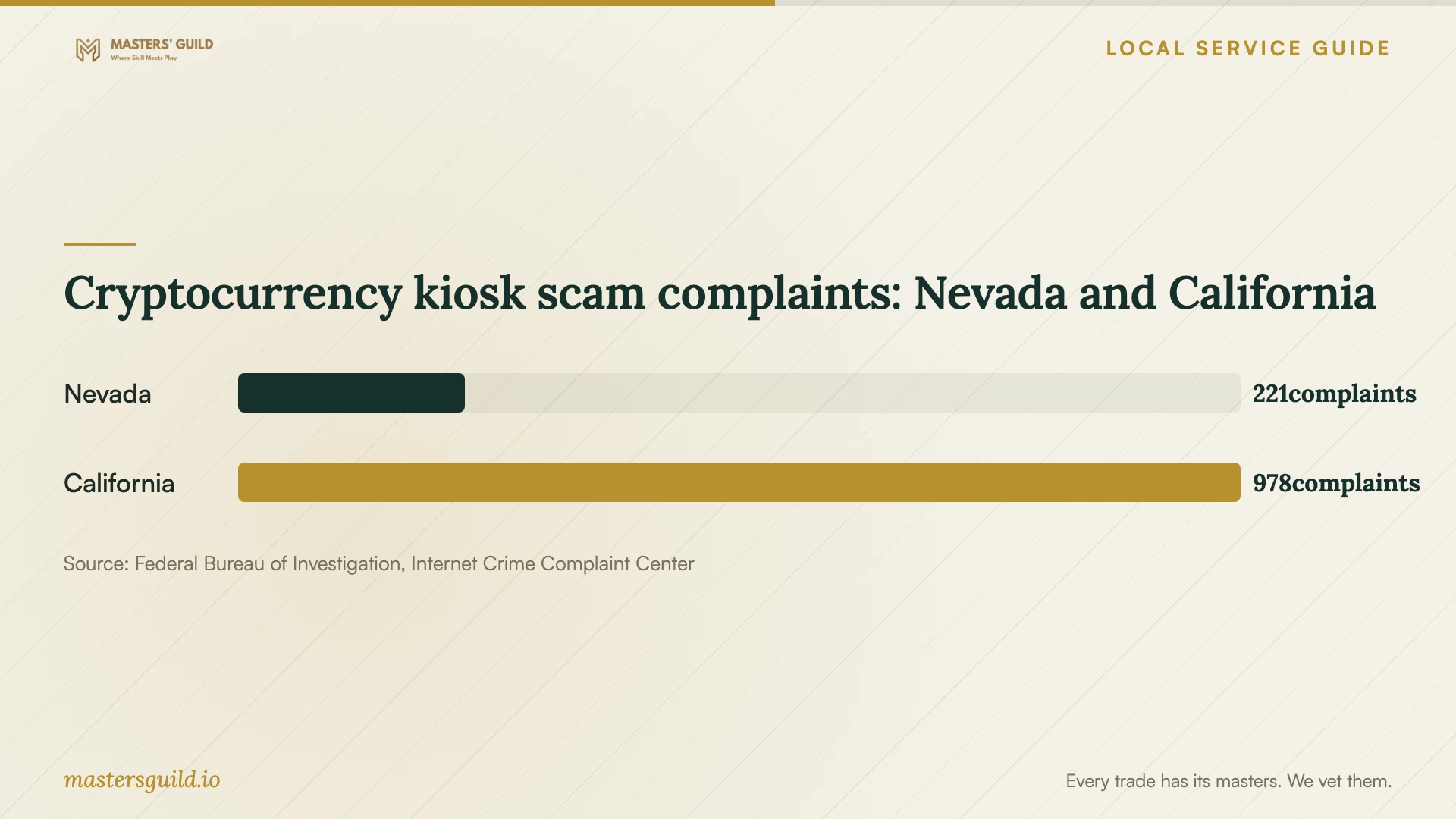
The chart provides context for that payment warning. IC3 recorded 221 Nevada complaints involving cryptocurrency kiosks in 2025. These reports cover kiosk-related scams across categories; they do not measure infected computers, Reno repair demand or the conduct of local technicians. [4]
At handover, ask the technician to describe what they found, what they changed and what remains unresolved. Open the files you asked them to preserve and review any backup they created. Ask them to demonstrate that the original symptom has stopped, explain any new software or subscription, and document how they removed remote access. Keep the invoice and written findings for follow-up.
Cryptocurrency kiosk scam complaints: Nevada and California
Local details that affect your job
Check licensing for a technician coming into Reno
Reno says businesses need a city business license when they conduct business within its incorporated limits, even if they operate from outside the city or hold another city’s license. Ask a visiting technician for their business name and Reno license information before booking. For licensing questions, contact the Business License Division at 775-334-2090. Do not assume that a Washoe County license covers a Reno appointment: the city says that county license covers unincorporated areas. [1]
Use Nevada’s invoice rules when cleanup includes hardware
Ask your provider to separate repair labor from any replacement drive or other physical goods. Nevada’s tax guidance exempts repair labor when the provider lists it separately and generally taxes tangible goods. This gives you a concrete reason to request an itemized invoice before approving a hardware replacement. Ask the Department of Taxation about a disputed or unusual charge rather than applying a blanket tax rule to the entire bill. [2]
Use the right route for a licensing complaint
For a business operating in Reno without a license, the city accepts complaints through its online service platform or Reno Direct at 775-334-4636. The city also states that it cannot recover money or force a business to complete work in a civil dispute. Keep your quote, messages and invoice, and distinguish a licensing complaint from a refund or unfinished-repair dispute. [1]
Choose your next step before approving repair
| Your situation | Next step | Ask before proceeding |
|---|---|---|
| An unsolicited caller claims your computer has a virus | End the call and choose support through contact details you have checked | Can the provider explain the diagnosis without relying on the caller’s claims? |
| You need personal files preserved | Request a written file-handling plan | Will you contact me before erasing storage or reinstalling the operating system? |
| A mobile technician is coming from outside Reno | Ask about licensing for work within Reno city limits | What business name and Reno license information can I check? |
| The repair includes replacement hardware | Request separate labor, parts and tax lines | Which charges cover repair labor and which cover physical goods? |
| The purported support provider demands a cryptocurrency kiosk payment | Stop and verify the request through independently obtained contact information | Have I confirmed who is requesting payment and why? |
Your hiring checklist
- Record the warning message and symptoms without calling the number in a pop-up.
- Confirm the provider’s business name, contact details and licensing for your appointment address.
- List important files and tell the technician which backups you can access.
- Approve diagnostic charges, the repair scope and a spending limit in writing.
- Require permission before drive erasure, reinstall or hardware replacement.
- Agree on credential entry, file copying and removal of remote access.
- Review the technician’s findings, preserved files and itemized invoice at handover.
Frequently Asked Questions
Can a technician from Sparks work at my Reno home?
Ask about their license for business activity in Reno. The city requires a Reno business license for work within its incorporated limits even when the business operates elsewhere. A license from another city does not replace that requirement. [1]
Should I approve an operating-system reinstall?
Ask why the technician recommends it, which files and applications they intend to preserve, and what you must reinstall afterward. Give written permission only after agreeing on backup handling, the total scope and charges.
Does Nevada tax computer repair labor?
Nevada’s Department of Taxation says repair labor is not taxable when the provider lists it separately on the invoice. Most physical goods transferred for value are taxable, so request separate lines if the repair includes hardware. [2]
Should I grant remote access after a virus-warning call?
Nevada’s Attorney General advises against giving computer control to an unsolicited caller. Contact support through details you have checked yourself before deciding whether to authorize a remote session. [3]
Sources and scope
This guide combines the sources below with practical planning guidance. Figures apply to the stated geography and period; request a written quote for your property.