
Local service guide
Computer Virus Removal in Raleigh, NC
Arrange Computer Virus Removal in Raleigh by choosing a technician you contact yourself, agreeing on file preservation before repair, and requesting a written total that separates diagnosis, cleanup and any reinstall. If a pop-up prompted your search, avoid its phone number or link. North Carolina's Department of Justice advises finding trusted support and warns that scammers use pop-ups to obtain remote access. Tell your chosen technician whether anyone accessed the computer or received your passwords so you can agree on both device cleanup and account recovery. [3]
Choose help without following the pop-up
Do not call a number displayed in an unexpected computer warning or follow its payment instructions. North Carolina's Department of Justice describes tech-support scams that begin with calls, emails or pop-ups and progress to requests for remote access. Its guidance recommends updating security software and running a scan if you suspect a computer problem. [3]
For a first conversation with a technician, describe what you observed: the warning text, the program you were using, whether the computer starts, and whether you clicked a link or installed anything. Avoid diagnosing the problem yourself. Ask the technician to explain what they will inspect and obtain your approval before moving beyond diagnosis.
If you already allowed an unknown caller to connect, disclose that before booking a routine cleanup. NCDOJ warns that remote access can expose information on the computer and connected networks, including password-protected information. Ask the technician to include a review of the access you granted in the proposed work. [3]
Set the repair and file-handling scope
Request a written scope that names the device, the reported symptoms and the work you authorize. Ask whether the technician proposes scanning and cleanup, operating-system repair, or a reinstall. Require a separate approval step for erasing storage, copying personal files or purchasing software.
Identify the files you need to keep, such as family photos, tax records or school assignments. Tell the technician whether you have a backup and whether you have checked that you can open it. If you are unsure, ask for a backup assessment before approving destructive work. Ask who will hold any copied files and when they will delete their working copies.
Compare remote support, drop-off and a home visit by asking what each technician can do for your device's current condition. Confirm how you will authorize access, whether you can supervise the session, and how the technician will end remote access. For drop-off work, request a receipt identifying the computer and accessories you leave.
Compare the complete quote
Ask each provider to price the same requested scope. Have them list the diagnostic charge, cleanup labor, backup work, operating-system work, travel and optional software. Ask whether you owe a diagnostic fee if you decline the repair and set a spending limit that requires your approval before additional work.
North Carolina's Department of Revenue says retail repair, maintenance and installation services sourced to the state are subject to applicable sales and use tax unless exempt. Its definition includes troubleshooting to identify a problem and work intended to restore property. Ask the provider to explain the tax treatment of your specific computer service and show applicable tax in the written total. [1]
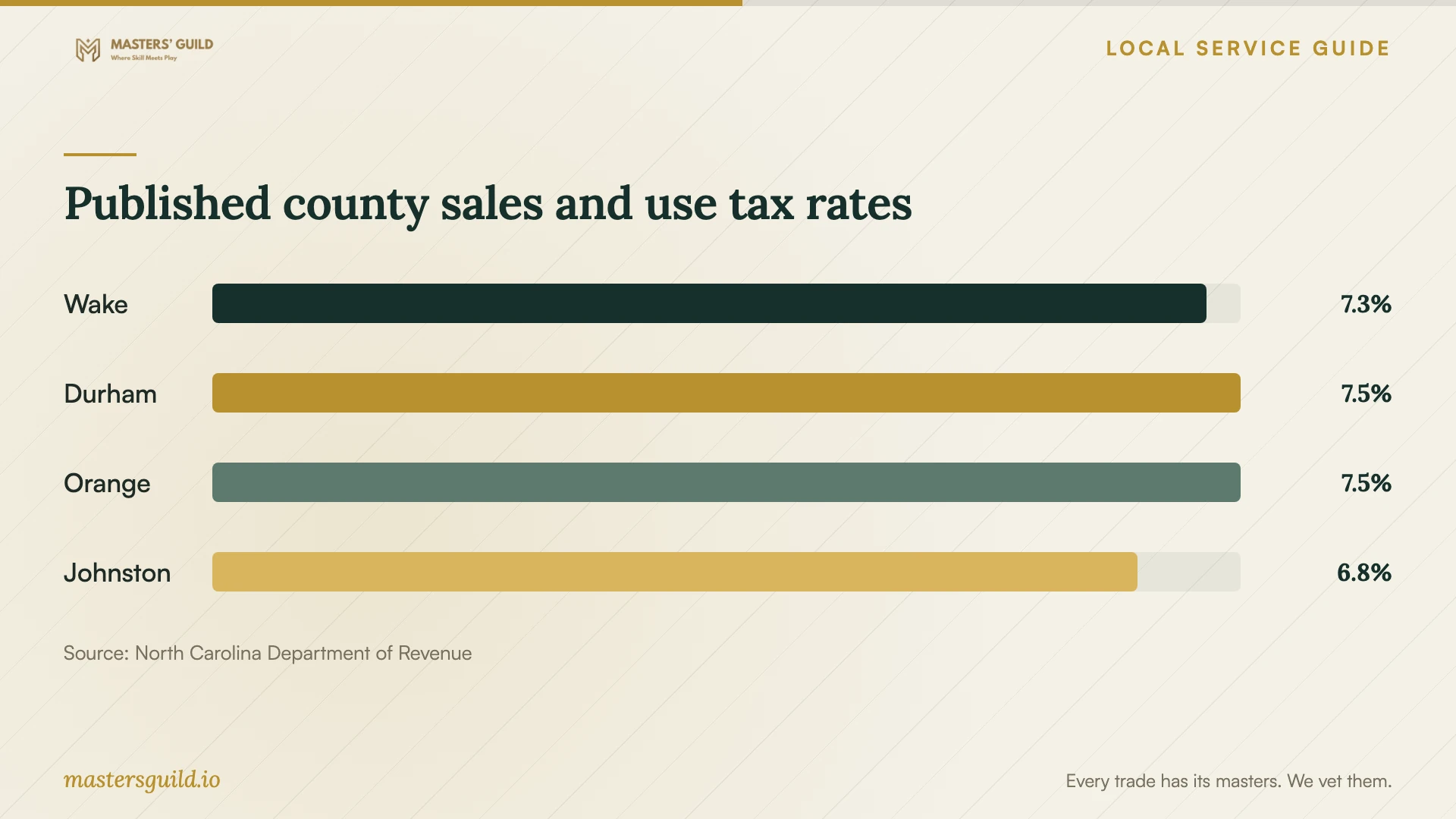
The county-rate chart provides tax context for comparing quotes from providers across the region. It does not establish a malware-removal price. Confirm the applicable county and sourcing with the provider rather than choosing a tax rate from the shop's address alone. [1] [2]
Plan account recovery and the handover
If you gave a tech-support scammer your username and password, NCDOJ advises changing that password right away and changing it on other accounts where you used the same password. Ask the technician to distinguish the device work they will perform from account changes you need to complete yourself. [3]
Before accepting the computer back, ask the technician to explain what they found, what they removed or changed, and what remains unresolved. Check that you can open the files you asked them to preserve and use the programs you need. Request written follow-up terms, including what to do if the same warning returns and whether another diagnostic charge would apply.
Published county sales and use tax rates
Local details that affect your job
Wake County tax belongs in the quote discussion
NCDOR's current county table lists Wake at 7.25%, including the transit tax component. For a service sourced to Wake County that qualifies as taxable repair or troubleshooting, ask the provider to include the applicable tax in your total. Have the provider confirm sourcing and any exemption before you compare that total with a quote from elsewhere in the region. [1] [2]
North Carolina complaint help after a support scam
If your repair search follows a suspected tech-support scam, North Carolina's Department of Justice accepts reports at 1-877-5-NO-SCAM or through its consumer complaint process. Record the caller's details, payment request and access you granted so you can describe the incident. Treat reporting and arranging computer repair as separate next steps. [3]
Choose your next step before authorizing repair
| Your situation | Next step | Question for the technician |
|---|---|---|
| An unexpected pop-up asks you to call | Avoid the displayed number and find trusted support. | Can you assess the warning without using the pop-up's contact details? |
| You suspect a problem and can use the computer | Consider NCDOJ's advice to update security software and run a scan. | What diagnosis do you propose if the concern continues? |
| An unknown caller already had remote access | Disclose the access before agreeing to a cleanup scope. | Will your assessment cover the access I granted? |
| You shared a password | Change that password and any reused copies, as NCDOJ advises. | Which account-recovery steps must I handle myself? |
| You need files preserved before a reinstall | Require a file-preservation plan and approval before erasure. | How will we confirm my requested files are recoverable before proceeding? |
Your hiring checklist
- Write down the symptoms and any contact with an unknown support caller.
- Contact a technician through information you verify yourself.
- Identify important files and tell the technician what backups you have.
- Approve the diagnostic scope and require consent before erasure or reinstall.
- Request an itemized total with applicable tax and a limit on extra charges.
- Agree on remote-access permissions or obtain a drop-off receipt.
- Ask for a written repair summary and check your files before accepting the handover.
Frequently Asked Questions
Can I try a scan before hiring someone?
NCDOJ recommends updating security software and running a scan if you think something is wrong. If you remain concerned, contact trusted support and describe the symptoms and scan results. Ask for diagnosis before approving a reinstall. [3]
Should I give the technician my account passwords?
Ask what access the technician needs and agree on a way for you to enter credentials when required. Set limits on file access and copying. If you already gave a password to a tech-support scammer, follow NCDOJ's advice to change it and any reused copies. [3]
Does the advertised repair price include tax?
Ask the provider. NCDOR describes taxable retail repair and troubleshooting services, subject to exemptions, and lists Wake County's combined rate as 7.25%. Request a written total that identifies applicable tax, diagnostic charges and optional work. [1] [2]
How can I arrange repair without losing my photos?
List the files you need, explain your backup situation and require approval before erasure. Ask the technician to describe the preservation plan and any limitations before work starts. Check the agreed files at handover.
Sources and scope
This guide combines the sources below with practical planning guidance. Figures apply to the stated geography and period; request a written quote for your property.