
Local service guide
Network setup in Phoenix: Plan and Hire
Arrange network setup in Phoenix by asking for a diagnostic visit and a written scope before approving equipment or wall work. Tell the technician which rooms and devices need service, request tests at those locations, and separate router configuration from cable installation and any new electrical work. Phoenix lists electrical updates, rewiring and additions as permit work, so resolve that part of the project before installation. [1]
Define the problem before choosing equipment
Write down where you need reliable service and what you do there: video calls in a home office, streaming in a bedroom, or connecting a printer. Record the affected device, approximate time and symptom. Tell the technician whether you want troubleshooting, replacement equipment, new cable routes or help configuring equipment you already own.
Ask for a diagnosis that compares a wired connection with wireless tests in the rooms you use. Have the technician record the test locations and conditions so you can compare results after the work. Request an explanation of which problem each proposed purchase addresses. Approve additional equipment only after you understand that recommendation.
Check the internet service available at your property
The FCC National Broadband Map lets you search a street address and review providers that report service there, their technologies, and maximum advertised download and upload speeds. Its fixed broadband view covers cable, fiber, DSL, satellite and fixed wireless. Use the address-level result when discussing a new service or an internet-plan change with your technician. [3]
Confirm the offer with the provider before ordering equipment around it. Bring your current plan details and equipment model numbers to the appointment. If a provider cannot supply service that the map reports at your address, the FCC offers an availability challenge process. Keep the provider's response with your records. [3]
For a cellular backup proposal, distinguish outdoor coverage information from a test inside your home. The FCC says its mobile coverage areas describe outdoor or in-vehicle connections and do not show indoor coverage. Ask the installer to demonstrate the proposed backup at its intended indoor location before you accept that part of the job. [3]
Separate configuration, cabling and electrical work
Ask the provider to list each task: configuring existing equipment, mounting access points, routing Ethernet cable, cutting wall openings and adding power. Request a route sketch for cable work and identify who will patch and finish any openings. Get property-owner approval before authorizing changes if you rent.
Phoenix's residential guidance identifies electrical updates, rewiring and additions as projects requiring permits. It does not settle the permit status of a particular Ethernet installation. If your proposal includes in-wall cabling or associated power work, describe the complete scope to Planning and Development and ask which approvals apply before you approve the quote. [1] [2]
Compare quotes by deliverables
Request separate amounts for diagnosis, installation labor, equipment, cable materials, wall repair and follow-up support. Ask whether you can approve the diagnostic visit without committing to the installation. Have the provider state any equipment subscriptions, ongoing support charges and exclusions before you accept.
Give competing providers the same room list and desired outcome. Ask each to identify equipment models, proposed mounting locations, cable endpoints and acceptance tests. For wall work, request proof of insurance and ask who handles any required permits. Compare the whole scope rather than the headline amount.
Agree on testing and handover
Before work starts, agree on the devices and locations you will test together. Include your home office and any room that prompted the service call. Ask the technician to demonstrate your intended tasks, record the results and explain any remaining limits before you sign off.
Request a list of installed equipment, labels for cable endpoints, administrator access and instructions for obtaining follow-up help. Enter passwords yourself where possible. Agree whether the provider may retain remote access, how you can revoke it and whether future assistance carries a charge.
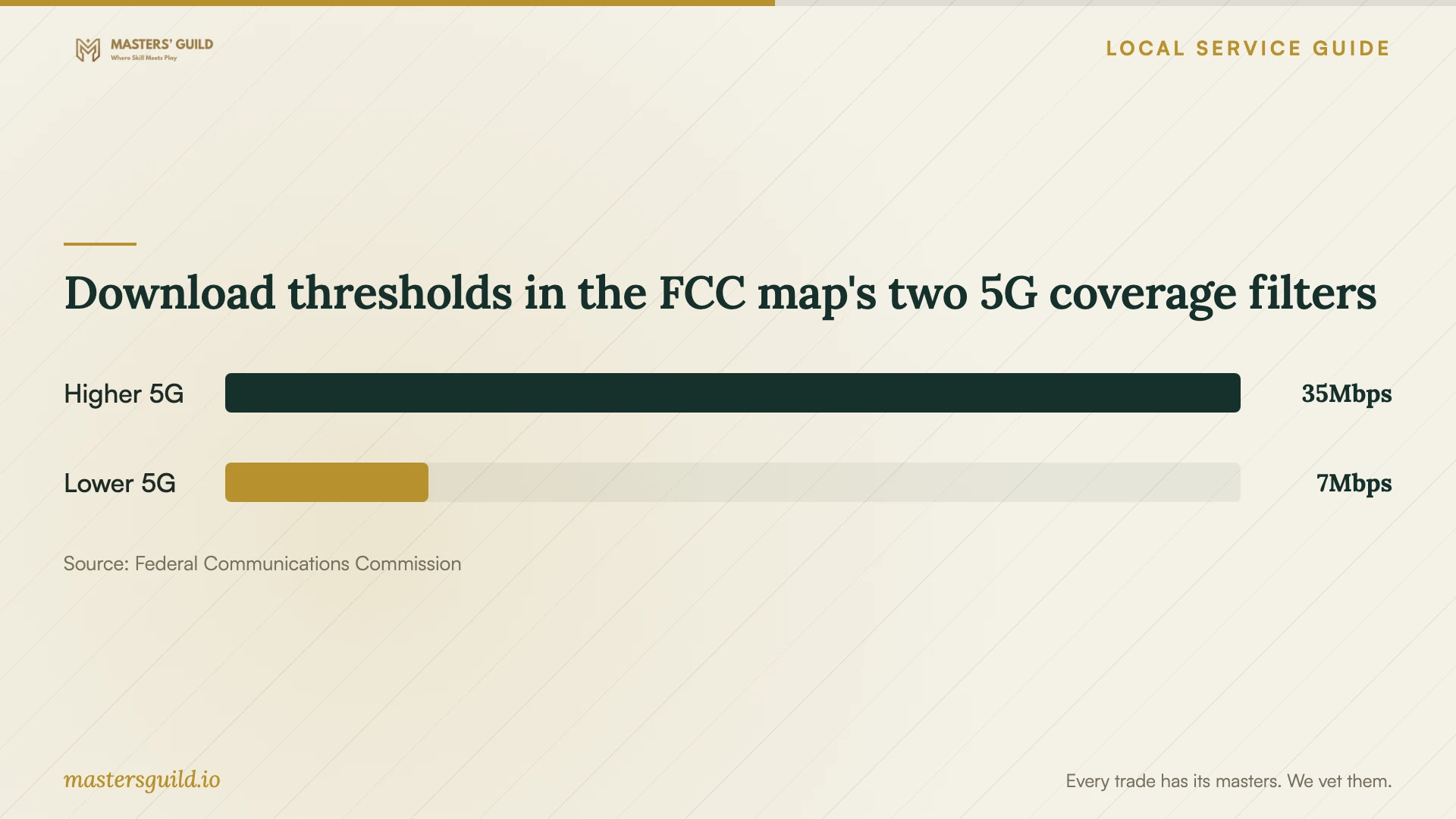
Download thresholds in the FCC map's two 5G coverage filters
Local details that affect your job
Resolve electrical permit scope before booking installation
Phoenix lists electrical updates, rewiring and additions among residential projects requiring permits. If the installer proposes a new outlet or other electrical changes alongside network work, ask for a separate description of that work and confirmation of who will arrange the permit and inspections. Avoid assuming the city's list establishes a blanket permit rule for Ethernet cable. [1]
Send a specific scope question to the residential team
For an unresolved home-installation question, Phoenix lists Residential Building at 602-261-8078 and [email protected]. Send the proposed cable route, wall openings and any power changes, then ask what approval your scope requires. The city also lists a Residential Code Information Line at 602-262-7884. Keep the response with your quote so the installer can price the approved scope. [2]
Choose the next step for your project
| Your situation | Next step | Ask for |
|---|---|---|
| You cannot explain the connection problem | Book diagnosis before approving equipment | Wired and wireless test results at named locations |
| You are considering a different internet provider | Check address-level FCC results and confirm the offer with the provider | Service technology and advertised download and upload speeds |
| The proposal includes new power or electrical changes | Resolve Phoenix permit requirements before installation | A separate electrical scope and responsibility for permits |
| You want Ethernet through finished walls | Ask the city about the specific scope and compare installation proposals | A route sketch, endpoint labels and wall-repair terms |
| You want cellular backup | Request an indoor demonstration at the intended location | A test rather than relying on FCC outdoor mobile coverage alone |
Your hiring checklist
- List the rooms, devices and tasks you want the technician to test.
- Gather your internet-plan details and existing equipment model numbers.
- Ask for a diagnostic quote and a separate installation proposal.
- Request a cable-route sketch and identify who will repair wall openings.
- Resolve scope-specific permit questions before approving building or electrical work.
- Confirm equipment ownership, recurring charges and follow-up terms.
- Agree on acceptance tests and administrator-access handover before work starts.
Frequently Asked Questions
Does every Ethernet installation need a Phoenix permit?
The supplied city residential guidance does not establish that rule. It lists electrical updates, rewiring and additions as permit work. Describe your cable route, wall openings and associated power changes to Residential Building and ask about the specific installation. [1] [2]
Should I buy a mesh kit before hiring someone?
Ask for diagnosis first. Have the technician explain the proposed placement, equipment choices and tests. Request separate quotes for using your current equipment and buying replacements so you can approve the work with a clear scope.
Can the FCC map tell me which provider serves my home?
It displays providers that report service at your address, along with technologies and maximum advertised speeds. Confirm availability with the provider before ordering. The FCC offers an availability challenge if the reported service information is incorrect. [3]
What should I receive before paying for completed work?
Agree in advance on room-by-room demonstrations, recorded test results, cable labels and administrator access. Ask for equipment details and written follow-up terms. Raise any unresolved items during the handover.
Sources and scope
This guide combines the sources below with practical planning guidance. Figures apply to the stated geography and period; request a written quote for your property.