
Local service guide
Technical skills training in Orlando: Plan and hire
For technical skills training in Orlando, start with a task you want to complete: an Excel report, a QuickBooks workflow, a website update or staff onboarding. Compare Orange County Library System's live online software classes with your goal. Request a private trainer's written lesson plan if you want instruction using your own practice files and individual feedback. OCLS offers Excel, QuickBooks, web design and beginner programming classes. [1]
Define the task before choosing an instructor
Describe what you want to do without help after the lesson. For Excel, name the report and calculations. For QuickBooks, identify the workflow you want to practice. For website instruction, specify the update and who will maintain the page. Give prospective instructors a sample with customer and financial information removed.
OCLS provides live, interactive online technology classes from home or the office. Its subjects include Excel, QuickBooks, WordPress, HTML and CSS. Read the class description and ask which level suits your starting skills before choosing a session. [1]
Consider private coaching for a particular workbook, staff workflow or coding project. Ask the instructor to describe how you will practice and how they will check your work. Start with a defined lesson outcome before buying a package. For team training, explain each participant's starting level and ask how the instructor will handle different learning needs.
Compare complete charges
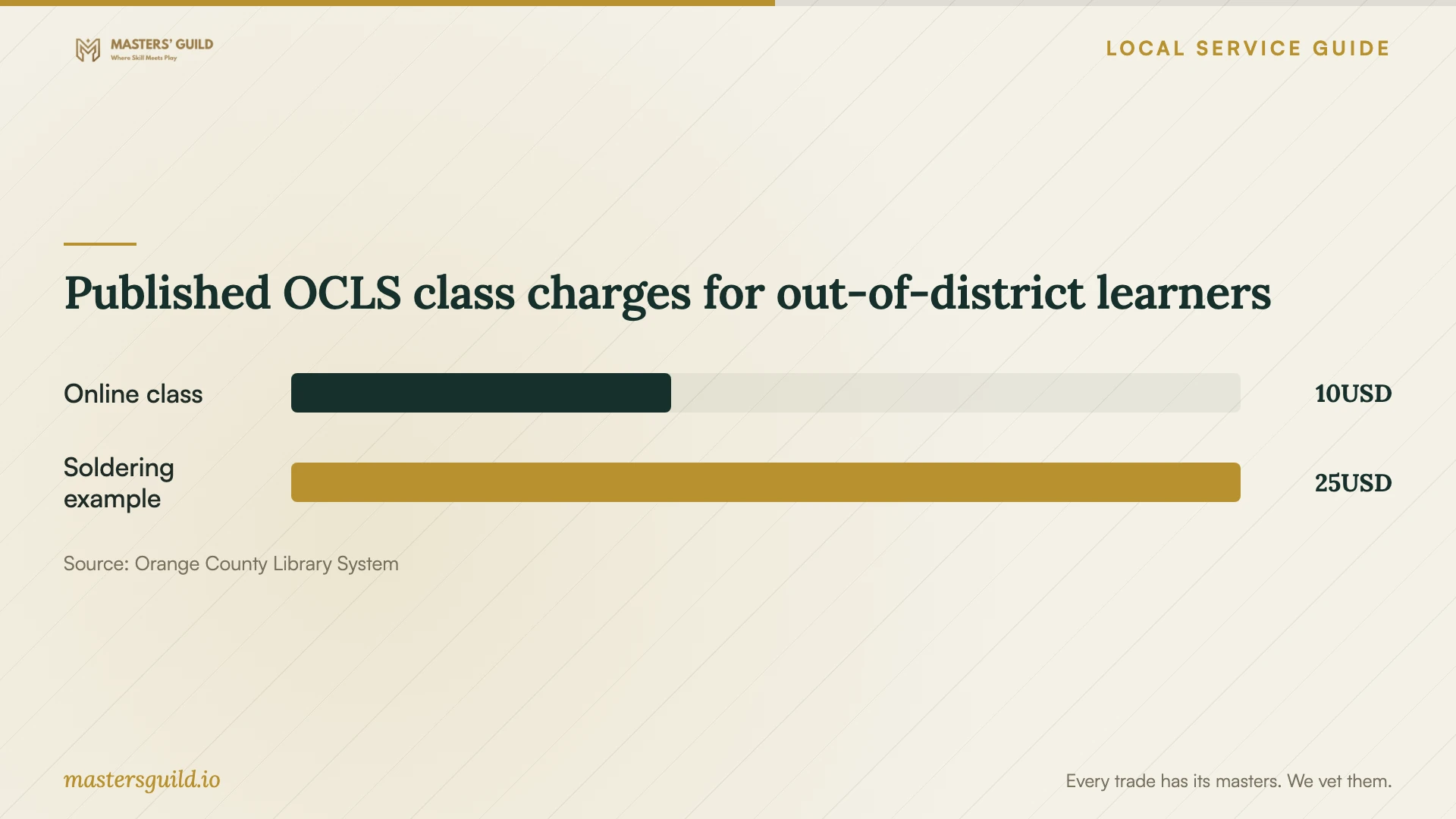
OCLS waives live online class fees for Orange County Library District resident cardholders, fee cardholders and Orange County Property Owner cardholders. Visitors outside the district pay $10 before class time; the library makes that fee nonrefundable. After registration, the library sends a class link. Participants need speakers or a headset for audio. [1]
For in-person technology classes, OCLS says most classes are free to district and fee cardholders, though some carry materials fees. Out-of-district users pay $10 plus applicable materials charges. The library's basic soldering example totals $25, comprising a $10 class fee and $15 materials fee. Confirm the current charge for the specific class before registering. [2]
Request a private instructor's total quote, including teaching time, preparation, travel, software and follow-up. Ask whether they charge per learner or per group. Record cancellation terms and compare proposals for the same task. Use the chart as a reference for the named library options; obtain separate quotes for private instruction.
Arrange equipment access before practice
The Melrose Center asks new users to attend a general orientation; attendees do not need a card for that orientation. Before booking a studio, simulator or Makerspace machine, users must attend an asset-specific orientation and complete an assessment successfully. The center also requires a zero library-account balance for studio or equipment bookings. [3]
For editing workstations, the center lists one free three-hour session per day for Orange County library cardholders and fee cardholders, then $25 for additional sessions. Out-of-district residents with a Melrose Card pay $25 for one three-hour session. Confirm the reservation and whether the center permits your proposed instruction before coordinating a trainer's visit. [3]
For instruction at your office, test the computer, audio and software login before the lesson. Use a practice account or a copy of your files. Keep passwords under your control and agree on remote access and recording permissions. If you also want the instructor to configure a live business system, request a separate description and charge for that work.
Plan career credentials through a separate route
CareerSource Central Florida connects career seekers with training, credentials, apprenticeships and work-based learning across a region that includes Orange, Lake, Osceola, Seminole and Sumter counties. Training applicants attend a required information session, meet a Career Consultant for eligibility review, and complete documentation and assessments. [4]
The agency lists training-request enrollment periods of July through September and January through March. October falls outside those published periods. Ask about the next opening before planning a course start; CareerSource says enrollment periods may close at capacity and its team must confirm program availability. [4]
Read total training cost and maximum covered cost separately. CareerSource's table lists Orange Technical College's Computer Aided Drawing and Modeling program at $5,413.24 total, with a $5,000 maximum covered cost. Ask the consultant to confirm your eligibility and the college to explain any amount you would owe, including expenses outside the listed total. [4]
Published OCLS class charges for out-of-district learners
Local details that affect your job
Confirm library eligibility before paying
OCLS names district resident, fee and Orange County Property Owner cardholders as eligible for free live online classes. Visitors outside the district pay $10 and can register by calling 407.835.7323. Ask the library to confirm your card category rather than using your mailing address as the basis for your budget. [1]
Coordinate Melrose access with the trainer
Complete the required asset-specific orientation and assessment before arranging a lesson that depends on a Melrose studio, simulator or Makerspace machine. Clear any library-account balance before booking equipment. Ask the center about the proposed activity and available reservation before agreeing to the trainer's appointment. [3]
Prepare for the next career-training window
CareerSource's published January through March and July through September request periods exclude October. An Orange County learner considering a credential should ask about the next enrollment announcement and required information session. Discuss eligibility and uncovered costs before paying a course deposit. [4]
Choose instruction for your goal
| Your goal | Route to consider | Confirm before booking |
|---|---|---|
| General Excel, QuickBooks or web design skills | OCLS live online class | Class level, registration, card eligibility and software requirements |
| Practice with your business files | Private task-focused coaching | Teaching plan, data access, total charge and follow-up |
| Hands-on learning such as basic soldering | OCLS in-person technology class | Class fee, materials charge and registration completion |
| Editing or production-equipment practice | Melrose Center resource booking | Applicable orientation, assessment, account balance and venue permission |
| An occupational credential | CareerSource Central Florida training review | Enrollment period, eligibility, availability and uncovered costs |
Your hiring checklist
- Describe the task you want to complete without help.
- List your device, software version and current skill level.
- Compare your goal with a library class description and confirm card eligibility.
- Ask a trainer for a teaching plan and a relevant work example.
- Get the total charge, preparation, follow-up and cancellation terms in writing.
- Prepare practice files with sensitive business information removed.
- Confirm venue permission, equipment access and reservation timing.
- Agree on a final practice task and the notes or files you will keep.
Frequently Asked Questions
Can I learn business software through the library?
OCLS offers live online Excel, QuickBooks and web design classes. Match the description to your goal. For instruction using your business's practice files, ask a private trainer to name the task and expected outcome in the lesson plan. [1]
Do free library classes include materials?
OCLS charges materials fees for some in-person technology classes, including classes with no tuition charge for qualifying cardholders. Out-of-district learners pay $10 plus applicable materials. Check the specific class total before completing registration. [2]
Can I reserve Melrose equipment before completing orientation?
The center requires an asset-specific orientation and successful assessment before booking a studio, simulator or Makerspace machine. Ask which requirements apply to your chosen resource and complete them before coordinating a trainer's visit. [3]
Will CareerSource cover my whole course?
Ask a Career Consultant to determine eligibility and explain coverage. The agency lists maximum covered costs separately from total training costs, with gaps for some programs. Confirm both your individual funding decision and current course availability before enrolling. [4]
Sources and scope
This guide combines the sources below with practical planning guidance. Figures apply to the stated geography and period; request a written quote for your property.