
Local service guide
Smart Appliance Setup in Orlando, FL
Arrange Smart Appliance Setup in Orlando by asking for a written scope covering your appliance models, app pairing, connection checks, scheduling and a hands-on demonstration. Separate those tasks from physical installation or changes to wiring and water connections. For OUC electric customers, ask the provider to review compatible appliance schedules: OUC says most customers will begin DemandLevel billing in November 2026 using October peak demand. [1]
Define the job before comparing offers
Describe the outcome you want: a dishwasher connected to your phone, laundry completion notifications, or help setting compatible delayed starts. Name each appliance and give its model number. Ask the provider to confirm the requested features against the manufacturer's instructions before you book.
Request separate quote lines for device pairing, network troubleshooting, automation setup and physical installation. Ask whether the provider charges a fixed fee or bills for time, what happens if pairing fails, and whether a return visit costs extra. Agree on a spending limit for troubleshooting before the appointment.
Request written quotes for your appliance models, pairing tasks and troubleshooting limit. Compare offers for the same list of tasks, and ask each provider to list travel charges, equipment purchases and ongoing subscription costs, if any. Confirm who approves extra work and how the provider will document that approval.
Prepare accounts and test the connection
Keep the appliance manuals, model numbers and the phone you plan to use within reach. Confirm that you can sign in to the relevant accounts and access recovery messages. Enter passwords yourself during the visit, and use your own email address for account ownership.
Ask the provider to test the connection at the appliance's installed location before proposing new network equipment. Have them explain any proposed router changes and record what they change. Request your approval before they reset a device or replace an existing configuration.
Before the provider leaves, operate the appliance from its controls and demonstrate the app features you requested. Practice changing a schedule, disabling notifications and recovering access. Ask the provider to remove any temporary access they used and leave a short record of completed work and unresolved issues.
Use scheduling to review overlapping loads
OUC distinguishes consumption, your total energy use, from demand, the electricity you draw over a short period. Its DemandLevel guidance recommends spreading out major appliance use, such as waiting to start a dryer until an oven or pool pump is off. OUC customers can review demand and consumption in their myOUC Usage Dashboard. [1]
Ask the setup provider to walk through your cooking and laundry routine. Where the appliance supports scheduling, choose start times that reduce overlap with other large loads. Follow the manufacturer's operating instructions and keep a way to cancel or override the schedule. Request a demonstration of each automation you agree to use.
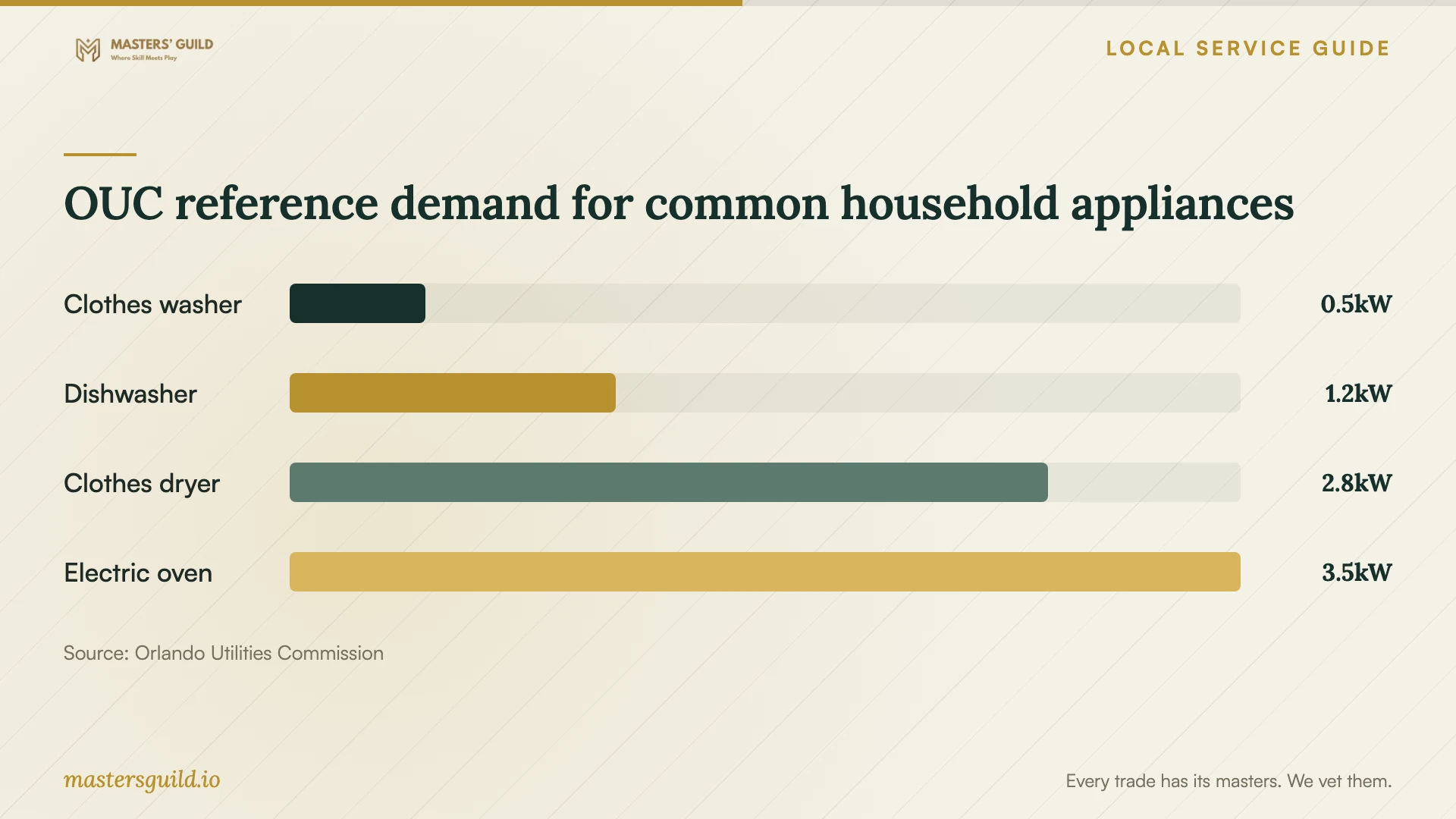
The chart uses OUC's reference appliance assumptions to help you discuss overlapping loads. OUC tells customers to check the appliance label or manual for its actual wattage. These figures do not establish your home's demand tier, your setup fee or a promised bill reduction. [2]
Check thermostat compatibility before purchase
If you include a smart thermostat, confirm HVAC compatibility before buying it or scheduling installation. OUC advises selecting a compatible thermostat and recommends the HVAC manufacturer's thermostat for a high-efficiency system to preserve its performance. [3]
Ask the provider to distinguish thermostat installation from app setup and scheduling. For an OUC rebate application, retain the purchase receipt showing the date, model, brand and cost, proof of ENERGY STAR certification, and a photo of the installed thermostat. OUC also requests an itemized installation invoice when a contractor performs the work. [3]
Resolve installation questions before the visit
If the proposed job includes a new outlet, wiring changes or a changed water connection, pause the booking until you have identified who will perform that work and confirmed the applicable requirements with the property's permitting authority. Ask the provider to state those exclusions or responsibilities in the quote.
For properties within City of Orlando limits, the city offers permit-technician appointments for permit questions and contractor registration or licensing information. Those appointments do not include a plan reviewer or inspector. Describe the proposed work when contacting the city so staff can direct your question. [5]
OUC reference demand for common household appliances
Local details that affect your job
October usage matters for OUC's upcoming billing change
As of October 10, 2026, OUC says most customers will begin DemandLevel with their November 2026 bill, based on October peak demand. Power Pass customers begin the charge with daily October usage. Check which account type you have before asking a setup provider to help review schedules, and use your own demand history to assess the result. [1]
Keep OUC thermostat rebate documents
OUC requires receipts or invoices dated and submitted within six months of purchase. Residential customers may submit up to two eligible devices per property address for consideration; OUC reviews additional devices case by case. Water-only customers do not qualify. Confirm your eligibility before treating the rebate as part of your budget; OUC pays approved rebates as a bill credit. [3]
Confirm the municipality before calling permitting
The city warns that an Orlando address may belong to unincorporated Orange County or another nearby city. Use its address checker first. For eligible city properties, contact Permitting Services at 407.246.2271 to ask about the appointment route for permit or contractor-registration questions. [4] [5]
Choose the next step for your setup
| Your situation | Next step | Confirm before booking |
|---|---|---|
| Installed appliance needs app pairing | Request a device-setup quote | Supported features, account ownership and completion test |
| Connection fails at the appliance | Include network troubleshooting in the scope | Spending limit and approval before network changes |
| OUC customer wants to review appliance overlap | Request compatible scheduling and review your Usage Dashboard | Your routine and the features your appliance supports |
| Smart thermostat purchase | Check HVAC compatibility and OUC rebate eligibility | Certified model, required records and submission deadline |
| Quote includes wiring or connection changes | Confirm municipality and consult the permitting authority | Who performs the installation and handles applicable requirements |
Your hiring checklist
- Send the appliance models and a list of requested app features.
- Separate pairing and scheduling from physical installation in the quote.
- Confirm the fee structure, troubleshooting limit and return-visit terms.
- Prepare account access, manuals and recovery details; enter passwords yourself.
- Ask for approval before device resets, network changes or equipment purchases.
- Test requested controls, notifications and schedules before the provider leaves.
- Retain receipts and installation records if you plan to seek a rebate.
Frequently Asked Questions
How much should I budget for setup?
Request written quotes for your appliance models, pairing tasks and troubleshooting limit. Compare the pairing fee, troubleshooting allowance, equipment costs and return-visit terms across offers. Ask the provider to get your approval before exceeding the agreed scope or spending limit.
Will appliance scheduling lower my OUC bill?
OUC recommends staggering major appliances to reduce peak demand. The effect on your bill depends on your usage patterns, and your DemandLevel tier resets each billing cycle. Review your Usage Dashboard and follow the appliance instructions when choosing schedules. [1]
Can I claim an OUC rebate for any smart thermostat?
OUC requires an ENERGY STAR-certified model and excludes water-only customers. The rebate covers the purchase cost up to $50 per device, subject to approval. Submit the required records within six months of purchase and confirm HVAC compatibility before buying. [3]
Who should I ask about permits if installation work is included?
Check your property's municipality first. An Orlando mailing address does not establish city jurisdiction. For a property within city limits, Orlando offers appointments for permit questions and contractor registration or licensing information; these appointments do not include an inspector or plan reviewer. [4] [5]
Sources and scope
This guide combines the sources below with practical planning guidance. Figures apply to the stated geography and period; request a written quote for your property.