
Local service guide
Cloud Service Setup in New Orleans: Hiring Guide
For Cloud Service Setup in New Orleans, hire a technician who will document the files and devices covered, complete the initial backup, demonstrate a restore and leave your business in control of its accounts. Request a written scope that separates setup labor from subscriptions and follow-up support. Include an evacuation access test: NOLA Ready identifies flooding, power outages and possible mandatory evacuation as hurricane concerns. [1]
Define the job before requesting offers
Describe what you need to recover: invoices, customer records, photographs, shared documents or files from a particular computer. List the devices, users and existing accounts. Ask the technician to identify which folders and applications the proposed service will cover, which it will exclude and how you will recover an earlier file version.
Request separate deliverables for moving existing files, configuring shared access and setting up backups. Ask the technician to explain what happens after a user deletes or changes a file. Have them demonstrate recovery with a disposable test file before you approve the arrangement.
Choose remote or on-site help around the work you need. For remote service, agree on how you will supervise access and end the session. For an on-site visit, list any drives or computers the technician must inspect. Ask them to state which tasks require your presence.
Compare quotes by scope and completion
Obtain written offers for your file inventory, devices and required support. Ask each provider to quote the same scope, with separate amounts for labor, recurring subscriptions, equipment and optional support. Include any return visit or follow-up needed to verify the initial upload.
Require a completion record that names the protected folders, backup schedule, account owner and restore procedure. Ask how the provider will handle skipped files, duplicate copies and upload failures. Agree on who checks the first completed backup and whether that check falls within the quoted fee.
Ask the technician to explain their experience with your chosen platform and show how they document a restore test. Request a plain-language handover that you or an employee can follow without calling them. Keep the original files until you have checked the transferred copies and accepted the work.
Arrange secure access and recovery
Create the account under a business-controlled email address and pay the subscription through your own billing account. Ask the technician to explain the available sign-in protections and recovery options. Enter credentials yourself where possible, and approve temporary access with a defined removal date.
CISA advises backing up data before starting encryption and storing recovery keys and passwords through a safe method. Losing that information can cause permanent data loss. Ask the technician to show you where your recovery information lives and how an authorized colleague can retrieve it if you are unavailable. [3]
If you include an external-drive backup, assign someone to update it and store it in a safe place. CISA advises disconnecting the drive when you are not backing up because ransomware could use the connection to delete or corrupt backups. [3]
Test business access before storm disruption
NOLA Ready identifies June 1 through November 30 as hurricane season and warns of flooding and power outages. It also states that residents and visitors must leave when the City orders a mandatory evacuation. Include off-site file access in your preparation rather than leaving the first recovery attempt until an evacuation. [1]
Before accepting the setup, sign in from a device you would take with you and open a representative business document. Ask the technician to help you prepare an offline copy of essential contact and recovery instructions. Assign a colleague to test their own authorized access, then record any tasks that still depend on equipment at the premises.
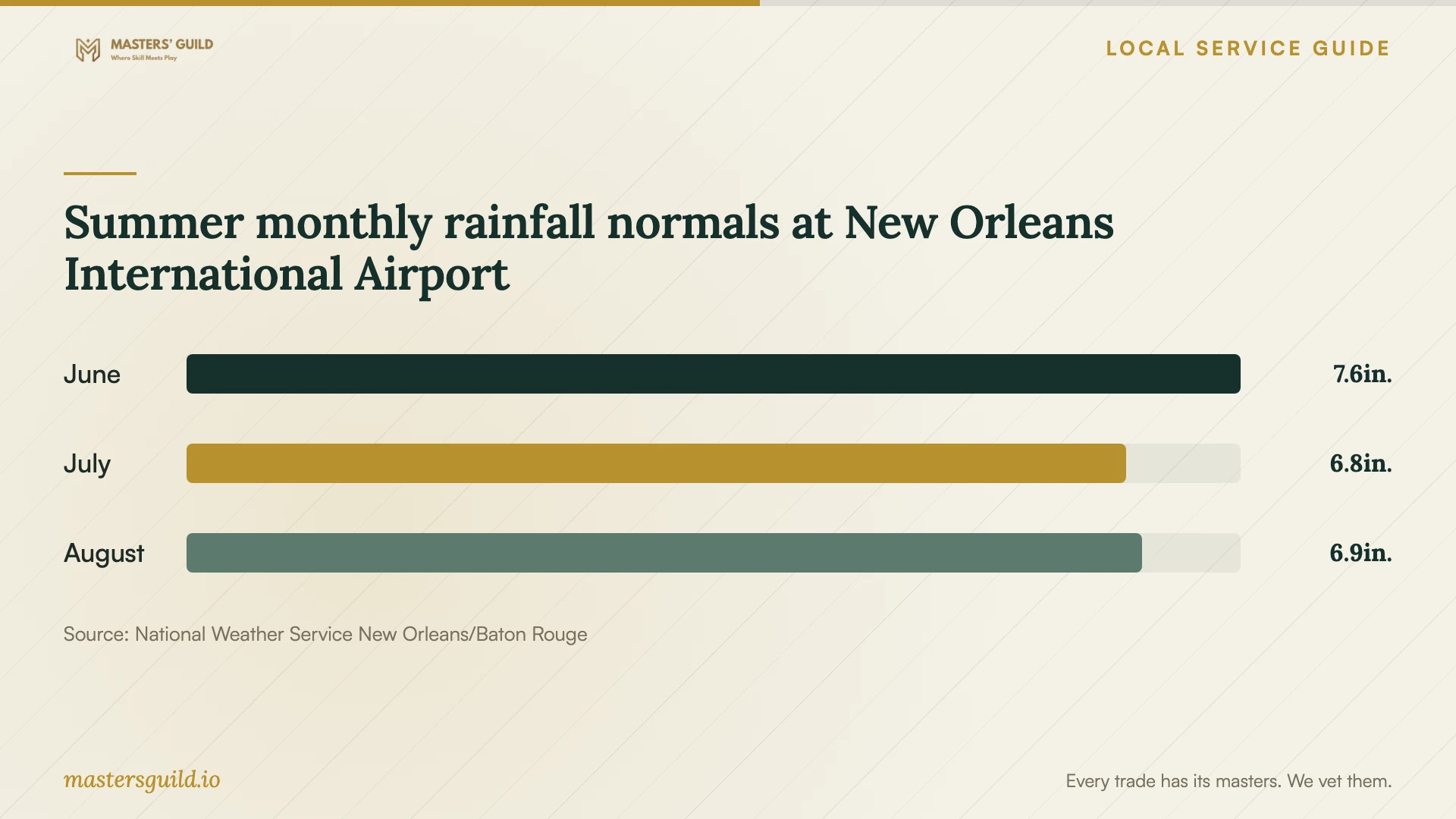
The National Weather Service publishes monthly precipitation normals for New Orleans International Airport. The chart provides historical rainfall context alongside the City's flood and outage guidance. Use it as a prompt to discuss off-site recovery with your technician, rather than as a forecast or an assessment of your address. [1] [4]
Summer monthly rainfall normals at New Orleans International Airport
Local details that affect your job
Plan around the City's business reentry process
NOLA Ready says businesses need a valid reentry placard to enter before the general public after a mandatory evacuation. Businesses must register each year through the City's One Stop App by selecting POST-EVACUATION Business Reentry, and the City assigns a tier. Include remote document access in the setup so your recovery plan does not depend on returning to retrieve a computer. Review your reentry registration as a separate preparedness task. [1]
Include Louisiana personal-information duties
Louisiana R.S. 51:3074 requires covered businesses and data owners or licensees to maintain reasonable security practices appropriate to the personal information they hold. It also requires reasonable steps to make personal-information records unreadable when they no longer need retention. For a local shop or office migrating such records, ask the technician to document access permissions and temporary-copy removal. Have the person responsible for your records approve retention decisions before anyone deletes data. [2]
Choose the scope to request
| Your priority | Ask the provider to include | Acceptance check |
|---|---|---|
| Recover business documents | Named folders, backup schedule and a written restore procedure | Restore a test file and open it |
| Move an existing file collection | An inventory, exception report and plan for preserving originals | Compare representative originals with transferred copies |
| Share files with employees | An owner-approved permissions list and access-removal procedure | Test each role with a disposable folder |
| Work away from the premises | An off-site sign-in test and offline recovery instructions | Open a business document from your evacuation device |
| Handle personal-information records | Owner-approved security, retention and temporary-copy removal instructions | Approve the access list and written data-handling record |
Your hiring checklist
- List devices, users, data volume and the folders or applications you need to recover.
- Identify the business account owner and the person who will approve technician access.
- Request separate quote lines for labor, subscriptions, equipment and follow-up checks.
- Agree on a method for handling incomplete uploads and migration errors.
- Watch the technician restore a disposable test file and record the steps.
- Test authorized access from a device you would take during an evacuation.
- Store recovery instructions and approve removal of technician access and temporary copies.
Frequently Asked Questions
Can I arrange the setup myself?
Consider doing it yourself if you can identify the files to protect, manage account recovery and demonstrate a restore. Hire help when you need a documented migration, employee permissions or assistance testing recovery. Ask for a defined setup job before committing to ongoing support.
What should I ask about the monthly subscription?
Request the subscription price, billing owner, storage allowance, renewal terms and any separate backup or support charges in writing. Ask the provider to identify the plan they propose and explain how you would export your files or end the service.
Should I keep an external backup as well?
Discuss an external copy of essential files as part of your recovery plan. CISA recommends secure external-drive or vetted cloud backups and advises disconnecting an external drive when you are not backing up. Assign someone to maintain the copy and safeguard its recovery information. [3]
What proves the technician has finished?
Require evidence that the agreed files completed their initial backup, a restore demonstration and a handover you can follow. Review unresolved errors before accepting the work. Confirm that you control billing and recovery, and that the technician has removed access you no longer authorize.
Sources and scope
This guide combines the sources below with practical planning guidance. Figures apply to the stated geography and period; request a written quote for your property.