
Local service guide
Data Recovery and Backup in Moncton, NB
For Data Recovery and Backup in Moncton, choose a provider after listing the files you need and checking whether you have a usable backup. Request a written assessment, a spending limit and file-handling terms before approving recovery work. For ongoing backups, ask the provider to demonstrate a restore and name who checks failures. The Canadian Centre for Cyber Security recommends offsite copies, offline backups and routine recovery testing. [3]
Describe the files you need before handing over equipment
Give prospective providers a short account of the problem: the device involved, when you last opened the files, error messages and any repair attempts. List the folders you need first, such as invoices, appointment records or unfinished client work. Request an assessment before trying further repairs or recovery software.
Find out whether the provider will work at its own premises or send the device elsewhere. Request the receiving business's name, shipping arrangements and a receipt for each handover. Identify who may approve additional work and keep the device description with your job records.
Agree on how you will inspect the results. Have the provider show that your priority files open and contain the information you need. Specify the delivery method, return of the original device and proposed deletion of working copies. Have the person responsible for your records approve deletion instructions.
Approve recovery costs in stages
Request separate charges for assessment, recovery, return media, shipping and urgent work. Ask what you owe if you decline the quote or the provider cannot recover your priority files. If it offers no-recovery, no-fee terms, request a written explanation of any charges that still apply.
Set a spending limit and require approval before the provider exceeds it. Agree on an assessment date and expected delivery date, then ask what could change them. Compare providers using the same file list, device description and acceptance criteria.
For ongoing backups, request setup and recurring charges, storage limits, restore charges and cancellation terms. Ask for export instructions and an account-access handover plan. Keep those instructions somewhere you can reach without the affected computer.
Choose backup copies and watch a test restore
The Cyber Centre recommends the 3-2-1 rule: three copies of your information, including the original, on two different media types, with one copy offsite. It also recommends an offline backup. Ask the provider to identify each copy and explain how it will keep the offline copy disconnected from your systems. [3]
Choose backup frequency by deciding how much recent work you could afford to recreate. List the computers, shared folders and applications you want covered. Identify the files you would need to reopen your shop or office, and name the person who will receive failure alerts and arrange corrections.
Require a test restore before accepting the setup. Have the provider restore selected files to a separate destination, open them with you and record the steps and time taken. The Cyber Centre recommends routine recovery testing, sensitive-data encryption, and strong passwords or passphrases with multi-factor authentication for cloud backup storage. [3]
Ask where the provider will store your files and where staff can access them. The Cyber Centre advises organizations to consider data residency and states that they retain legal responsibility for protecting their data when using cloud services. Have your privacy adviser review the proposed arrangement for your business. [3]
Plan equipment placement and outage procedures
Moncton's emergency guidance advises residents to keep important items and documents out of basements and off ground-level floors, and to keep important document copies offsite. Apply those precautions to office backup equipment: choose storage above floor level and arrange a copy away from the premises. [1]
During outages, the City advises turning off electronic equipment because a surge when electricity returns can damage electronics. Ask your provider to write shutdown and restart instructions for your computers and backup equipment. Assign someone to check the next backup after power returns. [1]
Use national incident figures as planning context
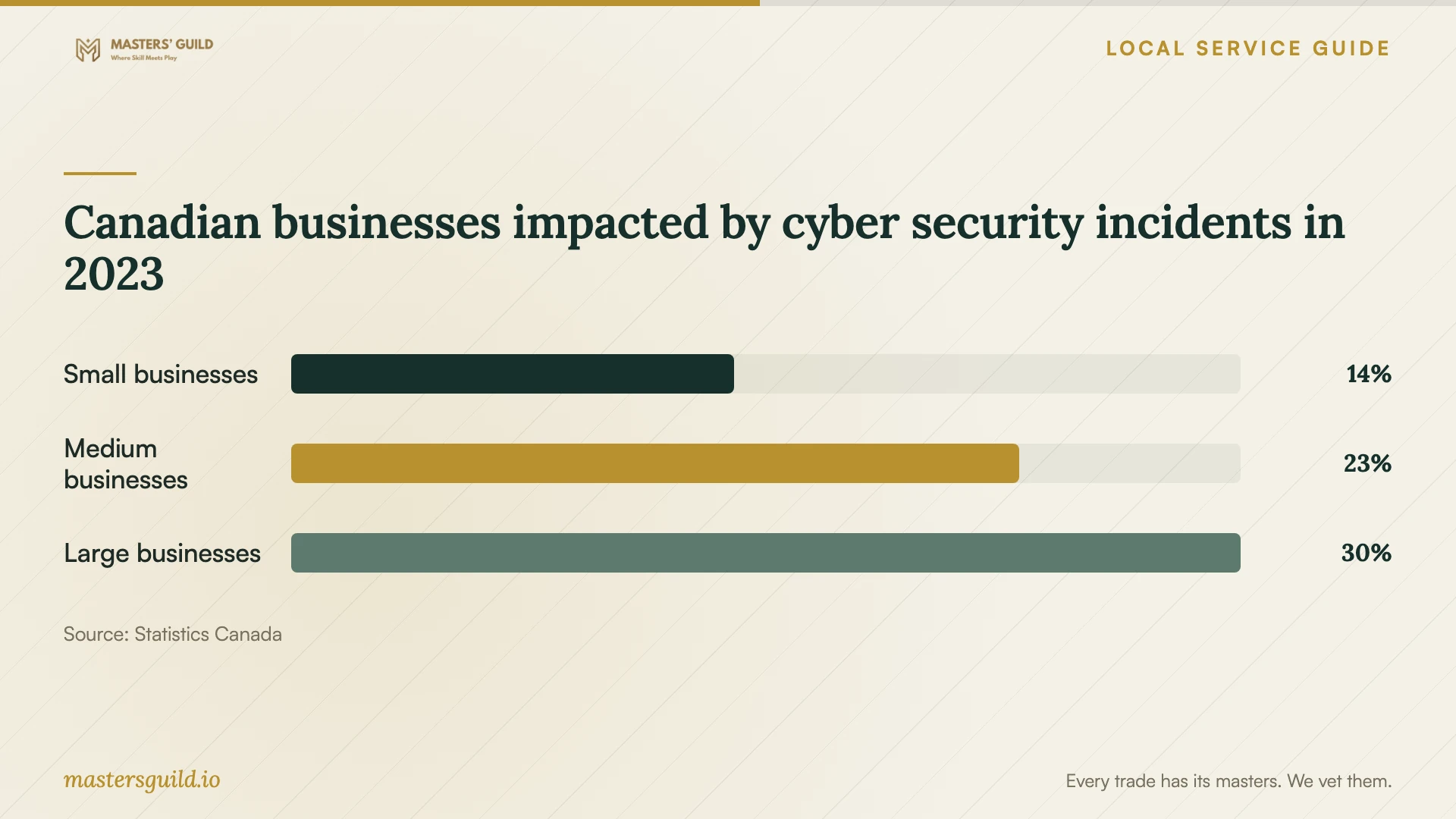
Statistics Canada reported that 14% of small businesses, 23% of medium-sized businesses and 30% of large businesses experienced impactful cyber security incidents in 2023. Its survey defined small businesses as enterprises with 10 to 49 employees. These Canadian results cover most sectors, excluding public administration, and exclude firms with fewer than 10 employees. [4] [5]
Use the chart to discuss recovery priorities with your provider. It does not establish Moncton incident rates or your business's chance of losing files. The Cyber Centre explains that backups can help restore systems and information but cannot prevent an attacker from selling or leaking stolen data. Ask whom you should contact if someone accesses business records without permission. [3] [4] [5]
Canadian businesses impacted by cyber security incidents in 2023
Local details that affect your job
Flooded basements: call NB Power before equipment retrieval
Moncton's flood guidance directs readers to contact NB Power before removing water or shutting off electricity in a flooded basement. The City lists 1-800-442-4424 for outages and 1-800-663-6272 for other electricity-related problems. Before arranging collection of water-exposed drives, obtain electrical safety guidance and ask the recovery provider how to handle and transport them. Keep staff out of the affected area while you arrange that guidance. [1]
New Brunswick health practices: confirm agreement requirements
The published consolidation of New Brunswick's Personal Health Information Privacy and Access Act is dated January 1, 2024. In that consolidation, section 52 sets out written-agreement requirements for custodians engaging agents or providing personal health information to information managers in the circumstances described. For a Moncton health practice, use this as a reason to consult your privacy adviser before sharing patient-data drives or arranging backups. Ask the adviser to confirm current legislation, applicable regulations and your practice's obligations. Review authorized access, subcontractors, protection, retention and secure destruction with the proposed provider before handover. [2]
Choose the next step for your situation
| Situation | Next step | Ask before approving |
|---|---|---|
| You have a recent backup | Request a test restore to a separate destination. | Does it contain the files you need, and can you open them? |
| You have no usable backup | Request a recovery assessment with a spending limit. | Which files will you inspect, and what fees apply if recovery fails? |
| Equipment is in a flooded basement | Follow Moncton's instruction to contact NB Power before water removal or electrical shutdown. | After electrical safety guidance, how should you handle and transport the device? |
| You need ongoing backups | Arrange offsite and offline copies, then test recovery. | Who checks failures, restores files and controls account access? |
| Your health practice will share patient records | Ask your privacy adviser to confirm current agreement requirements before access. | How should the agreement address access, subcontractors, retention and destruction? |
Your hiring checklist
- Write down the device details, what happened and the files you need first.
- Identify your last backup and request a test restore to a separate destination.
- Get assessment charges and unsuccessful-recovery terms in writing.
- Confirm work locations, onward shipment and who may access your files.
- Set a spending limit and agree on how you will inspect recovered files.
- List backup coverage, frequency, offsite storage and offline arrangements.
- Watch a restore test and assign responsibility for alerts and repeat tests.
- Agree on equipment return, working-copy deletion and backup export instructions.
Frequently Asked Questions
Should I request recovery or restore a backup first?
Ask the provider to check whether your backup contains usable copies of your priority files. Request a restore to a separate destination and inspect the contents before approving further work on the affected device. Agree on the checks and charges beforehand.
Can I keep all my backups at the office?
The Cyber Centre recommends an offsite copy because fire or flooding can affect an entire facility. It also recommends an offline backup to protect against many network threats. Ask your provider to explain how it will arrange both and demonstrate a restore. [3]
What should a health practice check before sharing a drive?
Ask your privacy adviser to confirm current legislation and agreement regulations for the proposed service. The January 1, 2024 consolidation of New Brunswick's health-information privacy law includes written-agreement provisions in section 52. That dated consolidation alone does not establish today's requirements. Resolve access, protection, retention and destruction terms before handing over patient records. [2]
How should I compare recovery quotes?
Give each provider the same account of the problem and list of required files. Compare assessment fees, spending limits, delivery arrangements and unsuccessful-recovery charges. Ask how you can inspect the results before accepting the work.
Sources and scope
This guide combines the sources below with practical planning guidance. Figures apply to the stated geography and period; request a written quote for your property.