
Local service guide
Computer Virus Removal in Mobile, AL
For Computer Virus Removal in Mobile, choose a technician who explains the proposed diagnosis and gives you a clear repair plan. Request a written quote for your device, symptoms, and file-preservation needs. Before handing over the computer, agree on access, approval before erasure, and a collection date.
Choose a repair contact you can verify
Use contact details you have checked to arrange help. Avoid granting remote access through an unsolicited call or warning message. Tell the technician what you saw, which application you were using, and what happened next. Describe symptoms without assuming that a slow computer or unfamiliar message proves an infection.
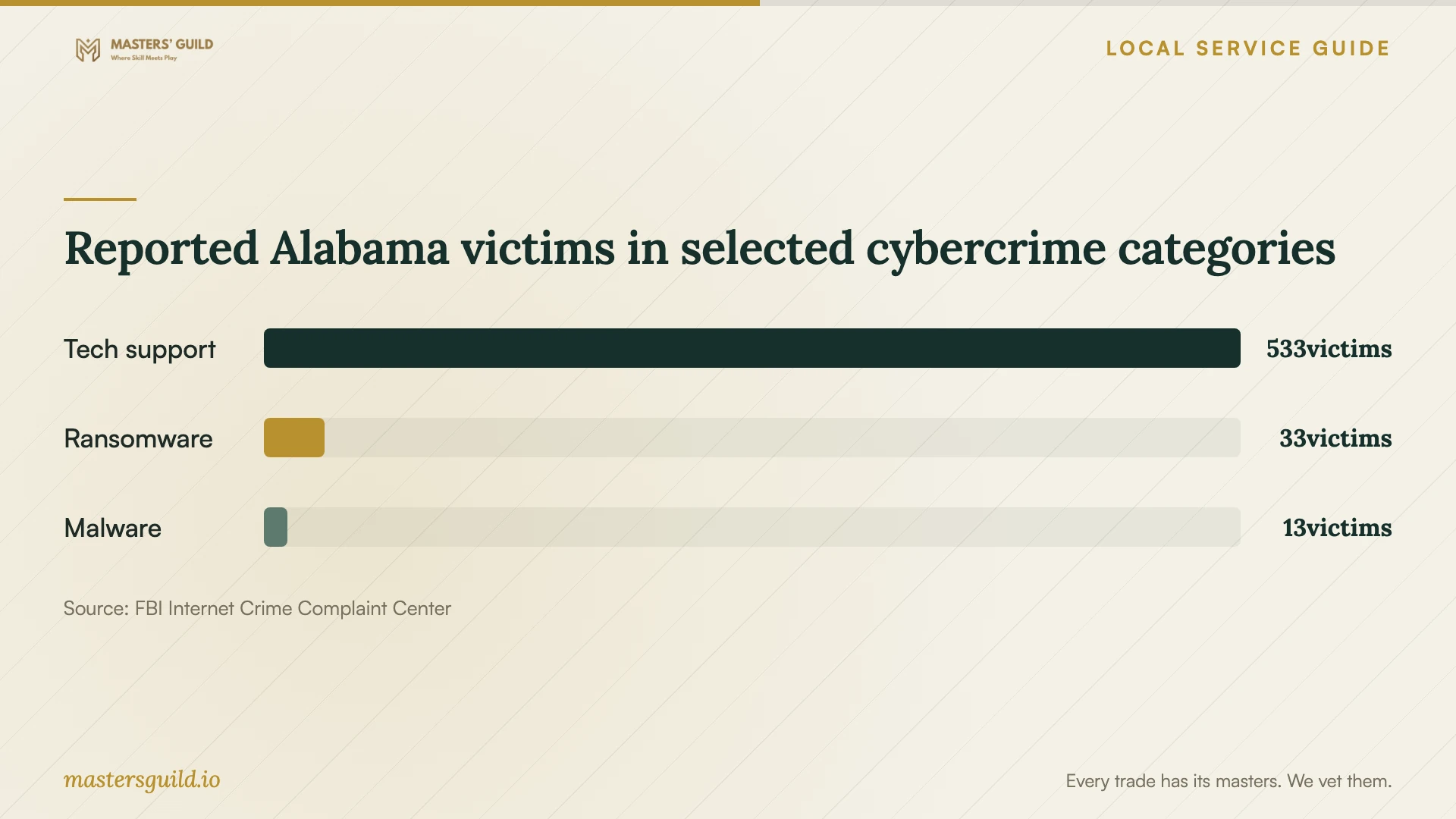
The FBI Internet Crime Complaint Center's 2025 Alabama report lists 533 tech-support victims and $19,932,083 in reported victim losses. These statewide figures give a reason to scrutinize requests for access or payment. They do not measure the quality of repair providers in Mobile. [4]
If you paid an unknown caller or shared financial credentials, contact your financial institution using a trusted number. Keep receipts and messages. Give your chosen technician the names of any applications the caller asked you to install, and include a review of that access in the appointment.
Define the work and protect private information
Have the technician distinguish malware cleanup from operating-system reinstallation, file recovery, and hardware replacement. Decide which additional tasks need a separate approval. Write down the folders, photographs, documents, and application data you need to keep, along with the location of any existing backup.
Discuss how the technician will handle temporary copies of your files, who can access them, and when the provider will delete them. If the technician proposes a reset or reinstallation, settle the backup destination and the applications to restore before authorizing that work.
Keep banking and email passwords out of job notes. Discuss whether you can enter the device login yourself or provide a temporary account. If you use device encryption, agree on a way to provide required recovery access without attaching credentials to the computer. Handle account password changes from a device you trust.
Compare costs and appointment arrangements
Request a written quote for your device, symptoms, and file-preservation needs. Check the diagnostic fee, whether the provider credits it toward repair, and any charges for travel, backup, or follow-up. Set a spending limit so the technician knows when to stop and discuss the next option.
Alabama's Department of Revenue exempts repair or installation labor from sales tax when the seller lists it as a separate invoice item. The department also states that local sales-tax rates vary. For a repair involving replacement parts, request separate labor and parts lines and an explanation of the tax calculation. Ask the provider to explain software charges rather than assuming they receive the same treatment as repair labor. [1]
Choose an appointment format that you can manage. For drop-off, settle the collection location and how the provider will contact you during the work. For a home visit, agree on an arrival window and prepare a workspace. For remote service, have the provider explain how you will verify the technician and end the session.
Check the result before taking the computer home
At handover, review the technician's record of what they found, changed, and could not resolve. Start the computer, open your usual applications, and check the files named in your repair plan. Have the technician explain remaining warnings and any changes to security settings. Keep the receipt and the instructions for reporting a recurring symptom.
If the technician recommends replacement, compare restoring the current computer with preparing another device for your files and applications. Include data transfer and old-drive handling in that discussion. Arrange data erasure before recycling, and keep a record of the work the technician completed.
Reported Alabama victims in selected cybercrime categories
Local details that affect your job
Arrange temporary computer access at Ben May Main Library
The Connection Center occupies the second floor of Ben May Main Library at 701 Government Street. Mobile Public Library lists public computers and in-library laptops for business or career work. It also offers Chromebooks and hotspots for 14-day take-home loans through the first-floor service desk. Before scheduling a drop-off repair, call the Connection Center at (251) 340-1536 to check availability and borrowing requirements. Plan essential paperwork or job applications around the access staff confirm. [2]
Use the residential recycling program only if eligible
The City of Mobile accepts household computers, components, and accessories at 4851 Museum Drive, 308 Pinehill Drive, and 1750 Dauphin Island Parkway. The free drop-off program serves City of Mobile residents; staff may request proof of residence. The city excludes business electronics and televisions. If you replace your computer, check current hours through 311 or (251) 208-5311 before traveling. Ask your technician to complete the old-drive arrangements before you take the equipment to a center. [3]
Match the appointment to your situation
| Your situation | Next step | Point to settle |
|---|---|---|
| The computer starts, but unfamiliar warnings appear | Arrange diagnosis and describe the messages | What does the technician need to inspect before recommending work? |
| An unknown caller controlled the computer | Include a review of remote-access applications | Which access will the technician review and remove? |
| You need computer access during repair | Check public computer access or equipment loans at Ben May Main Library | What is available for your intended use? |
| You plan to replace the computer | Compare setup and transfer work with restoration | Who will handle the old drive? |
| You want to use city electronics recycling | Confirm residential eligibility and a drop-off location | Can you provide proof of City of Mobile residence if requested? |
Your hiring checklist
- Record the symptoms and photograph warning messages without exposing private details.
- Bring the charger and identify any accessories the technician should test.
- Tell the technician about remote access or software an unknown caller requested.
- Prepare your file list and locate any existing backup.
- Check appointment arrangements and temporary computer access.
- Keep the repair record, receipt, and follow-up contact details.
Frequently Asked Questions
How should I budget for the appointment?
Request a written quote for your device, symptoms, and file-preservation needs. Compare the total proposed work across providers and check which charges apply if you decline repair after diagnosis.
Does a warning message prove that my computer has a virus?
Treat the message as something to investigate. Record its wording and where it appeared, then let your chosen technician inspect the device. Avoid using contact details within the warning to arrange help.
What should I do if the same symptom returns?
Record when it returned and what you were doing. Contact the provider through the details on your receipt, describe the symptom, and check the agreed follow-up terms before approving another charge.
Can I take a business computer to the city's recycling centers?
The city excludes business electronics from its residential drop-off service. Its recycling page directs businesses with larger quantities to arrange commercial pickup through Ransom Recycling. Confirm acceptance and data-handling arrangements before disposal. [3]
Sources and scope
This guide combines the sources below with practical planning guidance. Figures apply to the stated geography and period; request a written quote for your property.