
Local service guide
Minneapolis data recovery and backup planning
For data recovery and backup in Minneapolis, hire a provider who will assess your device, itemize the work, explain who handles your records, and demonstrate a restore before you accept the result. Identify whether you need missing files recovered, equipment assessed, or ransomware response. For suspected ransomware, CISA recommends isolating affected systems and prioritizing restoration on a clean network. Request incident-response expertise alongside recovery work. [1]
Define the recovery job before handing over equipment
Give the technician a short account of the problem: missing folders, an unreadable external drive, a damaged laptop, or a ransom message. Record the device model, priority files, last usable backup, and attempted fixes. Ask for an explanation of the assessment and obtain your approval terms before authorizing changes to the original device.
Name the business function you need to resume. You might prioritize sales records over archived photographs, or need an accounting application and its database restored together. Ask the provider to identify these dependencies. CISA recommends prioritizing recovery around critical services and the systems they depend on. [1]
Request an intake receipt identifying each device and accessory. Agree on pickup, shipping, or drop-off, and ask whether the receiving technician will perform the work or transfer it to a laboratory. Keep a named contact and an agreed update schedule.
Compare device-specific quotes and acceptance terms
Request a device-specific assessment and itemized quote. Ask bidders to separate diagnosis, recovery labor, replacement storage, transport, and backup setup. Have each provider state cancellation charges, rush charges, and what you owe if you decline recovery after diagnosis. Set a spending limit and require approval before extra work.
Define success through the files and functions you need. Agree on a recovered-file list and checks of representative documents before acceptance. For business software, involve the person who uses it in a functional test. Clarify whether the price covers file delivery, software installation, or both.
Ask for an assessment date before agreeing to a completion deadline. Discuss a temporary working arrangement while the technician examines the equipment. Put the scope, payment milestones, and handling of partial recovery in writing so you can compare offers on the same basis.
Agree on privacy and incident escalation
Ask who can view your records, where the provider stores working copies, and which subcontractors receive them. Include confidentiality, access limits, retention, deletion, and incident contacts in the agreement. CISA recommends contractual security requirements and restricting third-party access to systems within their responsibilities. [1]
The 2025 edition of Minnesota Statutes section 325E.61 addresses notification after qualifying unauthorized acquisition of covered personal information. It includes a custodian-to-owner notification provision, a law-enforcement delay provision, and a financial-institution exemption. Have counsel verify amendments and applicable requirements before relying on that edition for a present incident. [3]
For suspected ransomware, disconnect affected systems from the network and contact your incident-response lead. CISA recommends powering down only when network disconnection is impossible, because shutdown loses potential evidence in memory. Ask the response specialist to coordinate evidence preservation and rebuilding before the recovery technician restores business operations. [1]
Require a backup restore you can verify
Specify the folders, applications, and accounts the backup service must cover. Tell the provider how much recent work you could afford to lose and how long you could operate without access. Use those limits to agree on backup frequency, retention, restoration priorities, and responsibility for failed jobs.
CISA recommends offline, encrypted backups of critical data and regular disaster-recovery tests. Ask the technician to restore into a separate test location, open representative files, and record the outcome. Include an application check for business software as part of your acceptance criteria. [1]
At handoff, obtain restore instructions, backup account access, and secure access to encryption recovery information. Agree on account ownership, alert recipients, and the process for changing providers. Name the person responsible for the next restore test and put its date on your maintenance calendar.
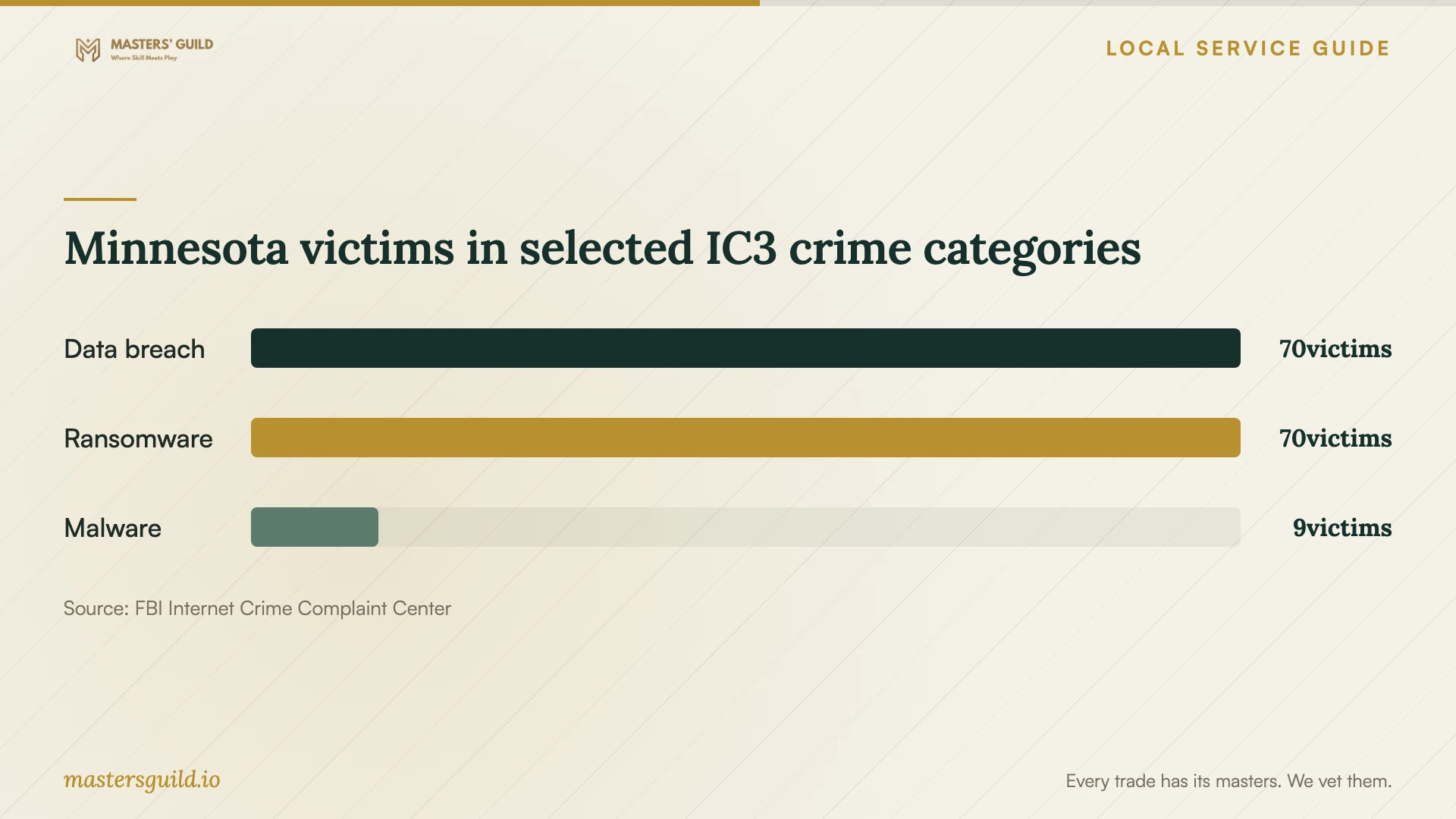
Minnesota victims in selected IC3 crime categories
Local details that affect your job
Business electronics need a separate disposal route
Hennepin County excludes electronics used for business purposes from its household facilities, including equipment from home businesses and property managers. Moving office equipment into your home does not make commercial waste eligible. Ask the provider to specify return or business recycling arrangements. The county advises removing personal data before recycling and disclaims responsibility for data left on devices. Check recovered files before authorizing erasure or destruction. [2] [4]
Build Minnesota breach escalation into the agreement
In the supplied 2025 statute edition, a business holding covered personal information it does not own must notify the owner or licensee immediately after discovering a qualifying breach. Subdivision 1(c) permits delay to a date certain when law enforcement affirmatively determines notification would impede a criminal investigation; subdivision 4 exempts defined financial institutions. That edition does not establish whether later legislation changed these provisions. Ask counsel to confirm current duties and have the provider name its escalation contact before receiving customer or employee records. [3]
Keep household disposal separate from office equipment
For eligible Hennepin County household electronics, the county lists facilities at 1400 West 96th Street in Bloomington and 8100 Jefferson Highway in Brooklyn Park. Bring proof of residency, such as a driver's license or utility bill, and confirm item acceptance before traveling. Keep personal and business devices separate when arranging the provider's equipment handoff. [4]
Choose a scope to discuss with the provider
| Your situation | Scope to request | Acceptance question |
|---|---|---|
| You have a usable backup | Supervised restore and application checks | Can we open priority files and test the business software? |
| Files are missing | Assessment with separate recovery authorization | What charges apply before I approve recovery? |
| Equipment is damaged or unreadable | Device-specific assessment and handling plan | Who performs the work and where will the device go? |
| You suspect ransomware | Incident response and clean-network recovery | Who preserves evidence and authorizes restoration? |
| You want ongoing backup support | Offline encrypted backups and regular restore tests | Who checks failures and demonstrates restores? |
Your hiring checklist
- List priority files and business functions to restore.
- Record device models, symptoms, attempted fixes, and available backups.
- Get an intake receipt and identify outside laboratories.
- Agree on assessment fees, a spending limit, and approval for extra work.
- Document access limits, retention, deletion, and incident contacts.
- Define file and application tests for acceptance.
- Obtain restore instructions and schedule the next backup test.
- Confirm equipment return or business recycling before disposal.
Frequently Asked Questions
How should I budget for recovery?
Request a device-specific assessment and written quote. Separate diagnostic charges, recovery labor, replacement storage, transport, and rush work. Ask what you owe for an unsuccessful attempt or partial recovery, and require approval before the provider exceeds your spending limit.
Should I shut down a computer with suspected ransomware?
CISA recommends isolating affected systems first. Disconnect network access and contact your incident-response lead. Power down only if disconnection is impossible; shutdown loses potential evidence in memory. [1]
What should the backup provider demonstrate?
Ask for a restore into a test location, checks of priority files, and an application test where needed. CISA recommends regular backup availability and integrity testing. Obtain restore instructions and agree on the next test before handoff. [1]
Can I recycle my home-business computer at a county facility?
Hennepin County excludes business-use electronics, including home-business equipment, from household drop-off. Arrange a business disposal route and agree on data removal or destruction after checking your recovered files. [2]
Sources and scope
This guide combines the sources below with practical planning guidance. Figures apply to the stated geography and period; request a written quote for your property.