
Local service guide
Data recovery and backup in Milwaukee, WI
Data recovery and backup in Milwaukee starts with choosing the right scope: recovering missing files, restoring an existing backup or responding to a suspected attack. Request a written diagnosis, approval limit, device-handling terms and a demonstration that you can open the returned files. For a business backup contract, require a restore test and name the person responsible for checking failures.
Choose the recovery scope before handing over a device
Write a short incident summary: the device model, the last time you opened the files, the error you saw and any repair attempts. List priority folders, including accounting exports, customer records or project files. Tell the provider whether you need individual documents or a working business application with its supporting data.
Find out who will perform the diagnosis and whether your device will leave the intake location. Require separate approval before the provider sends it to another facility, replaces components or erases anything. Agree on a diagnostic spending limit and confirm what you owe if you decline the proposed recovery.
For a suspected ransomware incident, CISA recommends isolating affected systems from the network first. Its guidance reserves powering down devices for situations where you cannot disconnect them, because shutdown loses potential evidence held in memory. Request incident-response support before authorizing a wipe or routine restore. [4]
Compare diagnosis-based quotes and approval terms
Request a quote that identifies the device, the priority files and the proposed work. Have the provider list diagnosis, recovery labor, replacement storage, shipping, expedited service and backup setup as separate items. Agree on what counts as successful recovery: for example, opening the named accounting file and checking the requested reporting period.
Request a diagnosis-based estimate for your device and priority files; confirm costs and turnaround before approving work. Establish when the provider will deliver its diagnosis, when you must approve further work and how it will communicate delays. For an ongoing plan, separate setup charges from recurring storage, monitoring and restoration support.
Wisconsin Department of Revenue lists data recovery and making backups of data files among nontaxable services. It lists hardware installation, hardware troubleshooting and installation or configuration of prewritten software among taxable services. The department also describes exceptions involving services necessary to complete a taxable sale and bundled transactions. Request an explanation of the classification of each charge. [1]
Set limits on access and device custody
Have the provider record the device serial number at intake and give you a receipt. Specify who may access the files, how the provider will transfer recovered data and when it will delete working copies. Arrange a secure way to provide any required credentials, and agree on how you will revoke that access after the job.
For business devices awaiting recycling or refurbishment, Wisconsin DNR calls for secure storage, a clear chain of custody and contracts that state how the recycler will handle data. Apply that disposal guidance when arranging what happens to the original drive after recovery. Keep the recovery authorization separate from permission to wipe or destroy it. [3]
Buy a backup plan you can restore
Tell the backup provider how much recent work you could afford to lose and how long you could operate without each system. Have it propose a backup schedule and restoration sequence around those limits. Put responsibility for checking backup failures, maintaining access and contacting you in the agreement.
CISA recommends maintaining offline, encrypted backups of critical data and testing their availability and integrity in a disaster-recovery scenario. It warns that ransomware variants may delete or encrypt accessible backups. Have the provider identify the copy that remains protected when your working network or account suffers a compromise. [4]
Before accepting setup, have the provider restore a representative file and demonstrate the recovery steps for a critical application. Record who holds the encryption keys and recovery credentials. Agree on repeat testing and a handover procedure if you change providers, so you can retrieve your backups and understand the restoration process.
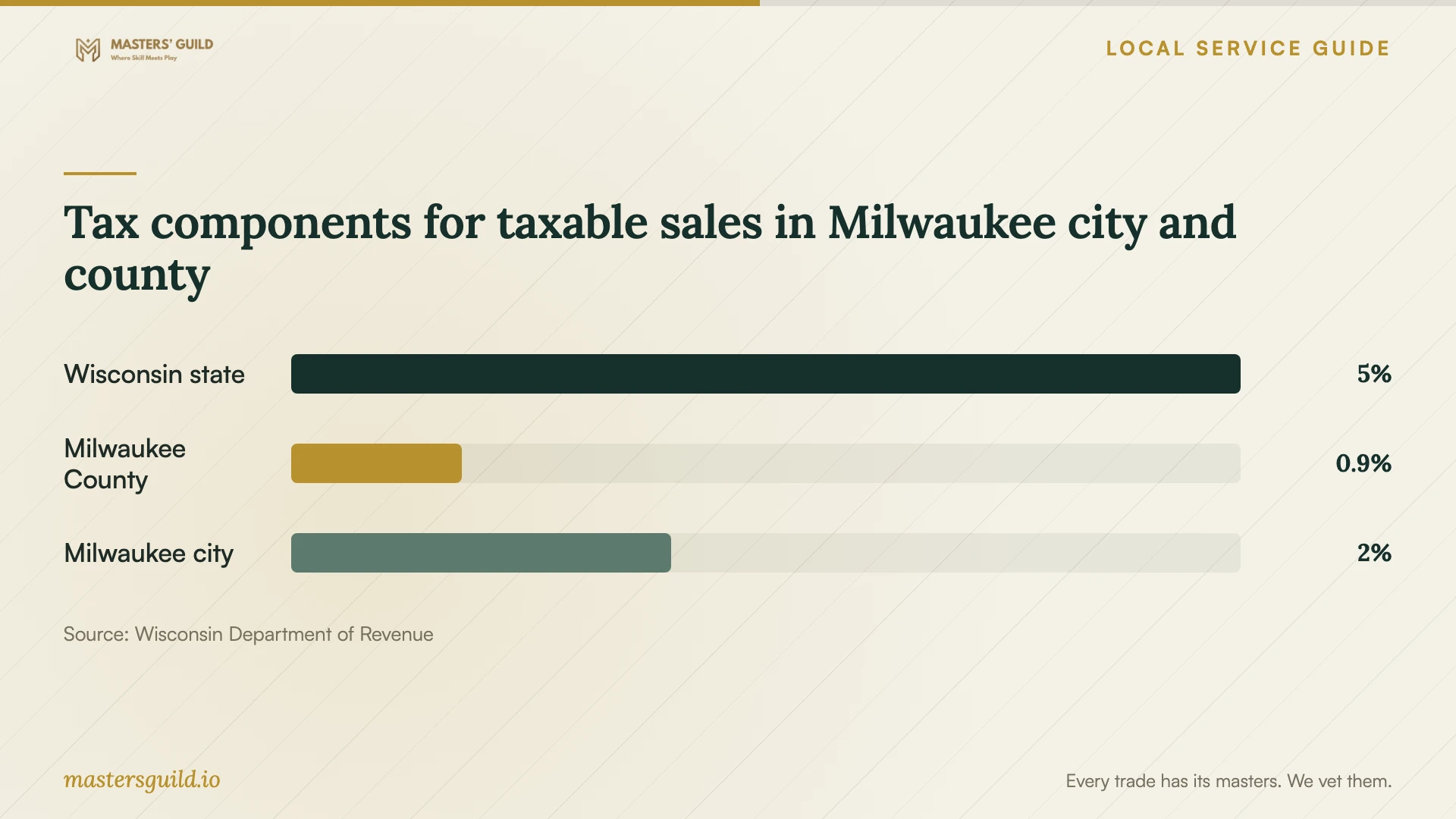
Tax components for taxable sales in Milwaukee city and county
Local details that affect your job
Separate recovery services from taxable Milwaukee purchases
Wisconsin distinguishes data recovery and file-backup services from taxable hardware and software work. For taxable sales sourced to a location within both the city of Milwaukee and Milwaukee County, the published components are 5% state, 0.9% county and 2% city tax, totaling 7.9%. The city extends into multiple counties, and the seller must follow sourcing rules. Have it confirm the transaction location and itemize taxable purchases rather than applying 7.9% to the whole recovery quote. [1] [2]
Confirm business acceptance before arranging electronics disposal
Wisconsin DNR says computers, external hard drives and flash drives cannot go into Wisconsin trash, landfills or incinerators. E-Cycle Wisconsin serves households and K-12 schools; some participating collectors also accept business equipment. For your Milwaukee business, check acceptance, fees, pickup and data-erasure terms before arranging a drop-off. DNR advises backing up files before wiping and warns that deleting files does not clear them from a device. [3]
Match the job to the support you need
| Your situation | Support to request | Approval condition |
|---|---|---|
| You have a backup and need business files restored | Backup restoration support | Have the provider restore a sample and confirm the required files open. |
| Files are missing and you have no checked backup | Recovery diagnosis | Approve further work after receiving a written scope, spending limit and definition of success. |
| You suspect ransomware | Incident-response support followed by recovery | Isolate affected systems as CISA advises; coordinate evidence preservation before wiping or rebuilding. |
| You want ongoing protection | Managed backup setup and testing | Require offline, encrypted backups and restoration testing consistent with CISA guidance. |
| You plan to retire the original device | Secure wiping or destruction and electronics recycling | Check business acceptance and contractual data-handling terms under Wisconsin DNR guidance. |
Your hiring checklist
- Write the incident history and list the files or applications you need first.
- Record device serial numbers and obtain an intake receipt.
- Confirm where diagnosis and recovery will occur, including any transfer to another facility.
- Set a spending limit and require approval before additional work.
- Request separate recovery, equipment, software, transport and recurring backup charges.
- Agree on access permissions, secure delivery and deletion of the provider's working copies.
- Open priority recovered files and witness a backup restore before accepting the work.
- Authorize wiping or disposal only after you have checked the returned data.
Frequently Asked Questions
How much should I budget for recovery?
Request a diagnosis-based estimate for your device and priority files; confirm costs and turnaround before approving work. Ask what you owe for diagnosis, unsuccessful work, shipping and return storage, and require approval before the provider exceeds your limit.
Should a Milwaukee recovery invoice include sales tax?
Wisconsin lists data recovery and making backups of data files as nontaxable, with exceptions. Hardware repairs, equipment and prewritten software may be taxable. Have the seller itemize the work and explain the tax treatment and transaction location. [1] [2]
What should I ask a business backup provider to demonstrate?
Have it restore selected files and a critical application, explain who checks failures and identify the protected backup copy. CISA recommends offline, encrypted backups and regular tests of backup availability and integrity. [4]
Can I recycle the failed drive after recovery?
Check the recovered files before authorizing disposal. Wisconsin DNR advises backing up wanted files before wiping, checking the recycler's data-security process and confirming business acceptance. Deleting files alone does not clear them from the device. [3]
Sources and scope
This guide combines the sources below with practical planning guidance. Figures apply to the stated geography and period; request a written quote for your property.