
Local service guide
Network setup in Miami: hiring and planning
Arrange network setup in Miami by asking for a diagnosis before buying equipment, defining the rooms and devices you need connected, and separating router configuration from new cabling in the quote. For a condo installation, confirm the permitting authority and building approval before authorizing cable work. Miami-Dade County lists residential data-cable exemptions for single-family homes, duplexes and townhouses, while requiring permits for commercial work, including condominiums and apartments. Confirm which rules apply to your address rather than assuming that county guidance settles a City of Miami project. [1]
Define the problem before choosing equipment
Write down where you lose connectivity, which devices struggle and what you were doing when the problem occurred. Ask the technician to compare a wired connection with Wi-Fi and to record results near the router and in the rooms you use. Request a diagnosis that separates the internet connection, router configuration and room coverage before approving replacements.
Give the technician a floor plan or room sketch, the router and modem model numbers, and a list of devices you need connected. Include your work desk, television, printer and any equipment that needs its own account or app. Ask the technician to explain the proposed location of each access point or cable outlet and how you will test it together.
Check the internet connection at your address
Use the FCC National Broadband Map as a starting point when comparing internet service. The FCC lets you search an address and view providers, connection technologies and maximum advertised download and upload speeds reported for that location. Confirm installation availability and plan terms with the provider before arranging your network appointment. [3]
Ask the installer to document your existing plan and test results before recommending a plan change. For cellular backup, request a test inside your home where you intend to place the equipment. The FCC states that its mobile coverage map represents outdoor or in-vehicle coverage, rather than indoor reception. [3]
Settle cabling permissions before work starts
Miami-Dade County exempts listed low-voltage data communication cable installations and repairs in single-family residences, duplexes and townhouses from its permit requirements. Its guidance requires permits for commercial work, including multifamily buildings, condominiums and apartments. Treat that distinction as a reason to check the building type and jurisdiction before comparing cabling bids. [1]
Ask the permitting authority responsible for your address to confirm the proposed scope. Describe new cable routes, wall penetrations and any electrical changes separately. Ask your building manager about access to shared spaces, approval of cable routes, contractor paperwork and work hours. Put responsibility for permits, inspections and building coordination in the written quote.
Compare quotes by deliverables
Request an itemized proposal with equipment model numbers, cable outlet locations, configuration tasks and testing. Ask whether the price includes materials, wall repairs, cleanup, travel and a return visit for unresolved problems. For equipment you already own, ask the technician to state whether they will configure it and support it after installation.
Define completion around your actual tasks: a video call at the desk, printing from your usual device, and connectivity in the rooms named in the brief. Ask for cable labels, a network diagram and administrator access at handover. Keep accounts under your control, arrange a secure credential handover and agree on the terms for any future remote support.
Plan support during a power interruption
Ask the technician to quote backup power and alternate connectivity as separate options, with a test procedure for each. Specify which equipment you want to keep running and request the proposed battery runtime for that equipment. Test the alternate connection with your essential tasks before relying on it.
FPL lets customers search outage information by address, city or ZIP code and access it from a battery-powered device. Its Power Tracker does not show flickers or brief interruptions, so a blank map cannot rule out a short power event. During a major tropical storm or hurricane, FPL may switch affected counties to storm mode without real-time information during initial restoration. [2]
Save your internet provider's support details, equipment restart instructions and network diagram somewhere you can access without your home connection. Ask the technician to explain which problems belong with the internet provider and which fall under their support agreement. Include appointment charges and remote-support fees in that agreement.
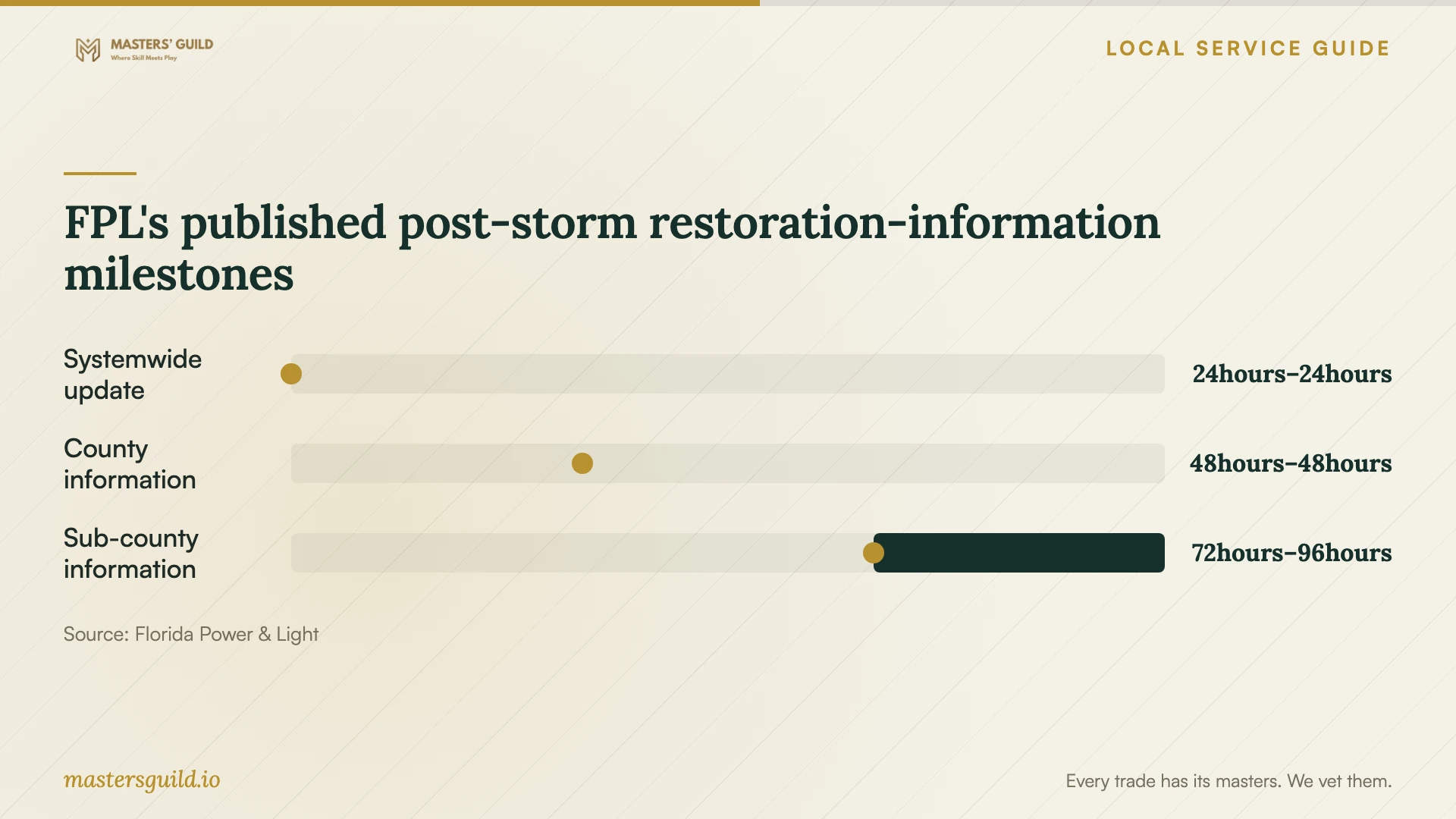
FPL's published post-storm restoration-information milestones
Local details that affect your job
County condo cabling rules affect the booking
Miami-Dade County distinguishes single-family residences, duplexes and townhouses from condos and apartments in its low-voltage permit guidance. It lists data communication cables among the exemptions for the former and requires permits for commercial work, including the latter. Before booking condo cabling in Miami, identify the authority responsible for the address and ask it to confirm the scope. Request a quote that names who will handle required permits and inspections. [1]
FPL storm information affects your backup plan
FPL warns that major-storm restoration information starts with broad estimates and becomes more geographically detailed after damage assessments. Its published sequence moves from a systemwide update within 24 hours to county information within 48 hours and sub-county information within 72 to 96 hours. Arrange an alternate place or connection for essential work rather than planning around an immediate neighborhood restoration estimate. [2]
Choose the scope to request
| Your situation | Scope to request | Before authorizing work |
|---|---|---|
| Connection problems in selected rooms | Diagnosis and a coverage plan | Ask for tests at the router and in the affected rooms before buying equipment. |
| Changing internet providers | Provider coordination and router configuration | Use FCC address-level listings as a starting point, then confirm availability with the provider. |
| New cable outlets in a condo | Cable routes, terminations and testing | County guidance requires permits for commercial work including condos; confirm the authority and requirements for your address. |
| Considering cellular backup | An indoor connection test and failover demonstration | FCC mobile coverage represents outdoor or in-vehicle coverage, so request an indoor test. |
| Preparing for storm interruptions | Backup-power and alternate-connectivity options | FPL may lack real-time outage information during initial major-storm restoration. |
Your hiring checklist
- Record affected rooms, devices, tasks and the time each problem occurs.
- Prepare router and modem model numbers, account access and a room sketch.
- Confirm internet installation availability with the provider for your exact address.
- Ask the responsible permitting authority and building manager about proposed cable work.
- Request separate prices for equipment, labor, cabling, repairs and follow-up support.
- Agree on room-by-room tests and a test of any proposed backup connection.
- Collect administrator access, cable labels, a network diagram and support terms.
Frequently Asked Questions
Do I need a permit for Ethernet cabling?
Miami-Dade County lists residential data communication cables as permit-exempt for single-family homes, duplexes and townhouses. It requires permits for commercial work, including condos and apartments. Ask the permitting authority responsible for your address to confirm your proposed installation before work starts. [1]
Should I buy a mesh system before the appointment?
Ask for a diagnosis and placement plan first. Request a proposal that explains the equipment choice, identifies where the technician will install it and lists the tests you will use to accept the work.
Can I rely on a coverage map for cellular backup?
The FCC says its mobile coverage map represents outdoor or in-vehicle coverage and does not show indoor coverage. Ask for a test at the proposed equipment location using the connection and tasks you intend to rely on. [3]
Does a clear FPL outage map rule out a power problem?
FPL says Power Tracker does not track flickers or brief interruptions. Record when equipment restarted or lost connection and give that information to the technician alongside any outage information. [2]
Sources and scope
This guide combines the sources below with practical planning guidance. Figures apply to the stated geography and period; request a written quote for your property.