
Local service guide
Software Installation in Memphis, TN: Hiring Guide
For Software Installation in Memphis, TN, hire a technician with a written scope that names your device, programs, backup responsibilities, and completion tests. Request a total that identifies labor, software purchases, and tax. Tennessee taxes software installation and repair performed in the state; for remote work, ask the provider to explain the tax treatment. Decide whether you need installation, settings changes, or instruction before comparing offers. [3]
Define the work before requesting offers
Write down the computer model, operating system, software name, and result you want. A useful request might ask the technician to install a purchased application, help you sign into your account, open an existing file, and show you how to save a new one. Include the exact error message. Remove personal information from any screenshot you share.
List file transfer, email setup, printer connection, account recovery, and instruction as separate requests. Have the provider identify which tasks the price includes and which require another charge. For an operating system change, agree on backup and recovery responsibilities before authorizing work.
Choose remote help or a visit
Tell the technician whether the computer starts, connects to the internet, and lets you sign into the account that owns the software. Have them explain whether they propose remote work or a visit for your particular task. Consider a visit if you want someone beside you while you handle equipment and test the result.
Agree on access boundaries before the session. Confirm the technician's name and the remote-access application they propose using. Stay present, enter passwords yourself, and approve purchases yourself. At the end, have the technician remove temporary access and explain any support software they recommend leaving installed.
Compare written quotes and Tennessee tax treatment
Obtain scope-specific written quotes that identify installation labor, software purchases or subscriptions, travel, backup or transfer work, and tax. Confirm whether the provider charges a fixed amount or bills for time. For time-based work, agree on a spending limit and require your approval before the technician exceeds it.
The Tennessee Department of Revenue says software installation and repair performed in the state are subject to sales tax. The department also explains that related service charges can form part of a taxable sale even when the seller itemizes them. An invoice label such as consulting does not establish an exemption. For remote service, ask where the technician will perform the work and how the provider determines the tax treatment. [3]
For its configuration guidance, the department defines configuration as activating features already coded into existing software, such as setting predefined switches or building tables within the standard application. It excludes development, modification, or creation of software code. Have the technician describe the actual tasks rather than relying on the word configuration in a quote. [4]
Under that guidance, optional configuration sold independently from software, customization, installation, or repair is not subject to sales tax. Configuration included as a required part of a software sale, or bundled with software, installation, or repair for one lump price, is taxable as part of the sale. Separate invoice lines alone do not establish that a service qualifies for the exemption. [4]
Use library resources for learning and temporary access
Memphis Public Libraries offers free computer classes at different times and locations, plus DigitalLearn and other learning resources. If you can open your application but need help with basic computer use, check the class options before paying for instruction during an installation visit. Confirm the subject and current schedule with the library. [2]
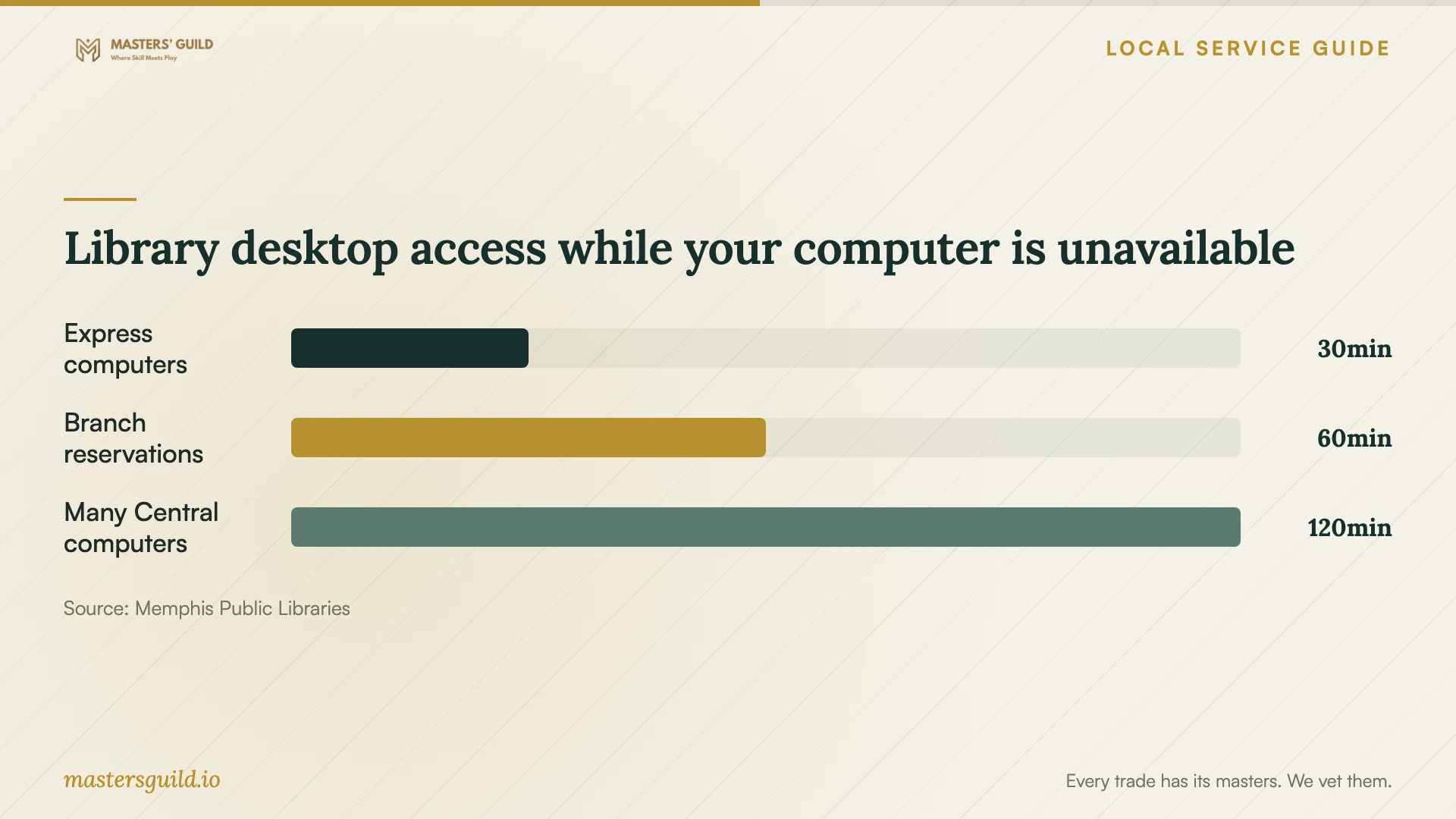
The library lists Microsoft Office Suite, Google Chrome, and Mozilla Firefox on its desktop computers. Branch computer reservations last one hour; many computers at Benjamin L. Hooks Central Library allow two-hour reservations. Reservations require an updated library card. Express computers allow 30 minutes without a card. Choose an access option that gives you enough time for the task you need to finish while your computer is unavailable. [1]
Arrange a separate technician appointment for changes to your own computer. Library policy prevents staff from plugging in, reconfiguring, or otherwise operating personal computers. Use library classes for learning and public desktops for temporary access; confirm availability before traveling. [1]
Prepare the device and test the result
Back up the files you want to keep and check that you can open a sample from the backup. Gather purchase receipts and activation information. Keep passwords private and enter them during the appointment. Have the technician check compatibility and explain any required purchase before making changes.
Define completion through tasks you can watch. Have the technician launch the program, confirm activation, open and save a sample file, and test the functions you requested. If the scope includes email or printing, test those before ending the appointment. Request a summary of the changes and written terms for follow-up help if the same problem returns.
Library desktop access while your computer is unavailable
Local details that affect your job
Separate library instruction from personal-device work
Memphis Public Libraries offers free computer classes at different times and locations, but its staff cannot operate or reconfigure your personal computer. Check the current class list for basic instruction. Arrange a technician for installation or settings changes on your own device. [1] [2]
Choose a public computer session that fits your task
With an updated library card, you can reserve a branch computer for one hour; many Benjamin L. Hooks Central Library computers allow two hours. Express computers offer 30 minutes without a card. Confirm availability and choose the session that fits your temporary access needs. [1]
Clarify Tennessee tax before accepting a quote
Tennessee's installation and repair guidance applies to work performed in the state. Ask the provider about remote-work tax treatment rather than assuming that booking from Memphis establishes where they perform the work. The state's configuration exemption concerns activating existing coded features, excludes code development or modification, and requires optional configuration sold independently from software, customization, installation, or repair. [3] [4]
Choose help that matches your task
| Your situation | Next step | Confirm before proceeding |
|---|---|---|
| You need basic computer instruction | Check free Memphis Public Libraries computer classes | The class covers your topic and fits your schedule |
| You need temporary Office access | Consider a library desktop computer | Availability, updated-card requirements for reservations, and the session limit |
| You need changes to your personal computer | Arrange a technician appointment | The written scope; library staff cannot operate or reconfigure your device |
| You want installation plus settings changes | Request a task-specific scope and tax explanation | Whether configuration activates existing features without code changes, and whether it is optional and independently sold or bundled |
| You want an operating system change | Agree on backup and recovery responsibilities | Which files and applications the technician will preserve and test |
Your hiring checklist
- List the device, operating system, software, error messages, and desired result.
- Confirm remote work or a visit, the proposed access method, and access boundaries.
- Request a written scope and total with purchases, travel, backup work, and tax explained.
- Have the provider explain tax treatment for remote work and any proposed configuration exemption.
- Agree on a spending limit and approval before additional work.
- Back up important files and open a sample from the backup.
- Gather purchase information and enter account passwords yourself.
- Test the agreed functions, remove temporary access, and request a written summary.
Frequently Asked Questions
How much should I budget for installation?
Obtain written quotes for your device and requested tasks. Request totals that include software purchases, travel, tax, and backup work. Compare offers using the same scope, and agree on a spending limit if the technician bills for time.
Can library staff install software on my laptop?
Memphis Public Libraries says staff cannot plug in, reconfigure, or otherwise operate your personal computer. The library offers public computers and free computer classes. Arrange a technician for installation on your device. [1] [2]
Does Tennessee tax software installation?
The Tennessee Department of Revenue says software installation and repair performed in the state are subject to sales tax. Have the provider explain the tax in your quote. For remote work, ask how they determine its tax treatment rather than assuming your booking location settles the question. [3]
Is software configuration exempt from tax?
Tennessee defines configuration as activating features already coded into existing software; it excludes developing, modifying, or creating code. Optional configuration sold independently from software, customization, installation, or repair is exempt under this guidance. Required configuration within a software sale, or configuration bundled with software, installation, or repair for one lump price, is taxable. Have the provider explain both the tasks and the sale arrangement. [4]
Sources and scope
This guide combines the sources below with practical planning guidance. Figures apply to the stated geography and period; request a written quote for your property.