
Local service guide
Cloud Service Setup in Markham, ON
Arrange Cloud Service Setup in Markham by requesting a written scope covering the files and accounts to move, staff permissions, account ownership, recovery testing and ongoing charges. Test your premises’ upload connection before scheduling the transfer, and agree on how staff will work during it. If you handle customer information, review the cloud provider’s privacy terms before moving records. Canada’s privacy regulator says businesses retain accountability when they outsource personal information. [3]
Define the work before requesting quotes
Write down the business task you want help with: shared project folders, off-site copies of records, a move from an existing service, or access across office computers. List the devices, users, current accounts and folders involved. Identify who can approve changes and which records need restricted access. Give each technician the same list.
Request separate amounts for setup labour, migration, subscriptions and continuing support. Ask whether the quote includes troubleshooting failed transfers, checking permissions and answering questions after handover. For hourly work, agree on an approval point before the technician exceeds your budget. Obtain a project-specific quote rather than assigning a price before defining the work.
Choose remote or on-site help based on what you want the technician to inspect. Request an on-site option if the scope includes office devices or connection testing. For remote work, agree on the access method, who will supervise the session and how the technician will remove access afterward.
Approve privacy terms and administrator access
The Office of the Privacy Commissioner of Canada advises businesses to examine where cloud providers store information, how they use it, whether they subcontract services and how businesses can retrieve their data. Outsourcing customer information does not transfer your business’s accountability to the provider. Address these questions before authorizing a migration. [3]
Ask who will control the main administrator account, subscription billing and recovery contact. Keep those under an owner or designated employee’s control. Give the technician access suited to the agreed work and arrange its removal at handover. Request a written record of accounts created and permissions assigned.
The Canadian Centre for Cyber Security recommends two-factor authentication for cloud administrator accounts and accounts distinct from internal administrator accounts. The privacy regulator recommends restricting access according to the sensitivity of the information. Ask the technician to demonstrate the configuration, then test access through an ordinary staff account. [3] [4]
Plan the transfer around your connection and workday
Ask the technician to measure upload performance at your premises and transfer a representative folder before committing to the full migration. Agree on when staff should stop editing source files, where they should save new work and who will resolve differences between copies. Retain the existing records until you have checked the destination and completed the agreed recovery test.
YorkNet’s regional program targets eligible underserved addresses and offers a property checker. Its schedule lists specified Angus Glen routes for expected home connections in spring 2027. Confirm your exact address, timing and suitability for your premises before tying a migration appointment to that future connection. [1]
If you create promotional files or digitize older media at the library, include collecting those files in your setup plan. Markham Public Library says its digitizing equipment saves to the patron’s USB, and its Digital Media Lab computers delete work each day. Bring your own storage, open the saved files to check them and arrange the cloud transfer from that retained copy. [2]
Accept the job after a working handover
Agree on acceptance checks before work starts. Have the technician open representative destination files, demonstrate the intended staff permissions and recover a sample file using the proposed backup process. Perform the checks yourself before accepting the handover. Ask which files remain on each device and which you should download before working without internet access.
Request handover instructions covering ownership, billing, recovery contacts, staff access and support. For customer information, include an exit plan. The privacy regulator advises businesses to arrange data return and secure deletion within specified timeframes when ending a provider relationship. Ask the technician to demonstrate how you would export your information before cancelling. [3]
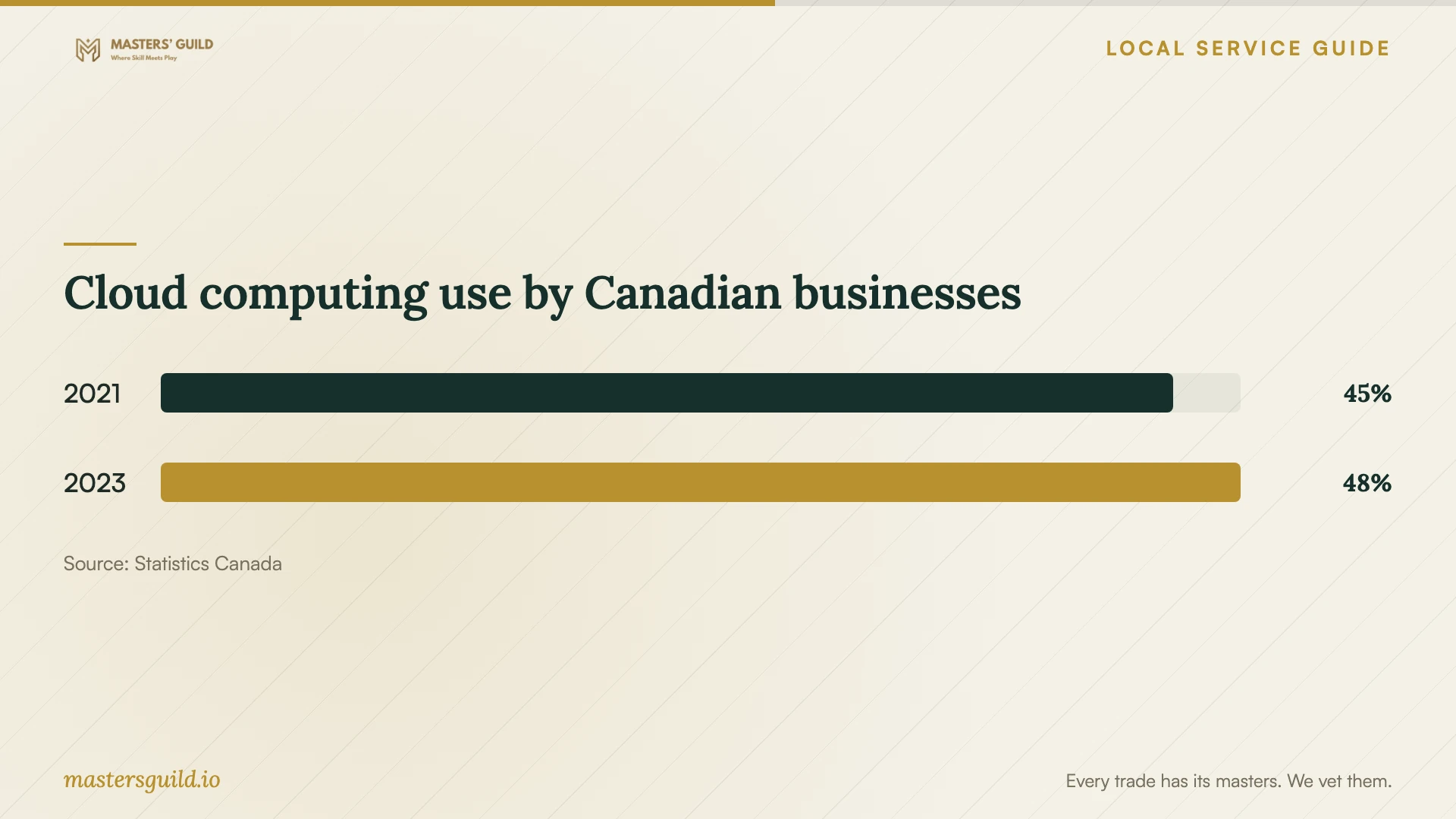
Statistics Canada reports cloud computing use by Canadian businesses at 45% in 2021 and 48% in 2023. Treat the accompanying chart as national adoption context. Choose a service against your access, privacy and recovery requirements; these figures do not measure local setup costs or establish the suitability of a provider. [5]
Cloud computing use by Canadian businesses
Local details that affect your job
Check the exact address before planning around fibre
YorkNet lists Angus Glen routes at Highway 48 and Elgin Mills Road, and McCowan Road and Elgin Mills Road, with home connections expected to start in spring 2027. YorkNet provides an address eligibility checker and cautions that its map information can change. Check your property and confirm whether the home-connection program suits your premises. Obtain a confirmed service date before booking work that depends on the upgrade. [1]
Retain library-created files before leaving
Markham Public Library offers free reservable digital media computers at several branches. Its Digital Media Lab computers refresh and delete work each day, while its digitizing equipment saves to the USB you supply. If you use these resources to prepare files, bring portable storage and verify your copy before leaving. Contact branch staff to reserve a computer and confirm equipment availability, then arrange migration from the copy you retain. [2]
Match the setup scope to your business task
| Your situation | Work to request | Acceptance check |
|---|---|---|
| Staff need shared folders | Account setup and named-user permissions | Test a staff account against the agreed access list |
| You are changing cloud providers | Migration, export planning and an agreed editing pause | Open destination files before retiring the source |
| You need recoverable copies | Backup configuration and a demonstrated recovery process | Recover a sample file and record the steps |
| You hold customer information | Review of provider terms, access controls and data location | Approve privacy arrangements before transferring records |
| You want to coordinate with YorkNet | Address eligibility and premises-suitability confirmation | Confirm service availability before scheduling dependent work |
Your hiring checklist
- List users, devices, accounts, folders and sensitive records before requesting quotes.
- Separate setup labour, subscriptions, migration and continuing support in the written scope.
- Request answers about data location, subcontractors, secondary uses and exit arrangements before approving a provider.
- Test the connection at your premises with a representative upload.
- Agree on a staff editing pause and a process for resolving file differences.
- Keep administrator ownership, billing and recovery contacts under business control.
- Test staff permissions and sample recovery before accepting the handover.
- Remove temporary technician access and retain the handover instructions.
Frequently Asked Questions
How should I compare setup quotes?
Give technicians the same user, device and file list. Ask them to separate labour, subscriptions, migration, recovery testing and support. Agree on deliverables and acceptance checks before approving work. Ask who will resolve incomplete transfers and whether follow-up support carries an additional charge.
Must my business keep customer data in Canada?
The privacy regulator says Canada’s private-sector privacy legislation does not prohibit transfers to another jurisdiction for processing, while cautioning that specific obligations can apply. Ask where primary and backup data will reside. Seek advice about requirements that apply to your business before approving a transfer. [3]
Should I wait for the Angus Glen fibre expansion?
Check your exact address first. YorkNet lists specified Angus Glen routes for expected home connections in spring 2027. That schedule does not confirm coverage throughout the neighbourhood. Test an upload on your existing connection, consider your operational deadline and confirm whether the program suits your premises. [1]
Can I use library computers to prepare files?
Markham Public Library offers free reservable digital media computers at several branches. Save your work to your own USB because the library deletes work from those computers each day. Contact branch staff to confirm equipment availability and plan the cloud transfer from your retained copy. [2]
Sources and scope
This guide combines the sources below with practical planning guidance. Figures apply to the stated geography and period; request a written quote for your property.