
Local service guide
Data Recovery and Backup in Manchester, NH
For Data Recovery and Backup in Manchester, NH, choose a provider who will assess the affected device, define which files you need, and quote recovery work separately from ongoing backup support. Ask for written approval before recovery begins, clear data-handling terms, and a demonstration that you can restore your backup. If you suspect ransomware, arrange incident response alongside restoration: CISA recommends isolating affected systems and restoring critical services on a clean network. [4]
Match the provider to the problem
Tell the provider whether you need missing files recovered, an existing backup restored, or a new backup arrangement. Describe the device, operating system, error messages, and the last time you accessed the files. List anything you have done since the failure, including repair attempts. Ask the provider to explain the proposed assessment before you authorize changes to the device.
Separate urgent business records from files that can wait. Name the folders, applications, and date ranges you need first. Ask whether the provider can inspect the device itself or must send it to a specialist. For a handoff or shipment, request a record of the device serial number, recipient, transfer date, and return arrangements.
For suspected ransomware, contact an incident-response provider before reconnecting equipment or restoring files. CISA recommends disconnecting affected systems from the network. It recommends powering them down only if network isolation is not possible, because shutdown loses potential evidence held in memory. Ask the responder to coordinate containment, evidence preservation, and restoration. [4]
Request a quote with approval points
Ask for separate charges for assessment, recovery, replacement storage, transport, and backup setup. Agree on a spending limit and require approval for additional work. Ask what you owe if you decline the recovery quote or the provider cannot deliver the files you specified. Define success by the records you need and whether you can open them.
Request an assessment deadline and a recovery estimate after diagnosis. Explain your business deadline and ask whether any priority charge changes the queue, the assessment timing, or the delivery timing. Before paying for completed work, inspect a file inventory and open representative documents or application records on a suitable replacement system.
Put privacy terms in the agreement. Ask who can access recovered files, which subcontractors may receive them, how the provider protects transfers, and when it deletes working copies. Give the technician only the access needed for the agreed job. Request a secure method for sharing credentials or recovery keys rather than including them in your initial inquiry. [4] [5]
Specify a backup you can restore
CISA recommends offline, encrypted backups of critical business data and regular tests of their availability and integrity. Ask the provider to document what it backs up, how often it runs, how long it retains copies, and who responds to failures. Agree on how much recent work you can afford to lose and how long you can operate without access. [4]
Ask the technician to restore a representative folder into a separate location while you watch. For business applications, request a test that includes opening the restored records in the application. Record the backup date, files tested, result, and person responsible for the next test. Include instructions another authorized employee can follow if your usual contact is unavailable.
For removable backup drives, CISA advises disconnecting them when you are not backing up, because ransomware can reach connected backups. For cloud arrangements, ask the provider to explain retention, deletion protection, account access, and the recovery process. CISA discusses cloud deletion protection and version control, while cautioning that immutable storage needs careful configuration. [4] [5]
Keep recovery keys and passwords in a safe place you control. CISA advises backing up data and securing recovery credentials before starting encryption. Ask the provider to document where your authorized staff can find those credentials and how you will retain access if you change support companies. [5]
Include power interruptions in the backup plan
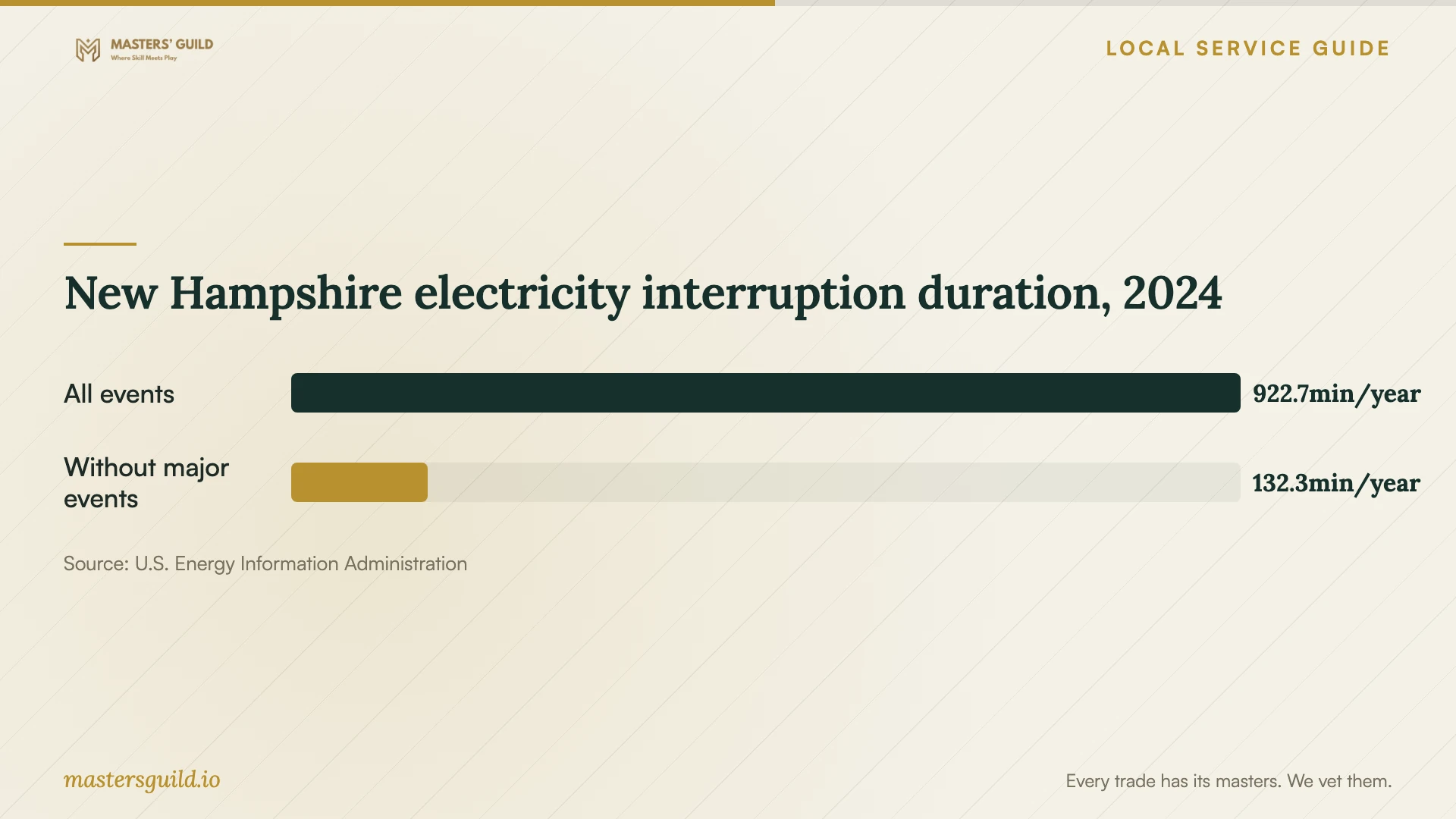
EIA reports 922.7 minutes of average non-momentary electricity interruption duration for New Hampshire in 2024 when including major events, compared with 132.3 minutes when excluding them. These statewide figures provide context for discussing power continuity; they do not describe your Manchester address or establish that an outage caused your data loss. [3]
Ask the provider whether your proposed setup should include a battery backup and a controlled shutdown procedure for computers or network storage. Request a demonstration of the shutdown process and an explanation of what happens to a backup job during a power interruption. Keep power protection, file backup, and restoration testing as separate items in the scope.
Close the job with records and a disposal plan
Before signing off, confirm that you can access the recovered files, identify any missing records, and receive the backup instructions. Ask for the original device back unless you have authorized another disposition. Keep the assessment, approved quote, transfer records, and restore-test results with your business IT records.
Manchester lists electronics among accepted materials at its Drop Off Facility. Arrange any needed data sanitization or documented storage-media destruction before disposal, and ask the recovery provider to explain the method it proposes. Treat the city's electronics acceptance as a disposal option; confirm data handling separately. [1]
New Hampshire electricity interruption duration, 2024
Local details that affect your job
Manchester electronics disposal requires a permit
The city operates its Drop Off Facility at 500 Dunbarton Road and requires annual permits, sold at the facility and valid for one year from issue. Businesses and nonprofits operating in Manchester qualify, as do contractors disposing of waste generated within city limits. For a commercial permit, the city lists proof such as a current city business license, recent utility bill, property tax statement, or lease showing the business name and Manchester address. Bring qualifying documentation and confirm applicable fees before taking retired equipment there. [1]
Possible breaches need a New Hampshire notification review
New Hampshire RSA 359-C:20 requires businesses that own or license computerized personal information to assess possible misuse after becoming aware of a security breach. If misuse has occurred, is reasonably likely, or cannot be determined, the statute requires notice to affected individuals as soon as possible. It also specifies regulator or attorney general notification. If recovery involves suspected unauthorized access, ask your responder to preserve incident records and involve legal counsel to assess notification duties alongside restoration. [2]
Choose the scope before authorizing work
| Your situation | Request | Acceptance check |
|---|---|---|
| You have a backup to restore | A scoped restoration and access test | Open the priority files or application records |
| Files are missing and no usable backup is available | An assessment, recovery quote, and approval point | Review recovered contents against your priority list |
| You suspect ransomware or unauthorized access | Incident response, isolation, and coordinated restoration | Have the responder document containment and assess notification needs |
| You need ongoing backup support | Offline encrypted copies, retention instructions, and restore testing | Complete a witnessed test and receive access instructions |
| You are retiring equipment | Data sanitization and a disposal plan | Retain completion records and prepare city permit documentation |
Your hiring checklist
- Record the device model, serial number, symptoms, and repair attempts.
- List priority folders, application records, and required date ranges.
- Identify available backups and locate encryption recovery credentials.
- Confirm who will handle the device and document any specialist transfer.
- Get assessment charges, spending limits, and unsuccessful-recovery terms in writing.
- Agree on secure file delivery and deletion of provider working copies.
- Open sample recovered files and complete a documented backup restore test.
- Arrange data sanitization and check Manchester permit documentation before disposal.
Frequently Asked Questions
How much should I budget for recovery?
Get a device-specific assessment and written quote. Ask the provider to separate diagnosis, recovery, storage, transport, and backup setup. Set an approval limit and clarify what you pay if recovery fails or you decline further work.
Should I turn off a computer showing a ransom note?
CISA recommends isolating affected systems from the network first. It recommends powering down only if isolation is not possible, because shutdown loses potential evidence in memory. Contact your incident responder using a separate communication method and follow the coordinated response plan. [4]
Can I leave an external backup drive connected?
CISA advises disconnecting an external backup drive when you are not backing up. Ransomware may access a connected drive and delete or corrupt its backups. Ask your provider to document a rotation or disconnection routine your staff can follow. [5]
Can my business use Manchester's electronics drop-off?
Businesses operating in Manchester qualify for commercial permits. The city requires an annual permit and qualifying documentation, and accepts electronics at 500 Dunbarton Road. Confirm fees and arrange data sanitization before disposal. [1]
Sources and scope
This guide combines the sources below with practical planning guidance. Figures apply to the stated geography and period; request a written quote for your property.