
Local service guide
Software Installation in Madison, WI: Plan Your Job
Arrange Software Installation in Madison, WI by giving the technician your computer model, operating system, program names, and the task you want to complete. Request an itemized quote for installation, licenses, backup, and follow-up help. If you have a UW-Madison affiliation, check your Microsoft 365 eligibility and the DoIT support scope before buying another license or booking outside help. [1] [2]
Define the installation before requesting offers
Describe the result you need: open and edit a document, send email from your account, use a purchased application, or restore a program after replacing a computer. Include the program version, device count, and any error message. Ask each technician to quote the same work so you can compare the total and the exclusions.
Separate a working-computer installation from an operating system reinstall. For a reinstall, require a written plan for preserving files, restoring applications, and checking access to your accounts. Tell the technician which folders matter, including photos and files stored outside the usual Documents folder. Agree on what requires your approval before the technician erases anything.
Check university licensing and support first
UW-Madison's student licensing policy lists eligibility for students enrolled in the current term, enrolled in the next term, eligible to enroll in the next term, or recorded as an INTD applicant in the current term. The university directs questions about an individual's licensing to the DoIT Help Desk. Ask about your status and the applications your entitlement covers before accepting a bundled software purchase. [1]
DoIT's personal-device guidance describes onsite, phone, chat, and email support for personal software troubleshooting. Its software repair scope covers operating system formatting, reinstalls, updates, and data transfers. It excludes user-installed third-party applications. Confirm access and whether your particular task falls within that scope before arranging a visit; do not assume campus support covers a purchased design, accounting, or specialist program. [2]
Request an itemized total rather than a headline price
Ask for labor, software purchases, subscription renewals, travel, backup, and training as separate lines. Request the minimum charge, the charge for an unsuccessful installation, and the approval process for extra work. State whether you already own the software and ask the technician to confirm the account that will hold the license.
The Wisconsin Department of Revenue lists installation and configuration of prewritten computer software, including online or onsite troubleshooting, as taxable services. It lists training and making backups of data files among nontaxable services, but explains that a service necessary to complete a taxable sale also becomes part of the taxable sales price. Ask the seller to explain the tax treatment of your actual invoice. [3]
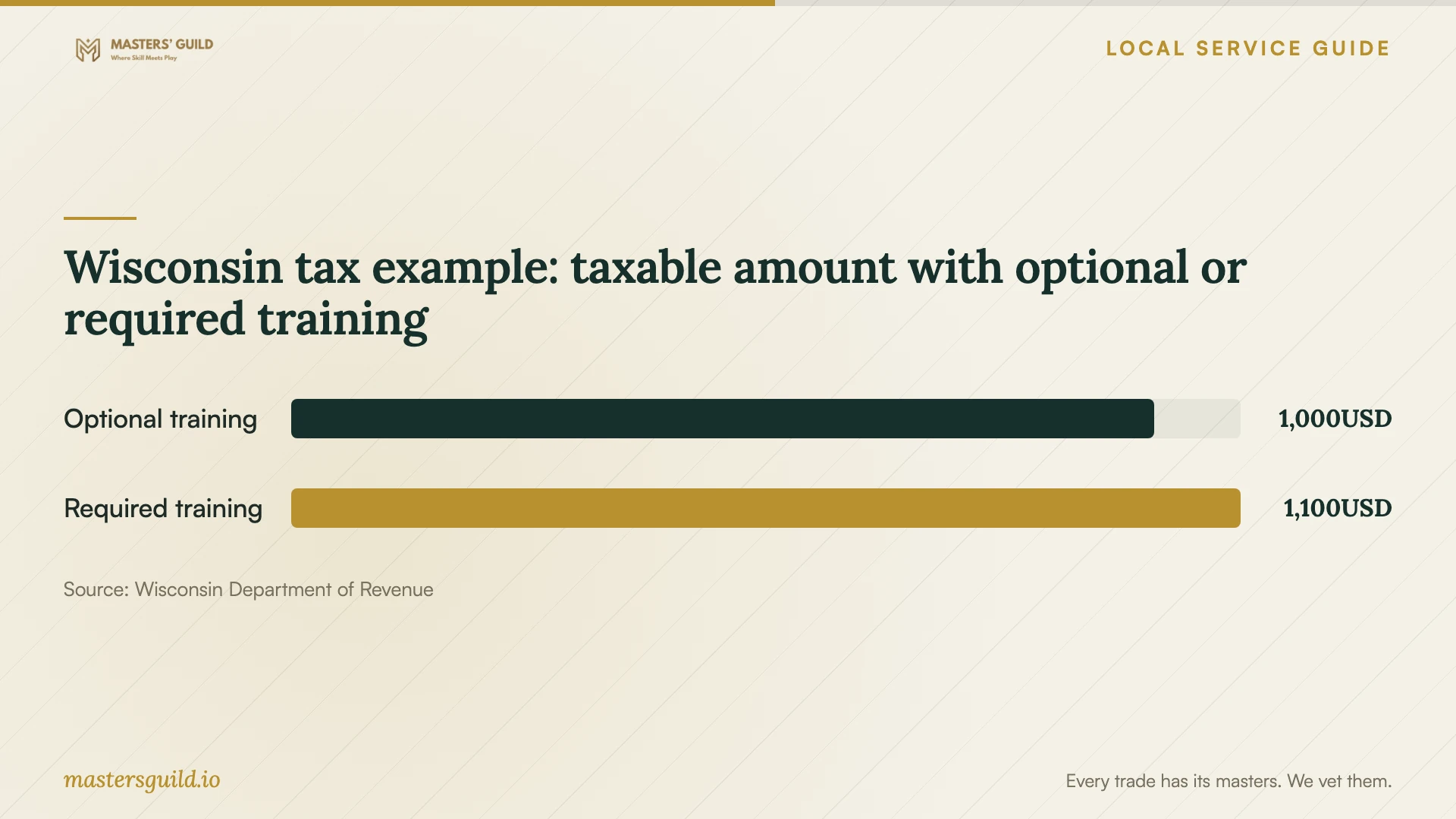
The training comparison uses the department's illustrative transaction: software priced at 1,000 dollars and training priced at 100 dollars. Optional training in that example leaves a taxable amount of 1,000 dollars; seller-required training raises it to 1,100 dollars. These figures illustrate a tax distinction. Use a written provider quote to establish your installation budget. [3]
Choose the service format and control account access
Ask whether the technician can complete your specific task remotely and what connection or access they need. If you want someone beside you to explain the steps, request an onsite appointment or ask a shop about a handover demonstration. For a drop-off, record the device condition, accessories, promised work, and collection arrangements.
Enter your own passwords and approve account verification prompts yourself. Ask the technician to explain any administrator access and remote-control tool before you authorize it. Agree on whether they will remove remote access at the end. Keep account recovery details under your control and avoid sending passwords with the initial job description.
Test the result before the appointment ends
Ask the technician to restart the computer, launch the application, and complete the task you requested. For document software, open an existing file, make a change, and save a copy. For email, send and receive a test message. Check that you can sign in with your own account and find the files you asked them to preserve.
Request a handover note with installed versions, license ownership, renewal charges you approved, and unresolved issues. Ask how to request follow-up help and which problems the quoted price covers. Keep the invoice and any purchase confirmation with your records.
Wisconsin tax example: taxable amount with optional or required training
Local details that affect your job
UW-Madison licensing can change what you need to buy
Before purchasing Microsoft 365, ask DoIT to check your student licensing status. UW-Madison includes eligibility to enroll in the next academic term among its listed eligibility routes, alongside current or next-term enrollment and INTD applicant status. Use the account-specific answer to decide whether your job needs activation help or a new software purchase. [1]
Match your request to DoIT's personal-device limits
For an operating system reinstall or data transfer, ask the DoIT Onsite Help Desk whether it can handle your request. For a user-installed third-party application, seek a technician who supports that program because DoIT excludes that work. DoIT also states that it has no formal partnership with repair shops in greater Dane County; do not treat a referral as a university endorsement. [2]
Wisconsin tax rules affect installation quotes
For a Madison job, ask the provider to distinguish prewritten software installation from optional training and backup work. Wisconsin's regulator gives those services different tax treatment, subject to its rules for services necessary to complete a taxable sale. Compare the final invoiced total and ask the seller to explain any combined charge. [3]
Choose the next step for your software problem
| Your situation | Next step | Confirm before booking |
|---|---|---|
| UW-Madison student seeking Microsoft 365 | Ask DoIT to check your licensing status. | Which applications your current entitlement covers. |
| Personal operating system reinstall or data transfer | Ask DoIT whether you can use its listed support services. | Access, task scope, and the file-preservation plan. |
| User-installed third-party application | Find a technician who supports that application; DoIT excludes it. | Experience with your version and an agreed completion test. |
| Installation with training or backup | Request separate service descriptions and prices. | The seller's tax treatment and whether training is optional. |
| Unclear errors or possible device trouble | Request diagnosis before approving a reinstall. | Diagnostic charges and approval for further work. |
Your hiring checklist
- Record the device model, operating system, application names, and exact error messages.
- Check your existing software purchases and any campus entitlement before authorizing another license.
- Identify files to preserve and agree on a backup before approving formatting or reinstalling the operating system.
- Request separate charges for labor, licenses, travel, backup, training, and tax.
- Agree on a spending limit and require approval for additional work.
- Enter passwords yourself and agree on the removal of remote access.
- Test activation, your intended task, and access to preserved files before accepting completion.
- Keep the invoice, license receipt, and written follow-up terms.
Frequently Asked Questions
How much should I budget for installation?
Request a written quote for your device, software, and intended result. Ask whether it includes licenses, backup, tax, and follow-up help. Do not use the tax illustration on this page as an installation price; the Department of Revenue uses those amounts to explain optional and required training. [3]
Can DoIT install my personal applications?
DoIT excludes support for user-installed third-party applications. Its personal software repair scope includes operating system formatting, reinstalls, updates, and data transfers. Ask the Help Desk to confirm whether it can handle your task before arranging service. [2]
Should I buy Microsoft 365 before the appointment?
Check your existing license first. If you are a UW-Madison student, ask DoIT about your licensing status and covered applications. The university lists multiple eligibility routes, including eligibility to enroll in the next term. Buy only after you understand what you already have. [1]
Does Wisconsin tax software installation labor?
Wisconsin lists installation and configuration of prewritten software as taxable. The regulator lists training and data backups as nontaxable services, with an exception when a service is necessary to complete a taxable sale. Ask the seller to explain each invoice line. [3]
Sources and scope
This guide combines the sources below with practical planning guidance. Figures apply to the stated geography and period; request a written quote for your property.