
Local service guide
Computer virus removal in Madison, WI
For computer virus removal in Madison, WI, choose a technician through a verified business contact and obtain a written quote covering diagnosis, file preservation, cleanup, and approval before reinstalling software. Agree on the total including applicable tax and an update time. If an unsolicited caller or warning screen prompted your search, contact a business through a separate channel. Wisconsin consumer protection officials warn that support imposters seek payment and computer access to steal information and install malware. [4]
Verify the warning before booking help
Contact a business through details you have checked outside the warning message. Wisconsin DATCP describes unsolicited callers who claim to represent familiar technology companies, point to normal error messages as evidence of infection, and request payment or computer access. The agency also warns about support pop-ups and misleading search results. Check the website address before calling or sharing information. [4]
Describe what happened: the warning wording, any downloads, whether you granted someone access, and whether you entered payment information. Ask the technician what they will examine before recommending cleanup. Treat the original caller's diagnosis as something to investigate rather than an established fact.
Agree on file protection and device access
List the folders you need, including family photographs, household records, and documents outside your usual folders. Tell the technician whether you have a backup and when you last checked that you could open its files. Require a file-preservation plan before approving a reset, drive replacement, or operating-system reinstall.
Ask who will access your files, where they will keep temporary copies, and when they will delete those copies. Agree on a way to provide device access without sharing unrelated email or banking passwords. For remote service, have the technician explain the connection process and how you will end access after the appointment.
Choose an appointment format around the help you want. Ask about a supervised remote session if you want to remain present, drop-off if you prefer to hand over the device, or a home visit if you need help reconnecting it afterward. Confirm availability, travel charges, and collection arrangements before booking.
Compare the full quote, including tax
Obtain a device-specific written quote. Request separate charges for diagnosis, malware cleanup, software repair, backup, and data recovery. Ask whether you owe a diagnostic charge if you decline the repair. Set a spending limit and require your approval before the technician adds work or purchases software.
Wisconsin Department of Revenue guidance lists online and on-site troubleshooting of hardware and prewritten software as taxable. It lists data recovery and making backups of data files as nontaxable, with exceptions for services necessary to complete taxable sales and rules for bundled transactions. Ask the provider to explain each charge's treatment; a separate invoice line does not guarantee exemption. [2]
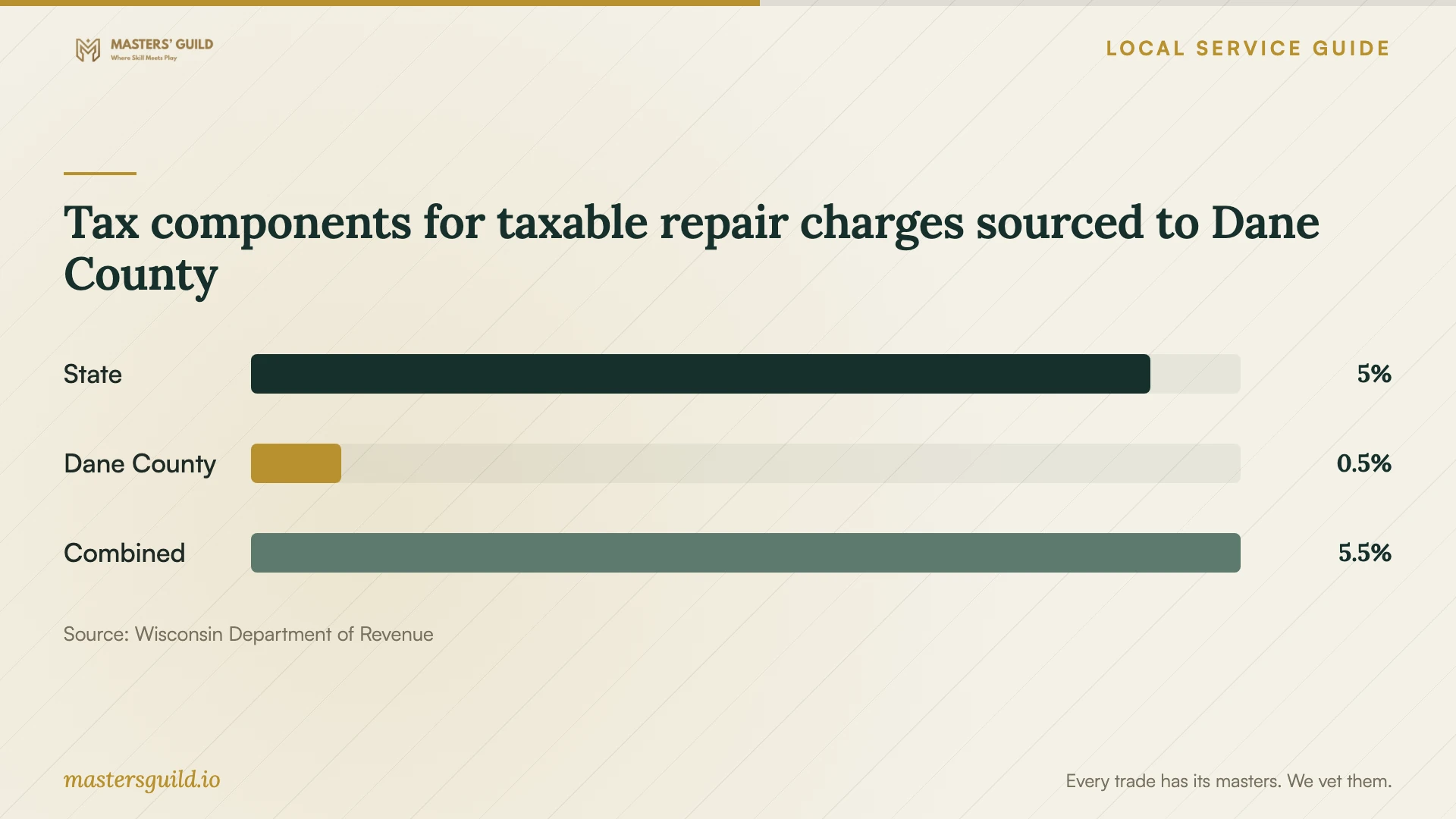
For taxable charges sourced to Dane County, the department's published rates total 5.5 percent: 5 percent state tax plus 0.5 percent county tax. Its repair guidance generally uses the seller's business location when you receive the service there, and the receipt location when you receive it elsewhere. Ask the provider to confirm the applicable location for drop-off or remote work. [2] [3]
Set a completion standard before handing over the device
Request a written summary of what the technician found, what they removed or changed, and what remains unresolved. Identify the files and applications you want to check at collection. Have the technician explain any recommendation to replace hardware, reinstall software, or buy a subscription before you authorize it.
Agree on an update time and discuss what happens if the technician finds another problem or needs longer. Ask whether the quote includes follow-up help for a returning symptom. Before accepting the work, open the agreed files, check essential applications, and confirm how the technician ended any remote access.
Tax components for taxable repair charges sourced to Dane County
Local details that affect your job
Use Wisconsin's consumer hotline to check a questionable business
DATCP's free Consumer Protection Hotline offers scam guidance, checks for complaints against businesses, and information about filing a complaint. Call 800-422-7128 during published office hours of 7:45 a.m. to 4:30 p.m., Monday through Friday except state holidays. Use this statewide resource before entrusting a questionable provider with your device, or for guidance after losing money or private data. [5]
Confirm Madison recycling eligibility before retiring the computer
Madison instructs residents to take computers to a drop-off site or private electronics recycler, rather than trash carts, recycling carts, or curbside pickup. The city charges residents no additional electronics drop-off fee and excludes business electronics. Nonresident property owners should confirm eligibility with the Streets Division: one part of the city page includes property owners, while another limits the program to residents. Before disposal, agree with the technician on file preservation and data handling. The city identifies Universal Recycling Technologies in Janesville as its recycler and describes its secure data-destruction certifications; ask about the handling of your device rather than assuming an individual destruction record. [1]
Choose the next step for your situation
| Situation | Next step | Ask before authorizing |
|---|---|---|
| An unsolicited caller or pop-up claims infection | Contact a business through verified details; DATCP warns about these support scams. | What diagnosis will you perform before recommending cleanup? |
| You need irreplaceable files preserved | Request a file-preservation plan before cleanup or reinstallation. | Which folders will you preserve, and what requires my approval? |
| The quote combines cleanup and backup | Request itemized charges and an explanation of Wisconsin tax treatment. | Which charges are taxable, and how do the exceptions apply? |
| You decide to retire a household computer | Arrange file preservation and resident drop-off or private recycling. Nonresident property owners should confirm city eligibility. | How will you handle the remaining data? |
Your hiring checklist
- Verify business contact details through a channel separate from the warning or unsolicited call.
- Record symptoms and disclose any access or payment information you gave another person.
- List essential files and describe your available backups.
- Require approval before erasing data, reinstalling software, or replacing a drive.
- Request itemized charges, applicable tax, and a spending limit.
- Agree on device access, temporary file storage, and deletion of copies.
- Confirm the update time and follow-up terms.
- Check agreed files and applications before accepting the completed work.
Frequently Asked Questions
How much should I budget for removal?
Request a written quote for your device and symptoms. Ask for diagnosis, cleanup, file protection, software repair, and applicable tax as separate items. Confirm what you owe if you decline the repair, and require approval for charges above your agreed limit.
Should I allow remote access?
Verify the business first and agree on the session's purpose and how to end it. DATCP warns that support imposters seek access to steal information and install malware. Avoid granting access through an unsolicited caller or warning-screen contact. [4]
Will cleanup preserve my photographs and documents?
Require a written file-preservation scope. Identify the folders you need, discuss backups, and require approval before the technician erases a drive or reinstalls the operating system. Ask them to explain any limits on preserving your files before work begins.
Can I put an old computer out for collection?
Madison instructs residents to take computers to a drop-off site or private electronics recycler. Do not use trash carts, recycling carts, or curbside pickup. The city excludes business electronics. Nonresident property owners should confirm eligibility with the Streets Division before taking a device to a city site. [1]
Sources and scope
This guide combines the sources below with practical planning guidance. Figures apply to the stated geography and period; request a written quote for your property.