
Local service guide
Cloud service setup in Madison, WI
For cloud service setup in Madison, WI, hire a technician against a written scope that names the devices, files, account owner, recurring charges, and recovery test. Before booking, check internet service at your address and ask the technician to assess your upload connection. Request a quote that separates software configuration, data transfer, backup work, and training so you can compare the work and understand Wisconsin tax treatment. [1] [2]
Choose the work you want completed
Write down your goal before requesting offers: accessing family photos from another device, moving files from an old computer, or recovering important documents after a device fails. Ask each technician to quote that outcome. Specify which folders to include, which devices need access, and who should have permission to view or change files.
Ask the technician to explain the selected service’s deletion, retention, and recovery settings before you approve it. Include a demonstration of recovering a sample file in the scope. Wisconsin DATCP’s backup guidance tells users to prepare their files, prioritize important documents, choose a backup schedule, and verify recovery by loading information back onto a computer. [4]
Check the connection before scheduling a transfer
The Public Service Commission of Wisconsin lets you search an address for providers, connection technologies, and advertised speeds. Its broadband map page identifies coverage data as of June 30, 2025, with a February 18, 2026 update. Treat those listings as a starting point and confirm the current offering at your property with the provider. [1]
Give the technician your approximate data volume and ask them to measure upload speed on the connection they will use. Request separate plans for hands-on setup and upload completion. Agree on who checks progress, handles failed transfers, and confirms completion if uploads continue after the appointment. For remote work, decide how you will authorize access and end the session.
Compare itemized quotes and recurring charges
Ask each provider to separate setup labor, migration, backup configuration, training, storage subscriptions, and any hardware. Request the billing basis, minimum charge, travel charge, and approval process for extra work. Compare the same devices and folders across quotes. Set a spending limit for troubleshooting and ask who pays for follow-up if the agreed recovery test fails.
Wisconsin Department of Revenue guidance lists configuration of prewritten software as taxable and making backups of data files as nontaxable, with exceptions for services necessary to complete a taxable sale. It also distinguishes hosted storage without customer control or physical access from taxable software or equipment arrangements. Ask the seller to identify the tax treatment of each charge rather than assuming the entire job has one classification. [2]
Have the technician explain the subscription renewal price, storage allowance, cancellation process, and how you would retrieve your files before closing the account. Keep the account and billing in your name. Ask for a written record of the service selected and the settings changed.
Prepare files and retain control of your account
Before the appointment, identify the folders you want included and flag private files that the technician should avoid. DATCP recommends cleaning up files before an initial backup and saving the most important files first. Keep original copies until you have checked the transferred files and witnessed the recovery test. [4]
Sign in yourself where possible. Ask the technician to walk you through account recovery and any additional sign-in protection you choose. Decide whether they need temporary access and remove that access at handover. Request instructions you can follow without the technician, including how to check the latest backup and recover a file.
Accept the job after a recovery demonstration
Choose a sample document or photo, ask the technician to recover it to a separate folder, and open it. DATCP advises verifying a backup by loading information from storage back onto the computer. Its guidance also tells employees to follow employer backup policies, so keep work files out of a household setup unless your employer authorizes their inclusion. [4]
Review the folder selection, device access, and sharing permissions together. Record any incomplete uploads, exclusions, and errors before accepting the work. Agree on a follow-up date for unfinished tasks and keep the handover notes with your subscription details.
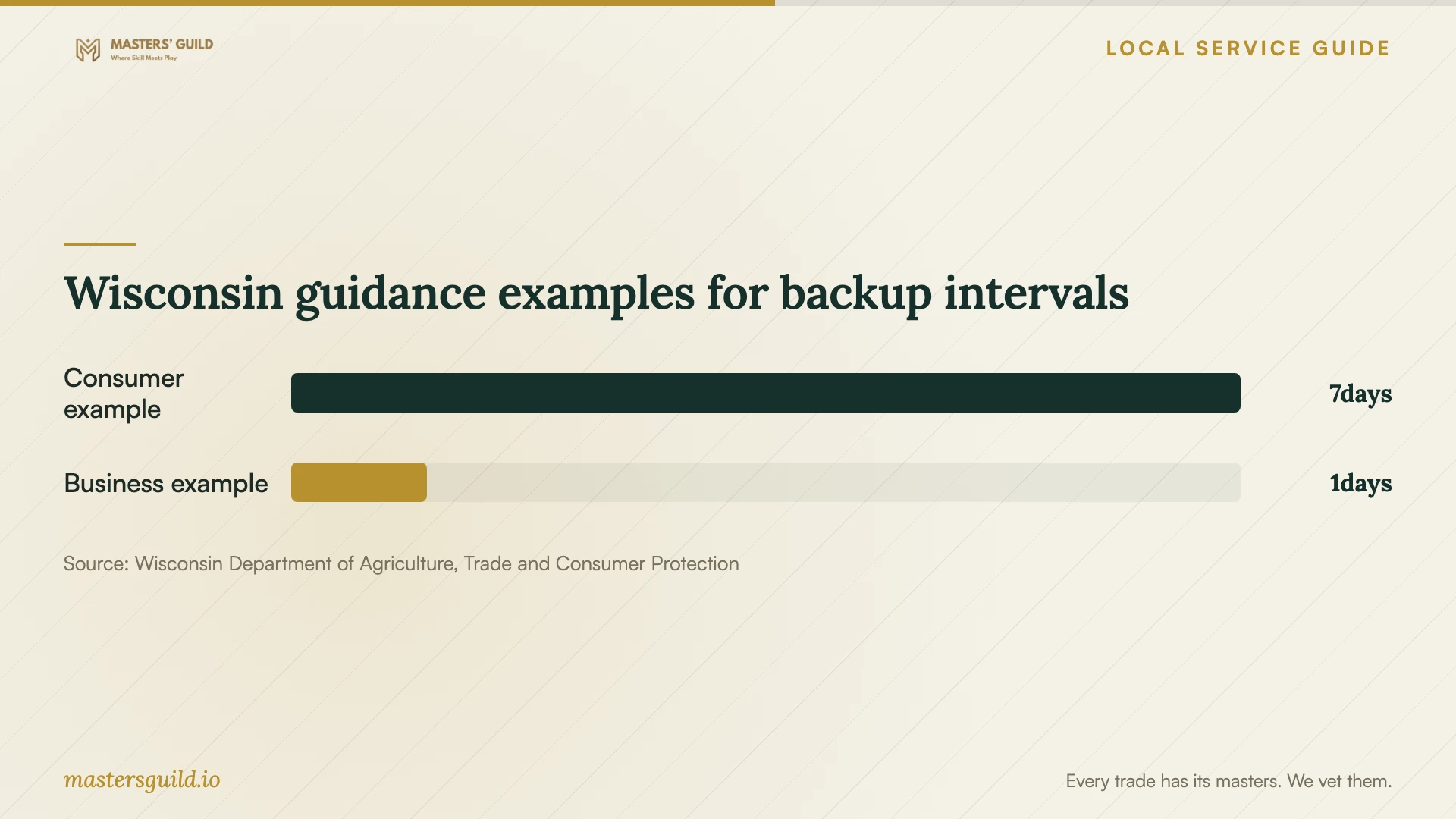
Wisconsin guidance examples for backup intervals
Local details that affect your job
Madison assistance for basic digital skills
The City of Madison’s Digital Inclusion page identifies computer skills training, technical support resources, and DANEnet, city IT, and library Computer Fix-It Clinics. Before paying for a training-only visit, use the city resource hub to ask about assistance suited to your device and skills. The page does not establish that these programs perform cloud migrations; confirm task coverage and availability before making plans. [3]
Wisconsin tax distinctions affect quote comparison
For a Madison job, request separate descriptions and prices for software configuration, data backup, and optional training. Wisconsin guidance treats prewritten software configuration as taxable, while listing data backups and training as nontaxable subject to its stated conditions. Ask the seller to explain bundled charges and any applicable exceptions before comparing totals. [2]
Check service at the property
Wisconsin’s broadband map supports address searches for service status, providers, technology types, and advertised speeds. Check the actual property rather than choosing a connection from a city-wide assumption. Confirm current availability with the provider, then ask the technician to assess the connection before committing to a transfer schedule. [1]
Choose the scope before requesting offers
| Your need | Request | Acceptance check |
|---|---|---|
| Basic device or account instruction | Training session; explore city-listed digital skills resources | You can repeat the agreed task without assistance |
| Files moved from an old device | Named folders, destination account, and transfer verification | Open sample files and review exclusions before retiring originals |
| Recoverable copies of important documents | Scheduled backup and recovery demonstration | Recover a sample file to a separate folder and open it |
| Access across household devices | Device list, account ownership, and sharing permissions | Check access from each agreed device and review who can edit |
Your hiring checklist
- List the devices, folders, approximate data volume, and desired outcome.
- Confirm current internet service and ask the technician to assess upload speed.
- Request separate setup, transfer, backup, training, subscription, and tax charges.
- Agree on account ownership, temporary access, and access removal.
- Choose a backup schedule and ask for a recovery demonstration.
- Check sample files and sharing permissions before accepting the work.
- Document unfinished uploads, follow-up responsibilities, and subscription renewal details.
Frequently Asked Questions
Can I arrange setup remotely?
Ask the technician which tasks they can complete remotely and what access they need. Agree on session authorization, how you will end access, and who will check unfinished uploads. Request an in-person option if you want help handling devices or practicing the steps together.
Does Wisconsin tax cloud setup?
Tax treatment depends on the work and transaction. State guidance lists prewritten software configuration as taxable and making data backups as nontaxable, subject to exceptions. Hosted storage also has conditions involving customer control and physical access. Ask for an itemized quote and the seller’s explanation. [2]
Can Madison resources help before I hire someone?
The city lists digital skills training, technical support resources, and Computer Fix-It Clinics. Ask about help with basic device preparation or learning tasks. Confirm the program’s scope; the city page does not promise cloud migration services. [3]
How often should I back up files?
Choose a schedule based on how much recent work you could afford to lose. DATCP’s October 2020 guidance gives weekly backups as a consumer example and daily backups as a small-business example. Treat those as planning suggestions and include a recovery test in your setup. [4]
Sources and scope
This guide combines the sources below with practical planning guidance. Figures apply to the stated geography and period; request a written quote for your property.