
Local service guide
Computer virus removal in Louisville, KY
Arrange computer virus removal in Louisville by asking a technician to assess the affected devices, explain how they will protect business files and provide a written estimate before you authorize work. For suspected ransomware, isolate affected devices from the network and contact an incident responder. CISA recommends isolation before recovery and investigation of the systems involved. [3]
Choose help that matches the incident
Describe the warning you saw, whether files open, which devices show symptoms and whether anyone obtained remote access. Ask the technician to explain whether their assessment covers one computer, shared storage, business accounts or the wider network. Request a clear statement of what they will investigate and what falls outside their service.
CISA explains that ransomware can encrypt files and involve stolen data or threats to publish it. It also warns that a ransomware event may follow an earlier network compromise. If you encounter a ransom demand or encrypted files, ask for incident-response capability, evidence preservation and a recovery plan. [3]
Tell the responder which operations you need to resume first, such as taking payments, accessing orders or running payroll. CISA recommends prioritizing restoration around critical services and the systems they depend on. Agree on those priorities before authorizing a rebuild. [3]
Verify the technician before granting access
Kentucky's Attorney General describes scammers who claim to provide Microsoft or Windows support, request remote access and demand money after locking a computer. The office also warns about pop-up support numbers and requests to open banking websites during a remote session. [2]
Obtain support contact details from the company's legitimate website, as the Attorney General recommends. Ask your chosen technician who will connect, which access tool they will use and how they will end access after the appointment. Keep banking activity outside the repair session. [2]
If you granted access to a suspicious caller, tell the responder what you installed, what information you disclosed and whether you opened financial accounts. Use a separate trusted device or phone to contact your bank and arrange support. Include unauthorized remote-access software and business account access in the assessment request.
Protect files and evidence before cleanup
For suspected ransomware, disconnect affected computers from Ethernet and Wi-Fi. CISA recommends powering down only if you cannot disconnect affected devices from the network through other means. Shutdown loses potential evidence held in memory. Coordinate the response with your IT contact by phone. [3]
Ask the responder how they will preserve logs and relevant evidence before removing software or rebuilding systems. CISA recommends preserving volatile evidence, maintaining offline encrypted backups and testing backup integrity. During recovery, it advises precautions against reinfecting clean systems. [3]
List essential folders, applications and existing backups. Agree on who can authorize copying, where the technician will store copies and when they will delete them. Require approval before a reset, drive replacement or reinstall. Arrange a check of important files and applications before accepting the work.
Compare estimates and define completion
Ask providers to quote the same incident-specific scope. Separate assessment, cleanup, file preservation, software reinstall, travel and follow-up support. Specify whether the estimate covers one device or the business environment. Set a spending limit and require approval for additional work.
Request a written estimate after describing the symptoms and your recovery priorities. Agree on a target for the first assessment and the next progress update. Discuss a temporary way to continue essential work while affected devices remain isolated. Ask the provider to identify uncertainties that could change the cost or schedule.
Before accepting the repair, request a record of what the technician found, changed and could not verify. Check agreed files and applications together. Ask for account-security, remote-access and backup instructions. CISA recommends addressing affected accounts and security gaps during recovery. [3]
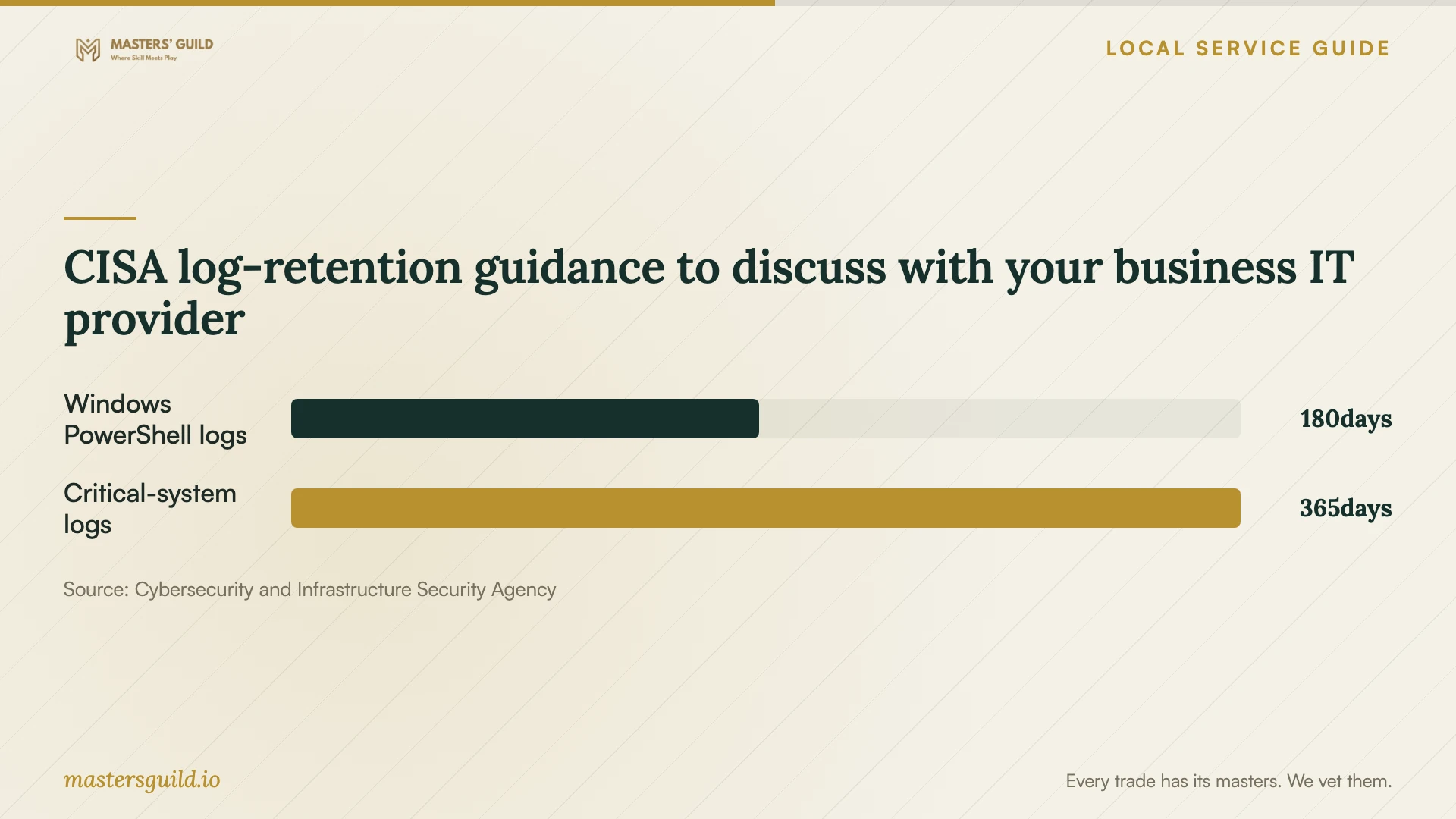
CISA log-retention guidance to discuss with your business IT provider
Local details that affect your job
Kentucky's route for reporting a suspicious repair offer
The Kentucky Attorney General provides a Scam Report route and advises Kentuckians to obtain support numbers from legitimate company websites. Apply that guidance before engaging a caller or pop-up repair service. If you suspect a fraudulent offer, retain the message, caller details and payment request for your report. Reporting does not replace arranging technical help for the affected computer. [2]
A Louisville legal referral contact for a repair dispute
The Kentucky Attorney General lists the Louisville Bar Association's Kentucky Lawyer Referral Service at 502-583-1801 among sources of legal assistance. For a disputed business repair contract, ask that service about a referral for advice on your agreement and requested remedy. The Attorney General cannot act as your private attorney. Eligibility for its consumer mediation process for a business repair purchase remains unverified; ask the office before relying on mediation. [1]
Choose your next step before booking
| Situation | Next step | Question to ask |
|---|---|---|
| A virus-warning pop-up gives a support number | Verify support through the company's legitimate website | Can I confirm your identity through your published contact details? |
| One device shows symptoms and files still open | Request an assessment with a written file-handling scope | What will you assess before recommending cleanup or a rebuild? |
| Files appear encrypted or a ransom demand appears | Isolate affected devices and contact an incident responder | Can you preserve evidence and investigate other affected systems? |
| Several devices or shared files show symptoms | Coordinate isolation and recovery with your IT responder | Which essential operations should we restore first? |
| A business repair dispute remains unresolved | Keep records and ask the Louisville lawyer referral service about legal advice | Does my agreement support the remedy I want? |
Your hiring checklist
- Record symptoms, affected devices and any remote access you granted.
- Identify the business operations you need to restore first.
- Verify the provider's contact details before granting access.
- List essential files, applications and existing backups.
- Agree on file access, copying, storage and deletion.
- Approve a written scope, spending limit and progress-update schedule.
- Require permission before a reset, reinstall or additional charges.
- Keep the completion record, agreement, invoice and correspondence.
Frequently Asked Questions
Can I arrange remote virus removal?
Ask whether remote assessment fits your symptoms and agree on access limits before connecting. Verify the provider through its legitimate website. Kentucky's Attorney General warns that tech-support scammers request remote access and may ask customers to open banking websites. [2]
Should I turn off a computer with suspected ransomware?
Disconnect it from the network first. CISA recommends powering down only when other network-isolation methods are unavailable, because shutdown loses potential evidence in memory. Coordinate further action with your IT contact or responder. [3]
Does removing malware recover encrypted files?
Define cleanup and file recovery as separate parts of the scope. CISA describes ransomware encryption as making files unusable and recommends restoring from protected backups with precautions against reinfection. Ask the responder to explain available recovery options before authorizing a rebuild. [3]
Can Kentucky's Attorney General resolve my business repair dispute?
Business-purchase eligibility for the office's consumer mediation process is unverified. Ask the office before relying on that route. Its guidance advises contacting the business first, and it cannot act as your private attorney. If a business refuses mediation or cooperation, the office says it generally can only track the information. [1]
Sources and scope
This guide combines the sources below with practical planning guidance. Figures apply to the stated geography and period; request a written quote for your property.