
Local service guide
Software installation in Long Beach, CA
Software installation in Long Beach starts with a device-specific quote covering the program, account activation, configuration, and a test of the finished setup. Tell the technician your operating-system version and what you want to do with the software. Before booking, decide whether you need installation, training, accessibility assistance, or repair. Long Beach Public Library offers computer courses and adaptive technology resources that can help you choose your next step. [1] [2]
Define the work before comparing quotes
Give each technician the same description: computer model, operating-system version, application name, device count, and any error message. Explain whether you own the software and can sign in to its account. Ask the technician to confirm compatibility before you authorize a purchase.
Separate installation from file transfers, restoring settings, connecting email, and troubleshooting an existing fault. Request a price for the agreed work and an approval point for extras. Ask the technician to contact you before removing an older application, reinstalling the operating system, or purchasing another subscription.
Include a completion test in the scope. For a document editor, open an existing file, make a change, save it, and reopen it. For email, send and receive a test message. Request a short walkthrough if you want help repeating those steps after the appointment.
Choose the assistance you need
Consider remote assistance if you can start the computer, connect to the internet, and follow instructions. Ask how you will authorize access and end the session. Request a home visit if you need someone beside you to handle equipment or demonstrate an accessible way to use the program.
If the computer will not start or the technician proposes repairs, pause to clarify the scope. California’s Bureau of Household Goods and Services covers personal-computer repair for personal or home-office use. For covered repairs, service dealers must provide a written estimate including the total price before repairs and disclose any trip charge before the service call. [3]
BHGS guidance addresses electronic-equipment repair. Ask the provider whether the proposed work falls within that repair scope and whether they are acting as a regulated repair dealer. Keep the agreed installation tasks and any proposed repair work separate in your estimate. [3]
Compare labor, software, and taxable purchases
Request a device-specific, itemized quote showing labor, software purchases, subscriptions, travel, diagnostics, and physical media. Confirm whether the price covers all the devices you listed. Agree on charges for an unsuccessful installation and the follow-up help included in the price.
CDTFA says software transmitted over the internet is generally not taxable. Supplying a physical backup copy as part of that software sale can make the entire software sale taxable. Ask the seller to explain each charge and its tax treatment before you approve the purchase. [4]
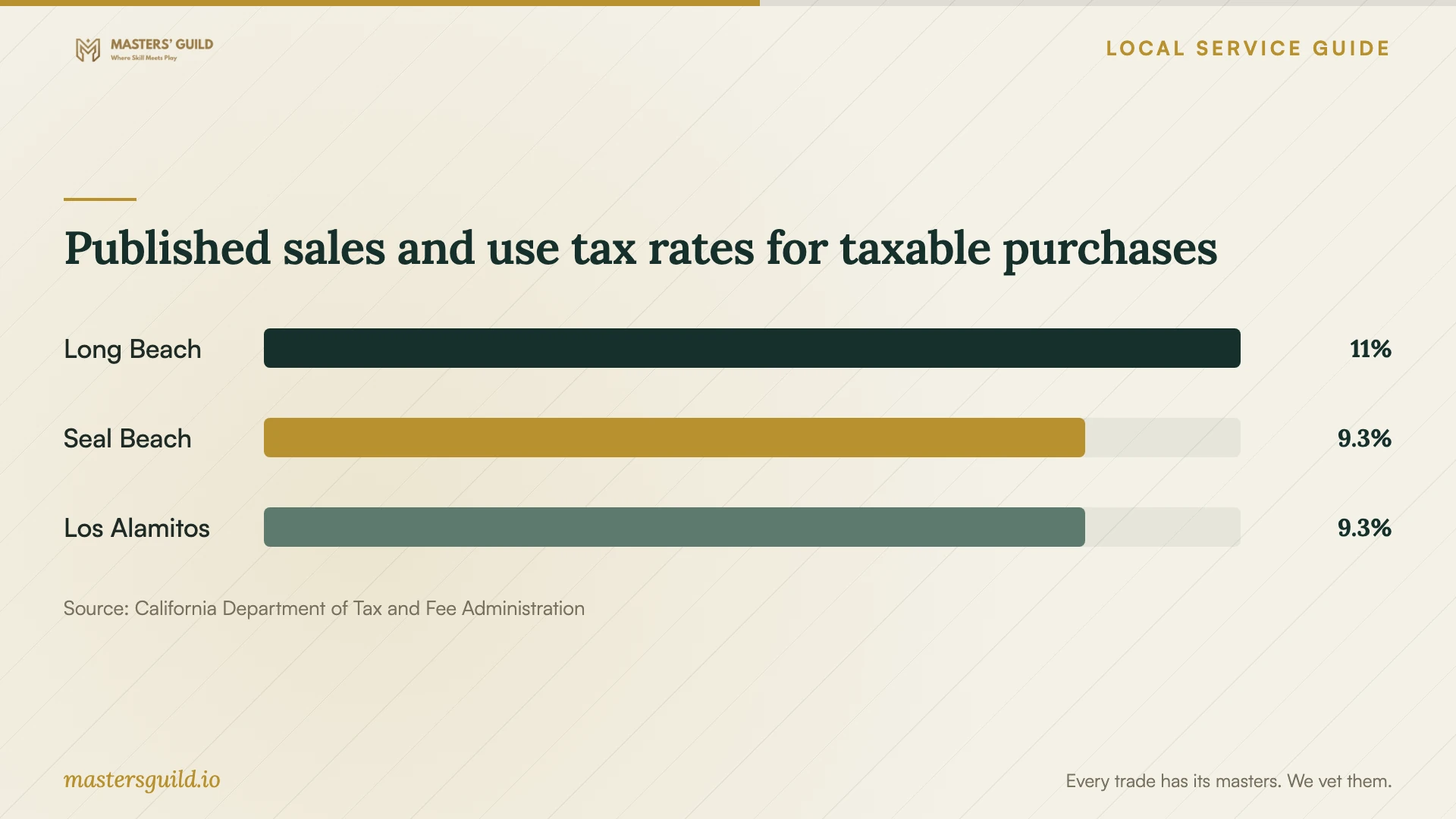
CDTFA’s table effective October 1, 2026 lists Long Beach at 11.000%. The chart compares that entry with two nearby city entries for context when your job includes taxable purchases. The agency also warns that listed rates may be outdated and provides an address lookup. Ask the seller to verify the applicable rate for your transaction. [5]
Prepare your files and keep control of access
Back up the files you want to keep and check that you can open the copies before the appointment. Gather receipts, subscription details, and account-recovery information. Keep passwords out of the job description. Plan to enter credentials yourself when the technician needs you to sign in.
Tell the technician which files and applications they may change. Require your approval before deletion or a system reset. During remote assistance, stay present and ask the technician to explain any access software they install. Review ongoing access at completion and decide whether to retain it.
Restart the computer and repeat your agreed test before accepting the work. Confirm that you control the software account and can find the receipt. Request a written record of installed programs, changed settings, and the follow-up terms you agreed on.
Published sales and use tax rates for taxable purchases
Local details that affect your job
Use library courses for help with Office
Long Beach Public Library offers free online resources with a library card. Its Basic Computer Skills courses cover Excel, Outlook, PowerPoint, and Word. If your program opens but you need help using it, explore a matching course before arranging installation. You can also use library computers and internet access free during open hours. [1]
Discuss adaptive software at two library locations
The Center for Adaptive Technology at Billie Jean King Main Library provides adaptive hardware, software, and staff assistance with computers and technologies. The library lists JAWS, ZoomText, and WordQ and SpeakQ at both that location and Michelle Obama Neighborhood Library. Contact staff about access and help with personal devices before visiting. Use the discussion to specify the accessibility features and demonstration you want from your technician. [2]
Check Udemy access before booking troubleshooting
Library access to Gale Presents: Udemy requires a Long Beach Public Library card and login from within California. The library warns that VPN or IP-masking use may cause an account lockout. If Udemy access is your problem, check those requirements before requesting software work. Contact Gale Support for a lockout or password-reset problem, as the library directs. [1]
Choose the next step for your software problem
| Your situation | Suggested next step | What to confirm |
|---|---|---|
| Office works, but you need help using it | Explore LBPL Basic Computer Skills courses | Library-card access and the course matching your application |
| You need screen reading, magnification, or writing assistance | Discuss library adaptive technology with staff | Access arrangements and help with your personal device |
| You want a new application installed | Request an installation and testing quote | Compatibility, account control, and the completion test |
| The technician proposes personal-computer repair | Clarify coverage and request a written estimate for covered repairs | Total repair price, diagnostic fees, and advance trip-charge disclosure |
| You cannot access library-provided Udemy | Check library-card and California login requirements | VPN or IP masking; contact Gale Support for account problems |
Your hiring checklist
- List each device, operating-system version, application, and desired result.
- Share the error message without exposing passwords or private files.
- Confirm who will purchase the software and control its account.
- Back up important files and check that the copies open.
- Agree on labor, travel, diagnostics, subscriptions, and approval for extra work.
- Choose remote assistance or a visit based on the help you need.
- Test the application after a restart and review remaining remote access.
Frequently Asked Questions
How much should I budget for installation?
Request a quote for your device, application, and desired result. Compare labor, software purchases, travel, diagnostics, and follow-up terms. Ask the technician to obtain your approval before adding work or buying a subscription.
Can the library help with software on my home computer?
Contact library staff to ask what help they offer for personal devices. LBPL provides computer courses, adaptive technology, and staff assistance with computers and technologies. Describe your device and task so staff can clarify the available help before you visit or hire a technician. [1] [2]
Will I pay sales tax on downloaded software?
CDTFA says internet-delivered software is generally not taxable. A physical backup copy supplied as part of the software sale can change that treatment. Ask the seller to identify taxable items and explain the tax charged on your invoice. [4]
What should I do if installation turns into repair?
Pause and request the revised scope and total price. For covered electronic-repair work, BHGS requires a written estimate before repairs. Its guidance permits a reasonable diagnostic fee and requires disclosure of any trip charge before the service call. [3]
Sources and scope
This guide combines the sources below with practical planning guidance. Figures apply to the stated geography and period; request a written quote for your property.