
Local service guide
Smart Appliance Setup in Long Beach, CA
For Smart Appliance Setup in Long Beach, arrange a technician for app pairing, account configuration and the functions you want demonstrated. If you also need wiring or plumbing changes, separate that work in the quote and ask the contractor to confirm the applicable licensing, permits and inspections. The city lists appliance replacement exemptions alongside separate electrical and plumbing requirements, so describe the proposed connections before booking. [1] [2]
Define the visit before comparing quotes
Tell the provider whether the appliance awaits installation, works but will not connect, or needs help with a particular setting. Send the brand, full model number and any connection error. Name the outcome you want: notifications, a delayed cycle or household access. Ask the provider to confirm those functions against your model's instructions.
Request a written quote that separates moving and connecting the appliance from app pairing. Include network troubleshooting only if you want it. Ask how the provider charges for diagnosis when pairing remains unresolved, whether another device costs extra and what a return visit would cover. Agree on approval for equipment purchases before the appointment.
Resolve physical installation and permit questions
Long Beach's permit FAQ exempts replacement of a residential cooking range, broiler unit or clothes dryer from a permit. Its electrical and plumbing guidance addresses wiring, circuits and piping separately. Give the Permit Center the model and proposed changes, such as adding a circuit or moving a water connection, rather than asking whether a smart appliance needs a permit. [1] [2]
The city requires inspection and approval before using or energizing electrical wiring that requires a permit. It also requires inspection and approval of plumbing work before concealment or service. Ask the contractor who will obtain any required permit, schedule inspections and document approval. Arrange app setup after resolving those installation steps. [2]
For proposed alterations, ask the contractor to identify the state license and classification appropriate to the work, then confirm them before hiring. Describe the whole installation when requesting that assessment. Keep utility changes outside an app-pairing technician's agreed scope unless you have confirmed who will perform and take responsibility for them.
Prepare your account and network access
Have the manufacturer's installation and connection instructions ready. Ask the technician to check the model's app and network requirements before recommending a router, hub or adapter. Write down the pairing steps you tried and the exact error. Share whether you control the router and can access its settings.
Use your own email address for the appliance account and check that you can receive sign-in verification messages. Enter passwords yourself during the visit. For a used appliance, ask the technician to confirm the manufacturer's ownership-transfer procedure before resetting it. In a rental or shared building, obtain permission before authorizing changes to wiring, piping or shared network equipment.
Program delayed start around your actual rate plan
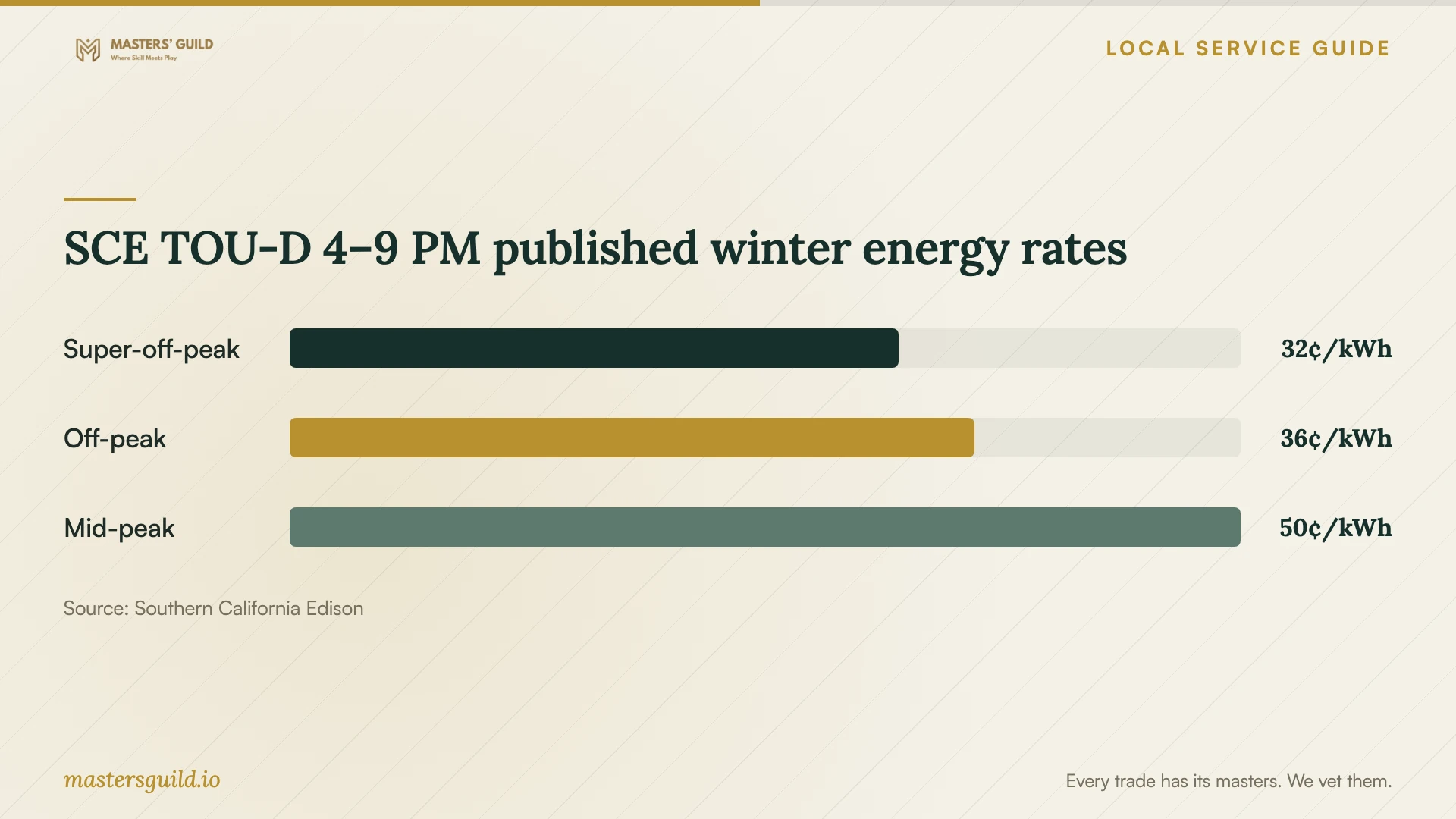
Review the rate-plan name on your electricity bill before choosing a schedule. SCE publishes different windows for its TOU-D 4 PM to 9 PM and TOU-D 5 PM to 8 PM plans. On the 4–9 plan's October–May schedule, it lists 32 cents per kWh from 8 a.m. to 4 p.m., 50 cents from 4 p.m. to 9 p.m. and 36 cents during the remaining hours, before baseline credit. [3]
SCE states that its displayed rates cover customers receiving both delivery and generation from SCE. Customers with another generation provider may pay different rates. Check your own plan details before adopting the chart's schedule. Ask the technician to demonstrate delayed start if your model supports it, and select an operating time consistent with the manufacturer's guidance. [3]
Include cancellation and manual operation in the demonstration. Ask how to change the schedule when your routine changes and how to check whether you enabled it. Keep any promised bill reduction out of the job's acceptance criteria; use successful setup of the functions you requested.
Agree on a useful handover
Test each agreed function on your phone before the technician leaves. Sign out and sign back in, identify the appliance in the app and change the requested settings. If you want household sharing, test the intended person's access using the manufacturer's supported method. Keep ownership and recovery access under your control.
Request handover notes naming the app, account owner, settings changed and unresolved problems. Ask the technician to explain reconnection after a router change and cancellation of any schedule. Record the support period, return-visit charge and next step for a fault that needs manufacturer assistance.
SCE TOU-D 4–9 PM published winter energy rates
Local details that affect your job
Contact the Permit Center with the installation scope
Long Beach lists its Permit Center at 411 W. Ocean Blvd., second floor, with contact number 562-570-7648. Describe both the appliance replacement and any proposed wiring or piping changes. Ask which exemptions apply and whether separate permits or inspections are needed before authorizing the work. [1] [2]
Check city documentation for installation contractors
The city's mechanical and plumbing guidance requires contractors working in Long Beach to have a city business license. At permit issuance, contractors with employees must show workers' compensation insurance proof. Ask the installation contractor to confirm those documents when arranging work involving utility connections. [2]
Consider daytime scheduling for the published winter plan
SCE labels October through May as winter in its displayed TOU schedules. For TOU-D 4 PM to 9 PM, the 8 a.m. to 4 p.m. super-off-peak window applies on weekdays and weekends. If you use that plan, discuss daytime delayed start rather than assuming overnight operation has the lowest listed energy rate. [3]
Choose help for your appliance's current condition
| Situation | Help to arrange | Before booking |
|---|---|---|
| Installed appliance needs app pairing | Setup technician, or follow the manufacturer's instructions yourself | Confirm model support, account access and the functions to demonstrate. |
| Pairing fails for an unknown reason | Technician offering network diagnosis | Agree on the diagnostic charge and approval for equipment purchases. |
| Residential range or dryer replacement | Installer suited to the model and connections | The city exempts replacement from a permit; check separate wiring or piping changes. |
| New wiring or altered plumbing | Contractor who can confirm the applicable licensing and permit scope | Resolve inspection responsibility and approval before use of permitted work. |
| Delayed-start setup | Technician who can demonstrate your model's supported settings | Check your actual rate plan; SCE publishes different windows for its 4–9 and 5–8 plans. |
Your hiring checklist
- Send the full model number, installation status, pairing error and requested functions.
- Separate physical installation, utility alterations and app setup in the quote.
- Confirm who will resolve licensing, permit and inspection questions for alterations.
- Prepare manufacturer instructions, your phone and account recovery access.
- Enter credentials yourself and keep control of the appliance account.
- Check your electricity plan before requesting a delayed-start schedule.
- Test the agreed functions and record unresolved issues and return-visit terms.
Frequently Asked Questions
How should I budget for setup?
Request a quote for your model and desired functions. Ask providers to separate app pairing, network diagnosis, physical installation, equipment purchases and return visits. Specify what you expect them to demonstrate so you can compare offers covering the same work.
Does replacing a smart dryer require a permit?
Long Beach exempts residential clothes dryer replacement from a permit. Assess added wiring or plumbing under the city's separate requirements. Describe the existing connections and proposed changes to the Permit Center before authorizing alterations. [1] [2]
Should I schedule my dishwasher overnight?
Check your rate plan. On SCE's displayed October–May TOU-D 4 PM to 9 PM schedule, the daytime 8 a.m. to 4 p.m. rate is lower than the overnight rate. Confirm your own rates and the manufacturer's operating guidance before choosing delayed start. [3]
Should the technician own the appliance account?
Use an account you own and can recover. Enter credentials yourself, test sign-in and confirm any household access. Ask the technician to leave instructions for changing the agreed settings and reconnecting the appliance.
Sources and scope
This guide combines the sources below with practical planning guidance. Figures apply to the stated geography and period; request a written quote for your property.