
Local service guide
Software Installation in London, ON: Hiring Guide
Arrange Software Installation in London, ON by asking a technician to quote the named applications, device setup, activation and testing as separate deliverables. Check your software entitlement before buying a licence, agree on how the technician will handle your files and account access, and define a working result you can test before the appointment ends. For help learning an application, consider London Public Library’s scheduled Volunteer Tech Tutors; eligible Western University users should check university software options before purchasing. [1] [2]
Define the installation before requesting quotes
Give the technician your computer model, operating-system version, application name and the task you want to perform. Include the exact error message if an installation has failed. Explain whether you already own the software, need help choosing an edition or want to move an existing installation to another computer. Ask the technician to check compatibility before you buy anything.
Separate an application installation from a larger project. If you need an operating-system reinstall, file transfer, email migration or help with suspected malware, name that work in the request. Ask the technician to explain which files and settings they intend to preserve, which changes require your approval and how you can return to the previous setup if the result fails your agreed test.
Choose remote help, a visit or a learning session
Ask a prospective technician whether they can complete your particular job remotely. Tell them whether the computer starts, connects to the internet and lets you sign in. For a visit, list the equipment you want tested together, including a printer or external drive. For a drop-off, agree on collection arrangements and write down which accessories you are handing over.
For remote work, ask how you will approve access, watch the session and disconnect it. Agree whether the technician will remove remote-access software afterward or retain it under a separate support agreement. Enter your own account credentials where possible, and ask the technician to explain any request for administrator access before you approve it.
London Public Library’s Volunteer Tech Tutors help with computer basics and using Word, Excel, PowerPoint or email at scheduled locations. If you can open the program but need help using it, check this option before booking a paid installation appointment. The library asks readers to check the schedule and call to confirm. Ask whether your question fits the tutor service before travelling. [1]
Check software access before paying
Western University’s Social Science Technology Services page lists software access by application and eligible group. It says eligible students, faculty and staff can install Office on several devices for no charge. It also lists no-charge personal Matlab installations for faculty, staff, graduate students and undergraduate students. Check the university’s current eligibility and installation instructions before asking a technician to purchase a retail licence. [2]
The same Western page lists annual reduced-rate purchases of SPSS for faculty, staff and students. Other applications have narrower eligibility: the ArcGIS entry names professors, instructors and graduate students. Match your role to the application’s entry rather than assuming one university affiliation gives you access to every title. [2]
Ask the technician to distinguish their labour charge from software purchases and subscriptions. Keep the purchase receipt and account ownership under your control. If you plan to use university-provided software for work outside your studies or university role, confirm permitted use with the university before arranging the installation.
Compare quotes by scope and handover
Request a written quote for your applications and devices, with labour, software, subscriptions, travel and backup work itemized. Specify activation work, settings to configure and tests to complete. Ask whether the price includes data transfer and follow-up support. Compare quotes for the same scope so you can see which provider includes the work you need.
For hourly work, agree on an approval point before the technician exceeds your budget. Require the technician to identify additional work before charging for it, including account recovery or compatibility troubleshooting. Ask who pays for another appointment if an agreed completion test fails, and record that agreement with the quote.
Before handover, perform your own test. Open the application under your usual account, open a sample file and complete the task you described in the quote. If the job includes email or printing, test those functions too. Request a short record of installed software, licence ownership, update settings and any remaining issue.
Include backup and security settings in the plan
If you use the computer for a home business, include security configuration in the installation scope. The Canadian Centre for Cyber Security recommends automatic updates, anti-malware protection, two-factor authentication where possible and access limited to the functions a user needs. Its business guidance also recommends backing up essential information and verifying that restoration works. [3]
Ask who will manage updates after installation and how you will recover important files if the computer fails. For household use, consider the same questions as preparation advice. Agree on a backup location and test access to the files you intend to preserve before authorizing a reinstall or removal of existing software.
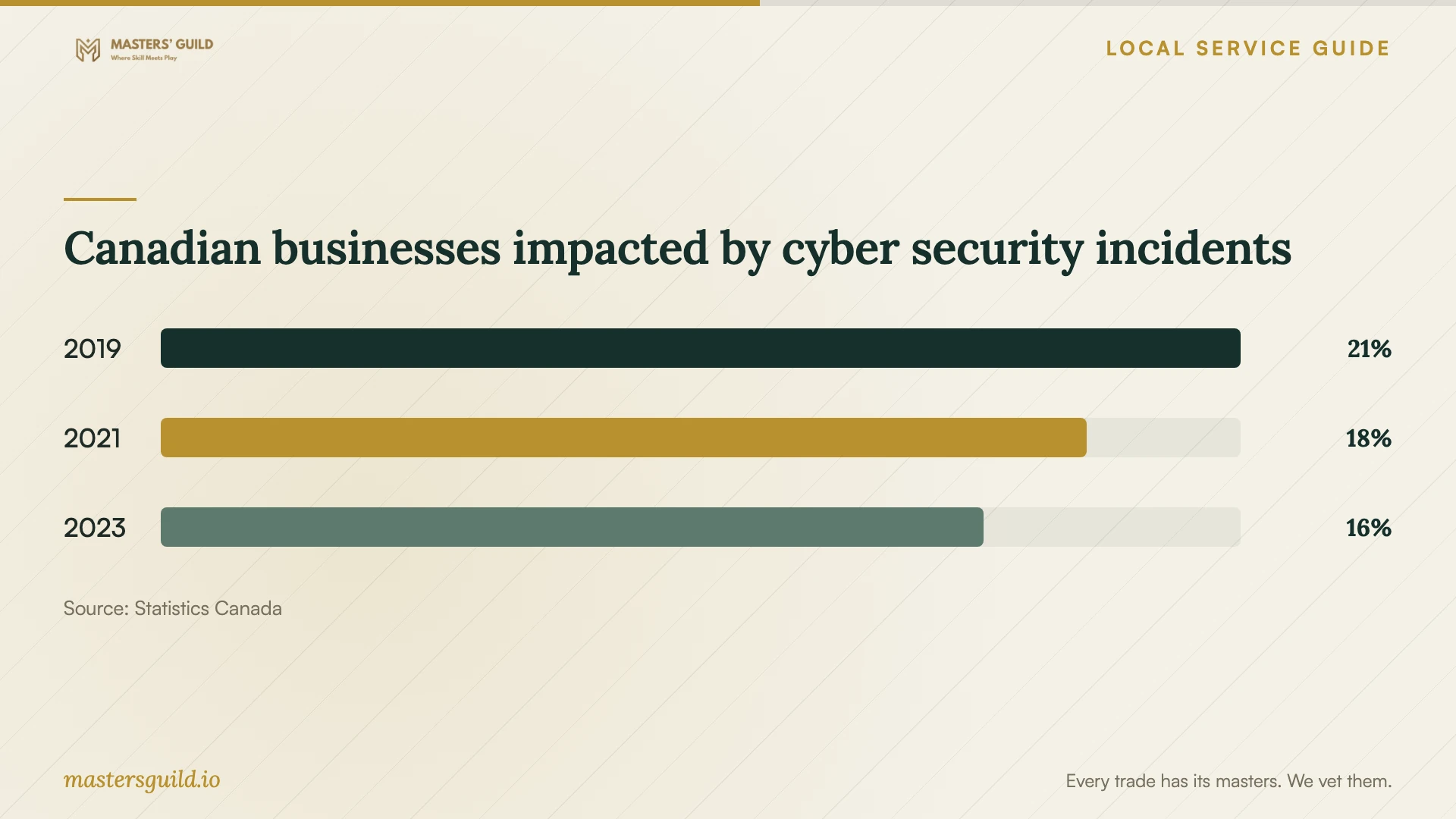
Statistics Canada reported that 16% of Canadian businesses in its survey scope experienced impactful cyber security incidents in 2023, compared with 18% in 2021 and 21% in 2019. These historical national business figures provide context for discussing security settings. They do not measure household risk, London conditions or how much protection a particular installation provides. [4]
Canadian businesses impacted by cyber security incidents
Local details that affect your job
Use library tutors for application skills
London Public Library offers Volunteer Tech Tutors at scheduled times at various locations for computer basics, Word, Excel, PowerPoint and email. Check the schedule and call to confirm before travelling. Choose this route when you want instruction in using an application; ask a technician for a separate quote if you need installation or repair. [1]
Check Western entitlement before buying a licence
Western’s software table distinguishes eligible groups and access methods. It lists no-charge Office installations for eligible students, faculty and staff, and reduced-rate annual SPSS purchases for faculty, staff and students. If you belong to one of these groups, check entitlement first and ask the technician to quote installation labour separately from any software purchase. [2]
Choose the next step for your software task
| Your situation | Next step | Confirm before proceeding |
|---|---|---|
| The program opens, but you need help using it | Check London Public Library’s Volunteer Tech Tutor schedule | Call to confirm availability and whether the tutor can address your question |
| You have an eligible Western affiliation | Check the university software table before purchasing | Your application, eligible group and permitted use |
| You want an application installed and configured | Request a technician’s quote for installation, activation and testing | Compatibility, licence ownership and your completion test |
| You need a reinstall or file transfer | Request a separate scope for preserving and restoring files | Backup access, settings to retain and approval for destructive changes |
| The device holds home-business information | Include security and recovery arrangements in the scope | Updates, authentication, access permissions and backup restoration |
Your hiring checklist
- Record the computer model, operating-system version, application names and any error messages.
- Check existing licences and any university entitlement before approving a software purchase.
- Describe the task you will use to test the completed installation.
- Agree on backup and restoration arrangements before changes begin.
- Get a written scope separating labour, software purchases, subscriptions, travel and backup work.
- Agree on account access and whether remote-access software will remain afterward.
- Complete the agreed tests and collect the installation record before closing the job.
Frequently Asked Questions
How much should I budget for installation?
Request a written quote for your applications and devices, with labour, software, subscriptions, travel and backup work itemized. Compare the same deliverables across providers. For hourly work, set an approval limit for additional work and ask how the technician will handle a failed completion test.
Can London Public Library install my software?
The library advertises scheduled Volunteer Tech Tutors for computer basics and using Word, Excel, PowerPoint or email. Its page does not promise installation or repair. Check the schedule and call to ask whether your question fits the service. [1]
Should I buy Office before hiring someone?
Check your existing access first. Western says eligible students, faculty and staff can install Office on several devices for no charge. Confirm eligibility with the university, then ask the technician to quote the work you need. [2]
What should I check before the technician leaves?
Use your usual account to open the application and complete the agreed task. Test any included email, printing or file access. Confirm that you control the software account and collect a record of changes, update arrangements and unresolved issues.
Sources and scope
This guide combines the sources below with practical planning guidance. Figures apply to the stated geography and period; request a written quote for your property.