
Local service guide
Network Setup and Support in London, ON
Arrange Network Setup and Support in London, ON by asking for a diagnosis and a written scope before approving equipment purchases or cable installation. Describe the rooms and devices affected, and ask the technician to separate internet-service troubleshooting from home-network work. For exterior installations, check heritage status; for buried connections, plan utility locates and review easements before scheduling excavation. [1] [2]
Choose the scope before choosing equipment
Start your job description with the problem you want the technician to resolve: dropped video calls in the study, poor coverage upstairs, a printer that loses its connection, or a new connection to a detached garage. Include your internet provider, modem and router models, affected devices, and whether the problem started after a move or equipment change.
Ask the technician to propose an initial diagnostic visit and explain what they will test. Request checks at the internet connection, through the router, and in the rooms where you need service. Agree on who will contact the internet provider if the diagnosis points to its service or equipment.
For coverage work, request a placement plan and an explanation of the connection between access points or mesh units. For cabling, request the number of outlets, their locations, the route and the termination method. Ask the installer to explain why the proposed approach suits your layout and intended devices.
Check service and power before booking troubleshooting
If connectivity stops during a power interruption, check London Hydro's outage map before arranging a network visit. The utility says it updates the map every minute. Account holders can also sign up for neighbourhood outage alerts by text, email or phone. [3]
Record which equipment has power and which devices still connect. Ask about backup power if you need connectivity during an interruption, and request an explanation of its limits. Agree on the equipment to include and the runtime you want the technician to assess.
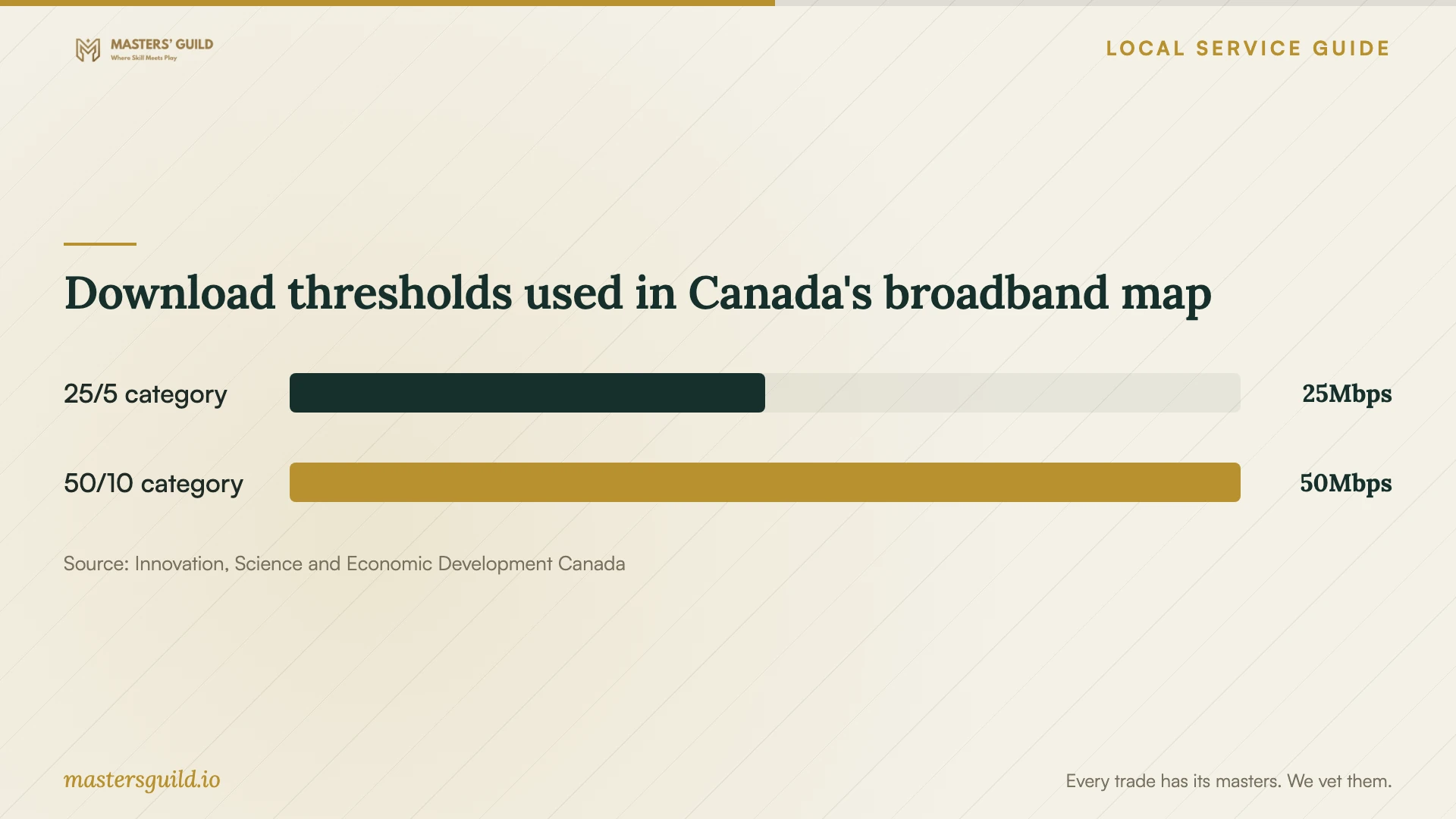
Before changing your internet plan or buying hardware for a new address, confirm service availability with the provider. ISED's Canadian broadband guidance explains that even its detailed road coverage uses approximately 250-metre segments and may include households that cannot obtain the indicated service. Treat mapped availability as a starting point for an address check. [5]
Get a quote you can compare
Request separate amounts for diagnosis, installation labour, equipment and materials. Ask whether the technician charges a minimum visit fee, whether diagnosis counts toward the installation price, and how they approve additional work. Compare quotes against the same rooms, outlets and equipment requirements.
For a cable installation, ask who handles wall openings, patching, painting and cleanup. Include exterior sealing and ground restoration where applicable. Require the installer to obtain your approval before changing an agreed route or adding an outlet.
Agree on completion checks before work starts. Ask for tests in your target rooms using your devices, labels for new cable outlets, and a record of equipment models and settings. Request a written description of follow-up support, including what the installer covers and any charge for a return visit.
Prepare access and keep control of accounts
Clear access to the modem, router, proposed outlet locations and any agreed basement or attic route. Have the devices you want tested available during the visit. Arrange owner or property-manager permission before approving holes or changes to shared areas.
Keep equipment accounts under your control. Enter passwords yourself where possible, and ask the technician to explain any remote-access arrangement before enabling it. At handover, confirm that you can sign in, change the Wi-Fi password and identify the support contact.
Download thresholds used in Canada's broadband map
Local details that affect your job
Check heritage approval before choosing an exterior route
London's heritage register distinguishes non-designated listed properties, individually designated properties and properties within heritage conservation districts. The City does not require heritage alteration approval for alterations to a non-designated listed building. For an individually designated property, it requires approval for alterations likely to affect identified heritage attributes; district requirements depend on the relevant district plan. Before approving exterior cable clips, drilling or equipment mounting, ask a Heritage Planner about your proposed route. The application process begins with consultation, followed by an application and supporting drawings or photographs. Contact Heritage at 519-930-3500 or [email protected]. [1] [4]
Plan a detached-garage trench around locates and easements
For a buried network connection, the City directs owners to call Ontario One Call at 1-800-400-2255 at least one week before excavation; it says the locate service has no charge. Review any easement agreement before accepting the trench route. London explains that easement agreements appear on property title and contain restrictions, with most municipal agreements including a no-build clause protecting access. The City keeps records of its infrastructure but directs questions about private utilities to their owners. For municipal easement questions, contact Geomatics at 519-661-4908 or [email protected]. [2]
Choose your next step
| Your situation | First step | Ask before approving work |
|---|---|---|
| Connection lost during a power interruption | Check London Hydro's outage map. | Does a technician visit still serve a purpose before power returns? |
| Poor connection in particular rooms | Request diagnosis and tests in those rooms. | Which placement or cabling changes do you propose, and how will you test them? |
| Buying equipment for a new address | Confirm internet service at the exact address with the provider. | Does the proposed equipment suit the service I can order? |
| Exterior installation on a heritage property | Check designation and consult Heritage about the route. | Does this drilling or mounting require approval? |
| Buried connection to an outbuilding | Arrange utility locates and review easements. | Who confirms the route and handles excavation and restoration? |
Your hiring checklist
- List affected rooms, devices and the times or activities associated with the problem.
- Provide modem and router models, your internet plan and a sketch of the areas needing coverage.
- Ask for diagnosis and installation costs as separate quote items.
- Confirm outlet locations, cable routes, equipment ownership and responsibility for surface repairs.
- Check heritage requirements for the proposed exterior work and review easements for a buried route.
- Agree on access, account handling, completion tests and follow-up support before the visit.
Frequently Asked Questions
How much should I budget for the work?
Request a quote based on your layout and agreed scope. Ask for diagnosis, labour, hardware, cable materials and surface repairs as separate items, plus applicable taxes and any minimum visit charge. For uncertain cable routes, ask what the installer needs to inspect before committing to a price.
Does a heritage-listed home need approval for router setup?
Check the property's category and the proposed alteration. London says non-designated listed properties do not need heritage alteration approval for building alterations. Individually designated properties require approval for changes likely to affect heritage attributes, while district requirements depend on the district plan. Discuss drilling or mounting with Heritage before scheduling it. [1] [4]
How far ahead should I arrange a buried network connection?
London directs owners to request utility locates at least one week before excavation. Allow additional time to review easements and agree on the route. Ask the installer to confirm the arrangements before setting an excavation date. [2]
Does a broadband map confirm service at my home?
Confirm with the provider. ISED warns that its national map aggregates coverage into areas or road segments and that some households within them may lack the indicated service. Ask the provider to confirm the technology and plan available at your exact address. [5]
Sources and scope
This guide combines the sources below with practical planning guidance. Figures apply to the stated geography and period; request a written quote for your property.