
Local service guide
Technical Skills Training in Lexington, KY
Choose Technical Skills Training in Lexington, KY around the task your staff must complete: request a scoped coaching quote for a specific workflow, consider Northside Digital Studio for supported software practice, or compare BCTC customized training for a team. Before booking, define the software, starting skill level, practice project, total cost, and how the instructor will check that employees can repeat the task without help. Northside offers personalized technology assistance; BCTC offers employer training onsite or at its central Kentucky campuses. [2] [3]
Define the work before choosing an instructor
Write a short training brief before comparing offers. Name the software and version, the employees attending, their starting skills, and the task they need to perform. Replace a broad request such as computer training with a concrete goal: import a sales export, correct inconsistent entries, and produce a weekly summary in Excel.
Ask the instructor to explain how they would teach that task and what prerequisite skills they would check. Request a sample exercise or lesson outline relevant to your work. For coding, ask how learners will practice debugging. For AI tools, specify approved accounts and use invented or sanitized business information during exercises.
Separate instruction from implementation in the agreement. Specify whether the instructor will teach staff, configure software, build a finished template, or provide follow-up support. Define a completion check, such as having an employee recreate a report from a fresh practice file.
Match the local option to the learning goal
For supported practice with office or creative software, consider Northside Digital Studio at 1733 Russell Cave Road. Lexington Public Library describes personalized help with hardware and software and a Mac lab with Word, PowerPoint, Excel, Photoshop, Illustrator, InDesign, Premiere Pro, and other applications. Ask staff whether they can support your project and whether practicing on a Mac suits the equipment your employees use at work. [2]
For an employer-led program, BCTC Workforce Solutions starts with an assessment of organizational goals and expected outcomes. Its central Kentucky offerings include computer skills, Microsoft Office, software, and AI training. It can deliver short or long-term programs at an employer's location or a campus. Ask for a proposal that identifies the delivery site, schedule, instructor preparation, and practice materials. [3]
For an employee pursuing a computing credential, compare BCTC's Computer and Information Technologies program. The college combines lectures with hands-on activities and lists programming, networking, security, database, and productivity-software options. Discuss the appropriate certificate or degree with an advisor before treating college enrollment as the solution to a single workplace task. [4]
Compare the full cost and commitment
Request a written total for private instruction. Ask whether the quote includes assessment, preparation, travel, software subscriptions, practice files, and follow-up questions. For group instruction, specify the participant limit and how the instructor will handle different starting skill levels. Agree on cancellation and rescheduling terms before paying for a package.
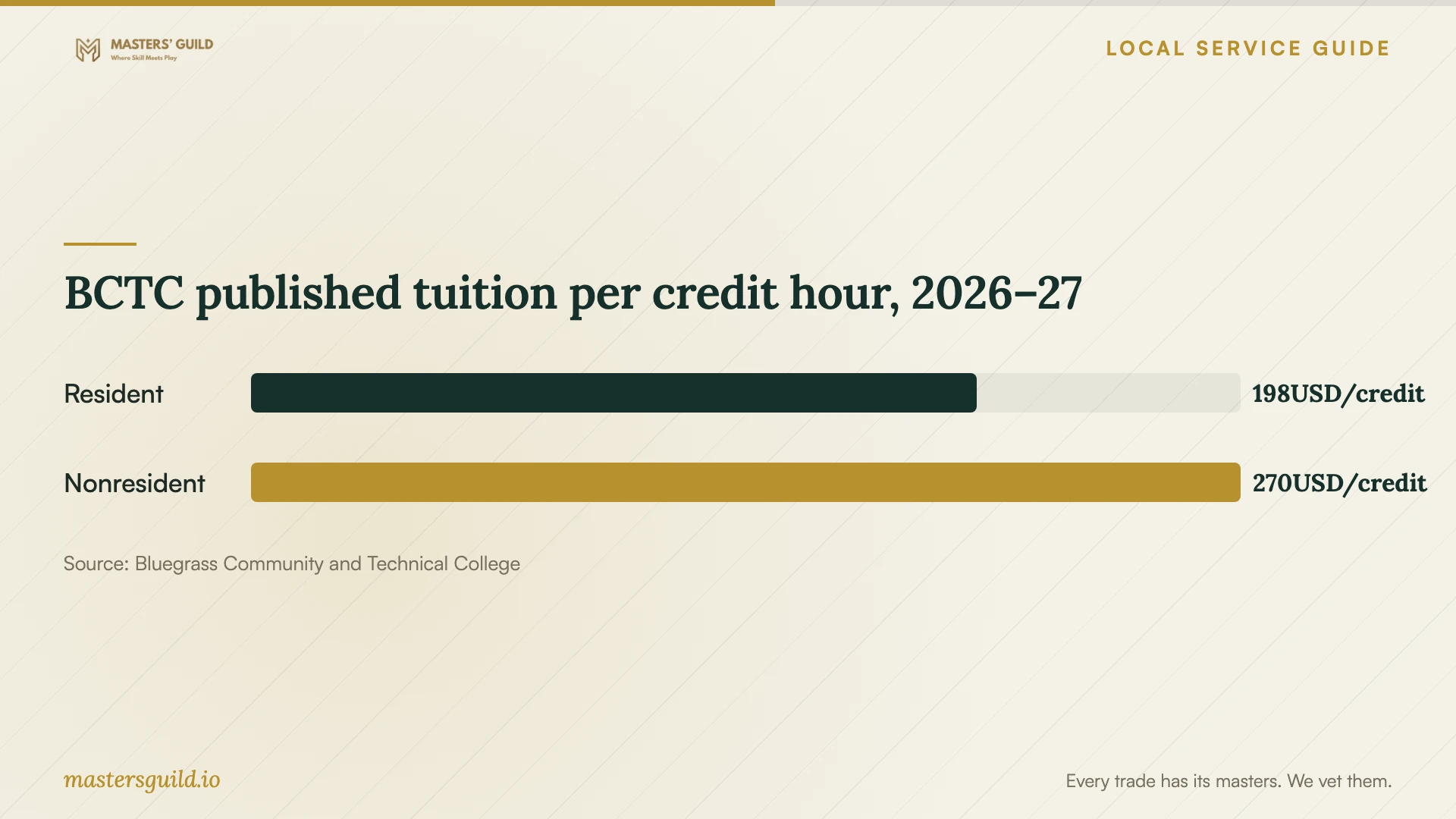
BCTC publishes 2026–27 resident tuition of $198 per credit hour and nonresident tuition of $270 per credit hour. It lists an $8 mandatory fee per credit hour for students other than dual-credit students. Online-only tuition is $198 per credit hour regardless of residency, with applicable mandatory fees and a $20 distance-learning fee per credit hour. Confirm the charges for the exact course before enrolling. [5]
For employer funding, BCTC says qualifying companies can receive KCTCS-TRAINS assistance on a project basis. Its published terms require the company to pay 25% of the project cost and a 10% administrative fee. Ask Workforce Solutions to confirm eligibility, available funding, the fee calculation, and the company's total obligation before approving training. [3]
Prepare the session and check the result
Give the instructor a sanitized example file and a description of the desired result. Confirm that employees can sign in, open the required software, and access the practice materials. For remote instruction, agree on the screen-sharing method and who will control the computer during exercises.
Ask learners to perform the task themselves during the lesson. Request short reference notes that match your software and workflow. At the end, use a fresh example to check whether each person can complete the task and explain the steps. Base any follow-up booking on the remaining gaps.
BCTC published tuition per credit hour, 2026–27
Local details that affect your job
Choose the correct library service
Book a Librarian appointments generally last 30 to 45 minutes and take place Monday through Friday during library business hours. Staff may refer or decline a topic because of expertise or availability, and the service excludes technical troubleshooting unrelated to library resources. For hands-on software help, ask Northside Digital Studio about its separate technology-assistance offering before arranging time away from work. [1] [2]
Arrange studio access before bringing a team
Northside requires new customers to complete its Experiential Learning Equipment Agreement. For a group of 10 or more, the library asks organizers to contact studio staff in advance. Materials can carry charges, including filament for 3D printing. Confirm the activity, group arrangements, and supply costs before planning a staff visit. [2]
Ask about credit for existing skills
BCTC offers special examinations for credit in selected computing courses. Students may take each exam once during their academic career and must not have received a grade, including a withdrawal, for that course. The CIT 111 hardware and software exam includes written and hands-on components. An employee with prior knowledge should ask an advisor about eligibility before registering for a course. [4]
Choose a training route by the outcome you need
| Your goal | Route to consider | Confirm before arranging |
|---|---|---|
| Learn a specific business workflow | Private coaching scoped to your task | Relevant teaching experience, practice files, deliverables, and total quote |
| Practice office or creative software with assistance | Northside Digital Studio | Staff support for the project, Mac compatibility, equipment agreement, and group arrangements |
| Train employees around shared business goals | BCTC customized training | Onsite or campus delivery, schedule, assessment, and funding eligibility |
| Pursue a computing credential | BCTC Computer and Information Technologies | Advisor guidance, credential requirements, course availability, and tuition |
| Get help with library resources or research | Book a Librarian | Topic acceptance and weekday appointment availability |
Your hiring checklist
- Name the workplace task and the result employees must produce.
- List software versions, devices, account access, and learner starting skills.
- Request a relevant lesson outline and a practical completion check.
- Confirm the location, participant limit, accessibility needs, and equipment.
- Obtain an itemized total and written cancellation terms.
- Prepare sanitized files and agree on any recording or file-retention rules.
- Have learners repeat the task without instructor prompts before arranging follow-up.
Frequently Asked Questions
Can the library help staff learn Excel or Adobe software?
Northside Digital Studio lists Microsoft Office and Adobe applications and provides personalized technology assistance. Describe the task to studio staff and confirm the help available. Book a Librarian has a different scope and excludes general technical support unrelated to library resources. [1] [2]
Can a local program train employees at our workplace?
BCTC Workforce Solutions offers customized training onsite at an employer's location or at central Kentucky campuses. Its listed subjects include computer skills, Microsoft Office, software, and AI. Request a proposal tied to your team's goals and schedule. [3]
What should a private training quote include?
Ask for the teaching scope, participant limit, session length, preparation charges, travel, software costs, and follow-up terms. Include a practical check of what learners can do afterward. Compare the total commitment before accepting an hourly rate or package.
Sources and scope
This guide combines the sources below with practical planning guidance. Figures apply to the stated geography and period; request a written quote for your property.