
Local service guide
Software installation in Lexington, KY
Software installation in Lexington, KY should start with a written scope: name the applications, identify your computer and operating system, and ask the technician to include activation and a working-file test. Separate installation labor from software purchases, backup, and troubleshooting. For a household computer used by a University of Kentucky student, check university software access before paying for another license; UK lists complimentary downloads and technology support. [1]
Define the result before requesting a quote
Describe what you need to do after the appointment. For example, ask to open and edit an existing document, join a meeting with working audio, or save a project in the required format. Give the technician the application name, required version, computer model, operating system, and exact error message if an earlier attempt failed.
Request separate prices for installing the application, activating the license, transferring files, setting up backup, and resolving existing computer problems. Ask whether the technician charges a fixed amount or by time, whether a minimum charge applies, and what requires your approval before the bill increases. Agree on who buys each license and which account will own it.
Choose remote or in-home help after discussing the tasks. Ask how you will reconnect after a restart and whether the technician needs physical access to printers, external drives, or other devices. For an operating-system reinstall, require a separate plan for protecting files and restoring applications before authorizing the work.
Check licenses and computer compatibility
For UK-related software, check eligibility before purchasing a personal subscription. UK Online directs students to complimentary software downloads and ITS support. It also explains that students need linkblue credentials and Duo authentication for resources including myUK and Microsoft365. Have the student confirm access before the appointment. [1]
UK College of Design separates requesting Adobe access, installing the desktop application, and holding an active license. Its guide advises students who see Trial or Buy prompts to check the license troubleshooting instructions before purchasing a subscription. If this happens on your household computer, ask the installer to identify the account or entitlement problem before approving another purchase. [3]
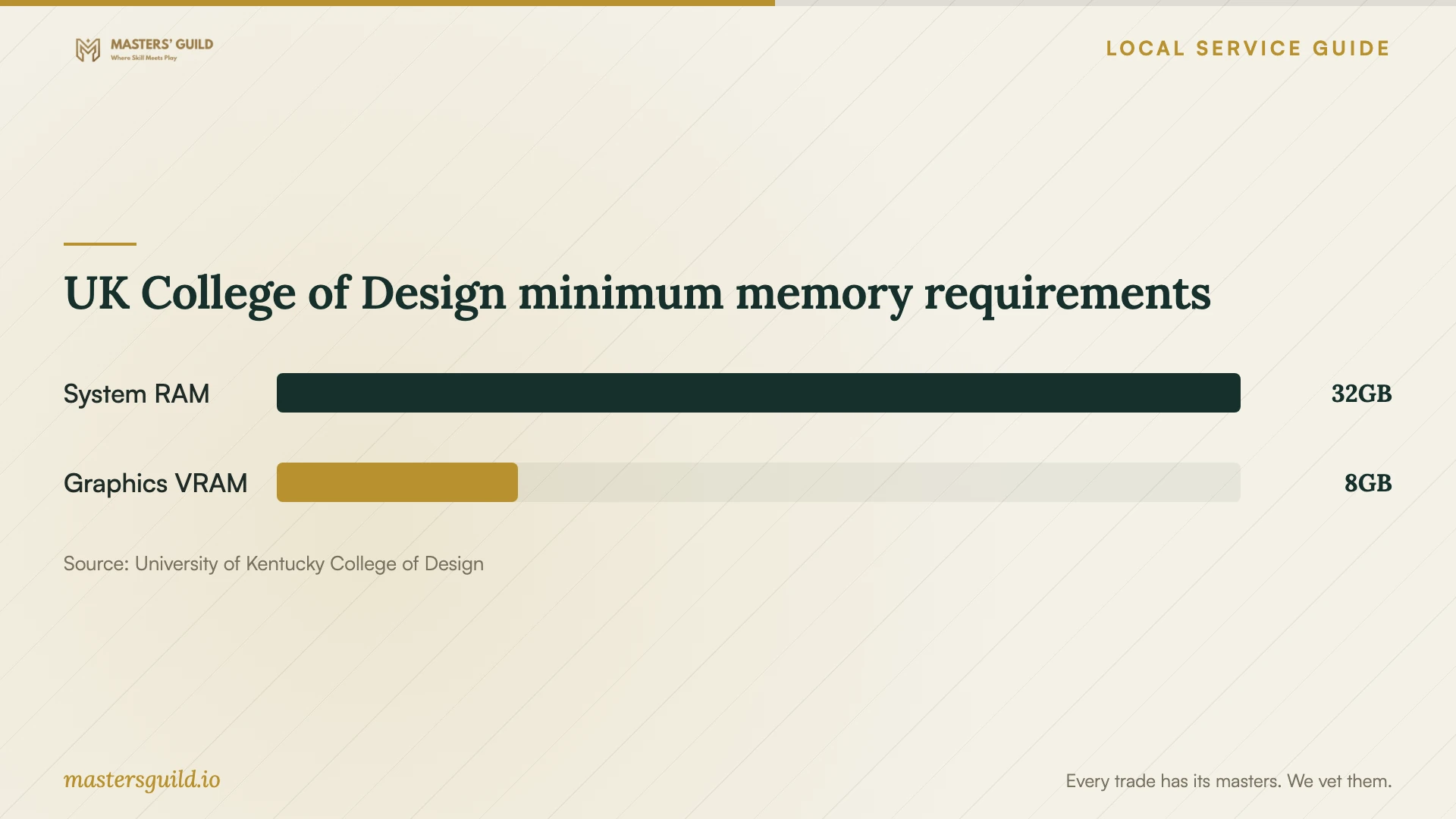
For College of Design coursework, follow the College's computer requirements rather than judging suitability from a single application's requirements. The guide specifies native 64-bit Windows 11, at least 32 GB of RAM, a 1 TB NVMe SSD, and dedicated NVIDIA RTX graphics with at least 8 GB of VRAM. Macs and Windows running virtually on a Mac do not meet that College requirement. Send the configuration to College technology staff before spending money on an installation intended for those courses. [3]
Prepare accounts and protect your files
Before work begins, make a separate backup of the files you need and reopen a sample from that backup. For design projects, include linked images and textures as well as the editable project. The College of Design guide recommends keeping a second copy elsewhere and testing recovery by reopening a sample. [3]
Enter passwords and approve authentication prompts yourself. Ask the technician to explain any request for administrator access or remote control before you grant it. Agree on whether remote access ends with the appointment, and ask the technician to remove any support software you do not want to keep.
For UK accounts, follow the university's password rules. UK Online says its policies prohibit password sharing or misuse, and the College of Design guide tells students not to send passwords or verification codes when requesting help. Keep the account holder present for sign-in and license verification. [1] [3]
Check the bill and test the installation
Compare written quotes for the same tasks. Ask each technician to state software charges, labor, travel or remote-session charges, and any applicable tax as separate items. Confirm what requires your approval before the technician adds work or purchases.
Keep receipts for software you purchase online. Kentucky's Department of Revenue says a six percent use tax may be due on taxable out-of-state purchases when the buyer did not pay at least six percent state sales tax. Its examples include software. Ask the provider to explain any tax charged on installation labor as a separate item. [4]
Before accepting the work, open the application using your account, check activation, and complete the task you agreed on. Save and reopen a test file. If the job includes cloud storage or printing, test those functions too. Ask for a written record of the installed version, license owner, renewal terms, unresolved errors, and any follow-up charge.
UK College of Design minimum memory requirements
Local details that affect your job
Use the library for library-resource help
Lexington Public Library's Book a Librarian service helps with downloading and troubleshooting library resources, including ebooks and digital magazines. It excludes other technical support and troubleshooting, though staff can help identify local resources. For a library-app problem, describe the resource when requesting help. For general software installation, arrange another support option. [2]
Route College of Design questions to College support
For a household supporting a UK College of Design student, confirm course software and licensing with College technology staff before hiring an installer. The College lists Tech Help in Gray Design Building, Room 114, and directs students to use its own PaperCut printer package rather than the general UK version. Include the College-specific package and a test print in any paid setup scope. [3]
Choose the right next step
| Your situation | Next step | What to confirm |
|---|---|---|
| A personal application needs installation | Request a scoped technician quote | Installation, activation, and a working-file test |
| A UK student needs university software | Check UK downloads and ITS support before purchasing | Eligibility, linkblue access, and Duo |
| A College of Design student needs course software | Confirm requirements with College technology staff | Computer configuration, course version, and license |
| A library ebook or digital-resource app fails | Request library-resource assistance | Identify the library service and describe the error |
| A general application fails outside library resources | Arrange another technical support option | The library excludes general troubleshooting |
Your hiring checklist
- List the applications, required versions, and tasks you want to complete.
- Record the computer model, operating system, and exact error messages.
- Confirm license ownership and any university entitlement before buying.
- Back up important files and reopen a sample copy.
- Have the account holder and authentication device available.
- Agree on labor, purchases, extra-work approval, and follow-up terms.
- Test activation, file saving, and any included printing or syncing before accepting the work.
Frequently Asked Questions
Should I buy the software before the appointment?
Confirm the version, license type, and account owner first. UK students should check university downloads; College of Design students should wait until an instructor or College technology staff confirms the required application and license. [1] [3]
Can Lexington Public Library install my personal software?
Do not book its consultation expecting general installation help. The library limits technical support and troubleshooting to library resources and can help you find other local resources. [2]
Does an installed application mean the license works?
Check activation before accepting the job. The College of Design's Adobe guidance treats access requests, installation, and active licensing as separate steps. Open the required application under your account and check any Trial or Buy prompt before purchasing again. [3]
What should count as a completed installation?
Agree on acceptance tasks before work starts: launch the application, confirm activation, open a representative file, save changes, and reopen it. Add printing, syncing, or transferred-file checks if you included those tasks in the quote.
Sources and scope
This guide combines the sources below with practical planning guidance. Figures apply to the stated geography and period; request a written quote for your property.