
Local service guide
Data Recovery and Backup in Lexington, KY
Arrange Data Recovery and Backup in Lexington by asking a provider to separate the immediate recovery assessment from the ongoing backup plan. Specify the files you need, approve a diagnostic spending limit, and require a demonstration that restored files open. Include commercial disposal in the scope: Lexington’s municipal electronics center excludes businesses, including home businesses. [1]
Define the recovery job before approving work
Give the provider a short incident history: the device involved, the last time you accessed the files, what happened before the loss, and what you have tried. List priority folders or applications by business importance. Ask the technician to distinguish recovering files from repairing the computer and returning an application to service.
For a damaged or unreadable device, ask for handling instructions before you transport it or attempt another repair. Request a written explanation of the proposed assessment, who will perform it, and whether the provider will send the device to another facility. Set an approval limit before handing over equipment.
Define success in terms you can check. Name the records you need, ask how you will review a recovered-file list, and agree on how to handle partial results. For accounting or scheduling software, request an application-level check with an authorized staff member, alongside a check that individual documents open.
Compare quotes and data-handling terms
Request separate prices for assessment, authorized recovery, shipping, replacement storage, and ongoing backup service. Ask what you owe if you decline the proposed work or receive only some of the requested files. Require a fresh approval before the technician exceeds the agreed scope.
Ask for separate estimates for diagnosis, recovery, and verification. State your business deadline and ask what the provider can commit to in writing. Avoid planning a reopening or payroll run around an unconfirmed completion date.
Before sharing access, ask who can view your files, how the provider transfers them, and when it deletes working copies. Record the device serial number and obtain a handover receipt. Specify who may authorize subcontracting and how you will receive encryption credentials through a separate, agreed channel.
Handle suspected ransomware before restoring
If you see a ransom message or suspect an active attack, disconnect affected devices from Ethernet and Wi-Fi and contact your incident response provider. CISA directs organizations to isolate impacted systems first. Its guidance reserves powering down for situations where network disconnection is impossible, because shutdown loses potential evidence in memory. [2]
Ask the responder to identify affected systems, preserve relevant evidence, and set restoration priorities. CISA recommends recovering critical services on a clean network and checking for an earlier unresolved compromise before rebuilding. Include investigation and recovery as explicit responsibilities when comparing providers. [2]
Specify a backup service you can test
Ask the provider to document what it will protect, how often it will copy changes, how long it will retain versions, and who will respond to failed jobs. Set your acceptable amount of lost work and your target time to resume operations. Ask the provider to explain how the proposed service addresses both.
CISA recommends offline, encrypted backups of critical data and regular tests of backup availability and integrity. It warns that ransomware variants attempt to delete or encrypt accessible backups. Ask the provider to explain which copy remains isolated and to demonstrate a restore using that copy. [2]
Make the handover include a witnessed restore, written recovery instructions, and an agreed test schedule. Ask a staff member to open representative restored files and confirm the selected business application works. Assign responsibility for checking alerts, updating the protected-file list, and keeping recovery credentials accessible to an authorized backup contact.
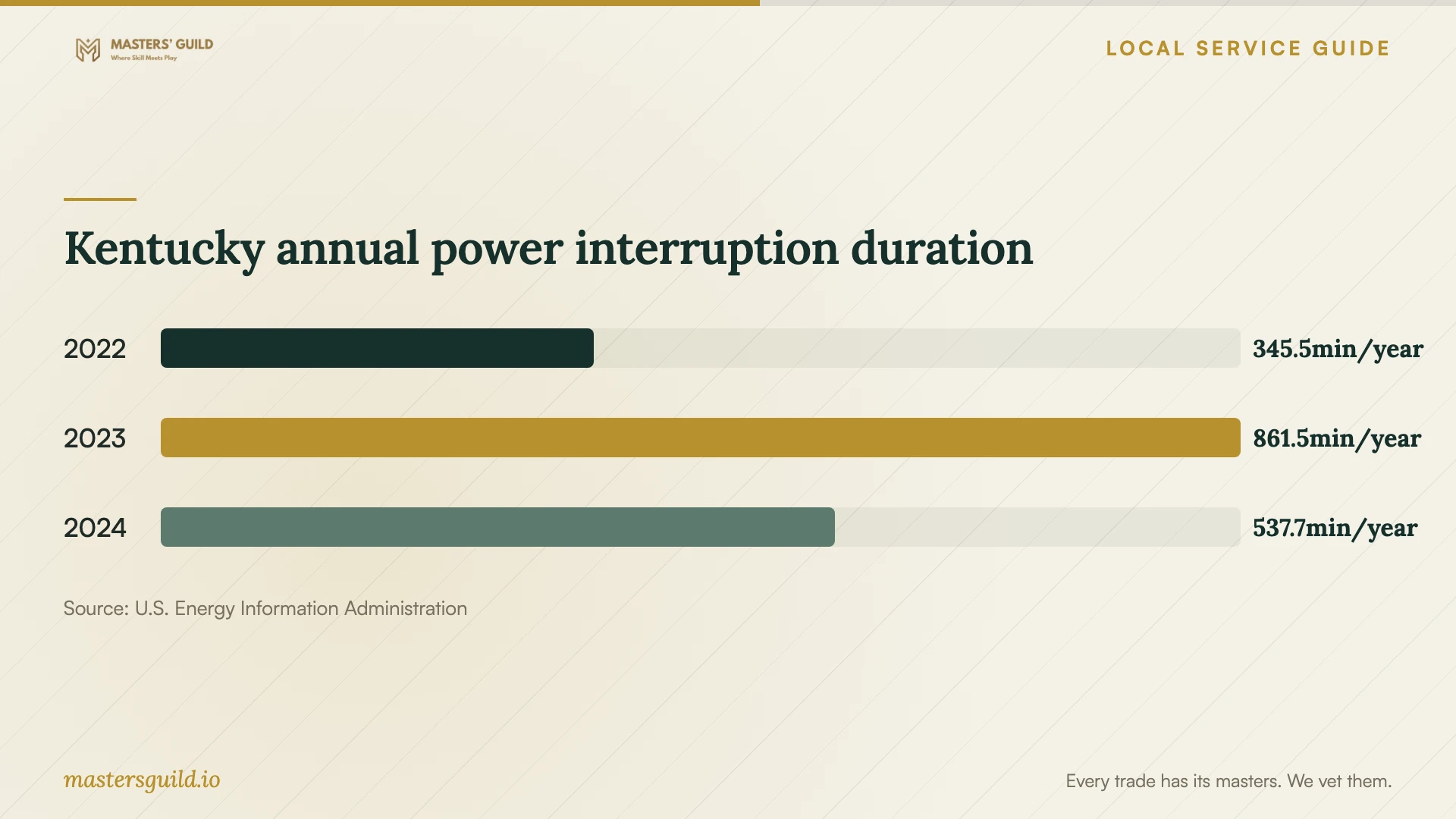
Kentucky annual power interruption duration
Local details that affect your job
Business equipment needs a commercial disposal arrangement
Lexington limits its Electronics Recycling Center to Fayette County residents and excludes businesses, home businesses, churches, and schools. If you operate from home, do not assume your residential address makes business equipment eligible. Ask your provider to identify a commercial disposal destination and include collection and documentation in the quote. [1]
Complete recovery before municipal recycling
For eligible personal equipment, the city lists its Electronics Recycling Center at 1306 Versailles Road, near the back of the property. The city says its contracted vendor erases computer hard drives twice. Keep equipment out of the disposal stream until you have accepted the recovered files and checked your replacement backup. Treat the center as a disposal destination after recovery. [1]
Use state outage data to question the continuity plan
EIA reports 537.7 minutes of average customer interruption duration for Kentucky in 2024 under its IEEE all-events measure, including major event days. This statewide figure does not describe a particular Lexington address. Ask the provider whether your setup needs battery-backed shutdown and how it will verify backups after power returns; request sizing for your actual equipment. [3]
Match the provider’s scope to the problem
| Situation | Scope to request | Acceptance question |
|---|---|---|
| You have a backup to evaluate | Restore assessment and verification | Can we open the priority files and use the required application? |
| The device is unreadable | Device assessment with an approval limit | Who will handle the device, and what happens if recovery is partial? |
| You suspect ransomware | Incident response, isolation, and recovery on a clean network | Who will investigate the compromise before restoration? |
| You need ongoing protection | Offline encrypted backup and regular restoration testing | Which isolated copy will you use in the demonstration? |
| You are retiring business equipment | Commercial disposal after recovery acceptance | Where will the equipment go, given the city program’s business exclusion? |
Your hiring checklist
- Write down the incident history and the files or applications you need first.
- Request handling and transport instructions for the affected device.
- Approve a diagnostic spending limit and require consent for additional work.
- Record the device serial number, handover contact, and subcontracting terms.
- Agree on partial-recovery charges and how you will verify results.
- Request a witnessed restore and written backup recovery instructions.
- Assign responsibility for backup alerts and future restore tests.
- Keep recovery acceptance and disposal authorization as separate decisions.
Frequently Asked Questions
How much should I authorize before diagnosis?
Set a diagnostic spending limit you can accept and require a written recovery proposal before further work. Ask the provider to state charges for declined work, partial results, shipping, and return storage. Compare quotes using the same priority-file list and acceptance requirements.
What should a backup demonstration include?
Ask the provider to restore selected critical files from the protected copy and let your staff check them. CISA recommends testing backup availability and integrity in a disaster recovery scenario. Include the steps, access requirements, and test outcome in your handover notes. [2]
Can my home business use the city electronics center?
The city excludes home businesses from its Electronics Recycling Center, along with other businesses and nonprofits. Arrange a commercial disposal route for business equipment and ask for its cost before authorizing collection. [1]
Should I switch off a computer showing a ransom message?
CISA recommends isolating affected systems from the network first. Disconnect Ethernet and Wi-Fi and contact your responder. Its guidance calls for powering down only when network disconnection is impossible, because shutdown loses potential evidence held in memory. [2]
Sources and scope
This guide combines the sources below with practical planning guidance. Figures apply to the stated geography and period; request a written quote for your property.